
1. Introducció
The VisionTek VT1000 Universal Dual Full HD USB 3.0 Laptop Monitor Docking Station is designed to expand the connectivity of your laptop, whether it runs Windows, macOS, or Chrome OS. This docking station allows you to connect to dual displays and a variety of peripherals through a single USB connection, transforming your laptop into a complete workstation.
Producte acabatview
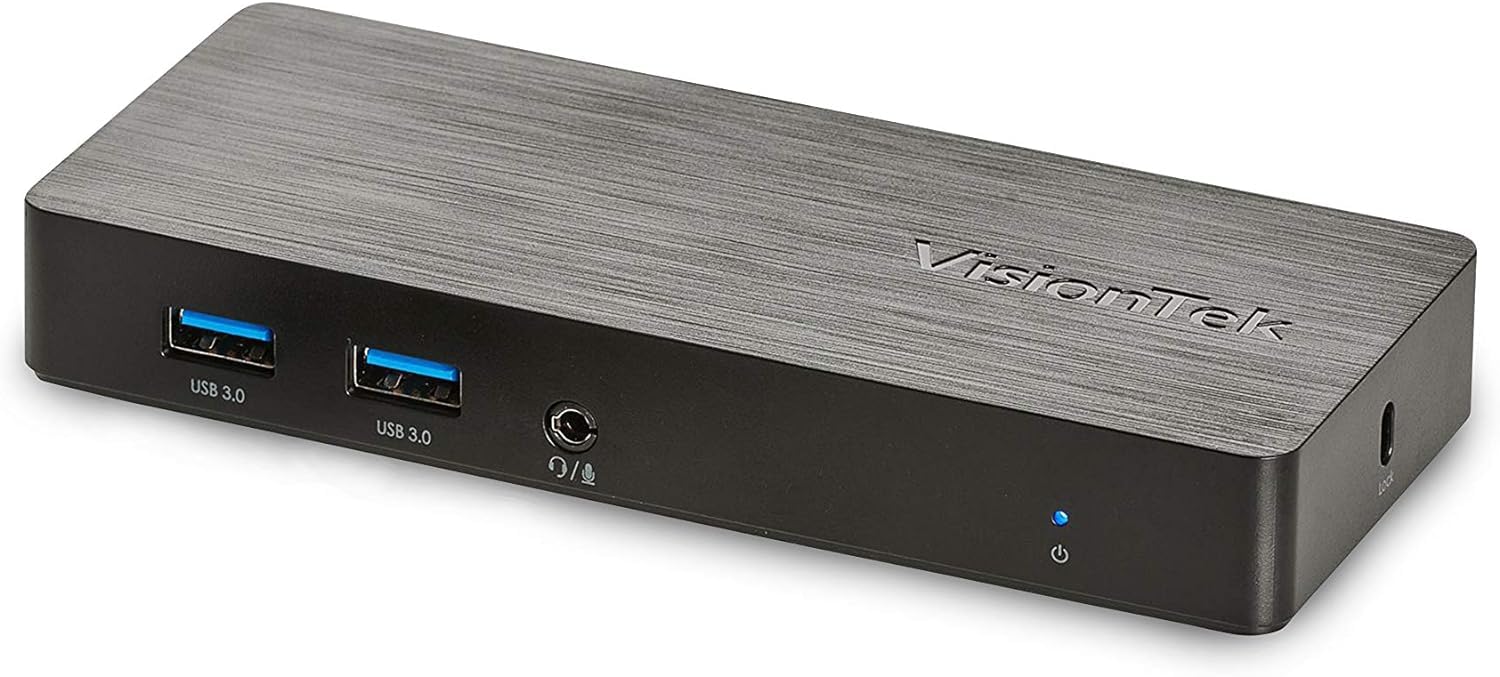
Imatge: Frontal view of the VisionTek VT1000 docking station.
Què hi ha a la caixa
- Estació d'acoblament USB 1000 universal VT3.0 Dual Display
- Cable USB 3.0
- User Manual (Quick Installation Guide)
- Adaptador d'alimentació

Image: The VisionTek VT1000 docking station and its included accessories.
2. Característiques clau
- Dual Full HD Displays: Connect two monitors to your laptop with full HD resolution (1920 x 1080 @ 60Hz) via 1x DisplayPort, 1x HDMI, and 1x 1080P VGA.
- Connectivitat ampliada: Features 3x USB 3.0 ports (5 Gbps transfer speed), 1x RJ45 (10/100/1000) Gigabit Ethernet port, and a headphone audio line in/out jack.
- Plug and Display: Utilizes DisplayLink drivers for plug-and-play functionality, simplifying setup for various workspaces.
- Àmplia compatibilitat del sistema operatiu: Compatible with Ultrabook, MacBook, Microsoft Surface Pro, Chromebook, Windows 11, Windows 10, Windows 8.1, Windows 7, and Mac OS 10.13 and up operating systems.
- Disseny compacte: Designed to be compact, taking up minimal desk space while providing extensive functionality.
3. Ports i indicadors
The VT1000 docking station provides a comprehensive set of ports for various connectivity needs. Refer to the video below for a visual guide to the ports.
Panell frontal
- 2 ports USB 3.0: Per connectar dispositius USB d'alta velocitat.
- Sortida d'àudio (connector d'auriculars): Per connectar auriculars o altaveus externs.
- Entrada de micròfon: Per connectar un micròfon.
- LED indicador d'alimentació: Illuminates when the dock is powered on.
Panell posterior
- 1 port VGA: For connecting a VGA monitor.
- 1 port HDMI: For connecting an HDMI monitor.
- 1x DisplayPort: For connecting a DisplayPort monitor.
- 1x RJ45 Gigabit Ethernet Port: Per a la connexió de xarxa amb cable.
- 1 port USB 3.0: Per connectar dispositius USB d'alta velocitat.
- USB-B Port (Upstream): For connecting the dock to your laptop via the included USB 3.0 cable.
- Entrada d'alimentació DC 5V: Per connectar l'adaptador de corrent.
- Ranura per a pany de seguretat: For securing the docking station.
Official Product Video: VisionTek VT1000 Universal Dual Display USB 3.0 Dock
Video: This official VisionTek video provides a visual overview of the VT1000 docking station, highlighting its features, ports, and connectivity options. It demonstrates how the dock can expand your laptop's capabilities into a full workstation.
4. Instruccions de configuració
- Connectar l'alimentació: Plug the included power adapter into the DC 5V input port on the rear of the VT1000 docking station, then plug the adapter into a power outlet. The power indicator LED on the front of the dock should illuminate.
- Connectar-se al portàtil: Use the provided USB 3.0 cable to connect the USB-B port on the rear of the docking station to an available USB 3.0 port on your laptop.
- Connectar monitors: Connect your external monitors to the desired video output ports on the rear of the docking station (HDMI, DisplayPort, or VGA). The VT1000 supports dual displays.
- Connecteu els perifèrics: Connect your keyboard, mouse, external hard drives, printers, webcams, or other USB devices to the USB 3.0 ports on the front and rear of the docking station.
- Connecta la xarxa (opcional): For a wired internet connection, connect an Ethernet cable from your router or network switch to the RJ45 Gigabit Ethernet port on the rear of the docking station.
- Connectar àudio (opcional): If desired, connect headphones or speakers to the audio out jack and a microphone to the mic in jack on the front of the docking station.
- Instal·lació del controlador: The VT1000 features DisplayLink Plug and Play technology, typically requiring no manual driver installation on compatible operating systems. If prompted, follow on-screen instructions or visit the VisionTek support website for the latest DisplayLink drivers.
5. Instruccions de funcionament
Once the VT1000 docking station is set up, it operates seamlessly with your connected laptop.
- Configuració de la pantalla: After connecting your monitors, your operating system should automatically detect them. You can configure display settings (e.g., extend, duplicate, primary display) through your computer's display settings.
- Ús del dispositiu USB: Connected USB devices will function as if directly connected to your laptop.
- Accés a la xarxa: The Gigabit Ethernet port provides a stable and fast wired network connection.
- Funcionalitat d'àudio: The audio ports allow for external audio output and microphone input. Ensure your operating system's sound settings are configured to use the docking station's audio device.
- Gestió d'energia: The docking station requires external power and does not supply power to your laptop. Ensure your laptop's power adapter is connected for charging.
6. Especificacions
| Característica | Detall |
|---|---|
| Marca | VisionTek |
| Número de model | 901147 (VT1000 Series) |
| Compatibilitat de sistemes operatius | Windows 11, Windows 10, Windows 8.1, Windows 7, macOS 10.13 and later, Chrome OS |
| Pes de l'article | 8 unces |
| Dimensions del producte (LxWxH) | 5.95 x 2.8 x 0.8 polzades |
| Interfície del maquinari | DisplayPort, Ethernet, HDMI, USB, USB 3.0, VGA |
| Dispositius compatibles | Portàtil |
| Ports USB totals | 3 (USB 3.0) |
| Ports HDMI totals | 1 |
| Wattage | 20 watts |
7. Solució De Problemes
- Sense sortida de pantalla:
- Ensure the docking station's power adapter is securely connected and the power indicator LED is on.
- Verify that the USB 3.0 cable connecting the dock to your laptop is firmly seated at both ends.
- Check that monitor cables (HDMI, DisplayPort, VGA) are securely connected to both the dock and the monitors.
- Confirm that your monitors are powered on and set to the correct input source.
- Reinicieu el portàtil i l'estació d'acoblament.
- Ensure DisplayLink drivers are installed and up-to-date, if necessary. Although typically plug-and-play, some systems may benefit from manual driver installation from the DisplayLink weblloc.
- Els dispositius USB no funcionen:
- Assegureu-vos que la base d'acoblament estigui engegada i connectada al portàtil.
- Try connecting the USB device to a different USB port on the dock or directly to your laptop to rule out device issues.
- Some high-power USB devices may require their own external power supply.
- Problemes de connexió de xarxa:
- Verify the Ethernet cable is securely connected to both the dock and your network.
- Check your laptop's network settings to ensure the Ethernet adapter is enabled.
- Restart your router/modem, the docking station, and your laptop.
- L'àudio no funciona:
- Check your laptop's sound settings to ensure the docking station's audio output is selected as the default playback device.
- Ensure headphones/speakers are properly connected to the audio out jack.
- Adjust volume levels on both your laptop and the connected audio device.
8. Manteniment
- Neteja: Feu servir un drap suau i sec per netejar l'exterior de l'estació d'acoblament. Eviteu utilitzar netejadors líquids o dissolvents.
- Emmagatzematge: Store the docking station in a cool, dry place away from direct sunlight and extreme temperatures when not in use for extended periods.
- Gestió de cables: Assegureu-vos que els cables no estiguin excessivament doblegats ni enredats per evitar danys.
9. Garantia i Suport
The VisionTek VT1000 Universal Dual Full HD USB 3.0 Laptop Monitor Docking Station comes with a Garantia limitada d'2 any. To ensure coverage, register your product with VisionTek within 30 days of purchase.
VisionTek offers excellent US-based customer support for any technical assistance or inquiries you may have. For support, please visit the official VisionTek weblloc web o consulteu la informació de contacte que es proporciona a l'embalatge del producte.
For further information and driver downloads, please visit: Suport VisionTek