
1. Introducció
The iCarsoft VAWS V1.0 is a professional and powerful vehicle fault diagnosis tool designed for Audi, VW, Seat, and Skoda vehicles. It features a 2.8-inch TFT LCD display and specialized diagnostic software to accurately identify and resolve complex vehicle issues. This manual provides detailed instructions for setting up, operating, maintaining, and troubleshooting your device.
2. Producte acabatview
2.1 Components del dispositiu
Familiarize yourself with the main components and controls of your iCarsoft VAWS V1.0 scanner.

Imatge 1: Davant i darrere view of the iCarsoft VAWS V1.0 scanner with numbered components.
- Pantalla LCD: Mostra els resultats de les proves i les opcions del menú.
- Botó TORNAR: Torna al menú o pantalla anterior.
- Botó amunt: Moves the cursor upwards for selection.
- Botó ABAIX: Moves the cursor downwards for selection.
- LEFT Button: Moves the cursor to the left for selection.
- Botó ENTER: Confirma una selecció o acció d'una llista de menú.
- RIGHT Button: Moves the cursor to the right for selection.
- Function Button (F1): Used for specific functions as indicated on screen.
- Function Button (F2): Used for specific functions as indicated on screen.
- Function Button (F3): Used for specific functions as indicated on screen.
- Botó AJUDA: Displays help information for test results or user operation.
2.2 Contingut del paquet
Verify that all items are present in your product package.
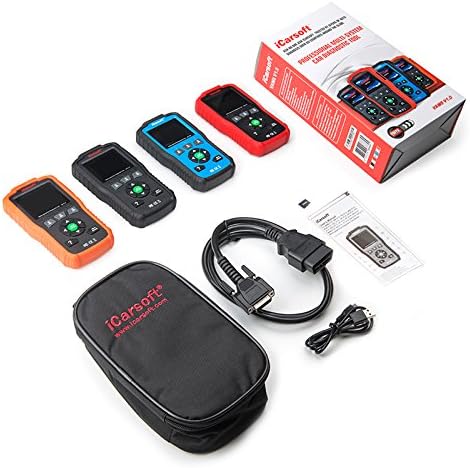
Imatge 2: The iCarsoft VAWS V1.0 scanner and its included accessories.
- iCarsoft VAWS V1.0 Diagnostic Scanner
- OBD-II Connection Cable
- USB Cable for Updates
- Manual d'usuari (aquest document)
- Funda protectora de transport
3. Configuració
3.1 Engegada inicial
The device is powered directly from the vehicle's OBD-II port. No external power source is typically required for basic operation.
3.2 Connexió al vehicle
- Locate the vehicle's 16-pin Data Link Connector (DLC), usually found under the dashboard on the driver's side.
- Assegureu-vos que el contacte del vehicle estigui en la posició OFF.
- Connect the OBD-II cable from the scanner to the vehicle's DLC.
- Turn the vehicle's ignition to the ON position (engine off). The scanner should power on automatically.
3.3 Selecció de la llengua
Upon first use or after a reset, you may need to select your preferred language. Navigate through the menu using the UP/DOWN buttons and confirm with the ENTER button. Supported languages include English, German, Dutch, Spanish, and French.
4. Instruccions de funcionament
4.1 Navegació bàsica
Use the directional arrow buttons (UP, DOWN, LEFT, RIGHT) to move through menu options. Press the ENTER button to select an option or confirm an action. The BACK button will return you to the previous screen or menu.
4.2 Funcions de diagnòstic
The iCarsoft VAWS V1.0 offers a range of diagnostic capabilities:
- Llegir i esborrar codis d'error: Access and clear Diagnostic Trouble Codes (DTCs) from various vehicle systems, including engine, transmission, Anti-lock Braking System (ABS), and airbags.
- Dades en directe: View real-time sensor data from the vehicle's ECU, which can assist in diagnosing intermittent issues.
- Full ECU Diagnosis: Perform a comprehensive scan of the Electronic Control Unit for a single vehicle brand.
- Oil Light/Service Reset: Reset the service lamp after performing an oil change or scheduled maintenance.
- Prova de la bateria: Obtain the voltage of the vehicle's battery via the OBD port when the engine is running.
- Biblioteca DTC: Look up definitions for DTCs directly on the device.
- Print Data Function: Record diagnostic data and generate customized test reports for printing via a connected computer.
5. Manteniment
5.1 Actualitzacions de programari
To ensure optimal performance and access to the latest vehicle data and features, regularly update the scanner's software. Updates are performed via USB 2.0 connection to a computer running Windows 10. Visit the official iCarsoft website for update instructions and software downloads.
5.2 Neteja i emmagatzematge
- Netegeu el dispositiu amb un suau, damp tela. No utilitzeu netejadors abrasius ni dissolvents.
- Store the scanner in its protective carrying case when not in use to prevent damage.
- Eviteu exposar el dispositiu a temperatures extremes o a la llum solar directa durant períodes prolongats.
6. Solució De Problemes
If you encounter issues with your iCarsoft VAWS V1.0 scanner, refer to the following common troubleshooting steps:
- El dispositiu no s'encén: Ensure the OBD-II cable is securely connected to both the scanner and the vehicle's DLC. Verify the vehicle's ignition is in the ON position. Check the vehicle's fuse for the OBD-II port if the issue persists.
- Error de comunicació: Confirm the vehicle's ignition is ON. Ensure the cable connection is stable. Try connecting to a different vehicle (if available) to rule out a vehicle-specific issue.
- Lectures incorrectes: Ensure the vehicle's make, model, and year are correctly selected in the scanner's menu (if prompted). Perform a software update to ensure the latest vehicle protocols are supported.
- La pantalla es congela: Disconnect the scanner from the vehicle, wait a few seconds, and then reconnect. If the issue persists, perform a software update.
7. Especificacions
| Característica | Especificació |
|---|---|
| Mostra | 2.8" TFT LCD, 320*240 Pixels |
| Temperatura de funcionament | 0 °C ~ 50 °C (32 °F ~ 122 °F) |
| Temperatura d'emmagatzematge | -20 °C ~ 70 °C (-4 °F ~ 158 °F) |
| Vol. Operatiutage | 9 ~ 18V |
| Corrent de funcionament | 150mA @ 12V (Typical) |
| Consum d'energia | 1.8 W (típic) |
| Dimensions (L x A x A) | 187.5 x 101 x 32 mm (7.38 x 3.98 x 1.26 polzades) |
| Pes de l'article | 1.6 lliures |
| Supported Operating System (for updates) | Windows 10 |
8. Garantia i Suport
iCarsoft products are designed for reliability and performance. For specific warranty details, please refer to the warranty card included with your product or visit the official iCarsoft website. For technical support, software updates, or further assistance, please visit the iCarsoft official weblloc o poseu-vos en contacte amb el seu departament d'atenció al client.
Official iCarsoft Weblloc: www.icarsoft.com