
Introducció
This manual provides comprehensive instructions for the installation, operation, and maintenance of your Techage Analog CCTV Camera HD 1080P Complete Security Bullet Camera Kit. Please read this manual carefully before using the product to ensure proper setup and functionality.

Figure 1: Techage Analog CCTV Camera HD 1080P Complete Security Bullet Camera Kit, showing the DVR and four bullet cameras.
Configuració i instal·lació
Follow these steps to set up your Techage security system.
1. Components del sistema
Your kit includes a Digital Video Recorder (DVR) and multiple 1080P bullet cameras. Each camera is designed for robust outdoor and indoor use with IP66 weatherproofing.

Figure 2: A single Techage 1080P bullet camera, featuring a 3.6mm lens and infrared LEDs for night vision.
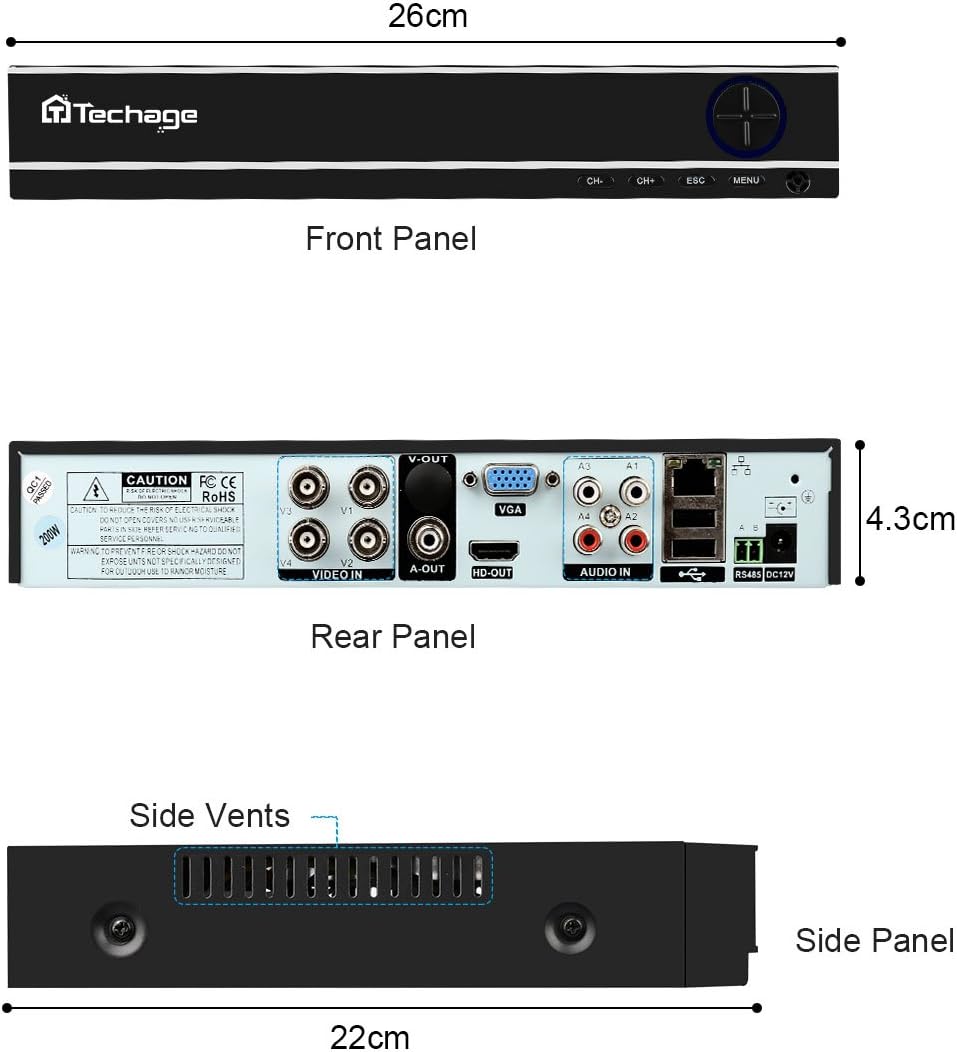
Figure 3: Front, Rear, and Side Panels of the Techage DVR, showing input/output ports and dimensions.
2. Connexió de maquinari
Connect all components as illustrated in the diagram below. Ensure all connections are secure before powering on the system.
- Connect each camera to the DVR using the provided power and video cables.
- Connecteu el DVR a un monitor o televisor mitjançant un cable HDMI o VGA.
- Connect the DVR to your network router using an Ethernet cable for remote viewcapacitats d'ingrés.
- Connect the power supply to the DVR and cameras.

Figure 4: Installation and Connection Diagram. This diagram illustrates how to connect the cameras to the DVR, and the DVR to a monitor/HDTV and network for live viewing.
3. Mobile Settings for Remote Viewing
A view your cameras remotely on your mobile device, follow these steps:
- Install the Xmeye App: Scan the QR code or visit the links below to download the Xmeye mobile application for your device.
- Local Login: Open the Xmeye app and select "Local Login".
- Afegeix un dispositiu: Toqueu la icona "+" per afegir un dispositiu nou.
- Introduïu el número de sèrie: Input the 16-digit serial number of your DVR. This can usually be found on the DVR itself or in the system information menu.
- Tria el dispositiu: Select the device from the list to begin viewfent servir les vostres càmeres.

Figure 5: Mobile Settings for Remote Viewing. This image illustrates the 5 steps to configure the Xmeye app for live camera viewing on a smartphone.
Instruccions de funcionament
Viu View i Enregistrament
Un cop connectat, pots view viu footage from your cameras on a connected monitor, or remotely via the Xmeye app on your computer, tablet, or smartphone. The DVR continuously records footage, which can be reviewed més tard.
Day and Night Monitoring
The cameras are equipped with infrared (IR) LEDs for true day and night monitoring. During the day, the cameras provide full-color video. As light levels decrease, the cameras automatically switch to black and white night vision mode to ensure continuous surveillance.

Figure 6: Day and Night Vision Comparison. This image shows the difference in camera footage during daytime (color) and nighttime (black and white infrared).
Motion Detection and Email Notifications
Configure motion detection settings on your DVR to trigger recordings and send instant email notifications to your registered email address when activity is detected. This feature enhances security by alerting you to potential incidents in real-time.

Figure 7: Email Notifications for Motion Detection. This image depicts how the system can send email alerts to your mobile device upon detecting suspicious activity.
Manteniment
- Objectius de càmera: Periodically clean camera lenses with a soft, lint-free cloth to ensure clear image quality. Avoid abrasive cleaners.
- Connexions de cable: Regularly check all cable connections (power, video, network) to ensure they are secure and free from damage.
- Ventilació del DVR: Ensure the DVR's side vents are clear of obstructions to prevent overheating.
- Actualitzacions de programari: Comproveu el del fabricant weblloc web per obtenir actualitzacions de firmware disponibles per al vostre DVR per garantir un rendiment i una seguretat òptims.
Resolució de problemes
| Problema | Causa possible | Solució |
|---|---|---|
| No video display on monitor/TV. | Loose video cable, incorrect input selected on monitor, DVR not powered on. | Check all video cable connections. Ensure monitor is set to the correct HDMI/VGA input. Verify DVR power supply. |
| Sense comandament viewing via mobile app. | DVR not connected to network, incorrect network settings, app not configured correctly. | Ensure DVR is connected to the internet. Verify network settings on DVR. Re-check mobile app configuration steps (Figure 5). |
| Mala qualitat d'imatge. | Dirty camera lens, low light conditions (if not in night mode), cable interference. | Clean camera lens. Ensure sufficient lighting or verify night vision is active. Check cable integrity. |
| La detecció de moviment no funciona. | Motion detection settings not enabled, sensitivity too low, recording schedule not set. | Access DVR settings to enable motion detection, adjust sensitivity, and set recording schedules. |
Especificacions
| Característica | Detall |
|---|---|
| Marca | Tecnologia |
| Tecnologia de connectivitat | Amb cable |
| Resolució de captura de vídeo | 1080p |
| Característica especial | Visió nocturna |
| Nombre de canals | 4 |
| Font d'alimentació | Elèctric amb cable |
| Dispositius compatibles | Càmeres |
| Format del senyal | Analògic |
| Tecnologia de poca llum | Visió nocturna |
| Fabricant | Tinosec |
| Dimensions del paquet | 11.7 x 10 x 9.7 polzades |
| Pes de l'article | 9.83 lliures |
| ASIN | B07BB7FYKX |
| Data de primera disponibilitat | 6 de novembre de 2018 |
Garantia i Suport
Specific warranty information for this product is not provided in the available data. Please refer to the product packaging or the manufacturer's official weblloc web per obtenir informació detallada sobre els termes i condicions de la garantia.
For technical support or further assistance, please contact Techage customer service through their official channels. Keep your purchase receipt and product serial number handy when contacting support.