
1. Introducció
The ZENEC Z-E3756 is a sophisticated 2-Din Naviceiver specifically engineered for seamless integration into Fiat Ducato III, Citroen Jumper II, and Peugeot Boxer II vehicles. This unit combines advanced multimedia features with a comprehensive navigation system, all controlled via a responsive 7-inch (17.8 cm) capacitive touchscreen. It offers a wide range of functionalities to enhance your driving experience, including digital radio, Bluetooth connectivity, and smartphone integration.
2. Configuració i instal·lació
The Z-E3756 is designed for direct fitment into the dashboard of compatible vehicles. Professional installation is recommended to ensure correct wiring and optimal performance. The unit integrates with the vehicle's steering wheel remote control for convenient operation.
2.1 Compatibilitat del vehicle
- Fiat Ducato III: Models 250/251 (2006 – 2011), 250/251 (2011 – 2014), 250/251 (X290) (from 2014), Serie 8 (from 2021, requires assembly kit N-XFDucduc.8)
- Citroen Jumper II: Models 250/250D/250L (from 2006)
- Peugeot Boxer II: Models 250/251 (from 2006)
- Opel Movano Type C: Des del 2021
2.2 Engegada i configuració inicials
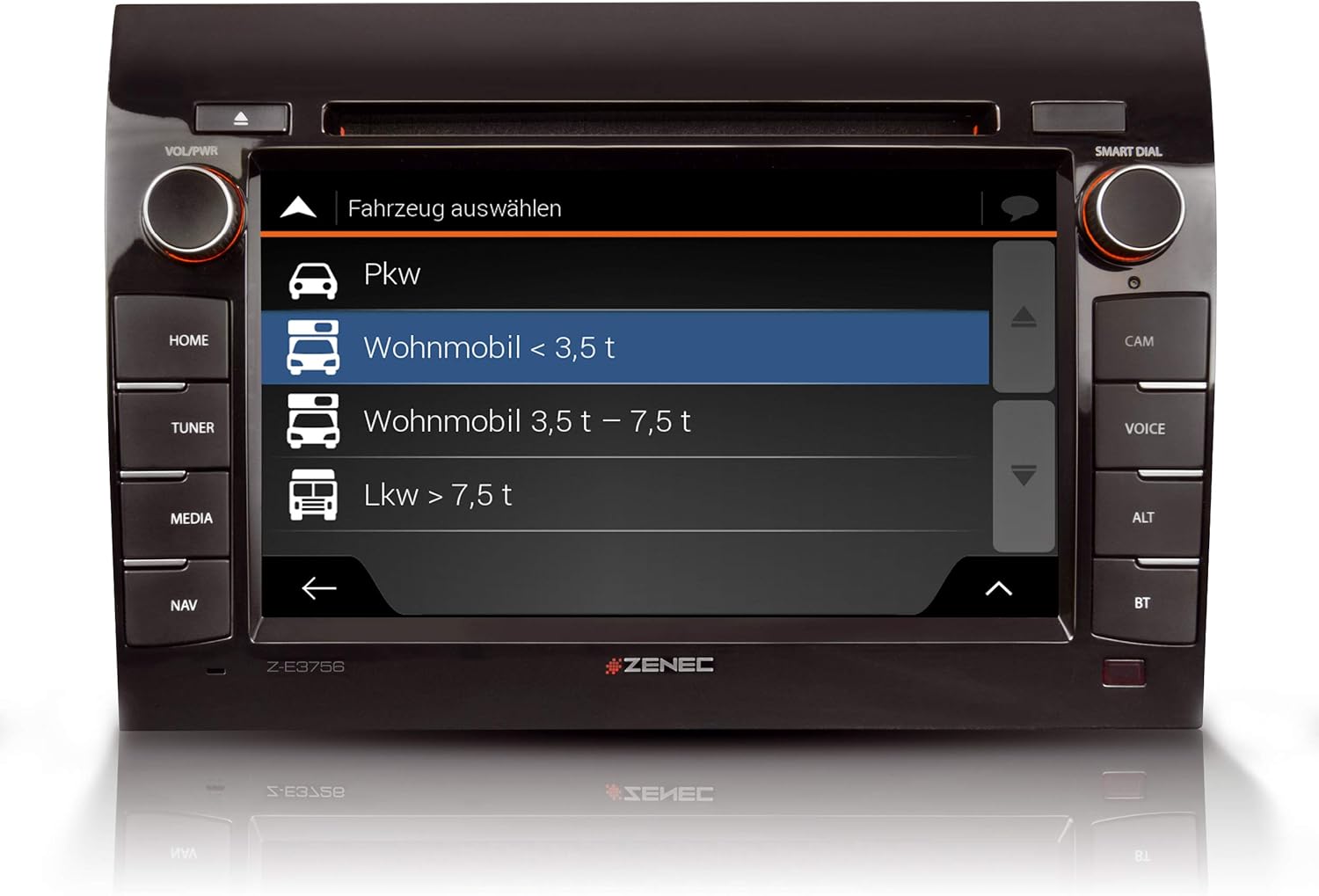
Upon initial power-up, follow the on-screen prompts to configure basic settings such as language, time, and region. For navigation, select the appropriate vehicle profile (e.g., 'Wohnmobil < 3.5 t' for motorhomes under 3.5 tons) and input vehicle-specific data to optimize route planning.

3. Instruccions de funcionament
The Z-E3756 features a user-friendly interface accessible via its capacitive touchscreen and physical buttons. The main menu provides access to all primary functions.
3.1 Interfície principal i navegació
The home screen typically displays quick access icons for key functions such as DAB+, Navigation, and Bluetooth. Swipe gestures or direct touches activate desired applications.

3.2 Funcions multimèdia
- Ràdio digital DAB+: Access a wide range of digital radio stations with enhanced sound quality. The dual tuner ensures stable reception.
- Ràdio FM: Standard FM radio reception is also available.
- Bluetooth: Connect your smartphone for hands-free calling and audio streaming. Manage contacts and call history directly from the unit.
- Reproductor de CD/DVD: Insert CDs or DVDs into the integrated drive for audio or video playback.
- Ports USB: Two USB ports allow connection of external storage devices for media playback or charging.
- HDMI: Connect compatible devices via HDMI for high-definition audio and video input.
- iPod/iPhone Compatibility: Direct control and playback from Apple devices.


3.3 Sistema de navegació
The integrated navigation system includes map data for 47 European countries. It features a dedicated Camping P.O.I. (Points of Interest) database with approximately 20,000 campsites and motorhome pitches, along with 6.5 million premium P.O.I.s. Route planning is optimized by selecting a vehicle profile and entering specific vehicle dimensions.

3.4 Android Auto Integration
Connect your Android smartphone to access compatible apps, including navigation applications, directly on the Z-E3756's display. Control functions via the touchscreen or Google Voice Assistant.

3.5 entrades de càmera
The unit features three camera inputs with micro-input, allowing for connection of rear-view cameras or other auxiliary cameras to enhance safety and maneuverability.

4. Manteniment
To ensure the longevity and optimal performance of your Z-E3756 Naviceiver, follow these general maintenance guidelines:
- Neteja de la pantalla: Feu servir un drap suau i sense borrissol per netejar suaument la pantalla tàctil. Per a taques difícils, fregueu lleugeramentampNetegeu el drap amb aigua o una solució de neteja segura per a pantalles. Eviteu materials abrasius o productes químics agressius.
- Unitat de CD/DVD: Keep the CD/DVD slot free from dust and debris. Avoid inserting damaged or dirty discs.
- Actualitzacions de programari: Periodically check the ZENEC website for available software and map updates to ensure you have the latest features and navigation data.
5. Solució De Problemes
If you encounter issues with your Z-E3756, consider the following basic troubleshooting steps:
- Sense energia: Check the vehicle's fuse box and ensure all power connections to the unit are secure.
- Sense àudio: Verify speaker connections, volume settings, and ensure the mute function is not active.
- Problemes de navegació: Assegureu-vos que l'antena GPS estigui connectada correctament i que tingui una visió clara view of the sky. Check for available map updates.
- Problemes de connectivitat Bluetooth: Ensure Bluetooth is enabled on both the Naviceiver and your mobile device. Try unpairing and re-pairing the devices.
- La pantalla no respon: Perform a soft reset by pressing and holding the power button for a few seconds, or consult the full manual for specific reset procedures.
For persistent issues, please refer to the comprehensive troubleshooting section in the full product manual or contact ZENEC customer support.
6. Especificacions
| Característica | Especificació |
|---|---|
| Marca | ZENEC |
| Número de model | 02027E3756 |
| Mida de la pantalla | 7 polzada (17.8 cm) |
| Tipus de visualització | Pantalla tàctil capacitiva |
| Tecnologia de connectivitat | Vehicle-specific wired connection |
| Característiques especials | Touchscreen, Bluetooth, DAB+, Android Auto, CD/DVD, HDMI, USB |
| Tipus de mapa | Europe (47 countries) |
| Mode de sortida d'àudio | estèreo |
| Components inclosos | Power supply, holder |
| Tipus de muntatge | Muntatge al quadre de comandament |
| Dimensions del paquet | 31.6 x 28 x 21.5 cm |
| Pes de l'article | 3.7 kg |
7. Garantia i Suport
For detailed warranty information, please refer to the warranty card included with your product or visit the official ZENEC website. For technical support, product registration, or service inquiries, please contact your authorized ZENEC dealer or the manufacturer's customer service department. Keep your proof of purchase and model number (Z-E3756) readily available when contacting support.