
DIGITEN DTC151
DIGITEN DTC151 Digital Temperature Controller User Manual
Model: DTC151 | Brand: DIGITEN
Introducció
The DIGITEN DTC151 Digital Temperature Controller is designed to precisely regulate and maintain desired temperatures in various environments. It features both heating and cooling modes, a clear LED display, and a reliable sensor probe, making it suitable for applications such as greenhouses, reptile enclosures, aquariums, and more.
This manual provides detailed instructions for the setup, operation, and maintenance of your DTC151 temperature controller.
Informació de seguretat
- Assegureu-vos que la font d'alimentació voltage matches the device's requirements (110V).
- Do not immerse the controller unit in water or expose it to excessive moisture. The sensor probe is waterproof, but the main unit is not.
- Always unplug the device from the power outlet before cleaning or performing any maintenance.
- Mantingueu el dispositiu fora de l'abast dels nens i les mascotes.
- Do not exceed the maximum current rating of 15A for connected appliances.
- Ensure proper ventilation around the controller and connected devices to prevent overheating.
Producte acabatview
The DTC151 features a compact design with an integrated temperature sensor probe and two power outlets for connecting heating and cooling devices.

Figura 1: Principal view of the DTC151 controller, showing the display, control buttons, temperature probe, and power outlets.

Figura 2: Close-up of the controller's front panel, highlighting the digital display and control buttons (SET, Up, Down).

Figura 3: The temperature controller showing the attached sensor probe, which is essential for accurate temperature readings.

Figura 4: The top of the controller features a convenient hook design for easy wall mounting or hanging, keeping cords tidy.
Configuració
- Col·locació: Position the DTC151 controller in a dry, stable location, away from direct sunlight or extreme temperatures. Utilize the integrated hook for wall mounting if desired.
- Col·locació del sensor: Place the temperature sensor probe in the area where you need to monitor and control the temperature. Ensure the probe is fully immersed in liquid if used in an aquarium, or positioned appropriately in air for other applications like greenhouses or reptile enclosures.
- Connexió d'alimentació: Plug the DTC151 controller into a standard 110V AC power outlet. The LED display will illuminate.
- Connecteu els electrodomèstics:
- Per Mode de calefacció: Plug your heating device (e.g., heat mat, space heater) into the designated heating outlet on the controller.
- Per Mode de refrigeració: Plug your cooling device (e.g., fan, cooler) into the designated cooling outlet on the controller.
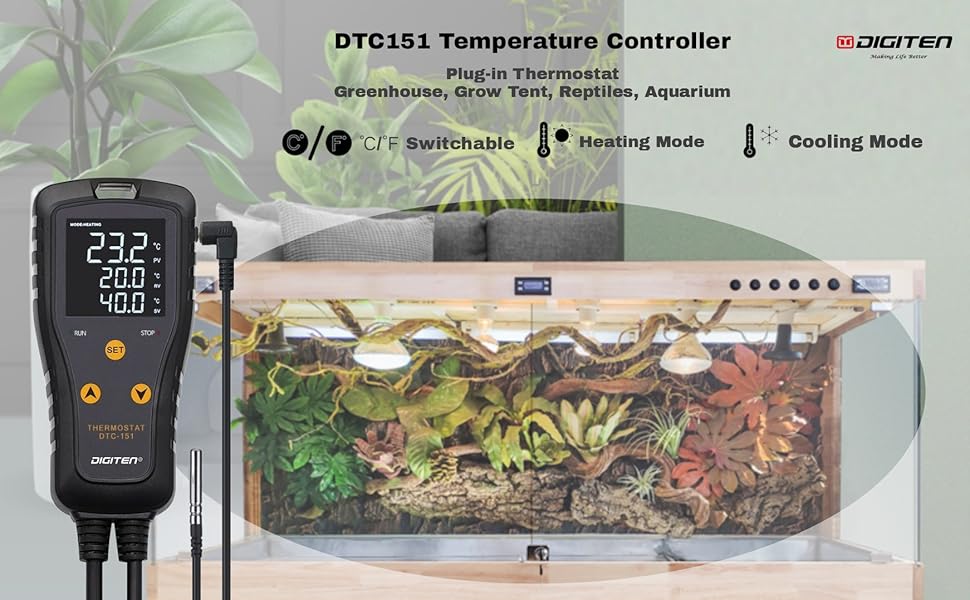
Figura 5: Illustration of the DTC151 connected to various heating and cooling equipment, demonstrating its versatility.
Instruccions de funcionament
Visualització finalitzadaview:
The LED display shows three main values:
- VA (Valor del Procés): Current measured temperature by the sensor.
- RV (Return Value): The temperature at which the connected device will turn ON.
- SV (Valor definit): The temperature at which the connected device will turn OFF.
1. Switching Temperature Units (°C/°F):
To switch between Celsius (°C) and Fahrenheit (°F), simultaneously press and hold the UP i ABAIX buttons for a few seconds until the unit changes on the display.
2. Setting Heating Mode:
In heating mode, the device will turn on when the temperature drops to the RV (ON) value and turn off when it reaches the SV (OFF) value.
- Premeu el botó SET button once. The PV value will start flashing.
- Utilitza el UP or ABAIX buttons to adjust the SV (OFF) temperature.
- Premeu el botó SET button again. The RV value will start flashing.
- Utilitza el UP or ABAIX buttons to adjust the RV (ON) temperature.
- Premeu el botó SET button a third time to confirm and save your settings.
Example for Heating Mode: If ON at 78°F and OFF at 83°F, the heater will activate when the temperature drops to 78°F and deactivate when it reaches 83°F.
3. Setting Cooling Mode:
In cooling mode, the device will turn on when the temperature rises to the RV (ON) value and turn off when it reaches the SV (OFF) value.
- Premeu el botó SET button once. The PV value will start flashing.
- Utilitza el UP or ABAIX buttons to adjust the SV (OFF) temperature.
- Premeu el botó SET button again. The RV value will start flashing.
- Utilitza el UP or ABAIX buttons to adjust the RV (ON) temperature.
- Premeu el botó SET button a third time to confirm and save your settings.
Example for Cooling Mode: If ON at 86°F and OFF at 82°F, the cooler will activate when the temperature rises to 86°F and deactivate when it drops to 82°F.
Demostració de vídeo:
Vídeo 1: This video demonstrates how to switch between Fahrenheit and Celsius, and how to set the ON/OFF temperatures for both heating and cooling modes on the DTC151 controller. It shows the process of adjusting the set values (SV) and return values (RV) for precise temperature control.
Manteniment
- Neteja: Regularly wipe the controller unit with a soft, dry cloth. Do not use abrasive cleaners or solvents.
- Cura del sensor: Keep the temperature sensor probe clean and free from debris. If used in water, periodically check for mineral buildup and gently clean if necessary.
- Inspecció del cable: Periodically inspect the power cords and sensor cable for any signs of damage, fraying, or kinks. Replace if damaged.
Resolució de problemes
| Problema | Causa possible | Solució |
|---|---|---|
| Display is off / No power. | No power to the outlet; loose connection; device malfunction. | Check the power outlet with another appliance. Ensure the controller is securely plugged in. If problem persists, contact support. |
| Connected device not turning ON/OFF. | Incorrect temperature settings (SV/RV); device not plugged into correct outlet; faulty appliance. | Verify SV and RV settings are appropriate for heating/cooling mode. Ensure appliance is plugged into the correct outlet (heating/cooling). Test appliance directly in a wall outlet. |
| Lectura de temperatura inexacta. | Sensor probe dirty or improperly placed; sensor damaged. | Clean the sensor probe. Ensure the probe is correctly positioned to measure the desired temperature. If suspected damage, contact support. |
| Display turns off quickly. | This is a power-saving feature. | Press any button to reactivate the display. This is normal operation. |
Especificacions
| Característica | Detall |
|---|---|
| Marca | DIGITEN |
| Número de model | DTC151 |
| Voltage | 110 Volts |
| Wattage | 1650 watts (15A) |
| Interval de control de temperatura | -40 °F a 248 °F (-40 °C a 120 °C) |
| Tipus de controlador | Pulsador |
| Tipus de visualització | LCD amb llum de fons |
| Característica especial | Programmable, High/Low Temperature Alarm |
| Material | Silicona |
| Dimensions del producte | 1.1 x 2.56 x 5.39 polzades |
| Pes de l'article | 1.06 lliures |
Garantia i Suport
DIGITEN provides a one-year warranty for any product quality problems. For technical support, troubleshooting assistance, or warranty claims, please contact DIGITEN customer service through their official channels or the retailer where the product was purchased.
Refer to the official DIGITEN weblloc web o la documentació de compra per obtenir la informació de contacte més actualitzada.
Ask a question about this manual
Ask about setup, troubleshooting, compatibility, parts, safety, or missing instructions. Manuals+ will review the question and use this page’s manual context to help answer it.