
1. Introducció
Thank you for choosing the Impex Thunder T2 Plus 80W 2.0 Channel Multimedia Speaker. This speaker system is designed to deliver a rich and powerful audio experience for your home entertainment needs. It features versatile connectivity options including Bluetooth, USB, SD/TF card, FM Radio, and AUX input, along with a wireless microphone for karaoke. Please read this manual carefully before using the product to ensure proper operation and to maximize its performance.

Figure 1.1: Impex Thunder T2 Plus Speaker System in a home environment.
2. Informació de seguretat
Per garantir un funcionament segur i evitar danys, observeu les següents precaucions de seguretat:
- Do not expose the speaker to water or moisture. This product is not water-resistant.
- Mantingueu l'altaveu allunyat de la llum solar directa, de fonts de calor i de flames obertes.
- Assegureu-vos que hi hagi una ventilació adequada al voltant de l'altaveu per evitar el sobreescalfament.
- Utilitzeu només l'adaptador d'alimentació subministrat amb la unitat.
- No intenteu obrir ni reparar l'altaveu vosaltres mateixos. Encarregueu tot el manteniment a personal qualificat.
- Mantenir fora de l'abast dels nens.
- Desendolleu l'altaveu durant tempestes amb llamps o quan no l'utilitzeu durant períodes prolongats.
3. Contingut del paquet
Verifiqueu que tots els elements siguin presents al paquet:
- 1 x Altaveu actiu
- 1 x Passive Speaker
- 1 x User Manual with Warranty Card
- 1 x cable d'àudio
- 1 x comandament a distància
- 1 x antena FM
- 1 x micròfon sense fils
- 1 x Wireless Microphone Battery
- Speaker Legs (for assembly)
4. Característiques del producte
The Impex Thunder T2 Plus offers a range of features for a comprehensive audio experience:
- 2.0 Channel Tower Speaker System
- 80W RMS Output Power
- Connectivitat Bluetooth per a la transmissió d'àudio sense fil
- USB Input for playing music from flash drives
- SD/MMC Card Slot for playing music from memory cards
- Ràdio FM incorporada
- AUX Input for connecting external audio devices (e.g., smartphones, laptops, TVs)
- Wireless Microphone for Karaoke function
- Two Wired Microphone Inputs
- Comandament a distància amb totes les funcions
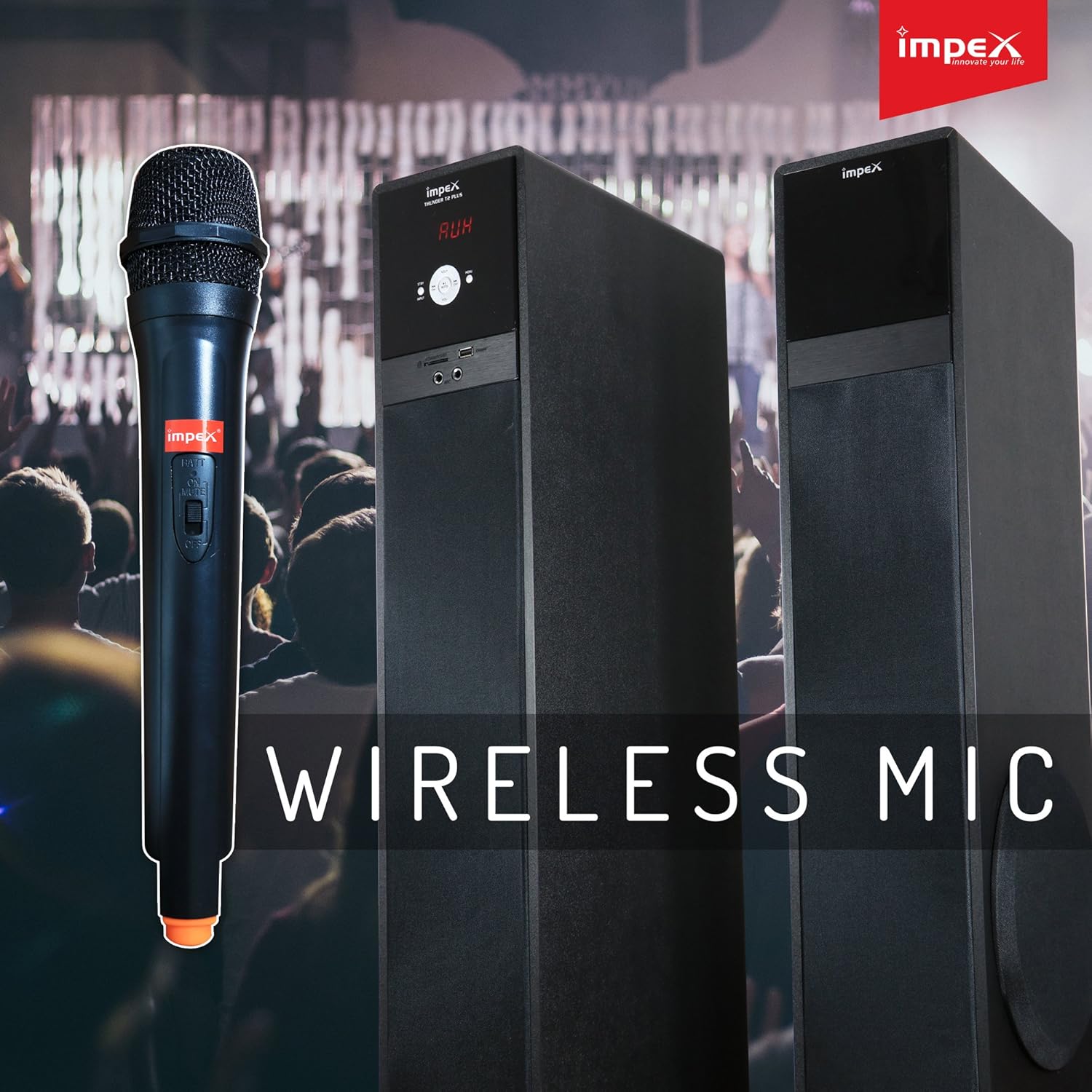
Figure 4.1: Wireless Microphone for Karaoke functionality.
5. Instruccions de configuració
5.1 Col·locació dels altaveus
Place the active and passive speakers on a flat, stable surface. Ensure they are positioned to provide optimal sound distribution in your listening area. Maintain some distance from walls for better bass response.
5.2 Connexió dels altaveus
- Connect the passive speaker to the active speaker using the provided speaker cable. The connection ports are typically located on the rear of each speaker.
- Assegureu-vos que les connexions siguin segures.
5.3 Connexió d'alimentació
- Plug the AC power cord into the power input on the active speaker.
- Insert the other end of the power cord into a standard AC power outlet.
5.4 Connexió de fonts d'àudio
The Thunder T2 Plus offers multiple ways to connect your audio devices:
5.4.1 Entrada AUX
- Use the provided audio cable (3.5mm to RCA or 3.5mm to 3.5mm, depending on your device) to connect your external audio source (e.g., TV, laptop, smartphone) to the AUX input port on the speaker.
- Select 'AUX' mode on the speaker.
5.4.2 USB / SD/TF Card
- Insert a USB flash drive or an SD/TF card containing MP3 audio files into the respective slot on the speaker.
- The speaker should automatically switch to USB/SD mode and begin playback. If not, select 'USB' or 'SD' mode.
5.4.3 Antena FM
- Connect the FM antenna to the FM antenna port on the rear of the active speaker.
- Extend the antenna for better reception.

Figure 5.1: Input panel with USB, SD/MMC, and Microphone ports.
6. Instruccions de funcionament
6.1 Encès/Apagat
Press the Power button on the front panel of the active speaker or on the remote control to turn the unit ON or OFF.
6.2 Selecció del mode
Press the 'MODE' button on the front panel or remote control to cycle through available input modes: Bluetooth, USB, SD/TF, FM Radio, and AUX.
6.3 Control de volum
Use the master volume knob on the active speaker or the 'VOL+' / 'VOL-' buttons on the remote control to adjust the overall volume.
6.4 Funcionament Bluetooth
- Canvia l'altaveu al mode Bluetooth. La pantalla mostrarà "BT" i un indicador d'emparellament parpellejarà.
- Activa el Bluetooth al teu telèfon intel·ligent, tauleta o altre dispositiu.
- Cerca 'THUNDER T2 PLUS' in the list of available devices and select it to pair.
- Once paired, the speaker will confirm the connection, and you can play audio from your device.
6.5 USB / SD/TF Playback
When a USB drive or SD/TF card is inserted, the speaker will automatically switch to the corresponding mode and begin playing audio files. Use the 'PLAY/PAUSE', 'PREV', and 'NEXT' buttons on the speaker or remote control to manage playback.
6.6 Funcionament de la ràdio FM
- Canvia l'altaveu al mode FM.
- Press the 'SCAN' button on the remote control to automatically scan and save available FM stations.
- Use the 'PREV' and 'NEXT' buttons to navigate through the saved stations.
6.7 Ús del micròfon (karaoke)
- For the wireless microphone, ensure a battery is inserted and turn it ON.
- For wired microphones, connect them to the 'MIC' input ports on the speaker.
- Adjust the microphone volume using the dedicated 'MIC VOL' control (if available) or the main volume.
6.8 Funcions de control remot
The remote control provides convenient access to all speaker functions:
- Potència: Turn the speaker ON/OFF.
- Mode: Switch between input sources (Bluetooth, USB, SD, FM, AUX).
- Volum +/-: Ajustar el volum mestre.
- Reproduir/pausa: Controla la reproducció multimèdia.
- Anterior/Següent: Skip tracks or FM stations.
- EQ: Seleccioneu els preajustos de l'equalitzador (si n'hi ha).
- Silenciar: Silencia o activa l'àudio.
- Repetiu: Repeat current track or playlist.
- Tecles numèriques: Direct track selection (USB/SD mode) or FM station input.

Figure 6.1: Full-function Remote Control.
7. Manteniment
Un manteniment adequat garanteix la longevitat i el rendiment del vostre sistema d'altaveus:
- Neteja: Feu servir un drap suau i sec per netejar l'exterior de l'altaveu. No utilitzeu netejadors líquids ni materials abrasius.
- Emmagatzematge: If storing the speaker for an extended period, unplug it from the power outlet and store it in a cool, dry place, away from dust and extreme temperatures.
- Ventilació: Ensure that the speaker's ventilation openings are not blocked to prevent overheating.
8. Solució De Problemes
If you encounter issues with your Impex Thunder T2 Plus speaker, refer to the following common problems and solutions:
| Problema | Causa possible | Solució |
|---|---|---|
| Sense poder | Power cord not connected; Power outlet not working; Speaker is OFF. | Check power cord connection; Try a different outlet; Press the Power button. |
| Sense so | Volume too low; Incorrect input mode; Audio cable loose/damaged; Bluetooth not connected. | Increase volume; Select correct input mode; Reconnect audio cable; Re-pair Bluetooth device. |
| Error de vinculació de Bluetooth | Speaker not in pairing mode; Device Bluetooth is OFF; Speaker too far from device. | Ensure speaker is in BT mode; Turn on device Bluetooth; Move device closer to speaker (within 10m). |
| La targeta USB/SD no es reprodueix | Incorrecte file format; Targeta/unitat no inserida correctament; Corromput files. | Assegureu-vos files are MP3; Reinsert card/drive; Try a different card/drive. |
| Mala recepció FM | Antenna not connected/extended; Weak signal. | Connect and extend FM antenna; Reposition antenna or speaker. |
| El comandament a distància no funciona | Batteries drained/incorrectly inserted; Obstruction between remote and speaker; Remote too far. | Replace batteries; Ensure clear line of sight; Move closer to speaker. |
Si el problema persisteix després de provar aquestes solucions, poseu-vos en contacte amb l'atenció al client.
9. Especificacions
Detailed technical specifications for the Impex Thunder T2 Plus speaker system:
| Característica | Especificació |
|---|---|
| Nom del model | Altaveu multimèdia 2.0 |
| Número de model | THUNDER T2 PLUS |
| Marca | Impex |
| Tipus d'altaveu | Woofer |
| Tecnologia de connectivitat | Amb cable, sense fil (Bluetooth) |
| Mode de sortida d'àudio | Envoltant |
| Configuració del canal de so envoltant | 2.0 |
| Potència màxima de sortida de l'altaveu | 80 watts |
| Font d'alimentació | AC |
| Mètode de control | Remot |
| Dispositius compatibles | Smartphone, Tablet, Laptop, TV, Desktop, MP3 Player |
| Tipus de muntatge | Terra de peu |
| Material | PC |
| Color | Negre |
| Pes de l'article | 19.9 quilos |
| Dimensions del producte | 41 x 38 x 90 cm |
| Resistent a l'aigua | No |
| Característiques especials | Automatic Speaker Setup, Auto EQ, Dolby TrueHD, Multi-room |
| Usos recomanats | Teatre a casa |
10. Garantia i Suport
Impex products are designed for quality and reliability. This product comes with a warranty as specified in the included warranty card. Please retain your purchase receipt for warranty claims.
Atenció al client:
For technical assistance, service, or warranty inquiries, please contact the Impex service helpline:
- Warranty Helpline: 1800 425 9444
- Weblloc: www.impextechnologies.in
Impex offers hassle-free doorstep service for your convenience.

Figure 10.1: Impex Warranty and Service Information.