
Introducció
Thank you for choosing the Power Dynamics PD632H Wireless Microphone System. This system provides a practical setup of two 20-channel UHF wireless microphones, suitable for various professional audio applications. This manual will guide you through the setup, operation, and maintenance to ensure optimal performance and longevity of your device.
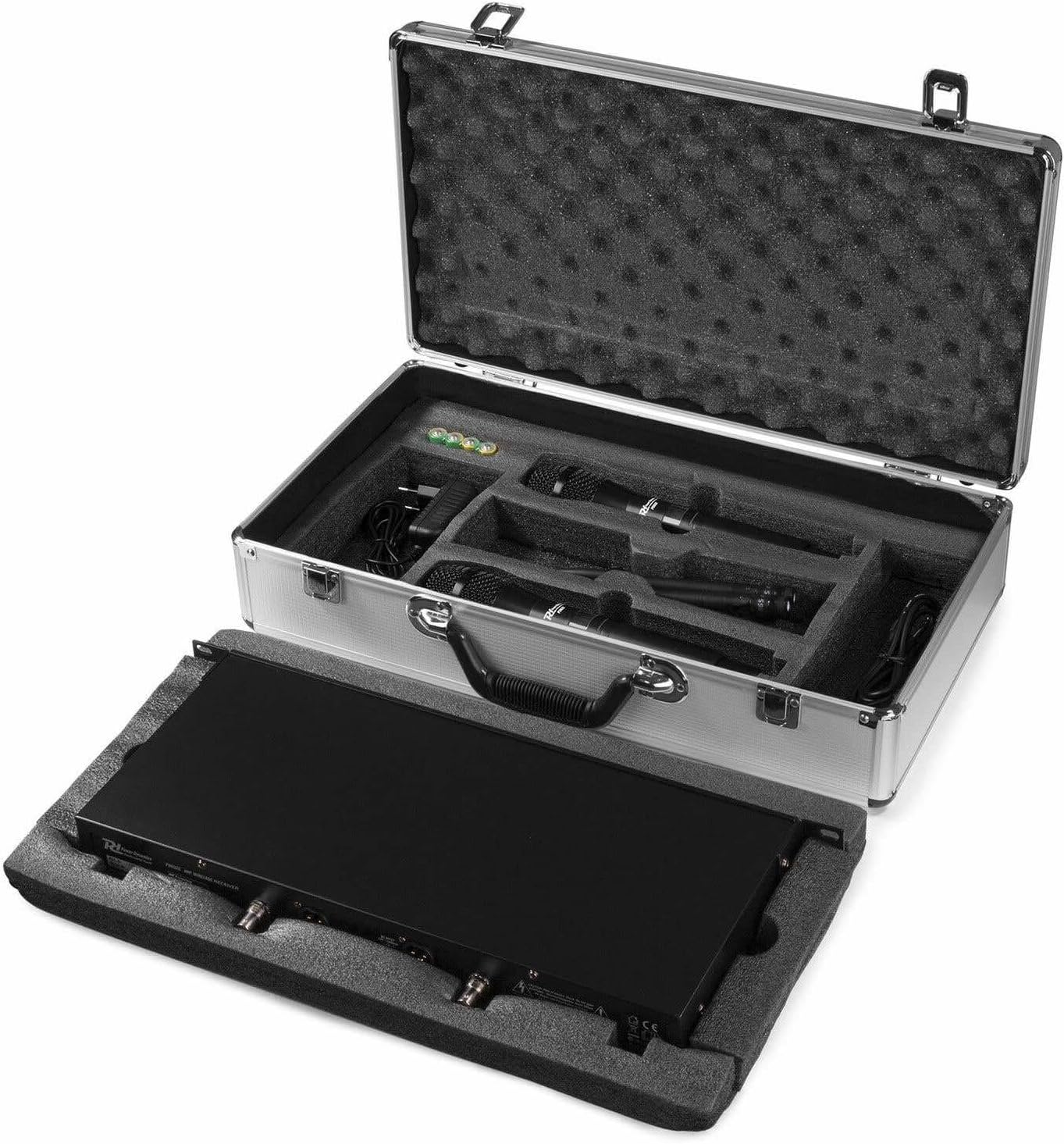
Image: The Power Dynamics PD632H Wireless Microphone System neatly packed in its robust aluminum carrying case.
Contingut del paquet
Si us plau, comproveu el contingut del paquet en desembalar-lo per assegurar-vos que hi hagi tots els components:
- 1 x Unitat receptora
- 2 micròfons de mà
- 1 x Aluminum Carrying Case
- 1 x adaptador de corrent (12 V)
- User Manual (available in Spanish, German, French, English, Dutch, Polish)

Image: All components of the PD632H system, including the receiver, two handheld microphones, power adapter, and cables, organized within the protective carrying case.
Instruccions de configuració
Follow these steps to set up your Power Dynamics PD632H Wireless Microphone System:
- Desempaquetar el sistema: Carefully remove all components from the aluminum carrying case.
- Connecteu el receptor:
- Attach the antennas to the receiver unit.
- Connect the power adapter to the receiver's 12V DC input and plug it into a power outlet (100-240V ~ | 50/60 Hz).
- Connect the receiver's XLR outputs to your amplifier, mixer, or PA system. The system features two balanced XLR microphone outputs.

Image: The rear panel of the PD632H receiver, highlighting the antenna ports, DC power input, and balanced XLR audio outputs for connection to external audio equipment.
- Instal·leu les piles del micròfon: Each handheld microphone requires 2 x 1.5V AA batteries (not included). Open the microphone's battery compartment and insert the batteries, observing polarity.
- Encès: Turn on the receiver unit using the On/Off button on the front panel. Turn on each microphone.
- Frequency Pairing (if necessary): The receiver unit transfers frequency to the microphone via infrared. If pairing is needed, follow the instructions in the "Operating Instructions" section.
Video: How to connect the receiver and audio devices
Video: This video demonstrates the process of connecting the wireless microphone receiver to various audio devices, ensuring proper setup for sound output.
Instruccions de funcionament
Operating your PD632H system is straightforward:
- Encès: Ensure both the receiver and microphones are powered on. The LED power lamp on the receiver should illuminate.
- Selecció de freqüència: The system features 2 x 20 UHF transmission frequencies (863.000 - 865.000 MHz). The receiver unit can transfer frequencies to the microphones via infrared. Use the controls on the receiver to select and adjust frequencies if needed. Separate adjustable transmission frequencies are available.
- Control de volum: Adjust the volume for each microphone using the volume regulators on the receiver.
- Funció de silenci: The microphones may include a mute function for temporary silence. Refer to the microphone's specific controls.
- Monitorització del senyal: The receiver has an LED radio frequency light to indicate signal reception from the microphones.

Image: The front panel of the PD632H receiver, displaying active channels and frequencies, along with volume controls for each microphone.
Video: Operation video of one-to-two wireless microphone
Video: A demonstration of the operational features of a one-to-two wireless microphone system, including basic usage and controls.
Manteniment
To ensure the longevity and optimal performance of your wireless microphone system, follow these maintenance guidelines:
- Neteja: Use a soft, dry cloth to clean the receiver and microphones. Avoid using abrasive cleaners or solvents.
- Substitució de la bateria: Replace microphone batteries promptly when the low battery indicator appears. Always use fresh 1.5V AA batteries.
- Emmagatzematge: When not in use, store the system in its aluminum carrying case in a cool, dry place, away from direct sunlight and extreme temperatures.
- Cura de l'antena: Handle antennas with care to prevent bending or breakage.
Resolució de problemes
If you encounter issues with your PD632H system, refer to the following common problems and solutions:
- Sense sortida de so:
- Ensure the receiver is powered on and connected correctly to the amplificador/mesclador.
- Check that microphones are powered on and have fresh batteries.
- Verify that the microphone volume controls on the receiver are not set to minimum.
- Confirm that the microphones are properly paired with the receiver (check LED RF light).
- Interference or Poor Sound Quality:
- Change the operating frequency on the receiver to avoid interference from other wireless devices. The system offers 2 x 20 UHF frequencies.
- Ensure there are no obstructions between the microphones and the receiver.
- Keep the receiver away from other electronic devices that may cause interference.
- Check microphone battery levels.
- Micròfon no emparellat:
- Assegureu-vos que tant el micròfon com el receptor estiguin encesos.
- Follow the infrared (IR) pairing procedure as described in the "Operating Instructions" or the relevant video.
- Ensure the IR windows on both devices are aligned during pairing.
Video: How to reset transmitter and receiver
Video: This video provides a step-by-step guide on how to reset and re-pair the transmitter and receiver units of a wireless microphone system, useful for troubleshooting connection issues.
Especificacions
| Característica | Especificació |
|---|---|
| Model | PD632H |
| Marca | Dinàmica de potència |
| Factor de forma del micròfon | Portàtil |
| Nombre de canals | 20 (x2 for dual microphones) |
| Freqüència de transmissió | 863.000 - 865.000 MHz (UHF) |
| Resposta de freqüència | 60 - 18,000 Hz |
| Ràtio senyal / soroll | > 97 dB |
| Connexions del receptor | 2 x XLR Microphone Outputs |
| Potència del micròfon | 2 piles AA de 1.5 V (no incloses) |
| Alimentació del receptor | 100 - 240 V ~ | 50/60 Hz (via 12V adapter) |
| Receiver Dimensions (WxHxL) | Aprox. 42 x 4.4 x 22 cm |
| Pes del receptor | Aprox. 1.7 kg |
| Microphone Dimensions (LxØ) | Aprox. 25 x 5 cm |
| Pes del micròfon | Aprox. 400 g |
| Característiques especials | Rack-mountable (48 cm), PLL technology, Infrared frequency transfer |
Garantia i Suport
For warranty information and technical support, please refer to the documentation provided with your purchase or visit the official Power Dynamics weblloc web. Conserveu el comprovant de compra per a qualsevol reclamació de garantia.
For further assistance, you may contact Power Dynamics customer service through their official channels. The user manual included in the package is available in multiple languages including Spanish, German, French, English, Dutch, and Polish.
Oficial weblloc: www.power-dynamics.eu