
1. Introducció
This manual provides essential information for setting up and operating your LG Exalt LTE VN220 cell phone. Please read this guide thoroughly to ensure proper use and to maximize the device's features.
The LG Exalt LTE VN220 is a compact flip phone designed for reliable communication. It features a 3.0-inch internal display, a 5 MP camera, and supports 4G LTE connectivity.
2. Configuració
2.1. Instal·lació i càrrega de la bateria
Your LG Exalt LTE VN220 comes with a 1470 mAh Lithium Ion battery. Ensure the battery is properly installed before first use.
- Traieu la coberta posterior del telèfon.
- Align the battery contacts with the terminals in the battery compartment and gently press down until it clicks into place.
- Torneu a col·locar la tapa posterior.
- Connect the charger to the phone's charging port and plug it into a power outlet. Charge the phone fully before initial use.
The battery provides approximately 11 hours of talk time on a full charge.
2.2. Instal·lació de la targeta SIM i la targeta MicroSD
The LG Exalt LTE VN220 supports CDMA network type and includes a microSD card slot for expandable memory.
- With the back cover and battery removed, locate the SIM card slot.
- Insert your activated CDMA SIM card into the designated slot, ensuring the gold contacts face down and the notched corner is correctly aligned.
- Locate the microSD card slot. Insert a microSD card (up to 32 GB, sold separately) into the slot until it locks into place.
- Torneu a inserir la bateria i la coberta posterior.
3. Funcionament bàsic
3.1. Encendre/apagar
- Per encendre: Press and hold the Power/End key until the screen lights up.
- Per apagar: Press and hold the Power/End key, then select 'Power Off' from the options on the screen.
3.2. Fer i rebre trucades
- Per fer una trucada: Open the phone, enter the phone number using the numeric keypad, and press the Send key (green call button).
- Per respondre una trucada: When the phone rings, open the phone and press the Send key.
- Per finalitzar una trucada: Press the Power/End key (red button).
3.3. Text Messaging
Per enviar un missatge de text:
- Open the phone and navigate to the 'Messages' menu.
- Select 'Create New Message' or a similar option.
- Introduïu el número de telèfon del destinatari o seleccioneu-lo dels vostres contactes.
- Type your message using the numeric keypad. The phone supports text-to-speech functionality.
- Premeu "Envia".
4. Característiques
4.1. Visualització
The LG Exalt LTE VN220 features a 3.0-inch WQVGA TFT Color LCD internal display with a resolution of 240 x 400 pixels. This display provides clear visuals for navigation, messages, and photos.

Image: The LG Exalt LTE VN220 in its open position, showcasing its internal 3.0-inch display. The screen displays a vibrant, colorful wallpaper with the Verizon logo, current time, date, and basic menu options like 'Contacts', 'Menu', and 'Message' at the bottom.
4.2. Càmera
Equipped with a 5 MP camera, the device allows you to capture photos and record videos in 720p resolution. The camera is located on the back of the phone.

Image: A dual view of the LG Exalt LTE VN220. On the left, the phone is open, displaying the internal screen and numeric keypad. On the right, the phone is shown from the back, highlighting the 5 MP camera lens and the textured silver finish.
4.3. Connectivitat
The LG Exalt LTE VN220 supports 4G LTE for fast data speeds, Wi-Fi for internet access, and Bluetooth 4.1 for connecting to wireless accessories. It also features HD voice for clearer call quality.
4.4. Memòria
The phone comes with 8 GB of internal memory and supports expandable storage via a microSD card slot, accommodating cards up to 32 GB.
5. Manteniment
- Neteja: Feu servir un drap suau i sec per netejar l'exterior del telèfon. Eviteu utilitzar productes químics agressius o materials abrasius.
- Cura de la bateria: To prolong battery life, avoid exposing the phone to extreme temperatures. Charge the battery regularly and avoid complete discharge.
- Emmagatzematge: Guardeu el telèfon en un lloc fresc i sec, allunyat de la llum solar directa i de la humitat.
6. Solució De Problemes
- El telèfon no s'encén: Ensure the battery is charged and correctly installed. Try connecting the charger to see if the charging indicator appears.
- Sense senyal de xarxa: Comproveu si la targeta SIM està inserida correctament. Desplaceu-vos a una zona amb millor cobertura de xarxa. Poseu-vos en contacte amb el vostre proveïdor de serveis si el problema persisteix.
- Problemes de qualitat de la trucada: Ensure you are in an area with good signal strength. Check for any obstructions around the microphone or speaker.
- La pantalla no respon: If the screen is frozen, try removing and reinserting the battery (if removable) to force a restart.
7. Especificacions
| Característica | Especificació |
|---|---|
| Nom del model | VN220 |
| Marca | LG |
| Mida de la pantalla | 3.0 polzades |
| Resolució de visualització | 240 x 400 pixels (WQVGA TFT Color LCD) |
| Càmera | 5 MP (enregistrament de vídeo 720p) |
| Memòria interna | 8 GB |
| Memòria ampliable | Fins a 32 GB (targeta microSD) |
| Capacitat de la bateria | 1470 mAh (ió de liti) |
| Temps de conversa | Fins a 11 hores |
| Sistema operatiu | Android |
| Connectivitat | 4G LTE, Wi-Fi, Bluetooth 4.1 |
| Tipus de xarxa | CDMA |
| Pes | 4.59 unces (0.3 lliures) |
| Dimensions | 4.44 in (Height) x 2.13 in (Width) |
8. Garantia i Suport
For warranty information and technical support, please refer to the documentation provided with your purchase or contact the seller directly. As this is a renewed product, warranty terms may vary from new devices.
9. Recursos addicionals
No official product videos from the seller are available for this specific model.
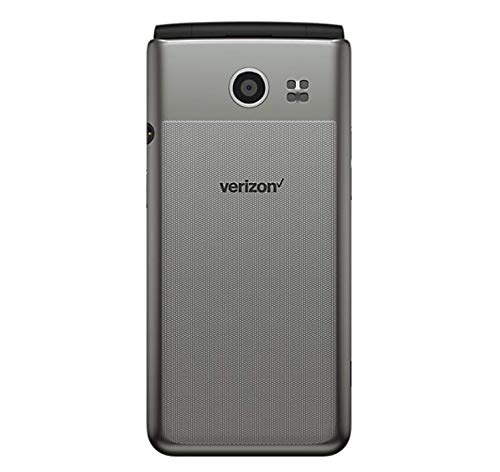
Image: The LG Exalt LTE VN220 in its closed, silver-colored flip phone form factor. The image shows both the front panel with the LG logo and a side profile, destacant el seu disseny compacte.