
Introducció
This manual provides detailed instructions for the proper use and care of your Vivitar DVR917HD 4K Action Camera. Please read this manual thoroughly before operating the device to ensure safe and effective use. The Vivitar DVR917HD is designed to capture high-quality video and photos in various environments, including underwater, thanks to its durable waterproof casing and versatile mounting options.
Característiques del producte
- Pantalla LCD en color de 2 polzades: For precise image capture, video playback, and photo viewing.
- Gravació de vídeo 4K: Capture stunning video at 4640 x 3480 resolution, along with 1080p and 720p options.
- 16 Megapixel CMOS Sensor: For high-resolution still photographs.
- Estoig resistent a l'aigua: Enables use in wet conditions and underwater adventures.
- Wi-Fi integrat: Allows direct streaming of content to compatible smartphones or tablets.
- Lent gran angular: Designed for capturing expansive scenes.
- Múltiples interfícies: Supports microSD, microSDHC, HDMI, and USB 2.0.
- Disseny compacte: Dimensions of 2.6 inches x 2.5 inches x 1.5 inches and a weight of 0.5 pounds.
Contingut del paquet
Verifiqueu que tots els elements que s'enumeren a continuació s'inclouen al vostre paquet:
- Vivitar DVR917HD 4K Action Camera
- Carcassa impermeable
- Comandament a distància sense fil
- Adaptador de corrent alterna
- Cable USB
- Cable HDMI
- Helmet Mounting Kit
- Muntatge de bicicleta

Image: The Vivitar DVR917HD camera shown with its full set of accessories, including the waterproof case, remote, various mounts, and cables.
Configuració
1. Inserció d'una targeta MicroSD
- Localitza la ranura per a targetes microSD al lateral de la càmera.
- Gently insert a compatible microSD or microSDHC card (Class 4 or higher recommended) into the slot until it clicks into place. Ensure the card is oriented correctly.
2. Carregant la bateria
- Connect the camera to the AC power adapter using the provided USB cable.
- Connecteu l'adaptador de corrent altern a una presa de corrent.
- The charging indicator light will illuminate. Charging is complete when the light changes color or turns off.
3. Using the Waterproof Housing
- Open the latch on the waterproof housing.
- Carefully place the camera inside the housing, ensuring it fits snugly.
- Close the latch securely. Before first use in water, perform a leak test without the camera inside.
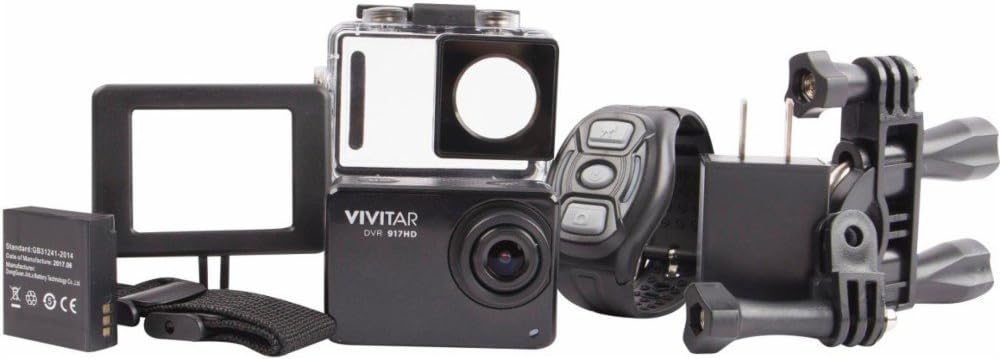
Image: The Vivitar DVR917HD camera positioned within its clear waterproof housing, with the back cover open.
4. Fixació de suports
The camera comes with a helmet mounting kit and a bicycle mount. Follow the instructions provided with each mount to securely attach the camera for your desired activity.

Image: The Vivitar DVR917HD camera enclosed in its waterproof case, securely attached to a mounting accessory.

Image: A person wearing a ski helmet with the Vivitar DVR917HD action camera visibly mounted on the top, against a snowy mountain backdrop.
Instruccions de funcionament
1. Encès / apagat
- To power on, press and hold the Power/Mode button (usually labeled 'MODE') until the screen illuminates.
- To power off, press and hold the Power/Mode button again until the screen turns off.

Imatge: Un primer pla view of the Vivitar DVR917HD action camera, highlighting its front lens and top control buttons.
2. Gravació de vídeo
- Ensure the camera is in video recording mode. Use the Mode button to cycle through modes if necessary.
- Press the 'OK' button to start recording. A red indicator light or on-screen icon will typically show recording is active.
- Press the 'OK' button again to stop recording.
3. Fer fotos
- Switch the camera to photo mode using the Mode button.
- Frame your shot using the 2-inch LCD display.
- Press the 'OK' button to capture a photo.

Image: The Vivitar DVR917HD camera's rear screen displaying a live view from a first-person perspective of someone riding a bicycle.
4. Connectivitat Wi-Fi
- Activeu el Wi-Fi a la càmera a través del menú de configuració.
- On your smartphone or tablet, search for the camera's Wi-Fi network and connect to it.
- Open the Vivitar app (if available) or a compatible action camera app to stream content or control the camera remotely.
5. Ús del comandament a distància sense fil
The included wireless remote control allows for convenient operation of the camera from a distance. Refer to the remote control's specific instructions for pairing and function details.
Manteniment
Cleaning the Camera and Housing
- Use a soft, lint-free cloth to clean the camera body and lens. Avoid abrasive materials.
- For the waterproof housing, rinse with fresh water after use in saltwater and allow to air dry. Ensure the O-ring seal is free of debris.
Cura de la bateria
- Carregueu la bateria completament abans de cada ús.
- No exposeu la bateria a temperatures extremes.
- Si guardeu la càmera durant un període prolongat, traieu-ne la bateria.
Emmagatzematge
Store the camera in a cool, dry place away from direct sunlight and excessive humidity. Keep it protected from dust and impacts.
Resolució de problemes
- La càmera no s'encén: Assegureu-vos que la bateria estigui carregada i inserida correctament.
- Problemes de gravació: Check if a microSD card is inserted and has sufficient free space. Ensure the card is not corrupted.
- Mala qualitat del so: The waterproof housing can significantly muffle sound. For better audio, use the camera outside the housing in dry conditions.
- Problemes de connexió Wi-Fi: Ensure Wi-Fi is enabled on the camera and your smart device. Try restarting both devices.
- Congelació de la càmera: Traieu i torneu a inserir la bateria per reiniciar la càmera.
Especificacions
| Característica | Especificació |
|---|---|
| Nom del model | DVR917HD |
| Número de model de l'article | 3216565590 |
| Resolució de fixes efectius | 16 MP |
| Resolució de captura de vídeo | 4K, 1080p, 720p |
| Format de captura de vídeo | MP4 |
| Tecnologia del sensor fotogràfic | CMOS |
| Mida de la pantalla | 2 polzades |
| Tecnologia de connectivitat | Wi-Fi |
| Tipus de memòria flash | Micro SD |
| Característica especial | Impermeable |
| Tipus de lent | Gran Angular |
| Tipus d'enfocament | Enfocament automàtic |
| Control de l'exposició | Automàtic |
| Pes de l'article | 717 g |
| Dimensions | 2.6 x 2.5 x 1.5 polzades (aproximadament) |
Informació de la garantia
For detailed warranty information regarding your Vivitar DVR917HD 4K Action Camera, please refer to the warranty card included in your product packaging or visit the official Vivitar weblloc web. Els termes i condicions de la garantia poden variar segons la regió i la data de compra.
Atenció al client
If you require further assistance, have questions not covered in this manual, or need technical support, please contact Vivitar customer service. Contact details can typically be found on the Vivitar official weblloc web o a l'embalatge del producte.