
1. Introducció
This manual provides essential information for the safe and efficient use of your ZTE Trek 2 HD K88 Tablet. The ZTE Trek 2 HD K88 is an 8-inch tablet featuring an HD display, an Octa-core processor, 2GB RAM, 16GB internal storage (expandable), and a 4600mAh battery. It operates on Android 6.0 Marshmallow and supports Wi-Fi and 4G-LTE connectivity.
Please read this manual thoroughly before operating your device to ensure proper functionality and to understand its features.

Imatge 1.1: Darrere view of the ZTE Trek 2 HD K88 Tablet, showing the AT&T logo and product labels.
2. Configuració
2.1. Carregant la bateria
Before first use, fully charge the tablet's battery. Connect the included power adapter to the tablet's charging port and then to a power outlet. The battery indicator on the screen will show charging status.
- Use only the power adapter provided with your device.
- A full charge can take several hours.
2.2. Encès / apagat
- Per encendre: Mantingueu premut el botó d'engegada fins que aparegui el logotip de ZTE.
- Per apagar: Mantingueu premut el botó d'engegada fins que aparegui el menú d'opcions d'engegada i, a continuació, seleccioneu "Apagar".
2.3. Configuració inicial
Upon first power-on, follow the on-screen prompts to configure basic settings:
- Seleccioneu el vostre idioma preferit.
- Connecteu-vos a una xarxa Wi-Fi.
- Inicia la sessió amb el teu compte de Google o crea'n un de nou.
- Review i acceptar els termes i condicions.
2.4. Inserció d'una targeta MicroSD (opcional)
The tablet supports expandable memory up to 128GB via a microSD card. Locate the microSD card slot, typically on the side of the device. Carefully insert the card with the gold contacts facing down until it clicks into place.

Imatge 2.1: Lateral view of the ZTE Trek 2 HD K88 Tablet, illustrating its thin design. The microSD slot is typically located on one of the side edges.
3. Instruccions de funcionament
3.1. Navegació bàsica
The ZTE Trek 2 HD K88 features a responsive touchscreen. Use the following gestures:
- Toca: Per seleccionar un element o obrir una aplicació.
- Toca i mantén premut: Per accedir a menús contextuals o moure elements.
- Llisca: Per desplaçar-se per pantalles o llistes.
- Pessigar: To zoom in or out on content like photos or web pàgines.
3.2. Home Screen and Apps
The home screen displays your favorite apps, widgets, and notifications. Swipe left or right to access additional home screens. Tap the "Apps" icon to view totes les aplicacions instal·lades.

Imatge 3.1: Frontal view of the ZTE Trek 2 HD K88 Tablet with the display active, showing the Android home screen with various application icons.
3.3. Connexió a Wi-Fi
- Vés a Configuració > Wi-Fi.
- Activa/desactiva el Wi-Fi On.
- Seleccioneu la xarxa desitjada de la llista.
- Introduïu la contrasenya si us demana i, a continuació, toqueu Connecta't.
3.4. Ús de la càmera
The tablet is equipped with 5 MP front and rear cameras. Open the Camera app to capture photos and videos.
- Toqueu el botó de l'obturador per fer una foto.
- Canvia entre la càmera frontal i la posterior amb la icona de commutació de la càmera.
- Explora diversos modes i configuracions dins de l'aplicació de la càmera.
3.5. Funcions d'àudio
The ZTE Trek 2 HD K88 features Dolby Audio powered dual front-facing speakers for an enhanced audio experience. Adjust volume using the physical volume buttons on the side of the tablet or through the on-screen volume controls.
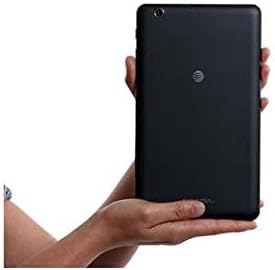
Image 3.2: The ZTE Trek 2 HD K88 Tablet held horizontally in two hands, demonstrating its comfortable and portable 8-inch form factor.
4. Manteniment
4.1. Neteja del dispositiu
To clean your tablet, use a soft, lint-free cloth. For stubborn marks, slightly dampen the cloth with water. Avoid using harsh chemicals, abrasive cleaners, or aerosol sprays, as these can damage the screen and finish.
4.2. Actualitzacions de programari
Comproveu periòdicament si hi ha actualitzacions de programari per assegurar-vos que la tauleta tingui les funcions i els pegats de seguretat més recents. Aneu a Configuració > Sobre la tauleta > Actualitzacions del sistema.
4.3. Gestió de l'emmagatzematge
Regularly manage your tablet's storage to maintain optimal performance. Delete unnecessary files, desinstal·leu les aplicacions que no feu servir i moveu suports multimèdia grans files to a microSD card or cloud storage. Go to Configuració > Emmagatzematge i USB a view ús d'emmagatzematge.
4.4. Cura de la bateria
Per allargar la durada de la bateria:
- Eviteu temperatures extremes.
- No deixeu que la bateria es descarregui completament amb freqüència.
- Desendolleu el carregador un cop la bateria estigui plena.
- Adjust screen brightness and disable unused features like Wi-Fi or Bluetooth when not needed.
5. Solució De Problemes
5.1. Problemes comuns i solucions
| Problema | Solució |
|---|---|
| La tauleta no s'encén | Assegureu-vos que la bateria estigui carregada. Premeu i manteniu premut el botó d'engegada durant almenys 10-15 segons per forçar un reinici. |
| Problemes de connexió Wi-Fi | Reinicia la tauleta i el teu encaminador Wi-Fi. Oblida't de la xarxa a la configuració del Wi-Fi i torna a connectar-te. |
| Les aplicacions es bloquegen o es bloquegen | Close and reopen the app. Clear the app's cache (Settings > Apps > [App Name] > Storage > Clear cache). Restart the tablet. |
| Rendiment lent | Close unused apps. Clear cache. Free up storage space. Restart the tablet. |
5.2. Restabliment de fàbrica
If issues persist, a factory reset may resolve them. This will erase all data on your tablet, so back up important information first. Go to Configuració > Còpia de seguretat i restabliment > Restableix les dades de fàbrica.
6. Especificacions
| Característica | Detall |
|---|---|
| Marca | ZTE |
| Nom del model | K88 |
| Sistema operatiu | Android 6.0 Marshmallow |
| Mida de la pantalla | 8 polzades |
| Resolució de visualització | 1280 x 800 (HD) |
| Processador | Qualcomm Snapdragon 617 de vuit nuclis (1.5 GHz) |
| Memòria RAM | 2 GB |
| Capacitat d'emmagatzematge | 16 GB (expandable up to 128 GB with microSD) |
| Càmera posterior | 5 MP |
| Càmera frontal | 5 MP |
| Capacitat de la bateria | 4600 mAh (up to 10 hours average life) |
| Connectivitat | Wi-Fi (802.11n), 4G-LTE (AT&T) |
| Àudio | Dolby Audio, Dual Front-Facing Speakers |
| Pes | 1.3 lliures |
| Accessoris inclosos | Adaptador de corrent |
7. Garantia i Suport
7.1. Informació de la garantia
This ZTE Trek 2 HD K88 Tablet comes with a 90-day limited warranty. Please refer to your purchase documentation for specific terms and conditions regarding warranty claims.
7.2. Atenció al client
For further assistance, technical support, or warranty inquiries, please contact the retailer or ZTE customer service. You may also visit the official ZTE support weblloc web per a preguntes freqüents i recursos addicionals.