
1. Introducció
Gràcies per la compraasing the Homtime D2qi Bluetooth Speaker with Wireless Charging and Alarm Clock. This device is designed to provide a versatile audio experience with convenient features for your daily life. Please read this manual carefully before use to ensure proper operation and to maximize the product's lifespan.
2. Informació de seguretat
- No exposeu el dispositiu a temperatures extremes, humitat o llum solar directa.
- Mantenir allunyat de l'aigua i altres líquids.
- No desmunteu ni intenteu reparar el dispositiu vosaltres mateixos. Envieu totes les tasques de manteniment a personal qualificat.
- Use only the provided or recommended power adapter.
- Eviteu deixar caure o sotmetre el dispositiu a forts impactes.
3. Contingut del paquet
Si us plau, comproveu el paquet per veure si hi ha els elements següents:
- Homtime D2qi Bluetooth Speaker
- Adaptador d'alimentació
- Manual d'usuari
4. Producte acabatview
The Homtime D2qi combines a high-quality Bluetooth speaker with a digital alarm clock and a convenient wireless charging pad. It features intuitive controls for easy operation.

Figura 4.1: Frontal view of the Homtime D2qi speaker with a smartphone placed on its top surface for wireless charging.

Figure 4.2: The Homtime D2qi speaker positioned on a book, showcasing its compact design and the digital clock display.

Figure 4.3: The Homtime D2qi speaker in a home setting, demonstrating wireless charging functionality.
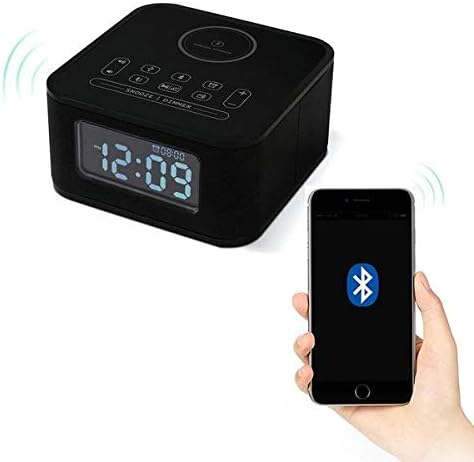
Figure 4.4: The Homtime D2qi speaker connected via Bluetooth to a smartphone.
5. Configuració
5.1 Connexió d'alimentació
- Connect the provided power adapter to the DC input port on the back of the Homtime D2qi.
- Connecteu l'adaptador d'alimentació a una presa de corrent estàndard.
- La pantalla s'il·luminarà, indicant que el dispositiu està encès.
5.2 Configuració inicial de l'hora
En el primer engegat o després d'un apagadatage, you may need to set the time. Refer to the 'Operating Instructions' section for detailed steps on setting the clock.
6. Instruccions de funcionament
6.1 Connexió Bluetooth
- Premeu el botó Botó Bluetooth on the top panel to enter Bluetooth pairing mode. The Bluetooth indicator will flash.
- Al telèfon intel·ligent o dispositiu d'àudio, activeu el Bluetooth i cerqueu els dispositius disponibles.
- Select "Homtime D2qi" from the list.
- Once connected, the Bluetooth indicator will stop flashing and remain solid. You can now play audio through the speaker.
6.2 Càrrega sense fil
- Place your Qi-compatible smartphone centrally on the wireless charging pad located on the top surface of the speaker.
- Ensure the phone is properly aligned with the charging coil.
- The charging indicator on your phone will show that charging has begun.
6.3 Funció de despertador
- Premeu el botó Botó d'alarma per entrar al mode de configuració d'alarma.
- Utilitza el botons +/- per ajustar l'hora i els minuts.
- Premeu el botó Botó d'alarma de nou per confirmar cada configuració.
- Per activar/desactivar l'alarma, premeu el botó Botó d'alarma briefly when not in setting mode.
- Per posposar, premeu la tecla Botó Posposa/Atenuació quan soni l'alarma.
6.4 Funció de ràdio
- Premeu el botó Botó de mode per canviar al mode de ràdio FM.
- Manteniu premut el botó Botó Reproduir/Pausa to auto-scan and save available stations.
- Utilitza el Botons Anterior/Següent to navigate through saved stations.
6.5 Call Answering
Quan es connecta mitjançant Bluetooth, l'altaveu es pot utilitzar per a trucades de mans lliures.
- Per respondre una trucada entrant, premeu el botó Botó Reproduir/Pausa.
- Per finalitzar una trucada, premeu el botó Botó Reproduir/Pausa de nou.
7. Manteniment
- Netegeu el dispositiu amb un drap suau i sec. No utilitzeu productes de neteja abrasius ni dissolvents.
- Keep the charging pad free of dust and debris to ensure efficient wireless charging.
- Guardeu el dispositiu en un lloc fresc i sec quan no el feu servir durant períodes prolongats.
8. Solució De Problemes
| Problema | Causa possible | Solució |
|---|---|---|
| Sense poder | L'adaptador de corrent no està connectat o la presa de corrent està defectuosa. | Assegureu-vos que l'adaptador de corrent estigui ben connectat al dispositiu i a una presa de corrent que funcioni. |
| No hi ha so de l'altaveu | Bluetooth not connected; volume too low; incorrect mode. | Ensure Bluetooth is paired. Increase volume on both the speaker and your device. Check if the speaker is in the correct mode (Bluetooth/Radio). |
| La càrrega sense fils no funciona | Phone not Qi-compatible; phone not aligned; phone case too thick. | Verify phone supports Qi wireless charging. Realign phone on the charging pad. Remove thick phone cases. |
| Buttons difficult to locate in the dark | Buttons are flush with the surface. | Familiarize yourself with button layout during daylight. Use the dimmer function to adjust display brightness. |
| Bluetooth disconnects automatically | Power saving feature; device out of range. | Reconnect Bluetooth manually. Keep devices within Bluetooth range (approx. 10 meters). |
9. Especificacions
| Característica | Detall |
|---|---|
| Marca | Hora local |
| Número de model | D2qi |
| Color | Negre |
| Tipus d'altaveu | Altaveus Bluetooth |
| Connectivitat | Sense fil |
| Dispositius compatibles | Telèfons intel·ligents |
| Potència de sortida | 5 - 10 watts |
| Pes del producte | 0.5 kg |
| Dimensions del paquet | 19.6 x 18.8 x 14.8 cm |
| Interfície del maquinari | Audio/Video Port |
10. Garantia i Suport
Homtime products are manufactured to the highest quality standards. For warranty information and customer support, please refer to the warranty card included in your package or visit the official Homtime weblloc web. Conserveu el rebut de compra com a comprovant de compra.