
DIGITEN DHC-101
DIGITEN Digital Humidity Controller DHC-101 User Manual
Model: DHC-101
1. Introducció
The DIGITEN DHC-101 Digital Humidity Controller is a pre-wired, simple-stage electronic humidistat designed for precise humidity management. It is suitable for a wide range of applications including dehumidifiers, humidifiers, reptile enclosures, greenhouses, exhaust fans, and fermentation processes. Featuring a large, lighted LCD screen for easy readability and a user-friendly interface, this plug-and-play device ensures accurate and stable humidity control.

Image: The DIGITEN DHC-101 controller is versatile, suitable for applications such as homebrewing, seed germination, cheese making, and cigar storage, ensuring optimal humidity levels.
2. Informació de seguretat
- Ensure the power supply matches the controller's specifications (100-240Vac).
- Do not immerse the controller or sensor in water or expose to excessive moisture.
- Mantenir fora de l'abast dels nens.
- No desmunteu ni modifiqueu el dispositiu. Encarregueu tot el manteniment a personal qualificat.
- Desconnecteu sempre el dispositiu abans de netejar-lo o fer-ne el manteniment.
- The case is designed with fireproof ABS material, but avoid exposing it to open flames or extreme heat.
3. Contingut del paquet
Verifiqueu que tots els elements siguin presents al paquet:
- 1 x DHC-101 Humidity Controller
- 1 x Humidity Sensor
- 1 x Manual d'usuari

Image: The DIGITEN DHC-101 Humidity Controller is packaged securely in a brown and black box.
4. Producte acabatview
The DHC-101 controller features a main unit with an integrated display and control buttons, a high-accuracy humidity sensor, and a pre-wired power plug for easy installation.

Image: The DIGITEN DHC-101 Digital Humidity Controller, showing the main unit, connected humidity sensor, and power plug.

Imatge: Un front clar view of the DIGITEN DHC-101 controller, highlighting its LCD display and control buttons.

Image: The high-accuracy humidity sensor for the DHC-101 controller, featuring a 2-meter lead length.
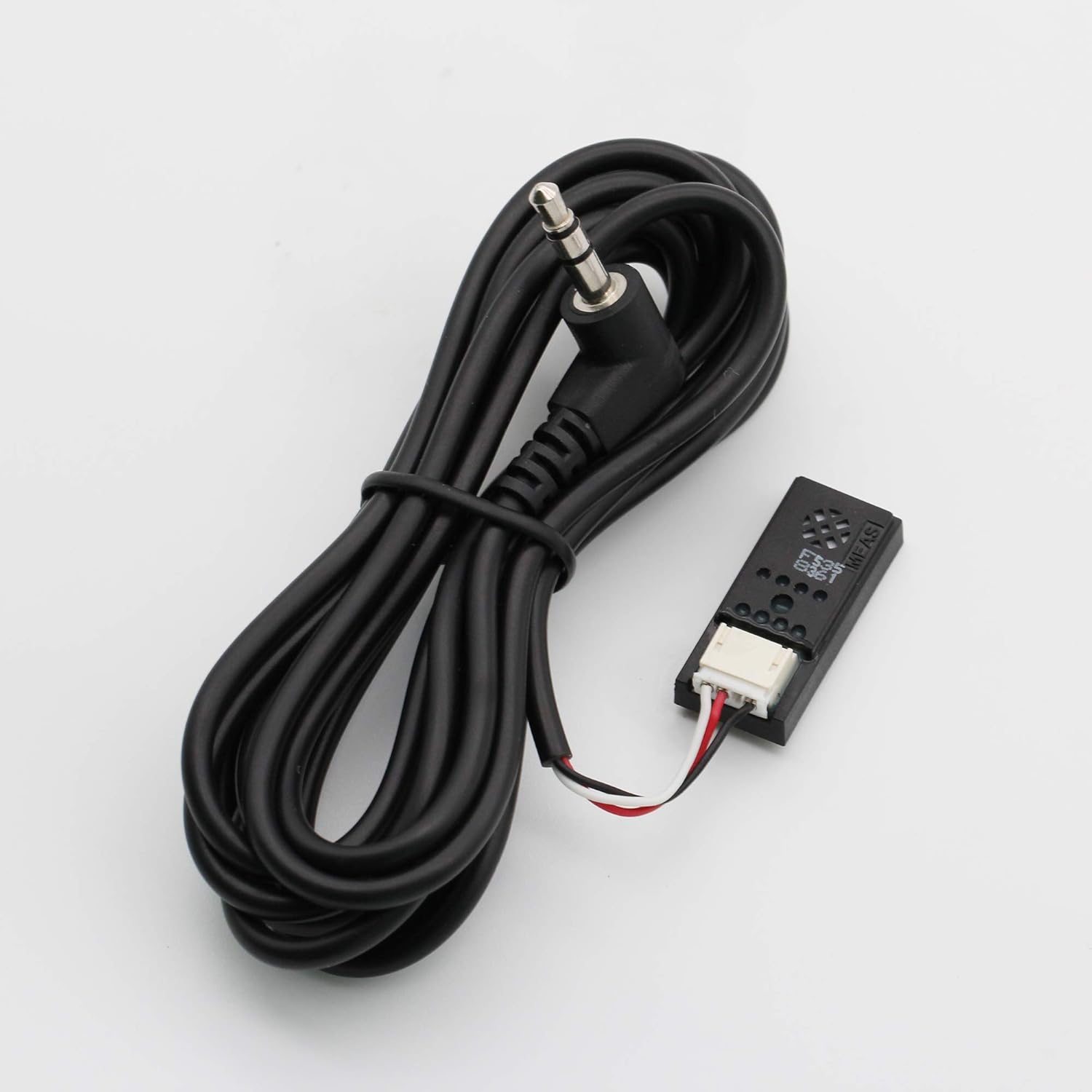
Image: Detail of the pre-wired output plug, designed for connecting the controlled device to the DHC-101 controller.
5. Especificacions
- Interval de control: 5-99% HR
- Resolució d'humitat: 0.1% HR
- Precisió: ± 3% HR
- Mode de control: Humidify or Dehumidify
- Potència d'entrada: 100-240Vac, 50 / 60Hz
- Humidity Control Output: Max. 10A, 100-240VAC
- Humidity Output Load: 1100W@110V, 2200W@220V
- Alarma del timbre: High and Low Humidity Alarm
- Model de sensor: MEAS HTG3500 series
- Sensor Lead Length: 2 m (6 peus)
- Relay Contact Capacity: Humidity (10A, 100-240VAC), Dehumidify (10A, 100-240VAC)
- Input Power Cable Length: 150 cm (6 peus)
- Output Power Cable Length: 18 cm (7 polzades)
- Material: Acrilonitril butadiè estirè (ABS)
6. Configuració
Seguiu aquests passos per a la configuració inicial:
- Desembalar: Carefully remove the DHC-101 controller and its components from the packaging.
- Connecta el sensor: Plug the humidity sensor into the designated port on the controller. Ensure a secure connection.
- Sensor de posició: Place the humidity sensor in the environment where humidity needs to be monitored and controlled. Ensure it is not directly exposed to water or extreme temperatures.
- Connecteu l'aparell: Plug your humidifier or dehumidifier into the output socket of the DHC-101 controller.
- Encès: Plug the DHC-101 controller's main power plug into a standard 100-240Vac electrical outlet. The LCD screen will illuminate.
7. Instruccions de funcionament
The DHC-101 operates in either Humidify or Dehumidify mode based on your set parameters.
Paràmetres de configuració:
Use the 'SET' button to enter programming mode and the up/down arrows to adjust values. Press 'SET' again to confirm and move to the next parameter.
Mode de deshumidificació:
To activate dehumidification, set the RUN humidity value to be més alt than the STOP humidity value. The LCD will display "MODE: DEHUMIDIFICATION".
- When the measured humidity is higher than the set RUN humidity, the dehumidification equipment will start operating.
- When the measured humidity reaches the set STOP humidity, the dehumidification equipment will stop operating.
Humidify Mode:
To activate humidification, set the RUN humidity value to be inferior than the STOP humidity value. The LCD will display "MODE: HUMIDIFICATION".
- When the measured humidity is lower than the set RUN humidity, the humidification equipment will start operating.
- When the measured humidity reaches the set STOP humidity, the humidification equipment will stop operating.
Funció d'alarma:
The controller features a buzzer alarm for high and low humidity conditions. Refer to the detailed user manual included in the package for setting alarm thresholds.
8. Manteniment
- Neteja: Wipe the controller and sensor with a soft, dry cloth. Do not use abrasive cleaners or solvents.
- Cura del sensor: Keep the humidity sensor clean and free from dust or debris to ensure accurate readings. Avoid physical damage to the sensor.
- Emmagatzematge: Si guardeu el dispositiu durant un període prolongat, desconnecteu-lo de l'alimentació i guardeu-lo en un lloc fresc i sec.
9. Solució De Problemes
- Problem: Display is blank.
- Solució: Ensure the controller is properly plugged into a live power outlet. Check the power cable for any damage.
- Problem: Appliance not turning on/off as expected.
- Solució: Verify that the RUN and STOP humidity settings are correctly configured for either humidification or dehumidification mode. Check if the appliance plugged into the controller is functioning correctly. Ensure the sensor is placed in an appropriate location and is not obstructed.
- Problem: Humidity readings appear inaccurate.
- Solució: Clean the humidity sensor to remove any dust or debris. Ensure the sensor is not exposed to direct airflow, extreme temperatures, or moisture that could affect readings. If issues persist, the sensor may need replacement.
- Problem: Buzzer alarm sounds frequently.
- Solució: Check the current humidity level against your set high and low alarm thresholds. Adjust the thresholds if necessary, or address the environmental conditions causing the humidity to exceed/fall below the set limits.
10. Garantia i Suport
For warranty information and technical support, please refer to the contact details provided in the user manual included with your product or visit the official DIGITEN weblloc. Conserveu el rebut de compra per a reclamacions de garantia.
Ask a question about this manual
Ask about setup, troubleshooting, compatibility, parts, safety, or missing instructions. Manuals+ will review the question and use this page’s manual context to help answer it.