
1. Introducció
Thank you for choosing the X.Cell M100 Wireless Mouse. This manual provides essential information for setting up, operating, and maintaining your new wireless mouse. Please read these instructions carefully before use to ensure optimal performance and longevity of your device.
2. Contingut del paquet
Verifiqueu que tots els elements siguin presents al vostre paquet:
- X.Cell M100 Wireless Mouse
- Nano receptor USB
- Pila AA (pot estar preinstal·lada o inclosa per separat)
- Manual d'usuari (aquest document)
3. Configuració
- Insereix la bateria: Locate the battery compartment on the underside of the mouse. Open the cover and insert the provided AA battery, ensuring correct polarity (+/-). Close the battery compartment cover.
- Connecteu el receptor USB: Remove the USB Nano Receiver from its storage slot, usually located inside the battery compartment or near it. Plug the receiver into an available USB port on your computer (PC or Mac).
- Encès: Turn on the mouse using the power switch, typically located on the underside. The mouse is designed for plug-and-play functionality, meaning it should automatically connect to your computer within a few seconds.
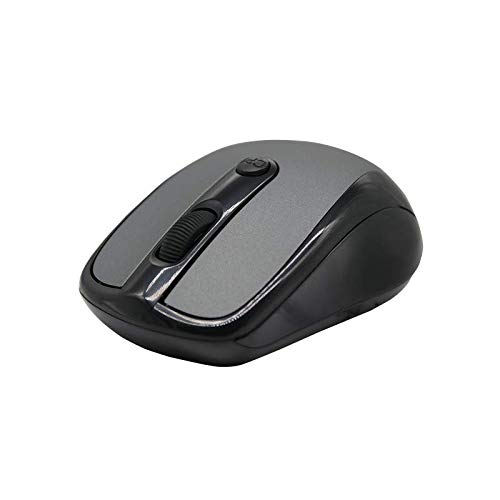
This image shows the X.Cell M100 Wireless Mouse from a top-down perspective, highlighting its ergonomic design and button layout.
4. Instruccions de funcionament
The X.Cell M100 Wireless Mouse utilizes 2.4 GHz wireless technology, providing a stable connection with an operating range of up to 10 meters. It is compatible with both PC and Mac systems.
- Botó esquerre: Funció de clic principal per seleccionar elements, obrir files, etc.
- Botó dret: Secondary click function for context menus and additional options.
- Roda de desplaçament: Desplaceu el cursor amunt o avall per navegar pels documents i web pàgines. La roda de desplaçament també funciona com a botó central.
- DPI Button (if present): Some models may include a DPI button to adjust cursor sensitivity. Refer to the mouse's physical design for this feature.

A hand demonstrates the comfortable grip and usage of the X.Cell M100 Wireless Mouse during operation.
5. Manteniment
- Neteja: Feu servir un drap suau i sec per netejar el ratolí. Per a la brutícia persistent, fregueu lleugerament.ampRenta el drap amb aigua. Evita utilitzar productes químics agressius o materials abrasius.
- Substitució de la bateria: When the mouse performance degrades or it stops responding, replace the AA battery. Follow the steps in the 'Setup' section for battery insertion. The mouse is designed for approximately 12 months of battery life under typical usage.
- Emmagatzematge: When not in use for extended periods, turn off the mouse to conserve battery life. Store the USB Nano Receiver in its designated slot to prevent loss.
6. Solució De Problemes
| Problema | Solució |
|---|---|
| El ratolí no respon |
|
| El moviment del cursor és erràtic o lent |
|
| Problemes de connexió |
|
7. Especificacions
- Model: XL-M-100-BLK
- Connectivitat: Sense fil de 2.4 GHz
- Interval de funcionament: Fins a 10 metres
- Compatibilitat: PC & Mac
- Font d'alimentació: 1 x bateria AA
- Durada estimada de la bateria: 12 mesos
- Dimensions (L x A x A): 2.4 x 6.4 x 4.6 cm
- Pes: 80 grams
- Color: Negre
8. Garantia i Suport
Specific warranty details and direct support contact information are not provided in the product description. Please refer to the product packaging or the official X.Cell website for the most current warranty policy and customer support options. Keep your purchase receipt as proof of purchase for any warranty claims.