
1. Producte acabatview
The MOCUTE 053 is a wireless gamepad designed for an enhanced gaming experience on Android devices. It features a comfortable ergonomic design, high-speed wireless connectivity, and a long-lasting battery, making it suitable for extended gaming sessions.
Característiques principals:
- High-speed and reliable Wireless 3.0 connection with a transmission range of up to 8 meters.
- Integrated 400mAh li-ion battery providing 20-30 hours of continuous gaming.
- Ergonomic curve design for comfortable and prolonged use.
- Compatible with a wide range of Android mobile phones and devices.
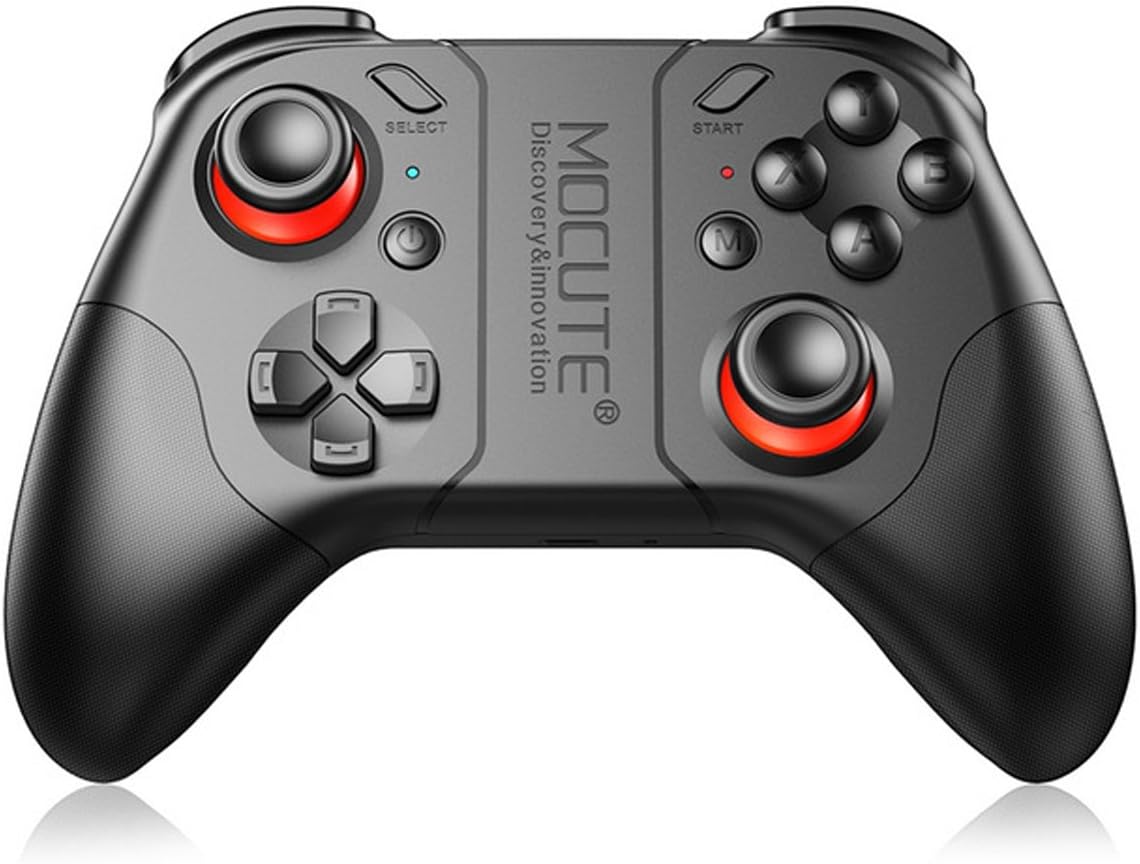
Figura 1: Frontal view of the MOCUTE 053 Wireless Gamepad, showcasinel seu disseny ergonòmic i la disposició dels botons.
2. Compatibilitat
The MOCUTE 053 Gamepad is designed for use with Android Wireless mobile phones and other Android devices, including tablets and TV Boxes. Compatible devices include, but are not limited to, Samsung Galaxy S9/S9+, S8/S8+, Note 8, GALAXY A9 Star, viv x21/x20, Y85/Y83, X PLAY6, HUAWEI Mate 10/10 Pro, P20/P20 Pro, P9/P9 Plus, P10/10 Plus, HUAWEI nova 3e, Tablet M5, PC, and OPPO A3/R15.
Nota important: This product does not support iOS system devices.
3. Disseny i controls del producte
Familiarize yourself with the layout of the MOCUTE 053 Gamepad to optimize your gaming experience. The diagram below details the function of each button and control.

Figure 2: Diagram illustrating the function of each button and control on the MOCUTE 053 Gamepad.
The gamepad features dual analog sticks, a D-pad, standard action buttons (A, B, X, Y), shoulder buttons (L1, R1), and triggers (L2, R2). Additional buttons include SELECT, START, and a central M button for mode switching or special functions depending on the game.
4. Configuració
4.1 Càrrega del GamePad
- Connect the provided USB charging cable to the gamepad's charging port.
- Connecteu l'altre extrem del cable a una font d'alimentació USB (per exemple, un port USB de l'ordinador o un adaptador de paret USB).
- El llum indicador de càrrega s'il·luminarà.
- Una càrrega completa sol trigar entre 2 i 3 hores. El llum indicador canviarà o s'apagarà un cop finalitzada la càrrega.
- A fully charged gamepad provides 20-30 hours of working time and up to 30 days of standby time.
4.2 Emparellament amb el dispositiu
- Assegureu-vos que el gamepad estigui prou carregat.
- Turn on the gamepad by pressing the Power button. The indicator light will start blinking, indicating it's in pairing mode.
- On your Android device, go to Settings > Bluetooth and turn Bluetooth on.
- Cerca available devices. The gamepad should appear as "MOCUTE 053" or similar.
- Select "MOCUTE 053" to initiate the pairing process.
- Once paired, the gamepad's indicator light will become solid, indicating a successful connection.
- If pairing fails, turn off the gamepad and your device's Bluetooth, then repeat the steps.
5. Instruccions de funcionament
5.1 Encès/Apagat
- Encès: Press and hold the Power button for a few seconds until the indicator light illuminates.
- Apagar: Press and hold the Power button for a few seconds until the indicator light turns off. The gamepad will also automatically power off after a period of inactivity to conserve battery.
5.2 Gaming Usage
- Once paired, launch your desired game on your Android device.
- Most Android games with gamepad support will automatically recognize the MOCUTE 053.
- Refer to the game's settings for controller mapping and customization options.
- Use the analog sticks for movement and camera control, the D-pad for directional input, and the action buttons (A, B, X, Y) for in-game actions.
- The shoulder buttons (L1, R1) and triggers (L2, R2) are typically used for shooting, aiming, or other quick actions.
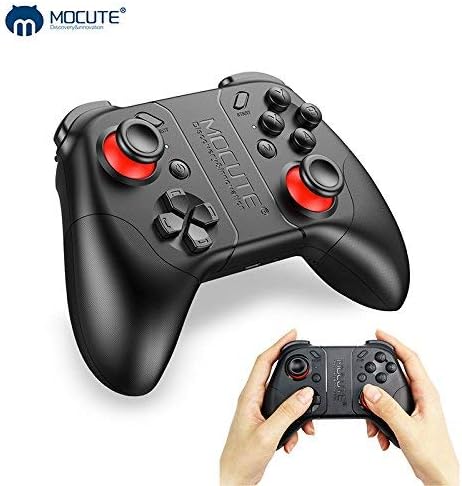
Figure 3: The MOCUTE 053 Wireless Gamepad held in hands, demonstrating its compact size and comfortable grip.
6. Manteniment
Proper maintenance will extend the lifespan of your MOCUTE 053 Gamepad.
- Neteja: Feu servir un drap suau i sec per netejar la superfície del gamepad. Per a la brutícia persistent, netegeu lleugerament.ampNetegeu el drap amb aigua. No utilitzeu productes químics agressius ni netejadors abrasius.
- Emmagatzematge: Guardeu el gamepad en un lloc fresc i sec, allunyat de la llum solar directa, temperatures extremes i humitat elevada.
- Cura de la bateria: Avoid fully discharging the battery frequently. If storing for a long period, charge the gamepad to about 50% every few months to maintain battery health.
- Eviteu les gotes: Protegiu el gamepad de caigudes i impactes, que poden danyar els components interns.
7. Solució De Problemes
If you encounter issues with your MOCUTE 053 Gamepad, refer to the following common problems and solutions:
| Problema | Possible causa/solució |
|---|---|
| El gamepad no s'encén. | Battery is low or depleted. Charge the gamepad for 2-3 hours. |
| No es pot emparellar amb el dispositiu. |
|
| Els botons no responen o fan lentitud. |
|
| El gamepad es desconnecta sovint. |
|
8. Especificacions tècniques
| Característica | Especificació |
|---|---|
| Model | MOCUTE 053 |
| Versió sense fil | 3.0 |
| Material | Plàstic ABS |
| Bateria | Bateria Li-ion de 400 mAh |
| Distància de transmissió | 2-8 metres |
| Temps de treball | 20-30 hores |
| Temps de càrrega | 2-3 hores |
| Temps d'espera | 30 dies (completament carregat) |
| Dimensions (L x A x A) | 170 x 140 x 60 mm |
| Pes | 226 g |
| Nombre de botons | 17 |
| UPC | 611864734743 |
9. Garantia i Suport
The MOCUTE 053 Wireless Gamepad comes with a standard manufacturer's warranty. For specific warranty terms and conditions, please refer to the documentation included with your purchase or contact MOCUTE customer support.
For technical assistance, troubleshooting beyond this manual, or warranty claims, please contact the manufacturer or your point of purchase. Keep your purchase receipt as proof of purchase.