
1. Producte acabatview
The ChiliTec CTW-902 WiFi Digital Wireless Weather Station is a multi-functional device designed to provide comprehensive weather data. It features a DCF radio-controlled clock, a rain and wind sensor, and displays indoor and outdoor temperature and humidity. The station supports WiFi connectivity for data viewing on mobile applications.
Característiques principals:
- DCF Radio-Controlled Clock with Calendar
- Indoor and Outdoor Temperature and Humidity Display
- Precipitation Measurement and Statistics
- Wind Speed and Direction Display
- Visualització de la pressió atmosfèrica
- Min/Max Temperature, Humidity, and Wind Speed Records
- Clear Color LCD Display (157mm x 76mm)
- WiFi Connectivity for Smartphone App Integration (Android, iPhone, iPad)
- Weather-Resistant Outdoor Sensor Unit
- Wall or Table Mounting Options

Figura 1.1: Acabatview of the ChiliTec CTW-902 WiFi Weather Station, showing the main display unit, the multi-sensor outdoor unit, and a smartphone app interface displaying current conditions.
2. Informació de seguretat
Please read all safety instructions before operating the device. Failure to follow these instructions may result in electric shock, fire, or damage to the device.
- Do not expose the main unit to direct sunlight, extreme temperatures, or high humidity.
- Assegureu-vos que el sensor exterior estigui muntat correctament per evitar danys causats pel vent o les caigudes.
- Feu servir només l'adaptador d'alimentació especificat per a la unitat principal.
- Batteries for the outdoor sensor should be inserted with correct polarity. Do not mix old and new batteries or different types of batteries.
- Mantingueu el dispositiu allunyat de camps magnètics forts.
- No intenteu desmuntar ni reparar el dispositiu vosaltres mateixos. Poseu-vos en contacte amb personal de servei qualificat.
3. Guia de configuració
3.1 Desembalatge i components
Carefully unpack all components and check against the packing list:
- Unitat de visualització principal
- Multi-Sensor Outdoor Unit (Rain gauge, Wind vane, Anemometer, Temperature/Humidity sensor)
- Mounting Pole/Bracket for Outdoor Unit
- Adaptador d'alimentació per a la unitat principal
- Cable Ties and Clamps
- Manual d'usuari (aquest document)

Figura 3.1: All components included with the weather station, showing the main display unit, the outdoor sensor, power adapter, and mounting accessories.
3.2 Outdoor Sensor Assembly and Placement
Assemble the outdoor sensor unit according to the diagrams. Ensure the wind vane and anemometer rotate freely. The rain gauge should be clear of obstructions.
- Attach the wind vane and anemometer to the main sensor body.
- Mount the assembled sensor unit in an open area, away from buildings, trees, and other obstructions that could affect wind or rain measurements.
- Ensure the sensor is level for accurate rain measurement. Use the included mounting pole/bracket and secure it firmly.
- The outdoor unit is weather-resistant, but avoid direct exposure to extreme conditions if possible.

Figura 3.2: Detallada view of the outdoor sensor unit, indicating the rain funnel for precipitation measurement, the sensitive wind direction sensor, the wind speed sensor (anemometer), and the solar cell for autonomous operation.
The outdoor unit requires 3 AAA batteries (not included). Insert them into the battery compartment, observing polarity.
3.3 Configuració de la unitat de visualització principal
- Place the main display unit indoors, away from direct sunlight and heat sources.
- Connecteu l'adaptador de corrent a la unitat principal i endolleu-lo a una presa de corrent.
- The display will light up, and the unit will begin searching for the outdoor sensor and DCF signal.
- Allow a few minutes for the main unit to establish connection with the outdoor sensor. Once connected, outdoor data will appear on the display.

Figura 3.3: The main display unit showing various weather parameters including time, indoor/outdoor temperature and humidity, atmospheric pressure, wind direction and speed, and rainfall. The display also indicates WiFi connectivity.
3.4 Configuració WiFi
To utilize the smartphone application features, the weather station needs to be connected to your home WiFi network.
- Download the recommended smartphone application (e.g., WS Tool, Ambient Weather) from your device's app store (Android, iOS).
- Follow the in-app instructions to connect your weather station to your WiFi network. This typically involves putting the station into a pairing mode and entering your WiFi credentials.
- Ensure your WiFi network is 2.4 GHz, as 5 GHz networks are not supported by this device.
- Un cop connectat, pots view real-time weather data and historical graphs on your smartphone.
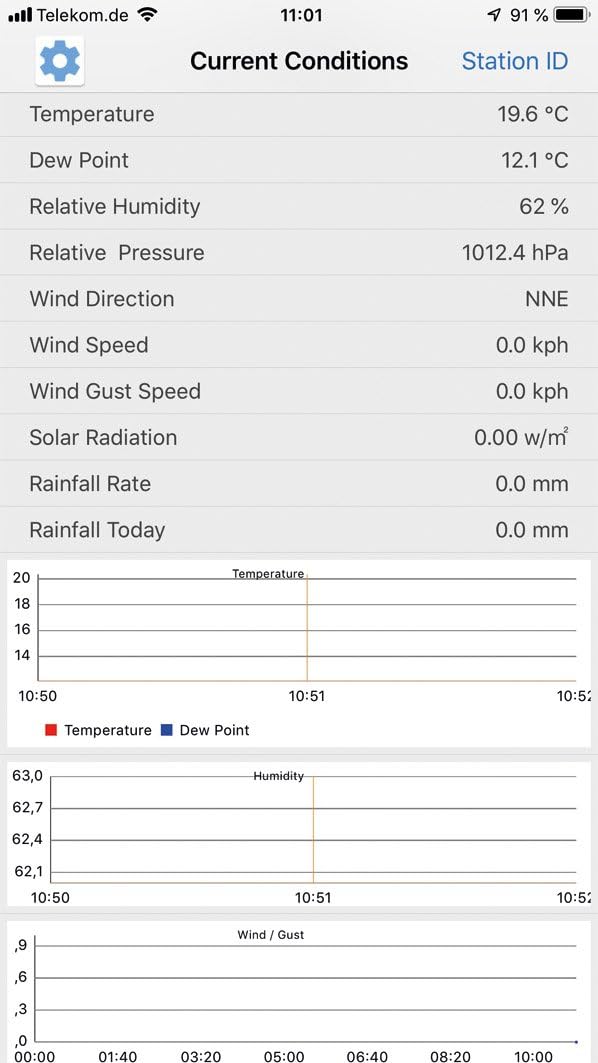
Figura 3.4: A smartphone application interface showing current weather conditions such as temperature, dew point, humidity, pressure, wind direction, wind speed, solar radiation, and rainfall rate. It also displays historical graphs for temperature, humidity, and wind/gust data over time.
4. Instruccions de funcionament
4.1 Mostra finalview
La unitat de visualització principal ofereix una visió completaview of current and historical weather data. The color display is divided into several sections:
- Hora i data: Located at the top left, synchronized via DCF radio signal.
- Temperatura i humitat interiors: Top right section.
- Temperatura i humitat exteriors: Middle right section.
- Pressió atmosfèrica: Middle left section, with historical graph.
- Dades del vent: Center section, showing speed, direction, and daily max.
- Precipitacions: Bottom right section, showing current and monthly precipitation.
- Índex UV i llum: Bottom left section (if applicable).
- Icones de previsió meteorològica: Top center, indicating sunny, cloudy, rainy, windy, or snowy conditions.

Figura 4.1: The vibrant color display of the weather station, clearly showing the layout of information including time, indoor and outdoor temperature and humidity, atmospheric pressure, wind data, and rainfall. Weather forecast icons are also visible.
4.2 Funcions dels botons
The display unit features several touch-sensitive buttons for navigation and settings:
- SET: Enter settings mode, confirm selections.
- TEMP: Switch between temperature units (°C/°F), view min/max temperature records.
- PLUJA: View different rainfall statistics (e.g., hourly, daily, weekly, monthly).
- VENT: Switch between wind speed units (km/h, mph, m/s), view wind gust records.
- PRESSIÓ: Switch between pressure units (hPa, inHg, mmHg), view historical pressure data.
- ALARMA: Set time or weather alarms.
- MÀXIM / MÍN: Toggle between maximum and minimum recorded values for various parameters.
- LLUM/SNOOZE: Adjust backlight brightness, activate snooze for alarms.
4.3 Data Logging and App Integration
The station continuously logs weather data. When connected to WiFi, this data is uploaded to cloud services (e.g., Weather Underground, Weathercloud.net) and can be accessed via the smartphone application.
- Open the installed weather station app on your smartphone.
- Ensure the station is online and connected to WiFi.
- Navigate through the app to view current conditions, historical graphs, and set alerts.
- Some apps allow sharing your weather data with a global network of personal weather stations.
5. Manteniment
Regular maintenance ensures accurate readings and extends the lifespan of your weather station.
- Neteja del sensor exterior: Periodically clean the rain gauge funnel to remove leaves, debris, or insects that could obstruct water flow. Wipe down the wind vane and anemometer to ensure free rotation.
- Substitució de la bateria: Replace the outdoor sensor batteries (3 x AAA) annually or when the low battery indicator appears on the main display. Use high-quality alkaline batteries.
- Neteja de la unitat principal: Wipe the display unit with a soft, dry cloth. Do not use abrasive cleaners or solvents.
- Actualitzacions de firmware: Comproveu el del fabricant website or the smartphone app for any available firmware updates for the weather station to ensure optimal performance and new features.
6. Solució De Problemes
| Problema | Causa possible | Solució |
|---|---|---|
| No es mostren dades exteriors. | Outdoor sensor not powered or out of range. Interference. | Check outdoor sensor batteries. Ensure sensor is within 50m (164 ft) of main unit. Reduce obstacles between units. Re-pair sensor if necessary (refer to specific pairing instructions in full manual). |
| Hora/data incorrecta. | DCF signal not received. | Ensure main unit is placed away from electronic interference. Allow time for signal reception (can take several hours). Manually set time if DCF signal is consistently weak. |
| Problemes de connexió Wi-Fi. | Incorrect WiFi password. 5GHz network used. Router too far. | Double-check WiFi password. Ensure you are connecting to a 2.4 GHz network. Move station closer to router. Restart router and weather station. |
| Inaccurate rain readings. | Rain gauge obstructed or not level. | Clear any debris from the rain gauge funnel. Ensure the outdoor sensor is mounted perfectly level. |
| Wind data not updating. | Anemometer/wind vane obstructed or stuck. | Check for physical obstructions (e.g., spiderwebs, leaves) preventing rotation. Gently clean and ensure free movement. |
7. Especificacions
- Model: CTW-902 WiFi (22515)
- Marca: ChiliTec
- Dimensions de la unitat principal: Aproximadament 20 x 15 x 3 cm (7.9 x 5.9 x 1.2 polzades)
- Visualització: Color LCD, 157mm x 76mm
- Connectivitat: Wi-Fi (2.4 GHz only), 433 MHz RF for outdoor sensor
- Outdoor Sensor Range: Up to 50 meters (164 feet) in open field
- Font d'alimentació: Main Unit: AC Adapter; Outdoor Sensor: 3 x AAA batteries (not included)
- Interval de temperatura: Indoor: 0°C to +50°C (32°F to 122°F); Outdoor: -40°C to +60°C (-40°F to 140°F)
- Rang d'humitat: 10% a 99% HR
- Interval de velocitat del vent: De 0 a 50 m/s (de 0 a 112 mph)
- Rainfall Display: De 0 a 9999 mm (de 0 a 393.6 polzades)
- Característiques especials: DCF Radio Clock, Min/Max Memory, Weather Forecast, App Integration
8. Garantia i Suport
ChiliTec products are designed for reliability and performance. For warranty information, please refer to the documentation included with your purchase or visit the official ChiliTec weblloc. Els termes de garantia estàndard solen cobrir els defectes de fabricació durant un període especificat a partir de la data de compra.
For technical support, troubleshooting assistance beyond this manual, or spare parts, please contact ChiliTec customer service. Contact details can usually be found on the product packaging or the official brand weblloc.
Fabricant: ChiliTec GmbH