
1. Introducció
This manual provides detailed instructions for the proper installation, operation, and maintenance of the uxcell PG9 Cable Gland. Designed for securing and sealing cables, this product ensures reliable and waterproof connections in various electrical applications. Please read this manual thoroughly before use to ensure safe and effective operation.
2. Producte acabatview
The uxcell PG9 Cable Gland is a waterproof plastic joint designed for cable fixing and sealing. It features an adjustable locknut mechanism, providing a secure and reliable connection for cables with diameters ranging from 4mm to 8mm. The gland is constructed from durable nylon plastic, ensuring an anti-loose structure and long service life.
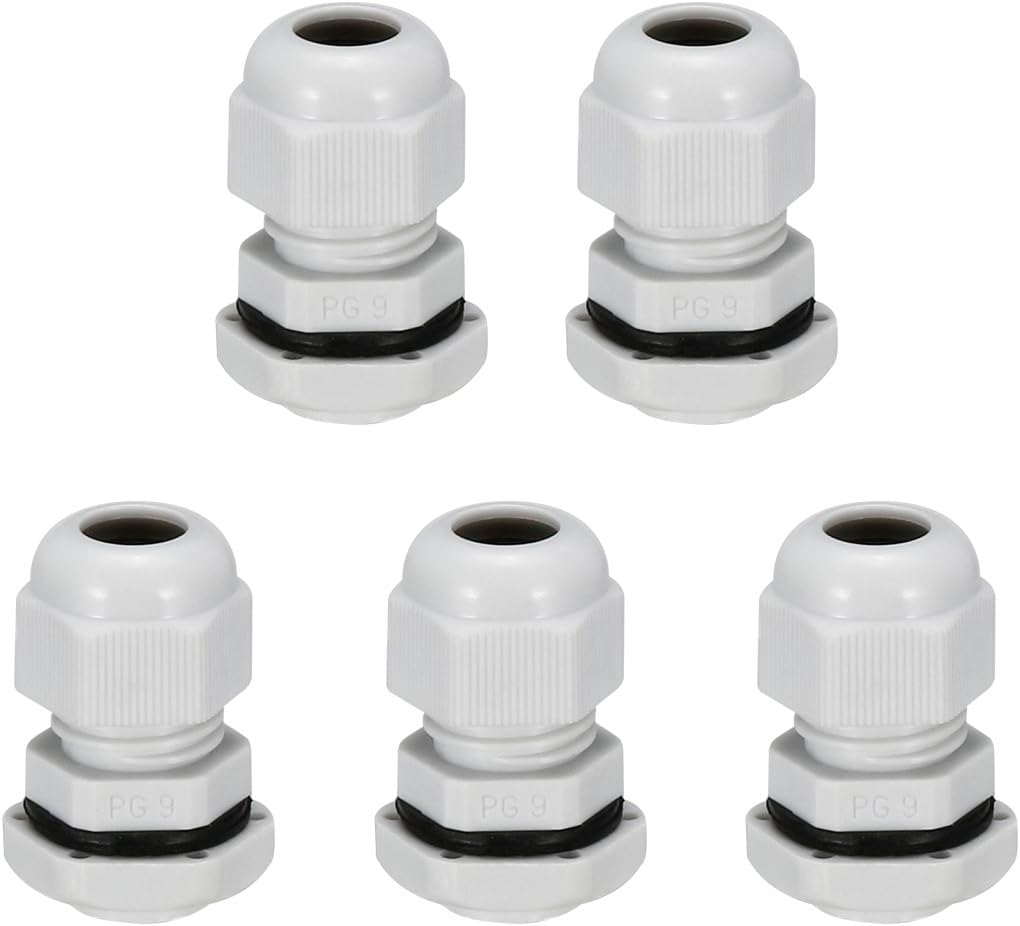
Image 2.1: A set of five white uxcell PG9 cable glands, showing their complete assembled form.
Característiques principals:
- Tipus: PG9
- Cable Diameter Fit: 4 mm-8 mm (0.16 polzades-0.31 polzades)
- Diàmetre de la rosca: 15.2 mm (0.6 polzades)
- Longitud del fil: 9 mm (0.35 polzades)
- Material: Durable Nylon Plastic
- Disseny: Anti-loose structure for reliable connection
- Instal·lació: Direct insertion and easy tightening without disassembly
- Components: Consists of a lock nut, valve body, seal, and sealing nut
- Aplicacions: Suitable for cable fixing, wiring, mechanical control boxes, switchboards, and various electrical appliances.

Image 2.2: Various application examples of cable glands, including use on a junction box, control panel, and power outlets.
3. Especificacions
| Atribut | Valor |
|---|---|
| Fabricant | uxcell |
| Número de part | a18032200ux0391 |
| Pes de l'article | 1.58 unces |
| Número de model | a18032200ux0391 |
| Mida | PG9 |
| Color | Blanc |
| Estil | Industrial |
| Material | Niló, plàstic |
| Mètode d'instal·lació | Threaded (Note: Product data listed 'Self-Adhesive', but actual installation is threaded) |
| Quantitat de paquet d'articles | 5 |
| Nombre de peces | 5 |
| Diàmetre de tall | 0.31 Inches (for cable) |
| Sistema de mesura | mètrica |
| Diàmetre muntat | 0.31 Inches (for cable) |

Image 3.1: A table detailing normal parameters such as thread size, cable range, thread O.D., and thread length for various PG model cable glands.
4. Configuració i instal·lació
The uxcell PG9 Cable Gland is designed for straightforward installation. Follow these steps to ensure a secure and waterproof connection.
Components of the PG9 Cable Gland:

Image 4.1: A PG9 cable gland shown both assembled and disassembled, illustrating its main components: lock nut, valve body, seal, and sealing nut.
- Prepara l'obertura: Ensure the mounting hole in your equipment (e.g., junction box, control panel) is appropriately sized for the PG9 thread.
- Disassemble the Gland: Separate the cable gland into its individual components: the lock nut, the main body (valve body), the sealing washer/gasket, and the sealing nut.
- Insert Main Body: Insert the threaded main body of the cable gland through the prepared opening from the outside of the equipment.
- Secure with Lock Nut: Place the lock nut onto the threaded main body from the inside of the equipment and tighten it firmly to secure the gland to the equipment.
- Inseriu el cable: Thread the cable through the sealing nut, then through the sealing washer/gasket, and finally through the main body of the gland. Ensure the cable is within the specified diameter range of 4mm-8mm.
- Tighten Sealing Nut: Once the cable is in position, tighten the sealing nut onto the main body. This compresses the sealing washer around the cable, creating a waterproof and strain-relieved seal. Tighten until the cable is firmly gripped and sealed, but do not overtighten.
- Verifica la connexió: Gently pull on the cable to ensure it is securely held and cannot be easily dislodged. Check for any gaps that might compromise the seal.

Image 4.2: Visual guide demonstrating how to measure cable diameter using calipers and the process of installing a cable gland into an enclosure.
5. Funcionament
Once properly installed, the uxcell PG9 Cable Gland operates passively by providing a secure and sealed entry point for your cable into an enclosure. Its primary function is to:
- Provide Strain Relief: Prevents the cable from being pulled out or damaged due to tension.
- Ensure Waterproofing/Resistance: Protects the internal components of the equipment from water, dust, and other environmental elements.
- Maintain Electrical Integrity: Helps prevent short circuits or other electrical issues by securing the cable.

Imatge 5.1: Primer pla views demonstrating the sealed and water-resistant properties of an installed cable gland, highlighting its protective function.
6. Manteniment
The uxcell PG9 Cable Gland is designed for durability and requires minimal maintenance. However, periodic inspection is recommended to ensure continued performance, especially in environments subject to vibration, extreme temperatures, or moisture.
- Inspecció visual: Regularly check the cable gland for any signs of physical damage, cracks, or degradation of the plastic material.
- Comprovació d'estanquitat: Periodically verify that both the lock nut and the sealing nut remain securely tightened. Loose connections can compromise the seal and strain relief.
- Integritat del segell: Inspect the sealing washer for any signs of wear, hardening, or cracking. If the seal appears compromised, consider replacing the gland.
- Neteja: Keep the area around the cable gland clean and free from excessive dust, dirt, or corrosive substances that could degrade the material over time.
7. Solució De Problemes
If you encounter issues with your uxcell PG9 Cable Gland, refer to the following troubleshooting guide:
Problemes comuns i solucions:
- Issue: Water or Dust Ingress
- Possible causa: Sealing nut not tightened sufficiently.
- Solució: Ensure the sealing nut is firmly tightened around the cable.
- Possible causa: Incorrect cable diameter used.
- Solució: Verify the cable diameter is within the 4mm-8mm range. A cable too thin will not seal properly.
- Possible causa: Damaged sealing washer.
- Solució: Inspect the sealing washer for tears or deformation. Replace the gland if the seal is damaged.
- Issue: Cable Pulls Out Easily / No Strain Relief
- Possible causa: Sealing nut not tightened sufficiently.
- Solució: Tighten the sealing nut until the cable is securely gripped.
- Possible causa: Cable diameter too small for the gland.
- Solució: Ensure the cable diameter is at least 4mm. For smaller cables, a different size gland is required.
- Issue: Gland is Loose on Equipment Enclosure
- Possible causa: Lock nut not tightened.
- Solució: Ensure the lock nut on the inside of the enclosure is firmly tightened against the enclosure wall.
8. Informació de seguretat
Always observe basic safety precautions when working with electrical components and installations.
- Desconnexió d'alimentació: Always ensure that power to the equipment is disconnected before performing any installation or maintenance.
- Personal qualificat: Si teniu dubtes sobre algun aspecte de la instal·lació, consulteu un electricista qualificat.
- Correct Tools: Use appropriate tools for tightening to avoid damage to the gland or injury.
- Environmental Suitability: Ensure the cable gland's material and IP rating are suitable for the intended operating environment.
- Eviteu apretar massa: Overtightening can damage the gland components or the cable insulation.
9. Garantia i Suport
For information regarding product warranty or technical support, please refer to the uxcell official weblloc web o contacteu directament amb el servei d'atenció al client. Conserveu el rebut de compra per a qualsevol reclamació de garantia.
You can visit the uxcell store for more products and information: uxcell Store on Amazon