
1. Introducció
The Retevis RT3S is a versatile dual-band digital and analog amateur radio designed for reliable communication. It supports Digital Mobile Radio (DMR) technology, including MOTOTRBO Tier I and II series, and offers features like dual time slots for repeaters, extensive channel capacity, and programmable functions. This manual provides essential information for setting up, operating, and maintaining your RT3S radio.
2. Què hi ha a la caixa
Upon opening your Retevis RT3S package, you should find the following items:
- 1 x Retevis RT3S Walkie-Talkie
- 1 x bateria
- 1 x adaptador
- 1 x antena
- 1 x Carregador
- 1 x Clip de cinturó
- 1 x cordó
- 1 x Manual d'usuari
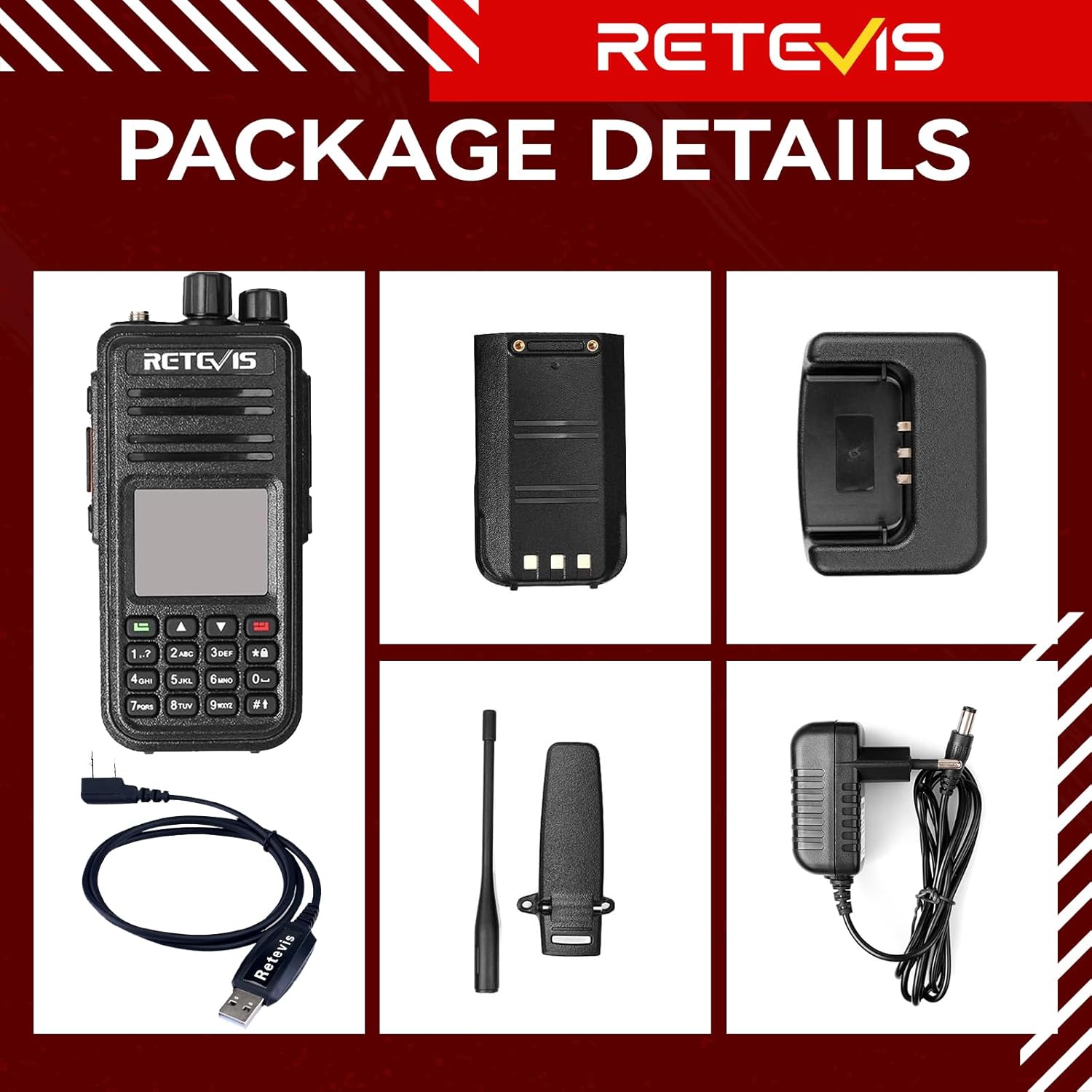
3. Característiques del producte
- The RT3S DMR amateur radio features 3000 channels, channel scanning, and a DTMF keypad. It is compatible with MOTOTRBO Tier I and II series.
- Switchable digital/analog mode. Supports text messages in digital mode, providing clearer voice communications.
- Equipped with a 2000 mAh lithium battery, offering up to 16 hours of working time and 48 hours of standby time.
- The DMR walkie-talkie can monitor signals on two channels and combine U-U / U-V / V-V in both digital and analog modes to prevent missing call information.
- Group call and all calls; 10,000 contacts; multifunctional communication. All can be easily managed to improve work efficiency.
- 2 time slots; CTCSS/DCS and DTMF function to filter irrelevant signals.
- The recording function helps remember important conversations and allows for repeated listening. Supports PC and manual settings.


4. Configuració
4.1. Instal·lació de la bateria
Align the battery with the grooves on the back of the radio and slide it into place until it clicks securely. To remove, press the release latch and slide the battery off.
4.2. Fixació de l'antena
Screw the antenna clockwise onto the connector on top of the radio until it is firmly seated. Do not overtighten.
4.3. Carregant la bateria
Connect the adapter to the charger base, then plug the adapter into a power outlet. Place the radio (with battery installed) into the charger base. The indicator light on the charger will show the charging status (typically red for charging, green for fully charged).
4.4. Initial Programming (Optional)
While basic functions can be set directly on the radio, advanced features and a large number of contacts/channels are best programmed using a PC with the appropriate software and programming cable. The RT3S supports importing up to 500,000 contacts via CSV file.
5. Instruccions de funcionament
5.1. Encendre/apagar i control de volum
Gireu el botó d'engegada/volum en sentit horari per encendre la ràdio i augmentar el volum. Gireu-lo en sentit antihorari per disminuir el volum i apagar la ràdio.
5.2. Selecció de canals
Use the Channel-selecting knob on top of the radio to navigate through available channels. Alternatively, use the keypad for direct channel input or menu navigation.
5.3. Botó Prem per parlar (PTT).
Premeu i manteniu premut el botó PTT al lateral de la ràdio per transmetre. Deixeu-lo anar per rebre.
5.4. Programmable Side Keys
The RT3S features programmable side keys that can be customized for quick access to various functions such as scanning, alarm, or other settings. Refer to the programming software for configuration options.
5.5. Digital and Analog Mode Switching
The radio supports both digital (DMR) and analog modes. This can typically be switched via the menu settings or pre-programmed channels.
5.6. Contact Management and Calls
The RT3S supports individual calls, group calls, and all calls. Contacts can be managed through the radio's menu or via PC software.
5.7. Funció d'escaneig
Activate the scanning function to monitor active channels within a programmed zone or frequency range. This can be assigned to a programmable side key for quick access.
5.8. NOAA Weather Channel Reception
The RT3S can receive NOAA weather forecast channels (where available) to keep you informed of real-time weather changes.
5.9. Encryption (DMR Mode)
In DMR mode, the RT3S supports ARC/AES-128/AES-256 encryption for secure communications. This setting is configured via the programming software.
6. Manteniment
6.1. Neteja
Netegeu la superfície de la ràdio amb un drap suauamp cloth. Do not use harsh chemicals or solvents. Ensure the radio is dry before use or charging.
6.2. Cura de la bateria
To prolong battery life, avoid overcharging or completely discharging the battery. Store the radio and battery in a cool, dry place when not in use for extended periods.
6.3. Cura de l'antena
Ensure the antenna is securely attached. Avoid bending or twisting the antenna excessively, as this can damage the connector or the antenna itself.
7. Solució De Problemes
7.1. Sense poder
- Comproveu si la bateria està instal·lada i carregada correctament.
- Ensure the Power/Volume knob is turned on.
7.2. No es pot transmetre ni rebre
- Verify that the antenna is correctly attached.
- Check if the radio is on the correct channel and frequency.
- Assegureu-vos que la bateria tingui prou càrrega.
- Confirm that the squelch level is set appropriately.
7.3. Mala qualitat d'àudio
- Ajusteu el nivell de volum.
- Check for obstructions between radios or interference sources.
- Ensure the microphone and speaker are clear of debris.
8. Especificacions
| Característica | Especificació |
|---|---|
| Marca | Retevis |
| Color | Negre |
| Nombre de canals | 3000 |
| Característica especial | Digital |
| Espectre de freqüència | 144-146 MHz / 430-440 MHz |
| Abast màxim de conversa | 5 quilòmetres |
| Voltage | 7.4 volts (CC) |
| Nivell de resistència a l'aigua | No resistent a l'aigua |
| Dimensions del producte (PxWxH) | 61P x 36l x 131H mm |
| Nombre de bateries | 1 ió de liti (inclòs) |
| Dispositius compatibles | DMR radio and analog walkie-talkies |
| Durada mitjana de la bateria | 48 Hours (standby) |
| Sistema de difusió | DAB (Note: This specification may be a generic listing and not directly applicable to all radio functions.) |
| Protocol de connectivitat | DMR |
| Pes de l'article | 820 grams |
| Número de model | EUA9110E-J9110P |
| UPC | 609378743702 |
| País d'origen | Xina |
9. Garantia i Suport
Retevis provides a 2-year warranty for the radio body and a 1-year warranty for accessories. A 30-day no-reason return policy is also offered. Beyond the warranty period, maintenance services are available, with buyers responsible for associated costs. For support, please contact Retevis through Amazon, and a response will be provided within 12 hours.