
1. Introducció
The Canon PowerShot G5 X is a compact digital camera featuring a 1.0-inch, 20.2 Megapixel High-Sensitivity CMOS sensor and a built-in 2.36 million dot electronic viewfinder. This camera is designed for advanced photographers seeking high-quality stills and video with comprehensive control. It includes Wi-Fi and NFC capabilities for easy sharing and remote operation.
Les característiques clau inclouen:
- 1.0-inch, 20.2 Megapixel High-Sensitivity CMOS sensor.
- Canon DIGIC 6 Image Processor for enhanced image quality and fast operation.
- Built-in 2.36 million dot electronic viewcercador.
- Multi-angle capacitive 3.0-inch touch panel LCD with 1.04 million dots.
- Full HD 1080p video recording at 60p/30p/24p.
- Integrated Wi-Fi and NFC for wireless connectivity.
2. Què hi ha a la caixa
Verify that all items are present before initial use:
- Canon PowerShot G5 X Camera Body
- Paquet de bateries
- Carregador de bateria
- Corretja per al coll

Figure 2.1: Included items with the Canon PowerShot G5 X camera.
3. Configuració inicial
3.1 Càrrega de la bateria
- Introduïu la bateria al carregador de bateria.
- Connecteu el carregador a una presa de corrent. L'indicador lluminós de càrrega s'il·luminarà.
- Once charging is complete, the indicator light will change or turn off. Remove the battery.
3.2 Inserció de la bateria i la targeta de memòria
- Obriu la tapa del compartiment de la bateria/targeta a la part inferior de la càmera.
- Insert the charged battery into the compartment, ensuring correct orientation.
- Insert a compatible SD, SDHC, or SDXC memory card into the card slot until it clicks into place.
- Tanqueu la coberta del compartiment de manera segura.
3.3 Engegar la càmera
Premeu el botó ON/OFF button located on the top of the camera to power it on. The lens will extend, and the LCD screen will activate.

Figura 3.1: Frontal view of the Canon PowerShot G5 X.
4. Funcionament de la càmera
4.1 Modes bàsics de tret
El selector de mode a la part superior de la càmera permet seleccionar diversos modes de dispar:
- Mode automàtic: For automatic settings.
- P (Programa AE): Camera sets aperture and shutter speed, but allows other adjustments.
- Av (AE amb prioritat d'obertura): Tu ajustes l'obertura del diafragma, la càmera ajusta la velocitat d'obturació.
- TV (Prioritat d'obturació AE): Tu ajustes la velocitat d'obturació, la càmera ajusta l'obertura.
- M (Manual): Controles tant l'obertura com la velocitat d'obturació.
- Custom Modes (C1/C2): Save and recall your preferred settings.
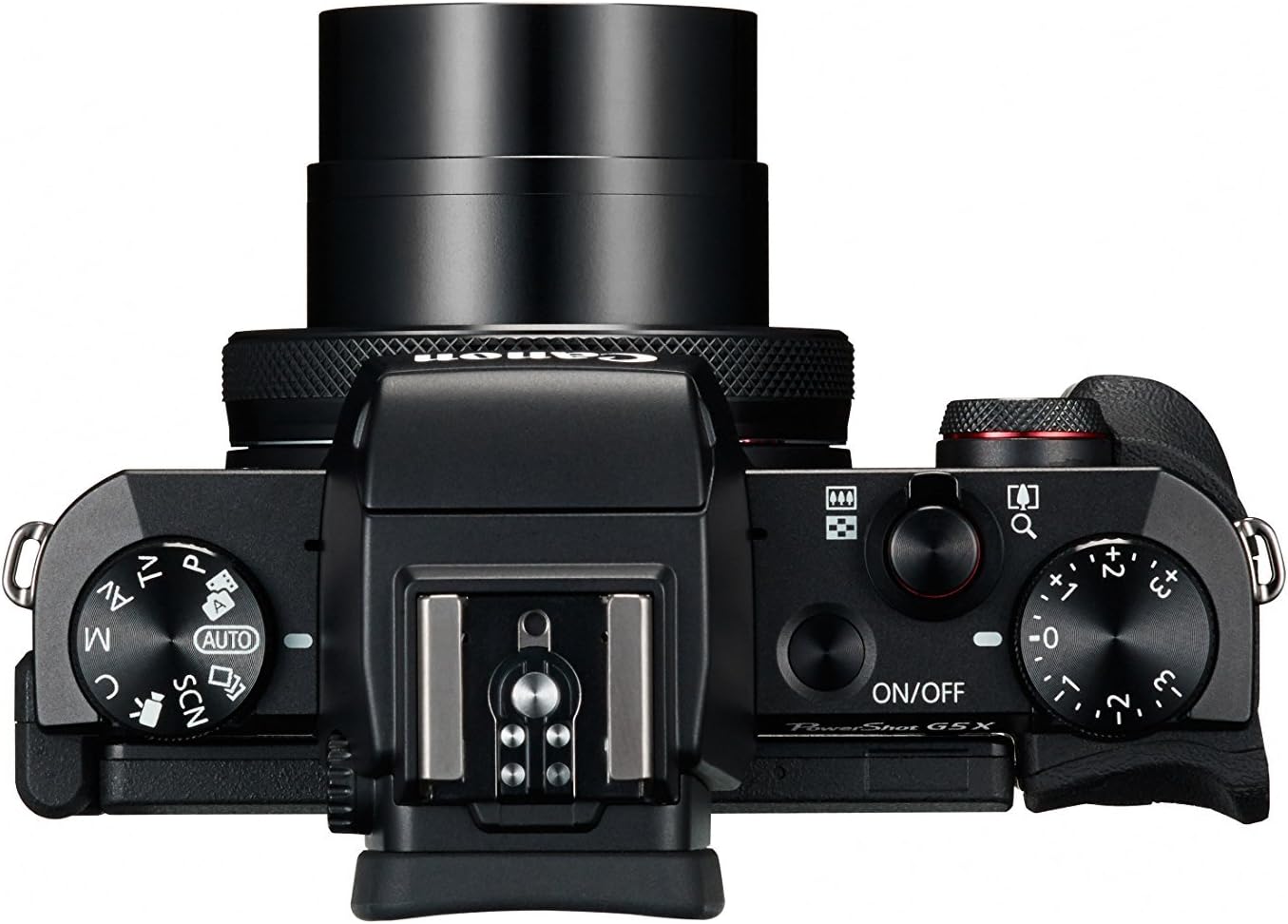
Figure 4.1: Top controls of the Canon PowerShot G5 X.
4.2 Utilitzant el Viewvisor i pantalla LCD
The camera features both an electronic viewfinder (EVF) and a multi-angle touch panel LCD. You can switch between them or use the EVF for composing shots in bright conditions. The LCD screen can be articulated for various shooting angles and touch operations.

Figure 4.2: Canon PowerShot G5 X with articulated LCD screen.

Figura 4.3: posterior view of the Canon PowerShot G5 X.
4.3 Gravació de vídeos
To record video, set the mode dial to the movie mode icon. Press the dedicated movie button to start and stop recording. The camera supports 1080p Full HD video at various frame rates (60p/30p/24p).
Connectivitat Wi-Fi i NFC 4.4
The camera's built-in Wi-Fi and NFC functions allow for wireless transfer of images and videos to compatible smart devices or computers. Refer to the camera's menu for detailed instructions on setting up these connections.
5. Manteniment i cura
5.1 Neteja de la càmera
- Lent: Use a lens brush or blower to remove dust, then gently wipe with a microfiber lens cloth. Avoid touching the lens surface directly.
- Pantalla LCD: Wipe gently with a soft, dry cloth. For stubborn smudges, use a screen cleaner specifically designed for electronics.
- Cos de la càmera: Wipe with a soft, dry cloth. Do not use organic solvents or strong cleaning agents.
5.2 Emmagatzematge
When not in use, store the camera in a cool, dry place away from direct sunlight and extreme temperatures. Remove the battery if the camera will not be used for an extended period.
6. Solució De Problemes
This section addresses common issues you might encounter with your Canon PowerShot G5 X camera.
| Problema | Possible causa/solució |
|---|---|
| La càmera no s'encén. | Battery is depleted. Charge the battery. Ensure battery is inserted correctly. |
| Les imatges són borroses. | Lens is dirty. Clean the lens. Shutter speed is too slow. Increase shutter speed or use image stabilization. Camera shake. Hold the camera steady or use a tripod. |
| Cannot connect to Wi-Fi/NFC. | Ensure Wi-Fi/NFC is enabled in camera settings. Check device compatibility and network settings. Refer to the camera's connectivity guide in the menu. |
| Error de la targeta de memòria. | La targeta de memòria està plena. Suprimeix els elements innecessaris. files or replace card. Card is corrupted. Format the card (this will erase all data). Card is incompatible. Use a supported SD, SDHC, or SDXC card. |
| El flaix no es dispara. | Flash is set to OFF. Change flash mode to Auto or On. Subject is too far. Check flash range. |
7. Especificacions
| Característica | Detall |
|---|---|
| Tipus de sensor | 1.0-inch High-Sensitivity CMOS |
| Resolució de fixes efectius | 20.2 MP |
| Processador d'imatges | DIGIC 6 |
| Zoom òptic | 4.2x |
| Obertura de lents | f/1.8-2.8 |
| Focal Length (35mm equivalent) | 24-100 mm |
| Estabilització d'imatge | Digital |
| Viewcercador | Built-in Electronic Viewfinder (2.36 million dots) |
| Pantalla LCD | 3.0-inch Multi-angle Capacitive Touch Panel (1.04 million dots) |
| Resolució de vídeo | 1080p Full HD (60p/30p/24p) |
| Connectivitat | Wi-Fi, NFC, HDMI, USB |
| Mitjans d'emmagatzematge | SD, SDHC, SDXC Memory Cards |
| Pes de l'article | 1.8 lliures |
| Número de model | 0510C001 |
| UPC | 748926548632 |
8. Garantia i Suport
8.1 Informació de la garantia
This Canon PowerShot G5 X camera comes with a 90-day limited warranty from the date of purchase. This warranty covers manufacturing defects under normal use. Please retain your proof of purchase for warranty claims.
8.2 Atenció al client
Per a assistència tècnica, servei o més consultes, consulteu el servei d'assistència oficial de Canon. weblloc web o poseu-vos en contacte amb el seu departament d'atenció al client. Normalment, podeu trobar la informació de contacte al fabricant weblloc.