
uxcell a18033000ux0429
uxcell 2Pcs Red Green Indicator Light User Manual
Model: a18033000ux0429
Introducció
The uxcell AD16 Series LED Indicator Lights are designed for clear visual indication of operational status in various electrical and mechanical systems. Utilizing high-bright LED chips, these indicators offer long service life and low energy consumption. They are ideal for monitoring equipment status, indicating power, or showing specific operating conditions in industrial, commercial, and DIY applications.
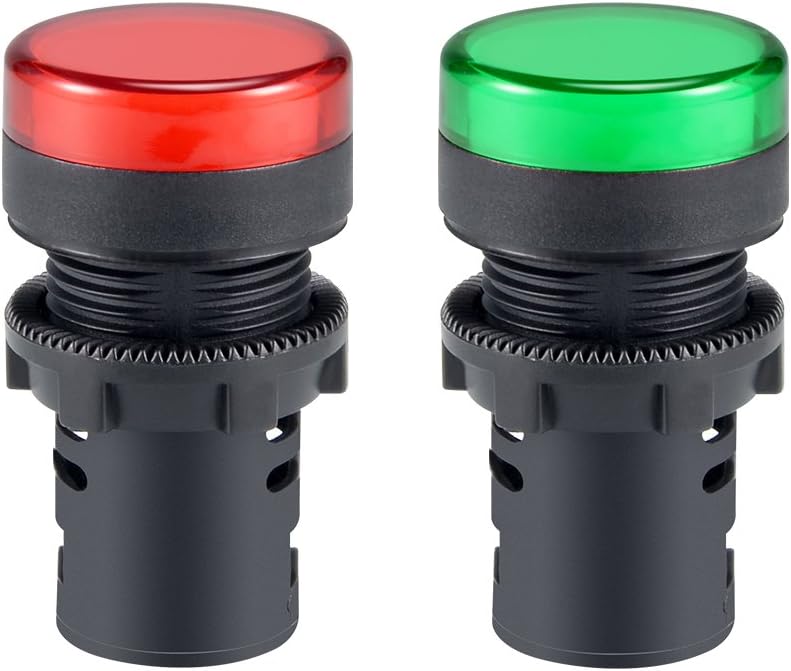
Figura 1: Mésview of the uxcell Red and Green Indicator Lights.
Característiques del producte
- Voltage: AC/DC 110V operation.
- Diàmetre de muntatge: Industrial standard 22mm (7/8") mounting diameter.
- Disseny compacte: Low behind-panel depth (37mm) with a panel locking nut, fitting panel thickness up to 6mm.
- Connexió: Secure screw-clamp connection for reliable operation.
- Durabilitat: Tested for over 20,000 hours of use, ensuring steady performance.
- Aplicació versàtil: Suitable for ships, machine tools, industrial equipment, switch cabinets, power distribution cabinets, HVAC panels, electrical panels, and DIY projects like PLC training.

Figure 2: Key features highlighted for the indicator lights.
Especificacions
| Atribut | Valor |
|---|---|
| Número de model | a18033000ux0429 |
| Voltage | AC/DC 110V |
| Diàmetre de muntatge | 22 mm (7/8") |
| Behind Panel Depth | 37 mm |
| Max Panel Thickness | 6 mm |
| Tipus de font de llum | Díode emissor de llum (LED) |
| Color | Vermell, verd |
| Material | Metall |
| Ampedat | 20 milionsamps |
| Pes de l'article | 1.44 unces (per parell) |
| Dimensions del paquet | 3.58 x 2.36 x 1.14 polzades |

Figure 3: Dimensional drawing of the indicator light.
Configuració i instal·lació
Proper installation is crucial for the safe and reliable operation of your indicator lights. Please follow these steps carefully:
- La seguretat primer: Before beginning any electrical work, ensure that the power supply to the circuit you are working on is completely disconnected and locked out. Verify with a voltage provador.
- Preparació del forat de muntatge: Drill a 22mm (7/8 inch) diameter hole in your control panel or equipment enclosure. Ensure the panel thickness does not exceed 6mm for proper fitment of the locking nut.
- Insert Indicator: Insert the indicator light through the prepared hole from the front of the panel.
- Secure with Locking Nut: From the back of the panel, thread and tighten the provided panel locking nut onto the indicator light's body until it is securely fastened. Do not overtighten.
- Connexions de cable: Connect the AC/DC 110V power supply wires to the screw-clamp terminals on the back of the indicator light. Ensure connections are firm and secure to prevent loose contacts. Observe proper polarity if applicable, though these AC/DC lights are generally non-polar.
- Install Dust Cap (Optional): If desired, attach the dust cap to the rear of the indicator light to protect the terminals from dust and debris.

Figure 4: Illustration of the dust cap component.
Instruccions de funcionament
The uxcell indicator lights are designed for straightforward operation once properly installed and connected to a power source.
- Encès: After installation, restore power to the circuit.
- Indicació: The indicator light will illuminate when the connected circuit or equipment is in the specified operational state (e.g., power on, system active, alarm condition).
- Codificació de colors: Use the red and green lights to signify different states (e.g., Red for 'Stop' or 'Fault', Green for 'Run' or 'Ready').
Manteniment
These LED indicator lights are designed for long-term, maintenance-free operation. However, occasional checks can ensure continued performance:
- Neteja: If the lens becomes dirty, gently wipe it with a soft, damp drap. Eviteu productes de neteja o dissolvents abrasius.
- Comprovació de la connexió: Periodically inspect the screw-clamp connections to ensure they remain tight and free from corrosion. Always disconnect power before checking connections.
- Tapa antipols: Ensure the dust cap (if installed) remains securely in place to protect internal components.
Resolució de problemes
If your indicator light is not functioning as expected, consider the following:
| Problema | Causa possible | Solució |
|---|---|---|
| La llum no il·lumina | No hi ha alimentació al circuit. Cablejat fluix o incorrecte. Vol incorrectetage aplicat. Damaged indicator light. | Verify power supply to the circuit. Check all wire connections for tightness and correct polarity (if applicable). Ensure the voltage is AC/DC 110V. Replace the indicator light if damaged. |
| La llum parpelleja o és tènue | Font d'alimentació inestable. Connexió fluixa. Indicator light nearing end of life (unlikely due to long lifespan). | Comproveu l'estabilitat de la font d'alimentació. Inspect and tighten wire connections. If issues persist, consider replacing the unit. |
If troubleshooting steps do not resolve the issue, contact uxcell customer support for further assistance.
Informació de seguretat
Please read and understand all safety warnings before installing or operating this product. Failure to do so may result in electric shock, fire, or serious injury.
- Risc elèctric: This product operates on AC/DC 110V. Always disconnect and lock out power before installation, maintenance, or troubleshooting.
- Personal qualificat: Installation and wiring should only be performed by qualified electricians or individuals with proper electrical knowledge.
- Vol correctetage: Assegureu-vos el subministrament voltage matches the indicator light's rated voltage (110V). Applying incorrect voltage can damage the device and pose a safety risk.
- Condicions ambientals: Do not expose the product to excessive moisture, extreme temperatures, or corrosive environments unless specifically rated for such conditions.
- Advertència de la proposta 65: Aquest producte pot contenir substàncies químiques que l'estat de Califòrnia sap que causen càncer i defectes congènits o altres danys reproductius. Per a més informació, visiteu www.P65Warnings.ca.gov.
Ask a question about this manual
Ask about setup, troubleshooting, compatibility, parts, safety, or missing instructions. Manuals+ will review the question and use this page’s manual context to help answer it.