
Introducció
This manual provides detailed instructions for the setup, operation, and maintenance of your TTEC PLUS TK-3800 White Desktop Headset Phone. Please read this manual carefully before using the device to ensure proper functionality and longevity.
Producte acabatview
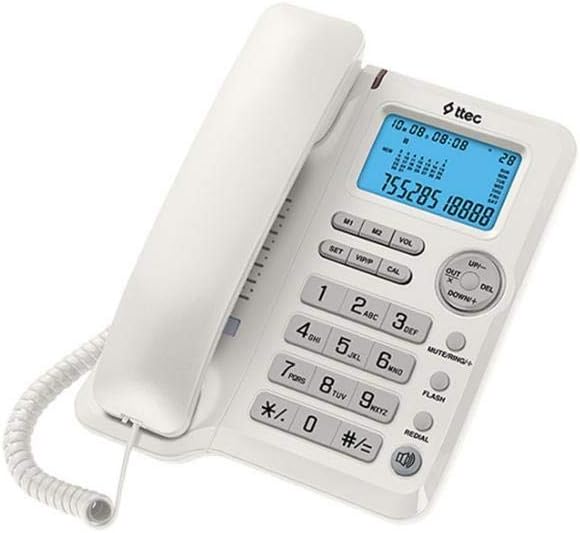
Figura 1: Frontal view of the TTEC PLUS TK-3800 Desktop Phone, showing the white casing, handset, blue backlit LCD display, and the full keypad with function buttons.

Figura 2: Angle view of the TTEC PLUS TK-3800 Desktop Phone, highlighting the ergonomic design of the handset and the compact base unit.
The TTEC PLUS TK-3800 is a versatile desktop phone designed for clear communication. It features a large, easy-to-read display, a comfortable handset, and dedicated buttons for various functions including volume control, memory dialing, and redial. It is also compatible with headsets for hands-free operation.
Configuració
- Desempaqueta el telèfon: Carefully remove all components from the packaging. Ensure you have the phone base, handset, coiled handset cord, and telephone line cord.
- Connecteu el telèfon: Plug one end of the coiled handset cord into the jack on the side of the phone base and the other end into the jack on the handset.
- Connexió a la línia telefònica: Plug one end of the telephone line cord into the LINE jack on the back of the phone base and the other end into your wall telephone jack.
- Connexió d'alimentació (si escau): This model typically draws power from the telephone line. No external power adapter is usually required.
- Initial Display Setup: The display should light up. You may need to set the current date and time using the 'SET' button and navigation keys (UP/DOWN). Refer to the 'Operating' section for detailed instructions on setting time and date.
Instruccions de funcionament
Fer i rebre trucades
- Per fer una trucada: Lift the handset or press the 'FLASH' button (if using hands-free/headset). Dial the desired phone number.
- Per rebre una trucada: When the phone rings, lift the handset.
- Per finalitzar una trucada: Torneu a col·locar el telèfon al bressol.
Teclat i botons de funció
- Teclat numèric (0-9, *, #): S'utilitza per marcar números de telèfon.
- SET: Enters setup mode for date, time, and other settings.
- VOL: Adjusts the volume of the ringer or speakerphone/headset.
- M1/M2: One-touch memory dial buttons. To program, press SET, then M1/M2, dial number, press SET again.
- AMUNT AVALL: Navigates through menus or adjusts settings in setup mode.
- DEL: Deletes characters or entries in certain modes.
- MUTE/RING+: Mutes the microphone during a call. Also functions as a ringer volume control in standby.
- FLASH: Used for call waiting, transferring calls, or initiating a new call without hanging up.
- RECOMPANYAR: Marca l'últim número trucat.
Configuració de la data i l'hora
- Press the 'SET' button. The display will show the current time/date setting.
- Use the 'UP'/'DOWN' buttons to adjust the year, month, day, hour, and minute.
- Premeu 'SET' de nou per confirmar cada configuració i passar a la següent.
- Once all settings are complete, the phone will return to standby mode.
Manteniment
- Neteja: Utilitzeu un suau, lleugerament damp drap per netejar la superfície del telèfon. No utilitzeu productes de neteja abrasius ni dissolvents.
- Emmagatzematge: Guardeu el telèfon en un lloc fresc i sec, allunyat de la llum solar directa i de temperatures extremes.
- Cura del cordó: Avoid tangling or stretching the coiled handset cord and telephone line cord excessively to prevent damage.
Resolució de problemes
| Problema | Causa possible | Solució |
|---|---|---|
| Sense to de marcatge. | El cable de la línia telefònica està desconnectat o defectuós. | Assegureu-vos que el cable de la línia telefònica estigui ben connectat tant al telèfon com a la presa de paret. Proveu-ho amb un altre telèfon si és possible. |
| La pantalla està en blanc. | No hi ha corrent de la línia telefònica. | Check the telephone line connection. Ensure the line is active. |
| No sento la persona que truca / La persona que truca no em sent. | Volume too low; Mute function active; Faulty handset cord. | Adjust volume using 'VOL' button. Deactivate 'MUTE'. Check handset cord connection. |
| El telèfon no sona. | Ringer volume is off or too low. | Press 'MUTE/RING+' to adjust ringer volume. |
Especificacions
- Marca: TTEC
- Model: TK-3800
- Tipus: Desktop Phone with Headset Compatibility
- ASIN: B07DJ13TX4
- Primera data disponible: 30 de maig de 2018
Garantia i Suport
For warranty information and technical support, please refer to the documentation provided with your purchase or visit the official TTEC weblloc web. Conserveu el rebut de compra com a comprovant de compra per a reclamacions de garantia.
Nota: Els termes de garantia específics poden variar segons la regió i el distribuïdor.