
1. Introducció
This manual provides instructions for the setup, operation, and maintenance of the Avaya 1616 IP Telephone (Model 700450190). The Avaya 1616 is designed for users who require a robust and feature-rich communication device, supporting 16 line appearances and a high-quality speakerphone. This guide will help you maximize the functionality of your IP telephone.
2. Configuració
Follow these steps to properly set up your Avaya 1616 IP Telephone.
2.1 Desembalatge i identificació de components
Carefully remove all components from the packaging. Ensure all parts are present before proceeding with the setup.
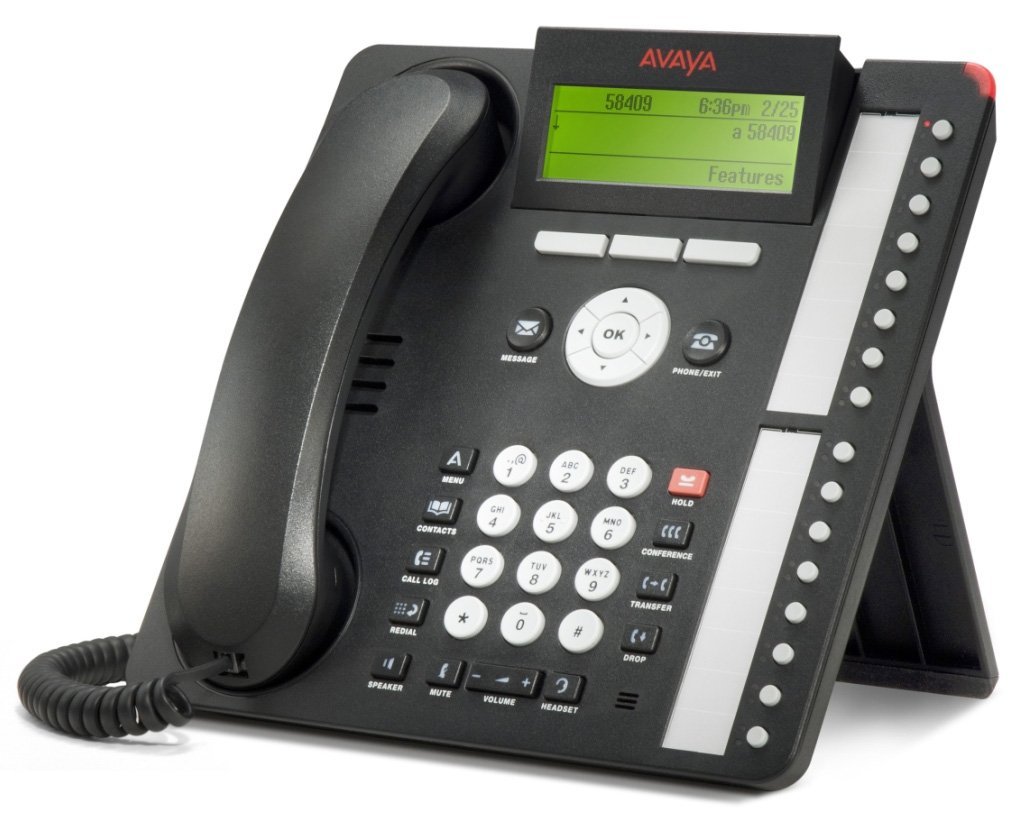
Figura 1: Avaya 1616 IP Telephone components. This image displays the main telephone unit, the handset, the coiled handset cord, an Ethernet cable, and the desk stand. The main unit features a display screen, a numeric keypad, and various function buttons. The desk stand is designed to elevate the phone for easier viewing i funcionament.
- Telephone Base Unit: The main body of the phone with keypad, display, and function buttons.
- Auricular: The receiver for voice communication.
- Cable del telèfon: Coiled cord connecting the handset to the base unit.
- Cable Ethernet: Per a connexió a la xarxa.
- Suport d'escriptori: For positioning the phone on a desk.
- Power Adapter (Sold Separately): A 5V local power supply may be required if Power over Ethernet (PoE) is not available.
2.2 Connexions físiques
- Attach the Desk Stand: Securely attach the desk stand to the bottom of the telephone base unit.
- Connecteu el telèfon: Plug one end of the coiled handset cord into the handset and the other end into the designated handset port on the side or back of the telephone base unit.
- Connecteu-vos a la xarxa: Insert one end of the Ethernet cable into the "LAN" port on the back of the telephone and the other end into a network switch or router. The phone supports dual Ethernet ports for connection of the phone and a collocated PC with VLAN separation.
- Connectar l'alimentació:
- Alimentació per Ethernet (PoE): If your network switch supports 802.3af PoE, the phone will receive power through the Ethernet cable. No separate power adapter is needed.
- Local Power Supply: If PoE is not available, connect a 5V local power supply (sold separately) to the power port on the back of the telephone and then to an electrical outlet.
Once connected, the phone will power on and begin its boot sequence. This may take a few moments.
3. Instruccions de funcionament
This section covers the basic operation of your Avaya 1616 IP Telephone.
3.1 Característiques clau
- 16 Line Appearances/Feature Keys: Programmable buttons with dual LEDs for line status and feature access.
- High-Quality 2-Way Speakerphone: Per a la comunicació amb mans lliures.
- Identificador de trucada: Displays incoming caller information.
- Operació multilínia: Supports multiple active lines.
- Capacitat de trucada de conferència: Basic conferencing features.
3.2 Funcions de trucada bàsiques
- Fer una trucada:
- Aixequeu el telèfon o premeu el botó Altaveu.
- Marqueu el número desitjat amb el teclat.
- Press the "Call" or "Dial" softkey, or wait for automatic dialing.
- Respondre una trucada:
- Lift the handset, or press the Speaker button, or press the flashing line appearance button.
- Finalització d'una trucada:
- Replace the handset, or press the Speaker button again if using speakerphone, or press the "End Call" softkey.
- Posar una trucada en espera:
- During an active call, press the "Hold" button. The line appearance LED will flash.
- To retrieve the call, press the flashing line appearance button.
- Transferència d'una trucada:
- During an active call, press the "Transfer" button. The current call is put on hold.
- Dial the number of the party to whom you wish to transfer the call.
- Wait for the party to answer (consulted transfer) or press "Transfer" again to complete the transfer (blind transfer).
- Iniciar una trucada de conferència:
- During an active call, press the "Conference" button. The current call is put on hold.
- Marqueu el número del tercer.
- Once the third party answers, press the "Conference" button again to join all parties.
4. Manteniment
Proper maintenance ensures the longevity and optimal performance of your Avaya 1616 IP Telephone.
4.1 Neteja
- Utilitzeu un suau, lleugerament damp cloth to clean the exterior surfaces of the phone.
- Avoid using abrasive cleaners, solvents, or strong chemicals, as these can damage the finish and electronic components.
- Do not spray cleaning liquids directly onto the phone. Apply to the cloth first.
- Ensure the phone is disconnected from power before cleaning.
4.2 Atenció general
- Mantingueu el telèfon allunyat de la calor excessiva, la llum solar directa i la humitat.
- Eviteu deixar caure el telèfon o sotmetre'l a impactes forts.
- Ensure cables are not pinched or strained.
5. Solució De Problemes
This section provides solutions to common issues you might encounter with your Avaya 1616 IP Telephone.
| Problema | Causa possible | Solució |
|---|---|---|
| El telèfon no s'encén. | Sense font d'alimentació o connexió defectuosa. |
|
| Sense to de marcatge. | Network connectivity issue or service problem. |
|
| No es poden fer ni rebre trucades. | Network configuration, service issue, or phone registration problem. |
|
| Mala qualitat d'àudio. | Network congestion, faulty cable, or handset issue. |
|
If the problem persists after attempting these solutions, please contact your IT department or Avaya support for further assistance.
6. Especificacions
Key technical specifications for the Avaya 1616 IP Telephone (700450190).
| Característica | Detall |
|---|---|
| Número de model | 700450190 |
| Line Appearances | 16 with dual LEDs |
| Altaveu | High-quality 2-way |
| Opcions de muntatge | Desk or wall mountable (with optional adapter) |
| Ports Ethernet | Dual (for phone and collocated PC w/VLAN separation) |
| Font d'alimentació | 802.3af Power over Ethernet (PoE) or optional 5V local power supply |
| Tipus de marcador | Teclat únic |
| Tipus de contestador | Digital |
| Dispositius compatibles | Computers, Telephone Networks, VoIP Services |
| Capacitat de trucades de conferència | Bàsica |
| Operació multilínia | Operació multilínia |
| Identificador de trucada | Sí |
| Color | Negre |
| Dimensions del producte | 9.8 x 7.9 x 2.8 polzades (aproximadament) |
| Dimensions del paquet | 16.8 x 10 x 3.3 polzades |
| Pes | 2.9 lliures (pes del paquet) |
7. Informació de la garantia
This Avaya 1616 IP Telephone (700450190) is typically offered with a Garantia limitada de 90 dies. This warranty covers defects in materials and workmanship under normal use. For specific terms and conditions, please refer to the warranty documentation provided at the time of purchase or contact your vendor.
Note: As a renewed product, warranty terms may vary from new products. Always confirm warranty details with your supplier.
8. Suport
For technical assistance, further troubleshooting, or inquiries regarding your Avaya 1616 IP Telephone, please contact your system administrator or the vendor from whom you purchased the device. Avaya's official support channels can also provide resources and documentation for their products.
For general information about Avaya products, you may visit the official Avaya weblloc.