
1. Introducció
The iDance BM-3L/WH Blaster Mini is a portable Bluetooth speaker designed for versatile audio playback and entertainment. Featuring 20W of powerful sound with strong bass and integrated LED light shows, it is suitable for various settings, from small gatherings to personal use. The built-in microphone allows for hands-free calling.
Característiques principals:
- 20W powerful sound with strong bass.
- 19 LED light show modes.
- Connectivitat Bluetooth per a la transmissió d'àudio sense fil.
- Supports USB and MicroSD card playback.
- Micròfon integrat per a trucades telefòniques.
- Rechargeable battery with up to 12 hours of playback.

Imatge 1.1: Frontal view of the iDance BM-3L/WH speaker, showcasing its LED light feature.
2. Producte acabatview
Familiarize yourself with the various components and controls of your iDance BM-3L/WH speaker.
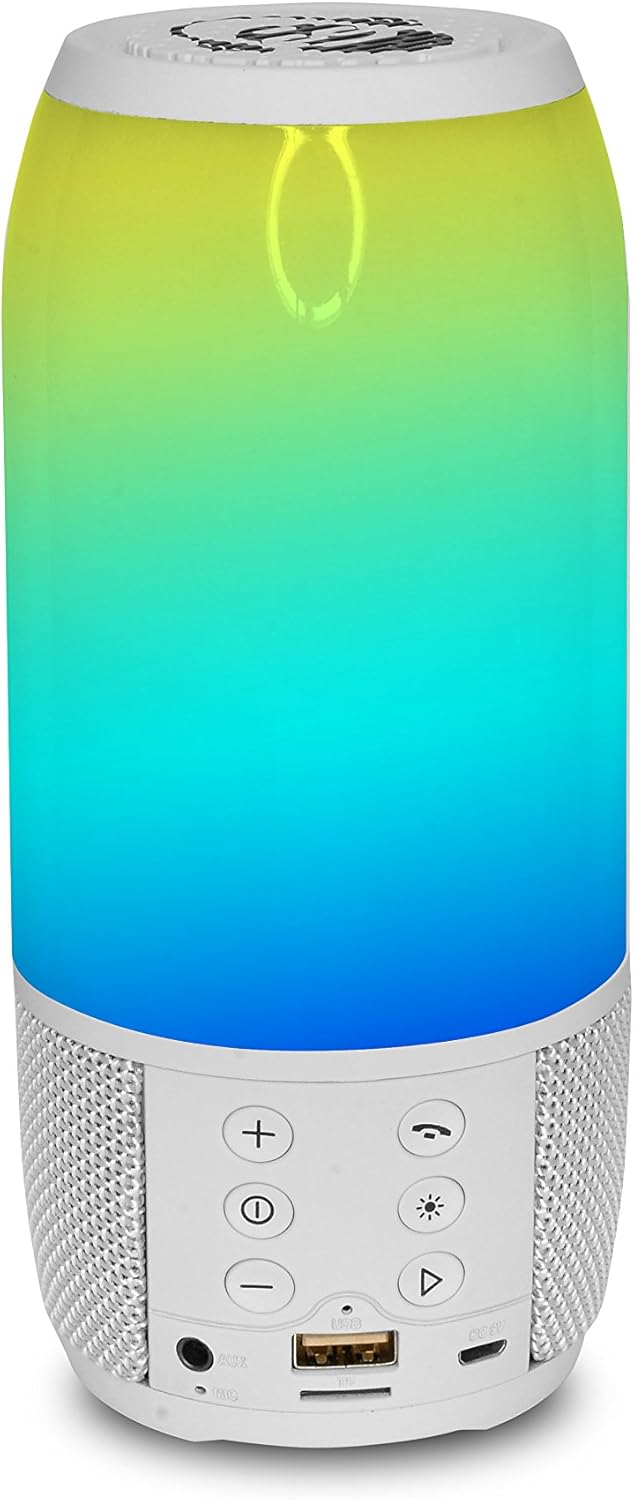
Imatge 2.1: posterior view of the speaker, highlighting the control panel and input ports.
Tauler de control i ports:
- Botó d'encesa: Mantingueu premut per activar o desactivar l'altaveu.
- Puja el volum (+): Augmenta el volum.
- Baixar el volum (-): Disminueix el volum.
- Botó Reproduir/Pausa/Trucada: Controla la reproducció de música i gestiona les trucades telefòniques.
- Botó de mode (M): Switches between Bluetooth, USB, and MicroSD modes.
- Botó del mode de llum: Cycles through the 19 different LED light shows.
- Port USB: Per a la reproducció des d'una unitat USB.
- Ranura per a targeta MicroSD: Per a la reproducció de targetes MicroSD.
- Port de càrrega DC 5V: Connecteu el cable de càrrega USB aquí.
- Entrada AUX: Per connectar dispositius d'àudio externs mitjançant un cable d'àudio de 3.5 mm.
3. Configuració
3.1 Càrrega de l'altaveu
- Locate the DC 5V charging port on the speaker.
- Connecteu el cable de càrrega USB proporcionat al port de càrrega de l'altaveu.
- Connecteu l'altre extrem del cable USB a un adaptador de corrent USB compatible (no inclòs) o al port USB d'un ordinador.
- El llum indicador de càrrega s'il·luminarà (el color pot variar) per indicar que l'altaveu s'està carregant.
- Once fully charged, the indicator light may change color or turn off. A full charge provides up to 12 hours of playback.
3.2 Engegada/apagada
- Per encendre: Press and hold the Power button for a few seconds until you hear an audible prompt or see the LED lights activate.
- Per apagar: Press and hold the Power button again for a few seconds until you hear an audible prompt or the LED lights turn off.
4. Instruccions de funcionament
4.1 Vinculació Bluetooth
- Ensure the speaker is powered on and in Bluetooth mode. If not, press the Mode button until you hear the Bluetooth prompt. The LED lights may flash to indicate pairing mode.
- Al dispositiu mòbil (telèfon intel·ligent, tauleta, etc.), activeu el Bluetooth i cerqueu els dispositius disponibles.
- Select "iDance BM-3L" or a similar name from the list of devices.
- Once paired, you will hear a confirmation sound, and the LED lights may change their pattern.
- Ara pots reproduir àudio des del teu dispositiu a través de l'altaveu.
4.2 USB/MicroSD Playback
- Insert a USB drive or MicroSD card (pre-loaded with MP3 audio files) into the corresponding port on the speaker.
- The speaker should automatically switch to USB or MicroSD mode and begin playing audio. If not, press the Mode button to cycle through modes until the correct one is selected.
- Use the Play/Pause button to control playback.
- Use the Volume Up/Down buttons to adjust the volume.
4.3 modes de llum LED
The speaker features 19 different LED light show modes. Press the Light Mode button to cycle through the various patterns and colors.
4.4 Fer i rebre trucades
Quan esteu connectat al telèfon intel·ligent mitjançant Bluetooth:
- Per respondre una trucada: Premeu el botó Reproduir/Pausa/Trucada una vegada.
- Per finalitzar una trucada: Premeu el botó Reproduir/Pausa/Trucada una vegada durant una trucada.
- Per rebutjar una trucada: Press and hold the Play/Pause/Call button for 2 seconds.
- To Redial Last Number: Premeu dues vegades el botó Reproduir/Pausa/Trucada.
4.5 Control de volum
Use the '+' button to increase the volume and the '-' button to decrease the volume. Adjust the volume to a comfortable listening level.
5. Manteniment
5.1 Neteja
- Always power off the speaker before cleaning.
- Feu servir un drap suau, sec i sense borrissol per netejar les superfícies exteriors.
- No utilitzeu netejadors abrasius, ceres o dissolvents, ja que poden danyar l'acabat.
- Eviteu que entri humitat a cap obertura.
5.2 Emmagatzematge
- Guardeu l'altaveu en un lloc fresc i sec, allunyat de la llum solar directa i de temperatures extremes.
- Si l'emmagatzemeu durant un període prolongat, carregueu la bateria periòdicament (per exemple, cada 3-6 mesos) per mantenir-la en bon estat.
6. Solució De Problemes
If you encounter issues with your iDance BM-3L/WH speaker, refer to the following common problems and solutions:
- Sense energia:
- Assegureu-vos que l'altaveu estigui completament carregat.
- Verifiqueu que el botó d'engegada estigui premut i mantingut premut correctament.
- Sense so:
- Comproveu el nivell de volum tant a l'altaveu com al dispositiu connectat.
- Ensure the speaker is in the correct mode (Bluetooth, USB, MicroSD, AUX).
- If using Bluetooth, ensure the device is properly paired.
- Problemes de vinculació de Bluetooth:
- Assegureu-vos que l'altaveu estigui en mode de vinculació Bluetooth.
- Desactiva i torna a activar el Bluetooth al dispositiu.
- Acosta l'altaveu al dispositiu.
- Oblida't del dispositiu de la configuració de Bluetooth del telèfon i intenta emparellar-lo de nou.
- Microphone Not Working During Calls:
- Ensure the speaker is properly connected via Bluetooth to your phone.
- Check your phone's audio output settings to ensure the call audio is routed to the speaker.
7. Especificacions
| Nom del model | BM-3L/WH |
| Marca | iDance |
| Tecnologia de connectivitat | Bluetooth |
| Tecnologia de comunicació sense fils | Bluetooth |
| Tipus d'altaveu | Subwoofer |
| Mode de sortida d'àudio | estèreo |
| Potència de sortida màxima | 20 watts |
| Font d'alimentació | Funciona amb bateria |
| Tipus de bateria | 1 bateria de liti-ió (inclosa) |
| Temps de reproducció | Fins a 12 hores |
| Característiques especials | Bluetooth, Portable, LED Light Shows |
| Dispositius compatibles | Dispositius compatibles amb Bluetooth |
| Connexions | Bluetooth, USB, MicroSD Card |
| Mètode de control | Voice (via connected device), Buttons |
| Color | Blanc |
| Material | BPA |
| Dimensions del producte (L x A x A) | 11 x 21 x 11 cm |
| Pes de l'article | 520 grams |
8. Garantia i Suport
8.1 Informació de la garantia
This product comes with a Limited Warranty. For specific details regarding the warranty period and coverage, please refer to the documentation included with your purchase or contact the manufacturer directly. Additionally, a 30-day return/replacement policy may apply depending on the retailer.
8.2 Atenció al client
For further assistance, technical support, or inquiries regarding your iDance BM-3L/WH speaker, please contact iDance customer service. Refer to the official iDance website or product packaging for contact information.