
1. Introducció
This manual provides essential information for the proper use, installation, and maintenance of the uxcell 2.54mm Pitch 40-Pin 40mm Long Double Row Straight Connector Pin Header Strip. These pin headers are designed for use in various electronic prototyping and circuit board applications, offering reliable electrical connections.
2. Producte acabatview
The uxcell pin header strips are versatile components for electronic projects. Each strip features a double row of 40 pins, providing a total of 80 connection points. They are commonly used to extend connections, create custom interfaces, or mount components onto prototype shields and PCBs.
Característiques principals:
- Nom del producte: Capçalera de pin
- Pins: 40 Pins per row (Double Row)
- Angle de muntatge: Recte
- Pin Pitch: 2.54mm (standard spacing)
- Longitud del pin: 40 mm / 1.57"
- Material: Plàstic, metall
- Color: Black, Silver Tone
- Contingut del paquet: 10 Pcs x Straight Pin Headers

Figure 2.1: A package containing 10 pieces of uxcell 40-pin double row straight connector pin header strips.
3. Configuració i instal·lació
These pin headers are designed for through-hole mounting on Printed Circuit Boards (PCBs) or for use with breadboards and prototype shields. Proper installation ensures reliable electrical contact and mechanical stability.
Passos d'instal·lació:
- Preparació: Ensure the PCB or prototyping board has appropriate 2.54mm (0.1 inch) spaced holes for the double row of pins.
- Alineació: Carefully align the pin header strip with the holes on your board. Ensure all pins are correctly seated in their respective holes.
- Assegurament: For permanent installations, solder each pin to the corresponding pad on the PCB. Use appropriate soldering techniques to avoid cold joints or solder bridges. For temporary connections, ensure the header is firmly pressed into a breadboard or female header.
- Verificació: After installation, visually inspect all connections to ensure proper alignment and secure attachment.

Figure 3.1: Detail showing the 2.54mm pin pitch, crucial for compatibility with standard prototyping boards.
4. Instruccions de funcionament
Once installed, the pin header strips serve as an interface for connecting other electronic components, wires, or modules. They are passive components and do not require active operation.
Directrius d'ús:
- Connexions: Connect jumper wires, female headers, or other components directly to the exposed pins. Ensure correct polarity and pin assignments according to your circuit design.
- Límits actuals: While pin headers are generally robust, avoid exceeding the current rating of the pins and the plastic housing to prevent damage. Consult specific component datasheets if high current applications are planned.
- Condicions ambientals: Use the pin headers within typical operating temperatures and humidity levels for electronic components.
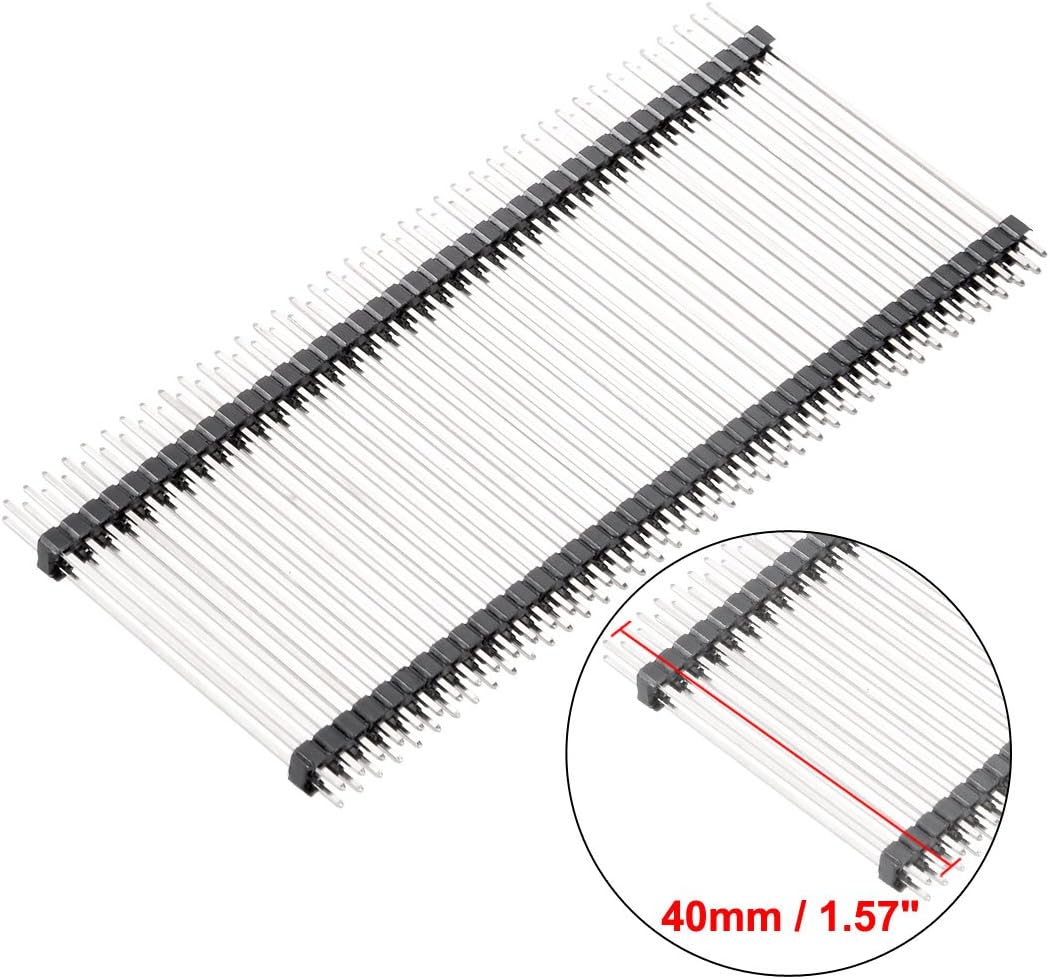
Figure 4.1: The 40mm (1.57 inch) pin length provides ample space for connections and mounting.
5. Manteniment
The uxcell pin header strips require minimal maintenance. Following these guidelines will help ensure their longevity and reliable performance.
Cura i emmagatzematge:
- Neteja: If necessary, gently clean the pins with a dry, lint-free cloth or a soft brush to remove dust or debris. Avoid using liquid cleaners directly on the pins.
- Emmagatzematge: Store unused pin headers in a dry, cool environment, away from direct sunlight and corrosive substances. Keep them in their original packaging or an anti-static bag to prevent physical damage and static discharge.
- Inspecció: Periodically inspect installed pin headers for any signs of corrosion, bent pins, or loose connections, especially in high-vibration environments.
6. Solució De Problemes
Most issues related to pin headers are due to improper installation or physical damage. Here are some common troubleshooting tips:
Problemes comuns i solucions:
- Sense connexió elèctrica:
- Check Soldering: Ensure all pins are properly soldered to the PCB with no cold joints or solder bridges.
- Comprova l'alineació: Verify that the pin header is correctly aligned and fully inserted into the mating connector or breadboard.
- Inspect for Bent Pins: Look for any bent or damaged pins that might not be making contact. Straighten carefully if possible, or replace the header.
- Connexió solta:
- Re-solder: If soldered, re-heat and add a small amount of fresh solder to ensure a strong joint.
- Verify Mating Connector: Ensure the female connector or jumper wire is securely gripping the pin header. Worn female connectors may lead to intermittent connections.
- Physical Damage (e.g., broken plastic, bent pins):
- Substitució: If the damage is significant and affects functionality, replace the pin header strip.
- Manipulació acurada: Always handle pin headers by the plastic body to avoid bending pins.
7. Especificacions
Detailed technical specifications for the uxcell 2.54mm Pitch 40-Pin 40mm Long Double Row Straight Connector Pin Header Strip.
| Característica | Especificació |
|---|---|
| Nom del producte | Capçalera de pin |
| Pins | 40 Pins per Row (Double Row) |
| Angle de muntatge | Recte |
| Pin Pitch | 2.54 mm |
| Longitud del pin | 40 mm / 1.57 polzades |
| Material | Plàstic, metall |
| Color | Black, Silver Tone |
| Pes de l'article | 4.9 ounces (for the package of 10) |
| Dimensions del paquet | 6.97 x 5.43 x 1.61 polzades |
| Número de model | a18040700ux0252 |
| Fabricant | uxcell |
| Data de primera disponibilitat | 21 de juny de 2018 |
8. Garantia i Suport
For warranty information or technical support regarding your uxcell pin header strips, please refer to the retailer's return policy or contact uxcell directly through their official website or customer service channels. Please have your product model number (a18040700ux0252) and purchase details ready when contacting support.