
1. Introducció
The AKASO V1-US Dash Cam is designed to provide reliable video recording for your vehicle, enhancing safety and providing evidence in case of incidents. This manual will guide you through the setup, operation, and maintenance of your dash cam.
2. Què hi ha a la caixa
Si us plau, comproveu el contingut del paquet per assegurar-vos que hi hagi tots els elements:
- AKASO V1-US Dash Cam
- Guia de referència ràpida
- Carregador de cotxe
- Cable USB
- Suports adhesius
- Eina de palanca

Image: Package contents of the AKASO V1-US Dash Cam.
3. Característiques del producte
- WiFi with App: The AKASO V1-US dash cam features built-in WiFi, allowing connection to your smartphone via a dedicated app. This enables live viewing, configuration adjustments, video download, and sharing to social platforms. The app also synchronizes the phone's time, eliminating manual time setting.

Image: Dash Cam displaying WiFi and GPS functionality with app integration.
- Track GPS: Integrated GPS accurately records driving tracks, including speed, longitude, latitude, and location data for every journey. Review driving routes and tracks on Google Maps through the phone app or the AKASO player on a computer.

Image: GPS tracking data displayed on a map via the AKASO player.
- Supervisió nocturna: Equipped with a SONY SENSOR, the dash cam captures Full HD 1296P images, offering improved imaging performance in both daytime and nighttime conditions. Wide Dynamic Range (WDR) automatically balances light and dark areas in the video.

Image: Dash Cam screen showing enhanced night vision recording.
- G-Sensor and Parking Monitor: Loop recording is standard. The built-in G-sensor locks recording clips to ensure data integrity during collisions. Parking mode activates the dash camera to record for 30 seconds if an impact is detected while parked, then turns off.
- Altres característiques: The AKASO V1-US dash cam includes a 16GB microSD Card, supporting up to 128GB (Class 10 or above). It features a 170-degree wide viewing angle to cover multiple traffic lanes. Its discreet design allows for unobtrusive placement in your vehicle.
4. Instruccions de configuració
4.1 Inserció de la targeta MicroSD
Before first use, insert a Class 10 or higher MicroSD card (up to 128GB) into the card slot on the dash cam. Ensure the card is inserted correctly until it clicks into place.
4.2 Muntatge de la càmera del salpicader
Choose a suitable location on your windshield that does not obstruct your view. Clean the area thoroughly. Attach the adhesive mount to the dash cam, then firmly press the mount onto the chosen area of the windshield. Adjust the camera angle as needed.
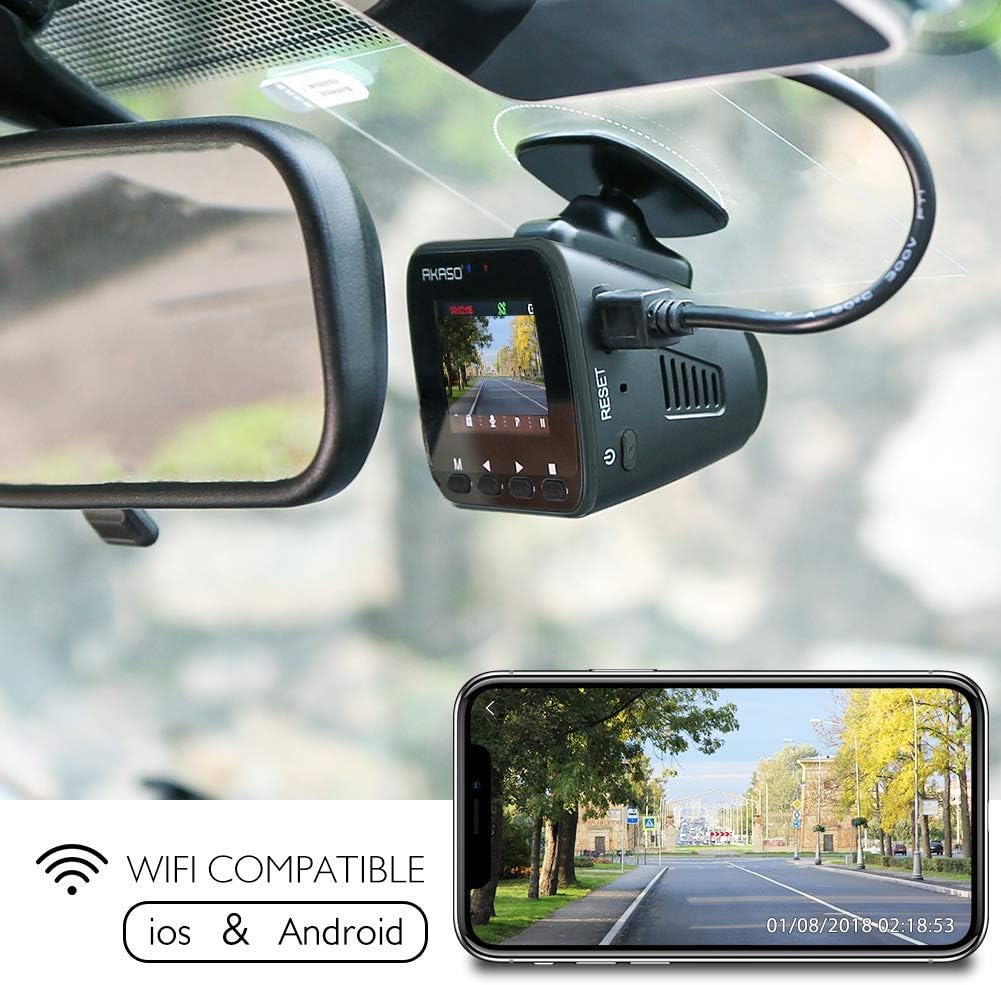
Image: Dash Cam mounted on a car windshield.
4.3 Connexió de potència
Connect the car charger to your vehicle's cigarette lighter socket and the other end to the dash cam's USB power port. The dash cam will automatically power on and begin recording when the vehicle starts.

Image: Diagram illustrating the USB power port and other components of the dash cam.
4.4 Configuració inicial
Upon first power-on, you may need to set the date, time, and preferred language. Use the buttons on the dash cam to navigate the menu and confirm your selections.
4.5 Connecting to the Phone App (WiFi)
Download the official AKASO Dash Cam app from your smartphone's app store. Enable WiFi on your dash cam and connect your phone to the dash cam's WiFi network. Follow the in-app instructions to pair your device and access features like live view i gestió de vídeo.
Video: Official video demonstrating the process of connecting the AKASO V1-US Dash Cam to a mobile device via WiFi.
5. Instruccions de funcionament
5.1 Encès/Apagat
The dash cam automatically powers on and begins recording when connected to a power source and the vehicle ignition is turned on. It powers off automatically when the ignition is turned off.
5.2 Modes d'enregistrament
- Enregistrament en bucle: The dash cam continuously records video in segments. When the memory card is full, the oldest unlocked video files are overwritten by new recordings. You can typically set segment lengths (e.g., 1, 3, or 5 minutes) in the settings.
- Sensor G: En cas d'impacte o col·lisió sobtada, el sensor G integrat detecta l'esdeveniment i bloqueja automàticament el segment de vídeo actual, evitant que es sobreescrigui amb l'enregistrament en bucle.
- Monitor d'aparcament: When enabled, this feature allows the dash cam to detect impacts while the vehicle is parked and the engine is off. If an impact is detected, the camera will automatically power on, record for a short duration (e.g., 30 seconds), and then power off again.
Image: Dash Cam screen illustrating loop recording functionality.
5.3 Accessing Footage
Recorded videos can be accessed in several ways:
- Via Phone App: Connect your smartphone to the dash cam's WiFi. Use the app to browse, download, and manage recorded videos directly on your phone.
- Per ordinador: Remove the MicroSD card from the dash cam and insert it into a computer's card reader. You can then view and transfer video files. For GPS data, use the dedicated AKASO player software.
Vídeo: Presentació oficial del producte en vídeoasing the key features and general operation of the AKASO V1-US Dash Cam, including WiFi connectivity, GPS, and video quality.
6. Manteniment
- Formatació regular: It is recommended to format the MicroSD card regularly (e.g., once a month) to ensure optimal performance and prevent data corruption. This can usually be done through the dash cam's settings menu.
- Neteja: Keep the camera lens and screen clean using a soft, dry cloth. Avoid using abrasive cleaners or solvents.
- Temperatura: Avoid exposing the dash cam to extreme temperatures for extended periods, as this can affect battery life and performance.
7. Solució De Problemes
- La càmera del salpicader no s'encén: Ensure the car charger is properly connected and the vehicle's cigarette lighter socket is functioning. Check the USB cable for damage.
- Problemes de gravació: Verify that a MicroSD card is inserted and is Class 10 or higher. Format the card if issues persist. Check if the card is full or corrupted.
- Problemes de connexió WiFi: Ensure WiFi is enabled on the dash cam and your phone. Try restarting both devices. Confirm you are connecting to the correct WiFi network broadcast by the dash cam.
- El GPS no funciona: Assegureu-vos que la càmera del salpicader tingui una visió clara view of the sky for GPS signal acquisition. It may take a few minutes for the GPS to lock on.
- Video Playback Lag: This can be due to a slow MicroSD card. Use a high-speed Class 10 or U3 card.
8. Especificacions
| Característica | Especificació |
|---|---|
| Marca | AKASO |
| Nom del model | V1-US |
| Tecnologia de connectivitat | Wi-Fi |
| Característica especial | Built-In GPS, Built-In WiFi |
| Resolució de captura de vídeo | 1296p (higher than 1080p) |
| Components inclosos | Dash Cam |
| Tipus de muntatge | Muntatge adhesiu |
| Camp de View | 170 graus |
| Mètode de control | App |
| Mida de la pantalla | 1.5 polzades |
| Tipus de memòria flash | MicroSD |
| S'inclouen les piles | Sí |
| Tipus de visualització | LCD |
| Tipus de pila de bateria | Polímer de liti |
| Velocitat de fotogrames | 30 FPS |
| Mida màxima admesa de la memòria flash | 128 GB |
| Pes de l'article | 2.08 unces |
9. Garantia i Suport
The AKASO V1-US Dash Cam comes with a warranty that covers manufacturing defects. For specific warranty details, please refer to the documentation included with your product or contact AKASO customer support.
For technical assistance, troubleshooting, or further inquiries, please visit the official AKASO weblloc o poseu-vos en contacte amb el seu equip d'atenció al client.