
1. Introducció
This manual provides detailed instructions for the installation, operation, and maintenance of your Akozon Digital Programmable Timer. Please read this manual carefully before use to ensure proper function and safety.

Figure 1: Akozon Digital Programmable Timer 12V
2. Producte acabatview i Característiques
The Akozon Digital Programmable Timer is a weekly programmable electronic timer designed for precise control of various electrical equipment. Its robust design and advanced features ensure reliable operation.
- Control automàtic: Automatically turns electrical equipment on and off according to preset schedules.
- Alta precisió: Equipped with a high-precision chip for accurate timing.
- Programació setmanal: Supports advanced programming for up to one week in advance.
- Múltiples programes: Features 16 ON/OFF settings (programs) for daily or weekly scheduling.
- Potència de seguretat: Integrated high-performance rechargeable battery maintains time display and stores data for over 12 months during power outages.
- Construcció duradora: Housing made of hard, durable plastic for extended lifespan.
- Pantalla LCD: Clear LCD for easy viewing del temps i l'estat del programa.
- Instal·lació de carril DIN: Designed for convenient installation on a DIN rail.
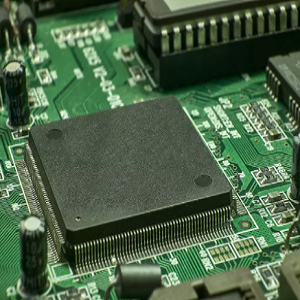
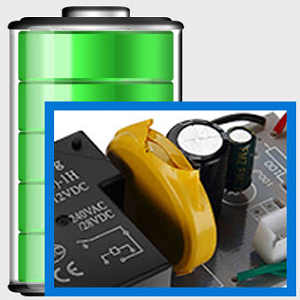
Figure 2: Internal components showing the high-precision chip and rechargeable backup battery.
3. Especificacions
| Número de model | Akozonqegcgmk04u-01 |
| Entrada Voltage | 12 V DC/AC |
| Capacitat de sortida | 25(16)A, 240VAC |
| Consum d'energia | <1W |
| Interval de cronometratge | 1 minut a 168 hores |
| Programes | 16 ON/OFF settings (daily/weekly) |
| Error de cronometratge | <±2 seconds/day |
| Memòria de fallada elèctrica | >12 months (with internal rechargeable battery) |
| Temperatura de funcionament | -20 °C a 55 °C |
| Mètode d'instal·lació | Carril DIN |
| Dimensions (aprox.) | 36 mm (W) x 86 mm (H) x 65 mm (D) |
| Pes (aprox.) | 120 g |
| Mostra | LCD |

Figura 3: Dimensions detallades del producte i especificacions clau.
4. Informació de seguretat
- Desconnecteu sempre l'alimentació abans de la instal·lació o el manteniment.
- Installation should be performed by a qualified electrician to prevent electric shock or damage to the device.
- Assegureu-vos que l'entrada voltage matches the timer's specifications (12V DC/AC). Connecting to incorrect voltagi pot danyar la unitat.
- Do not expose the device to excessive moisture or extreme temperatures outside the specified operating range.
- Do not disassemble the timer; refer servicing to qualified personnel.
5. Configuració i instal·lació
5.1 DIN Rail Installation
The timer is designed for easy installation on a standard 35mm DIN rail. Simply clip the timer onto the rail in your distribution box.

Figura 4: Example of the timer installed on a DIN rail within a distribution box.
5.2 Instruccions de cablejat
Refer to the wiring diagram below for correct connection. Ensure all connections are secure and comply with local electrical codes.
- Terminals 1 i 2: Power input (12V DC/AC).
- Terminals 3, 4, 5: Output contacts.
- 3: Normalment tancat (NC)
- 4: Comú (COM)
- 5: Normalment obert (NO)

Figure 5: Detailed wiring diagram showing connections for power input and output contacts.

Figura 6: Examples of wiring methods, including direct load connection and connection via a contactor.
6. Instruccions de funcionament
6.1 Initial Setup and Unlocking
- Upon first use, connect the timer to power (12V DC/AC).
- Premeu el botó RESET button to clear all previous settings and initialize the timer.
- The timer display may be locked. To unlock, press the C/R button four times. The lock icon will disappear from the display. If no operation occurs for 15 seconds, the timer will automatically lock again.
6.2 Configuració de l'hora i el dia actuals
After unlocking, set the current time and day:
- Premeu el botó P button (Program button) once.
- Premeu el botó D+ per configurar el dia actual de la setmana (DL, DT, DC, DH, DV, DS, DG).
- Premeu el botó H+ botó per configurar l'hora actual.
- Premeu el botó M+ botó per configurar el minut actual.
- Premeu el botó P button again to exit time setting mode.

Figura 7: Primer pla view of the timer's control buttons.

Figure 8: Explanation of button functions and display elements, including day, hour, minute, and reset.
6.3 Control manual
Premeu el botó MANUAL C/R button to cycle through manual control modes:
- ACTIVITAT: Output is continuously ON.
- AUTOMÀTIC: Timer operates according to programmed schedules.
- DESACTIVAT: Output is continuously OFF.
Seleccioneu AUTO for the timer to follow your programmed settings.
7. Programming ON/OFF Schedules
El temporitzador admet fins a 16 programes d'encesa/apagada. Segueix aquests passos per configurar els horaris desitjats:
- Premeu el botó P per entrar al mode de programació. La pantalla mostrarà "1 ON".
- Premeu D+ to select the day(s) for this program. You can choose a single day, weekdays, weekends, or all days.
- Premeu H+ per configurar l'hora d'encesa.
- Premeu M+ per configurar el minut d'encesa.
- Premeu P de nou. La pantalla mostrarà "1 OFF".
- Premeu D+ to select the day(s) for this OFF program (usually the same as ON, but can be different).
- Premeu H+ to set the OFF hour.
- Premeu M+ to set the OFF minute.
- Repeat steps 1-8 for additional ON/OFF programs (up to 16). Press P to advance to the next program number.
- Per sortir del mode de programació, premeu MANUAL C/R button. Ensure the timer is set to AUTO mode for programs to execute.
Note: If you need to cancel a program, press the C/R botó mentre viewing the specific ON or OFF program. This will clear the settings for that program.
8. Aplicacions
The Akozon Digital Programmable Timer is versatile and can be used in various applications, including:
- Controlling lamps and lighting systems (e.g., streetlights, garden lights, neon signs).
- Managing water heaters and preheaters.
- Automating agricultural facilities (e.g., irrigation systems).
- Controlling broadcasting equipment.
- Scheduling household appliances.
- Operating sprayers and bottling equipment.

Figura 9: Examples of environments where the timer can be used, such as controlling outdoor lighting and industrial equipment.
9. Manteniment
- Keep the timer clean and free from dust. Use a soft, dry cloth for cleaning.
- No utilitzeu netejadors abrasius ni dissolvents.
- Assegureu-vos una ventilació adequada al voltant del dispositiu per evitar el sobreescalfament.
- The internal battery is designed for long-term backup. If the timer consistently loses time or program settings after a power outage, the internal battery may need professional inspection.
10. Solució De Problemes
| Problema | Causa possible | Solució |
|---|---|---|
| La pantalla està en blanc. | No power supply or internal battery depleted. | Check power connections. Allow time for the internal battery to charge (connect to power for several hours). |
| Timer does not respond to button presses. | Timer is locked. | Premeu el botó C/R button four times to unlock. |
| Programs are not executing. | Timer is not in AUTO mode. Incorrect program settings. | Premeu MANUAL C/R fins que es mostri "AUTO". Review and correct program settings. |
| Time or settings are lost after power outage. | Internal backup battery is not charging or is depleted. | Ensure the timer is connected to power for sufficient time to charge the internal battery. If the issue persists, contact customer support. |
| Output is always ON or OFF, ignoring programs. | Timer is in manual ON or OFF mode. | Premeu MANUAL C/R fins que es mostri "AUTO". |
11. Garantia i Suport
Akozon products are manufactured to high-quality standards. For warranty information or technical support, please refer to the contact details provided with your purchase or visit the official Akozon weblloc.
Conserveu el vostre comprovant de compra per a reclamacions de garantia.