
1. Introducció
This manual provides instructions for the setup, operation, maintenance, and troubleshooting of your iKBC CD87BT mechanical keyboard. Please read this manual thoroughly to ensure proper use and to maximize the lifespan of your device.
2. Producte acabatview
The iKBC CD87BT is an 87-key mechanical keyboard offering both wired USB Type-C and wireless Bluetooth 3.0 connectivity. It features Cherry MX Brown switches, known for their tactile feedback, and durable PBT OEM profile keycaps. The keyboard is compatible with iOS, Android, Windows, and Mac operating systems.
Les característiques clau inclouen:
- Cherry MX Brown Switches: Tactile feedback suitable for typing and gaming.
- Dual Connectivity: Wired (USB Type-A to C) and Wireless (Bluetooth 3.0).
- Multi-Device Support: Connects up to 4 Bluetooth devices simultaneously.
- Durable PBT Keycaps: OEM profile with laser-engraved legends.
- Adjustable Ergonomics: 3-level adjustable feet for preferred typing angle.
- Anti-Ghosting: 100% anti-ghosting with full key rollover in USB mode.
- Multimedia Keys: Dedicated functions via FN key combinations.
- DIP Switches: For advanced customization.
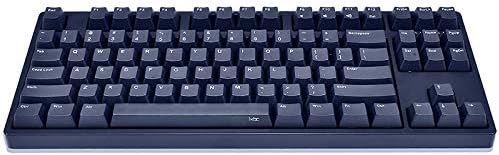
Image 1: The iKBC CD87BT 87-key mechanical keyboard in navy blue. This image displays the full keyboard layout, highlighting its compact tenkeyless design and the dark blue PBT keycaps.
3. Configuració
3.1 Desembalatge i contingut
Carefully remove all items from the packaging. The package should contain:
- iKBC CD87BT Mechanical Keyboard
- Cable USB tipus A a C
- Funda antipols
- Tirador de claus
- 2 piles AAA (preinstal·lades o incloses per separat)
3.2 Instal·lació de la bateria
The keyboard requires 2 AAA batteries for wireless operation. If not pre-installed, locate the battery compartment on the underside of the keyboard, open it, and insert the batteries according to the polarity indicators. Close the compartment securely.
3.3 Connexió per cable
Per utilitzar el teclat en mode cablejat:
- Connect the USB Type-C end of the provided cable to the port on the keyboard.
- Connecteu l'extrem USB tipus A del cable a un port USB disponible de l'ordinador.
- El teclat es detectarà automàticament i estarà llest per al seu ús.
3.4 Wireless (Bluetooth) Connection
The iKBC CD87BT can connect to up to four Bluetooth devices. Follow these steps to pair your keyboard:
- Ensure the keyboard is powered on and in Bluetooth mode (if there's a physical switch, refer to the keyboard's underside).
- Al dispositiu (ordinador, tauleta, telèfon intel·ligent), activeu el Bluetooth i cerqueu dispositius nous.
- On the iKBC CD87BT, press and hold the FN clau i un dels F1, F2, F3, o F4 keys for approximately 3 seconds. The indicator light above the corresponding F key will flash, indicating pairing mode.
- Select "iKBC CD87BT" from the list of available Bluetooth devices on your computer or mobile device.
- If prompted, enter the pairing code displayed on your screen using the iKBC CD87BT keyboard and press Entra.
- Once paired, the indicator light will stop flashing and remain solid for a few seconds, then turn off. The keyboard is now connected.
Per canviar entre dispositius emparellats, premeu FN + F1, F2, F3, o F4 corresponent al dispositiu desitjat.
4. Instruccions de funcionament
4.1 Mecanografia bàsica
The iKBC CD87BT functions as a standard 87-key keyboard. Simply type as you would on any other keyboard.
4.2 Funcions multimèdia
Access multimedia controls by holding the FN key and pressing the corresponding function key:
- FN + F9: Mut
- FN + F10: Baixar el volum
- FN + F11: Pujar el volum
- FN + F12: Calculadora
4.3 Bloqueig de tecles de Windows
To prevent accidental presses of the Windows key during gaming or other activities, the Windows key can be locked. Refer to the keyboard's specific key combination for this function, typically FN + Clau Win or a dedicated switch.
4.4 Interruptors DIP
The keyboard features 4 DIP switches on its underside for advanced customization of key functions or layout. Consult the detailed manual provided with the product or the manufacturer's website for specific DIP switch configurations and their effects.
4.5 peus ajustables
The keyboard is equipped with three levels of adjustable feet on the underside. Adjust them to find your preferred typing angle for comfort and ergonomics.
5. Manteniment
5.1 Neteja del teclat
Per mantenir un rendiment i un aspecte òptims:
- Disconnect the keyboard from your computer or turn off Bluetooth before cleaning.
- Utilitzeu un drap suau i sense pelusa lleugerament dampened with water or a mild cleaning solution to wipe the keycaps and case. Avoid harsh chemicals.
- Per a la pols i les restes entre les tecles, feu servir aire comprimit.
- The included key puller can be used to carefully remove keycaps for deeper cleaning. Ensure to re-install them correctly.
5.2 Funda antipols
Utilize the provided dust cover when the keyboard is not in use to protect it from dust and spills, extending its lifespan.
6. Solució De Problemes
6.1 Keyboard Not Responding (Wired)
- Assegureu-vos que el cable USB estigui connectat correctament tant al teclat com a l'ordinador.
- Prova de connectar el cable a un port USB diferent de l'ordinador.
- Prova el teclat en un altre ordinador per descartar un problema específic de l'ordinador.
6.2 Keyboard Not Connecting (Bluetooth)
- Verify that the keyboard has fresh batteries and is powered on.
- Assegureu-vos que el Bluetooth estigui habilitat al vostre dispositiu.
- Repetiu el procés d'emparellament (Secció 3.4).
- If previously paired, try removing the keyboard from your device's Bluetooth list and re-pairing.
- Assegureu-vos que el teclat estigui dins de l'abast efectiu del dispositiu Bluetooth.
6.3 Les tecles no es registren o s'escrivien dues vegades
- Check for debris under the keycap. Use a key puller to remove the keycap and clean the switch area with compressed air.
- Ensure the keyboard firmware is up to date (check the iKBC official weblloc).
7. Especificacions
| Marca | IKBC |
| Model | CD87BT |
| Tipus de canvi | Cherry MX Brown (Tactile) |
| Material de claus | PBT (OEM Profile, Laser Engraved) |
| Disseny | 87-Key (Tenkeyless), ANSI/US |
| Connectivitat | Wired (USB Type-C), Wireless (Bluetooth 3.0) |
| Compatibilitat amb dispositius Bluetooth | Fins a 4 dispositius |
| Compatibilitat amb SO | iOS, Android, Windows, Mac |
| Dimensions (L x A x A) | 38.58 x 20.4 x 5.49 cm (14.09" x 8.03" x 2.16" approx.) |
| Pes | 1.43 kg (2.42 lliures aprox.) |
| Font d'alimentació | Wired (USB), 2 AAA Batteries (Wireless) |
| Components inclosos | USB Cable, Dust Cover, Key Puller |
8. Garantia i Suport
For warranty information and technical support, please refer to the documentation included with your product or visit the official iKBC weblloc web. Els termes i condicions de la garantia poden variar segons la regió i el distribuïdor.