
1. Introducció
This manual provides essential information for the safe and correct operation of your Shinco SO3A 32-inch HD Ready LED TV. Please read all instructions carefully before using the television and retain this manual for future reference.
The Shinco SO3A offers a 32-inch HD Ready display with a resolution of 1366x768p, a 60Hz refresh rate, and a 178-degree viewing angle. It features an A+ Grade Panel, 16.7 million colors, noise reduction, and multiple picture modes. Connectivity options include 2 HDMI ports, 2 USB ports, and 1 VGA port. Audio is delivered through 20W speakers with surround sound capability. Additional features include USB to USB copy, Dynamic Light Control, Eco Vision, and Eye Safe Feature.
2. Informació de seguretat
Observeu sempre les precaucions de seguretat següents per evitar descàrregues elèctriques, incendis o danys al televisor.
- Font d'alimentació: Connecteu el televisor només a una presa de corrent de CA amb el volum correctetage tal com s'indica a l'etiqueta del televisor.
- Ventilació: Assegureu-vos que hi hagi una ventilació adequada al voltant del televisor. No bloquegeu les obertures de ventilació.
- Aigua i humitat: No exposeu el televisor a la pluja ni a la humitat. No col·loqueu objectes plens de líquids, com ara gerros, a sobre del televisor.
- Neteja: Desendolleu el televisor abans de netejar-lo. Feu servir un drap suau i sec. No utilitzeu netejadors líquids ni aerosols.
- Col·locació: Col·loqueu el televisor sobre una superfície estable i plana o munteu-lo fermament a la paret. Eviteu col·locar-lo sota la llum solar directa o a prop de fonts de calor.
- Llamp: During lightning storms or when unused for long periods, unplug the TV from the wall outlet.
3. Contingut del paquet
Verifiqueu que tots els elements siguin presents al paquet:
- 1 x Shinco SO3A LED TV Unit
- 1 x Table Stand Pair
- 1 x comandament a distància
- 1 x Targeta de garantia
- 1 x Manual d'usuari (aquest document)
- 1 x Wall Mount Kit (includes screws and anchors)

4. Configuració
4.1 Desembalatge
Carefully remove the TV from its packaging. It is recommended to keep the original packaging for future transport or service needs.
4.2 Instal·lació del suport (muntatge sobre taula)
- Col·loqueu el televisor cara avall sobre una superfície suau i neta per evitar que es facin malbé la pantalla.
- Align the table stand legs with the corresponding screw holes on the bottom of the TV.
- Fixeu les potes del suport amb els cargols proporcionats. Assegureu-vos que estiguin ben ajustades.

4.3 Instal·lació de muntatge a la paret
If you choose to wall mount your TV, ensure you use the included wall mount kit and follow the instructions provided with the kit. Professional installation is recommended for wall mounting.

4.4 Connexió de perifèrics
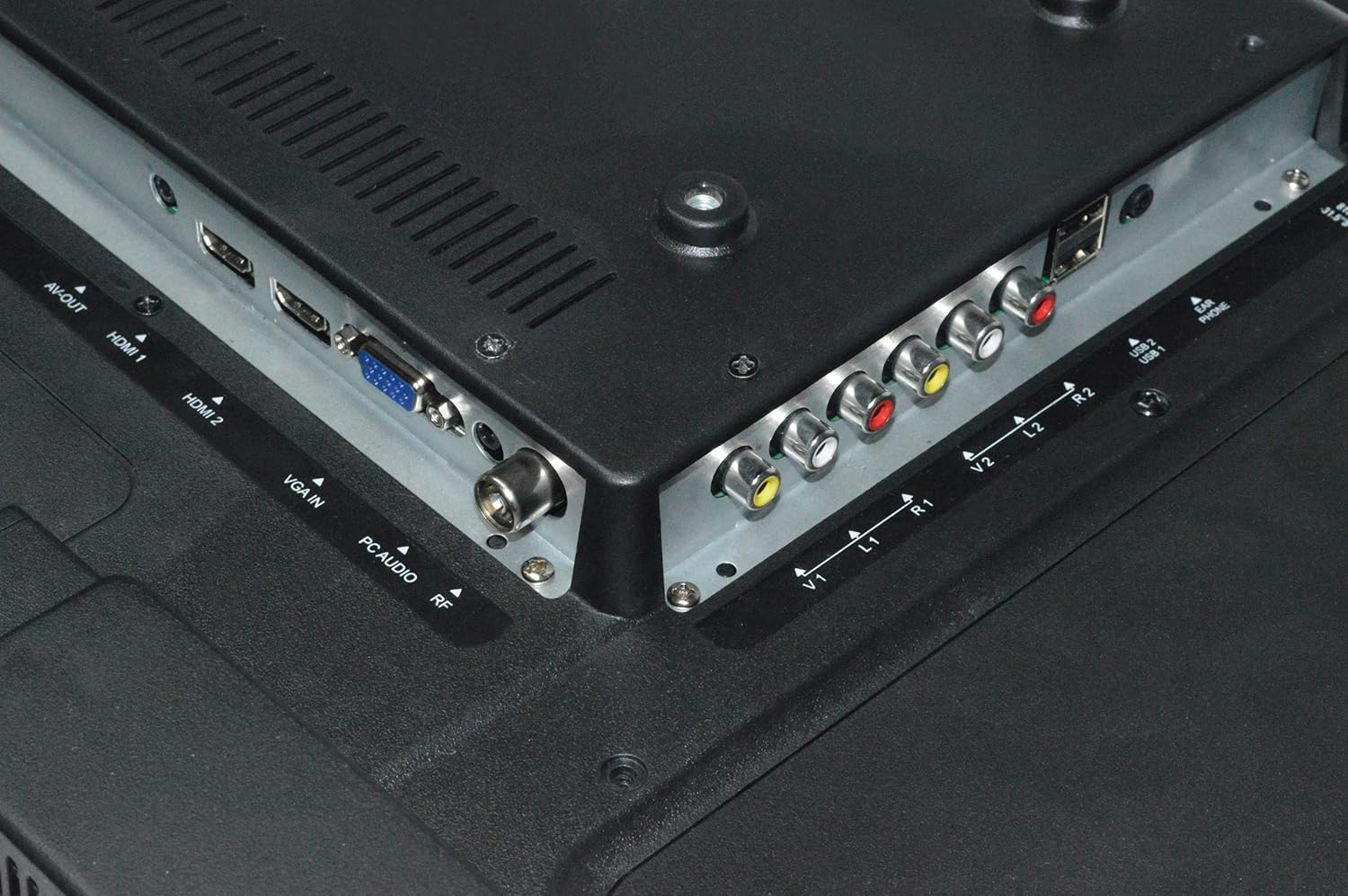
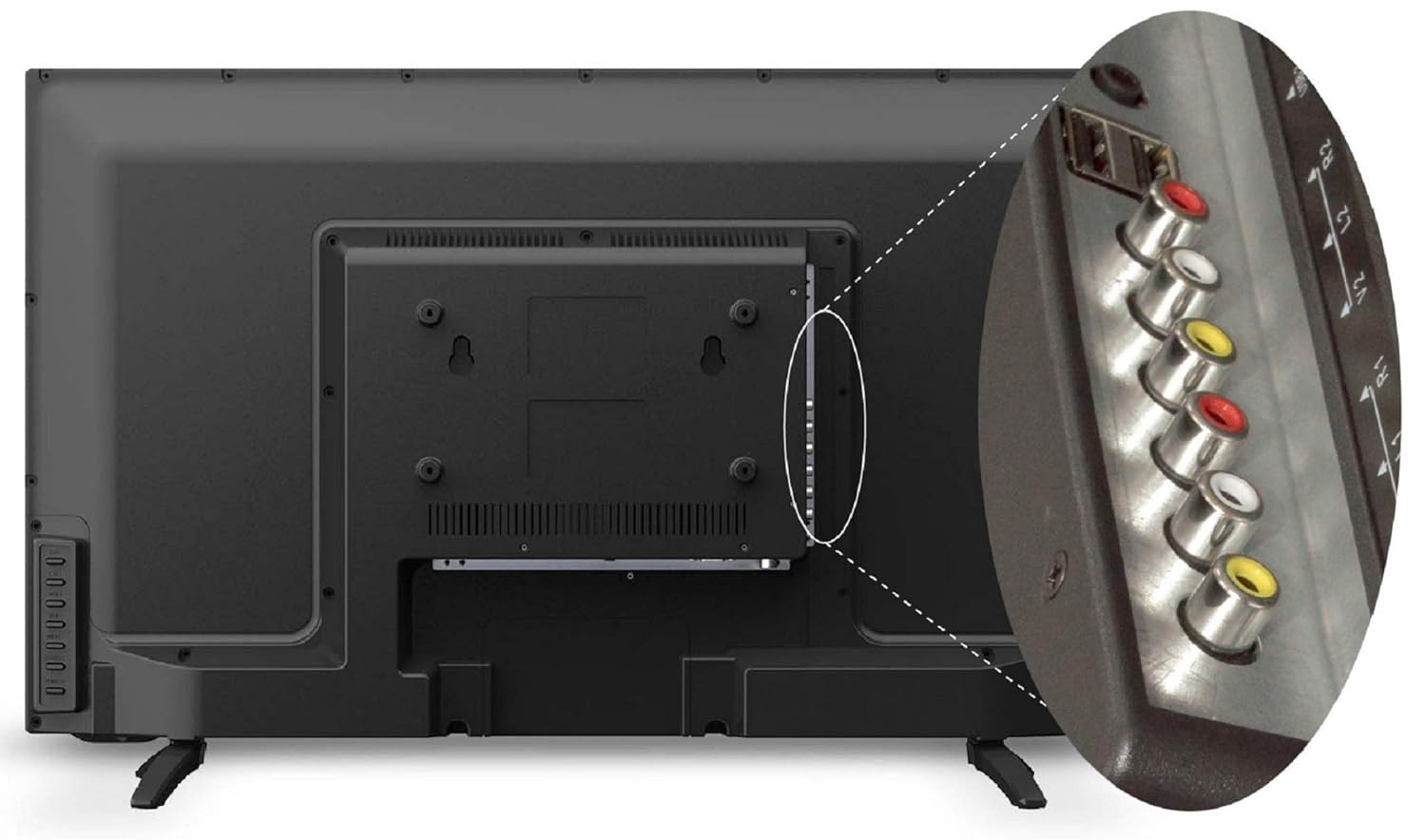
El televisor ofereix diversos ports per connectar dispositius externs:
- Ports HDMI (x2): Connecteu descodificadors, reproductors de Blu-ray, consoles de jocs o altres dispositius compatibles amb HDMI.
- Ports USB (x2): Connect USB storage devices for media playback or USB to USB copy function.
- Port VGA (x1): Connecteu un ordinador o portàtil.
- Entrada AV: Connecteu dispositius antics mitjançant cables de vídeo compost i àudio estèreo.
- Entrada RF: Connecteu una antena o un cable per a emissions de televisió.
4.5 Connexió d'alimentació
After connecting all necessary cables, plug the power cord into a wall outlet. The TV will enter standby mode.
5. Instruccions de funcionament
5.1 Funcions de control remot
The remote control allows you to operate all TV functions. Insert two AAA batteries (not included) into the remote control, ensuring correct polarity.

- POTÈNCIA: Encén o apaga el televisor (mode d'espera).
- FONT: Selects input source (HDMI1, HDMI2, AV, VGA, USB, TV).
- VOL +/-: Ajusta el nivell de volum.
- CH +/-: Canvi de canals.
- MENÚ: Accedeix al menú principal.
- D'ACORD: Confirma les seleccions als menús.
- Botons de navegació (amunt/avall/esquerra/dreta): Navega pels menús i opcions.
- MUT: Silencia o restaura el so.
- ECO: Activates Eco Vision mode for power saving.
- ASPECTE: Canvia la relació d'aspecte de la pantalla.
5.2 Configuració inicial
Upon first power-on, the TV will guide you through initial setup steps:
- Selecció d'idioma: Trieu el vostre idioma preferit.
- Country Selection: Seleccioneu la vostra regió.
- Escaneig de canals: The TV will automatically scan for available channels if an antenna or cable is connected.
5.3 Funcions bàsiques del televisor
- Encès/apagat: Press the POWER button on the remote or the TV's control panel.
- Selecció de la font d'entrada: Press the SOURCE button to cycle through available inputs (HDMI, AV, USB, TV, VGA).
- Ajust de volum: Use VOL +/- buttons.
- Canvi de canal: Use CH +/- buttons for sequential change or number buttons for direct input.
5.4 Configuració de la imatge
Access the Picture menu to adjust display settings:
- Mode d'imatge: Select from Standard, Dynamic, Mild, or User to suit your viewpreferència.
- Brillantor: Ajusta la luminància general de la pantalla.
- Contrast: Ajusta la diferència entre les zones clares i fosques.
- Color: Ajusta la saturació del color.
- Nitidez: Adjust the clarity of image edges.
- Dynamic Light Control: Automatically adjusts backlight based on content.
- Reducció de soroll: Reduces visual noise in the picture.
- Eye Safe Feature: Reduces blue light emission for comfortable viewing.
5.5 Configuració de so
Access the Sound menu to adjust audio settings:
- Mode de so: Select from Standard, Music, Movie, or User.
- Equalitzador: Customize audio frequencies in User mode.
- So envoltant: Enable or disable virtual surround sound.
- Balanç: Ajusteu l'equilibri dels altaveus esquerre/dret.
5.6 Reproducció multimèdia USB
Insert a USB storage device into one of the USB ports. The TV will detect the device and prompt you to open the media browser. You can play supported audio (MP3), image (JPEG), and video files.
- USB to USB Copy: This feature allows direct copying of files between two USB devices connected to the TV.
6. Manteniment
6.1 Neteja del televisor
- Desendolla sempre el televisor abans de netejar-lo.
- Feu servir un drap suau, sec i sense borrissol per netejar la pantalla i la carcassa.
- Per a marques difícils, esbandiu lleugeramentampNetegeu el drap amb aigua o un netejador de pantalles suau i no abrasiu. No ruixeu líquid directament sobre el televisor.
- Avoid using chemical cleaners, as they may damage the TV's finish.
6.2 Cura del comandament a distància
- Mantingueu el comandament sec.
- Eviteu deixar-lo caure o sotmetre-lo a forts impactes.
- Replace batteries when the remote's range decreases or it stops responding.
7. Solució De Problemes
Si teniu problemes amb el televisor, consulteu els problemes i solucions més comuns següents:
| Problema | Possible solució |
|---|---|
| Sense poder | Check if the power cord is securely plugged into the TV and the wall outlet. Ensure the wall outlet has power. |
| No hi ha imatge, però hi ha so | Check the input source. Ensure the external device (set-top box, DVD player) is turned on and connected correctly. |
| No hi ha so, però hi ha imatge | Check the volume level and ensure the TV is not muted. Check audio settings in the menu. |
| El comandament a distància no funciona | Revisa i substitueix les piles. Assegura't que no hi hagi cap obstrucció entre el comandament a distància i el sensor d'infrarojos del televisor. |
| Poca qualitat d'imatge | Adjust picture settings (brightness, contrast, sharpness). Check antenna connection for broadcast TV. Ensure the source device is outputting a high-quality signal. |
8. Especificacions
Key technical specifications for the Shinco SO3A 32-inch HD Ready LED TV:
| Característica | Especificació |
|---|---|
| Marca | Shinco |
| Model | SO3A |
| Mida de la pantalla | 32 polzades (80 cm) |
| Tecnologia de visualització | LED |
| Resolució | HD Ready (1366x768 Pixels) |
| Freqüència d'actualització | 60 Hz |
| Viewangle ing | 178 graus |
| Tipus de visualització | Panell de qualificació A+ |
| Ports HDMI | 2 |
| Ports USB | 2 |
| Port VGA | 1 |
| Sortida d'àudio | 20 watts |
| Dimensions del producte (LxWxH) | 73.6 x 19 x 47.4 cm |
| Pes de l'article | 6.35 kg |
| Font d'alimentació | AC |
| Any model | 2019 |


9. Informació de la garantia
Your Shinco SO3A LED TV comes with a Garantia estàndard del fabricant d'1 any des de la data de compra. Aquesta garantia cobreix els defectes de fabricació en condicions d'ús normal.
For any product defects, damage, or features not matching the description provided, this product is eligible for replacement within 10 dies de lliurament. Please contact customer support for assistance.
10. Suport
For technical assistance, service, or warranty claims, please contact the manufacturer:
Fabricant: Videotex International Pvt Ltd
Adreça: 347-C, Ecotech-3, Udyog Kendra -2, Greater, Noida - 201306, Uttar Pradesh, India
Número de contacte: 8882569569