
1. Introducció
The SUNMI L2 SmartOrder is a rugged industrial terminal designed for various business applications requiring mobility and data capture. It features an Android 7.1 operating system, a 5-inch display, and an integrated 1D/2D Zebra scanner. This manual provides essential information for the proper setup, operation, and maintenance of your device.
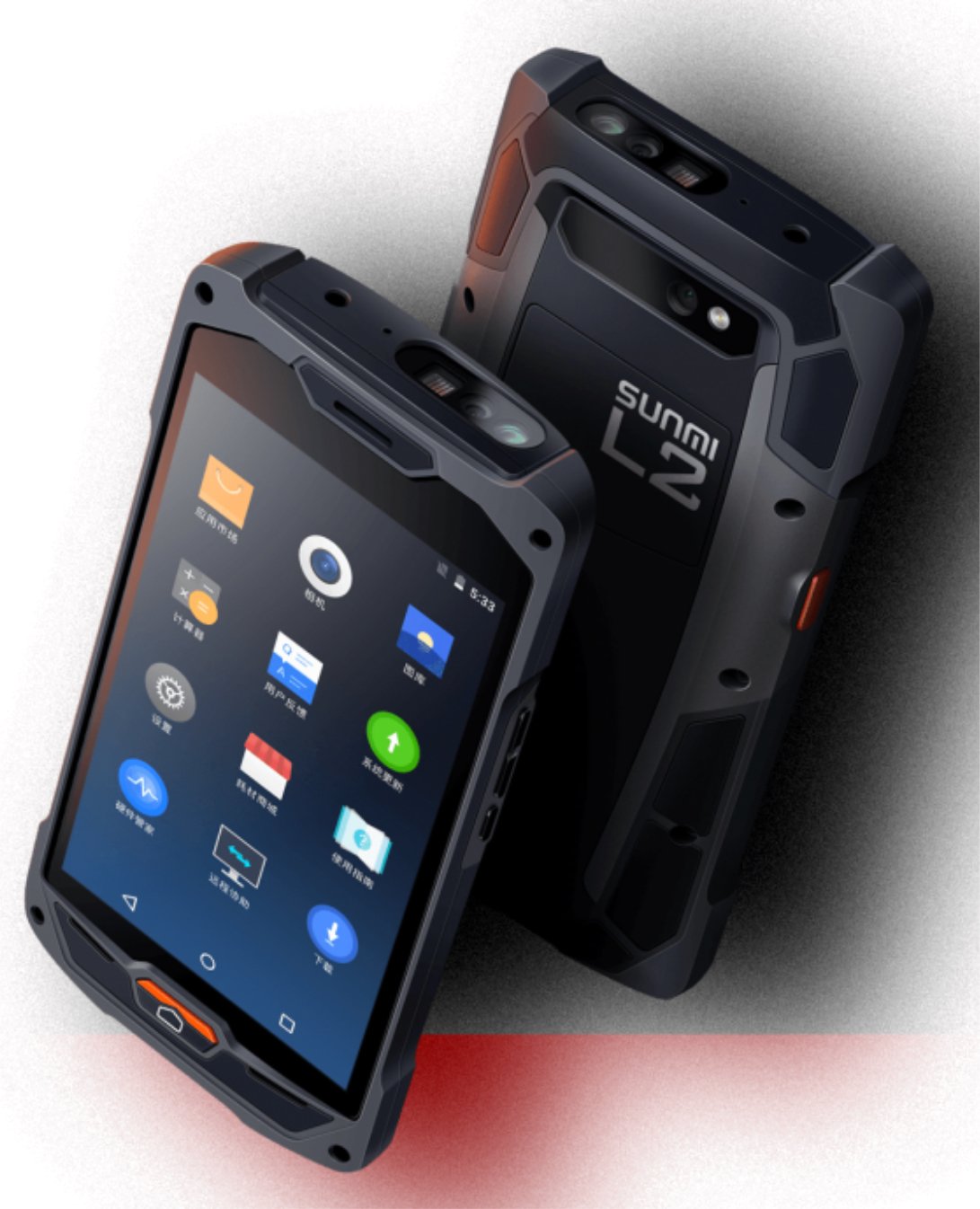
Figura 1: Davant i darrere view of the Sunmi L2 SmartOrder industrial terminal.
2. Informació de seguretat
Si us plau, llegiu totes les instruccions de seguretat abans d'utilitzar el dispositiu per evitar lesions o danys. Conserveu aquest manual per a futures consultes.
- No exposeu el dispositiu a temperatures extremes, llum solar directa ni humitat elevada.
- Use only SUNMI-approved accessories and power adapters.
- Avoid dropping or subjecting the device to severe impact, despite its rugged design.
- No intenteu desmuntar ni reparar el dispositiu vosaltres mateixos. Poseu-vos en contacte amb personal de servei qualificat.
- Mantingueu el dispositiu allunyat de dispositius mèdics, ja que pot interferir amb el seu funcionament.
3. Dispositiu acabatview
The SUNMI L2 SmartOrder is designed for durability and functionality. Key features include:
- Pantalla de 5 polzades: High-resolution touchscreen for clear visibility.
- 1D/2D Zebra Scanner: Integrated for efficient barcode and QR code scanning.
- Port USB-C: Per a càrrega i transferència de dades.
- Ranura per a targeta SIM: For cellular network connectivity.
- Ranura per a targetes TF: Per a emmagatzematge ampliable.
- PSAM Card Slot (Optional): For enhanced security in professional applications.
- NFC Induction Area: For near-field communication.

Figura 2: posterior view showing SIM card slot, TF card slot, PSAM card slot, and NFC induction area.

Figure 3: Three different scanner options for the Sunmi L2: Zebra Code Scanner, Standard Code Scanner, and without scanner.
4. Configuració
4.1. Instal·lació i càrrega de la bateria
The device is equipped with a 5000mAh high-volume battery. Ensure the battery is fully charged before initial use.
- Connecteu el cable USB-C proporcionat al port USB-C del dispositiu.
- Connect the other end of the USB-C cable to a compatible power adapter and plug it into a power outlet.
- The charging indicator will illuminate. Allow the device to charge completely before disconnecting.

Figure 4: Illustration of the 5000mAh high-volume battery with Quick Charge technology.
4.2. Instal·lació de la targeta SIM i TF
To install SIM or TF cards:
- Locate the card slot cover on the rear of the device (refer to Figure 2).
- Obriu la coberta amb cura.
- Introduïu la targeta SIM a la ranura designada per a targetes SIM amb els contactes daurats cap avall.
- Insert the TF card (microSD) into the TF card slot if additional storage is required.
- Close the card slot cover securely to maintain the device's IP67 rating.
4.3. Engegada inicial
After charging, press and hold the power button located on the side of the device until the screen illuminates and the SUNMI logo appears. The device will boot into the Android 7.1 operating system.
5. Instruccions de funcionament
5.1. Navegació bàsica
The SUNMI L2 operates on Android 7.1. Navigate the interface using the touchscreen. Swipe to unlock, tap icons to open applications, and use the navigation buttons (Home, Back, Recent Apps) as standard for Android devices.
5.2. Using the 1D/2D Zebra Scanner
The integrated Zebra scanner is located at the top of the device.
- Obriu l'aplicació d'escaneig al vostre dispositiu.
- Point the scanner window at the barcode or QR code you wish to scan.
- Press the dedicated scan button (if available on your model) or trigger the scan via the software interface.
- Ensure the barcode is well-lit and within the scanner's optimal range for accurate reading.

Figura 5: A baix view of the Sunmi L2, highlighting its rugged design and integrated scanner.
5.3. Connectivitat
El dispositiu admet diverses opcions de connectivitat:
- Xarxa sense fil (Wi-Fi): Supports 2.4 GHz and 5 GHz bands. Access Wi-Fi settings from the Android system menu to connect to available networks.
- Bluetooth (BT): Pair with other Bluetooth-enabled devices such as printers or headsets via the Bluetooth settings.
- GPRS/LTE: Utilize cellular data by inserting a SIM card and configuring network settings.
- NFC: For short-range wireless communication, typically used for contactless payments or data exchange.
6. Manteniment
6.1. Neteja del dispositiu
Per mantenir el rendiment i l'aspecte del dispositiu:
- Utilitzeu un drap suau i sense pelusa lleugerament dampened with water or a mild screen cleaner.
- Avoid using harsh chemicals, abrasive cleaners, or solvents, as these can damage the device's surface and seals.
- Ensure all port covers are securely closed before cleaning to maintain water and dust resistance.
6.2. Cura de la bateria
Una cura adequada de la bateria n'allarga la vida útil:
- Eviteu descarregar completament la bateria amb freqüència.
- No exposeu el dispositiu a temperatures extremes de calor o fred, ja que això pot degradar el rendiment de la bateria.
- If storing the device for an extended period, charge the battery to approximately 50% and store it in a cool, dry place.
6.3. Emmagatzematge
When not in use, store the SUNMI L2 in a cool, dry environment, away from direct sunlight and corrosive materials.
7. Solució De Problemes
This section addresses common issues you might encounter with your SUNMI L2 device.
- El dispositiu no s'encén: Ensure the battery is sufficiently charged. Connect the device to a power source and attempt to power it on again.
- Scanner not working: Verify that the scanning application is active and the scanner is enabled in the device settings. Ensure the barcode is clean, undamaged, and properly illuminated.
- Connectivity issues (Wi-Fi/Cellular): Check your Wi-Fi network connection or cellular data settings. Ensure the SIM card is correctly inserted. Try restarting the device.
- La pantalla tàctil no respon: Reinicieu el dispositiu. Si el problema persisteix, contacteu amb l'assistència.
8. Especificacions
Key technical specifications for the SUNMI L2 SmartOrder:
| Número de model | Sunmi L2 Zebra T8900 |
| Sistema operatiu | Android 7.1 |
| Mostra | 5 polzades |
| CPU | Quad Core |
| RAM | 2 GB |
| ROM | 16 GB |
| Escàner | 1D/2D Zebra Scanner |
| Connectivitat | USB-C, WLAN 2.4/5 GHz, Bluetooth, GPRS, LTE, NFC |
| Bateria | 5000mAh (up to 2 days use, 30 days standby) |
| Durabilitat | IP67 rated (dust-proof, water-resistant, drop-resistant) |
| Temperatura de funcionament | -20 °C a +55 °C |
| Pes | 349.27 g |
| Dispositius compatibles | Desktop computer, Laptop, POS, Smartphone, Tablet |

Figure 6: Sunmi L2 device partially submerged in water, demonstrating its IP67 dust-proof and water-resistant capabilities.
9. Garantia i Suport
For detailed warranty information, technical support, or service inquiries, please refer to the official SUNMI website or contact your authorized SUNMI distributor. Please retain your purchase receipt as proof of purchase for any warranty claims.