
Introducció
This manual provides essential instructions for setting up, operating, and maintaining your Optoma W335 WXGA DLP Professional Projector. Designed for business presentations, classrooms, and home use, this projector delivers bright, clear images with a long lamp life. Please read this manual thoroughly before use to ensure optimal performance and safety.
Configuració
Desembalatge i inspecció inicial
Carefully remove the projector and all accessories from the packaging. Verify that all components listed in the 'What's in the Box' section are present and undamaged.
- W335 projector
- Cable d'alimentació
- Remot
- Bateria
Col·locació
The Optoma W335 is portable, weighing less than 7 pounds, making it easy to move between rooms. For optimal viewing, place the projector on a stable, flat surface. Ensure adequate ventilation around the unit to prevent overheating.

Image: The Optoma W335 projector showing its compact size and dimensions (12.44" width, 9.2" depth, 4.27" height).
The projector features adjustable legs for easy height and angle adjustments, allowing you to find the perfect screen area for projection. This helps in achieving a level and properly aligned image.
Connectivitat
The W335 offers a variety of input options for connecting to different devices:
- HDMI: Per a vídeo i àudio digital d'alta definició.
- VGA: For analog video connections, commonly used with computers.
- Vídeo compost: Per a vídeo de definició estàndard.
- Entrada/Sortida d'àudio: For connecting external audio sources or speakers.
- USB Power Out (5V/1.0A): For powering external devices like streaming sticks.
- RS232: Per a la integració del sistema de control.
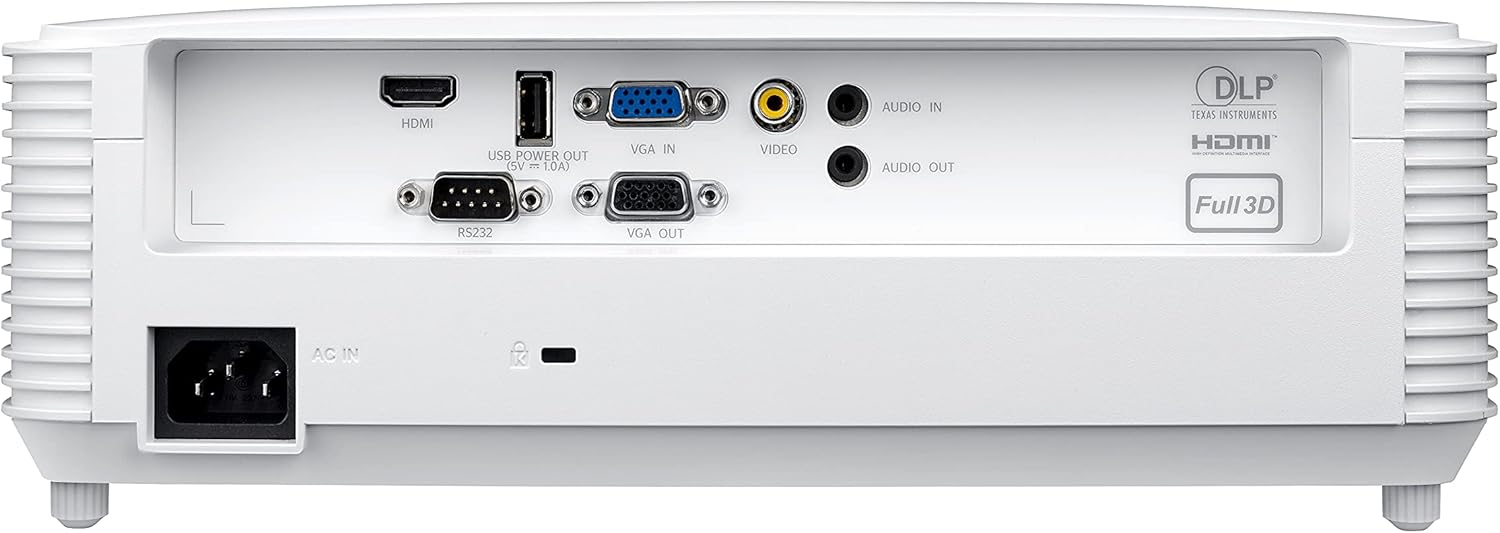
Image: Rear panel of the Optoma W335 projector, clearly showing the HDMI, VGA In, VGA Out, Video, Audio In, Audio Out, RS232, and USB Service Only ports.
Connect your source device (e.g., laptop, Blu-ray player) to the appropriate input port on the projector. Ensure the power cord is securely connected to the projector and a power outlet.
Instruccions de funcionament
Encès/Apagat
Press the power button on the projector's control panel or the remote control to turn the unit on or off. Allow a few moments for the projector to warm up or cool down.

Imatge: Superior view of the Optoma W335 projector, highlighting the control panel with power, menu, and navigation buttons, along with focus and zoom rings.
Ajust de la imatge
- Focus: Gireu l'anell d'enfocament de l'objectiu per augmentar la nitidesa de la imatge.
- Zoom: Use the zoom ring to adjust the image size without moving the projector.
- Correcció Keystone: The W335 supports vertical keystone correction to square the image if the projector is not perfectly perpendicular to the screen. This can be adjusted via the on-screen menu.
The projector delivers vibrant and sharp WXGA resolution (1280 x 800) images with a 22,000:1 contrast ratio, suitable for various environments including well-lit rooms due to its 3,800 lumens brightness.
Àudio
An integrated 10-watt speaker provides room-filling audio. For enhanced sound, connect external speakers to the Audio Out port.
Manteniment
Lamp La vida
El projector lamp has a life of up to 15,000 hours, providing many years of use with minimal maintenance. When the lamp reaches the end of its life, a warning indicator will appear, and the lamp will need to be replaced. Refer to the full user manual for detailed lamp instruccions de substitució.
Neteja
- Lent: Use a soft, lint-free cloth and lens cleaning solution to gently clean the projector lens.
- Exterior: Netegeu l'exterior casinNetegeu amb un drap suau i sec. Eviteu productes de neteja o dissolvents abrasius.
- Vendes d'aire: Regularly check and clean the air vents to ensure proper airflow and prevent overheating. Use a soft brush or compressed air to remove dust.
Resolució de problemes
- Sense imatge:
- Ensure the projector is powered on and the source device is connected and active.
- Check the input source selection on the projector.
- Verifiqueu que tots els cables estiguin connectats correctament.
- Imatge borrosa:
- Ajusteu l'anell d'enfocament de l'objectiu.
- Assegureu-vos que el projector estigui a la distància correcta de la pantalla.
- Use keystone correction if the image is distorted.
- Sense so:
- Comproveu la configuració de volum tant al projector com al dispositiu font.
- Ensure external speakers (if used) are properly connected and powered.
- Verify the audio cable connection.
- Sobreescalfament del projector:
- Ensure air vents are clear and not obstructed.
- Feu funcionar el projector en una zona ben ventilada.
- If the issue persists, power off the projector and allow it to cool down before restarting.
Especificacions
| Característica | Detall |
|---|---|
| Dimensions del producte | 9.6 x 12.4 x 3.9 polzades |
| Pes de l'article | 6.61 lliures |
| Número de model de l'article | W335 |
| Marca | Optoma |
| Usos recomanats | Negocis, Educació |
| Característica especial | Llançament curt |
| Tecnologia de connectivitat | HDMI, VGA |
| Resolució de visualització | 1280 x 800 (WXGA) |
| Brillantor | 3800 lúmens |
| Relació de contrast | 22,000:1 |
| Lamp La vida | Fins a 15,000 hores |
| Altaveu integrat | 10 watts |
| Relació de llançament | 1.55 – 1.73:1 |
Garantia i suport
For detailed warranty information and technical support, please refer to the official Optoma website or the documentation included with your product. You can also contact Optoma customer service directly for assistance.
Visita el Optoma Store on Amazon per obtenir més informació sobre el producte.