
Monarch Specialties I 7412
Manual d'instruccions
Monarch Specialties Computer Desk
Model: I 7412
Brand: Monarch Specialties
Introducció
This manual provides detailed instructions for the assembly, operation, and maintenance of your Monarch Specialties Computer Desk, Model I 7412. Please read all instructions carefully before beginning assembly and retain this manual for future reference.
Informació de seguretat
Always follow the safety guidelines provided in the instruction manual. Ensure all components are securely fastened before use. Do not overload the desk. Keep small parts away from children during assembly.
Contingut del paquet
Before assembly, verify that all parts and hardware are present and undamaged. Refer to the parts list included in your product packaging. If any parts are missing or damaged, contact Monarch Specialties customer support.

Imatge 1: Frontal view of the assembled Monarch Specialties Computer Desk. This desk features a brown reclaimed wood-look finish with black metal legs and three drawers.
Muntatge i muntatge
Assembly typically requires two adults. Ensure you have adequate space and the necessary tools (e.g., screwdriver, Allen wrench, if not provided). Follow the steps below in sequence.
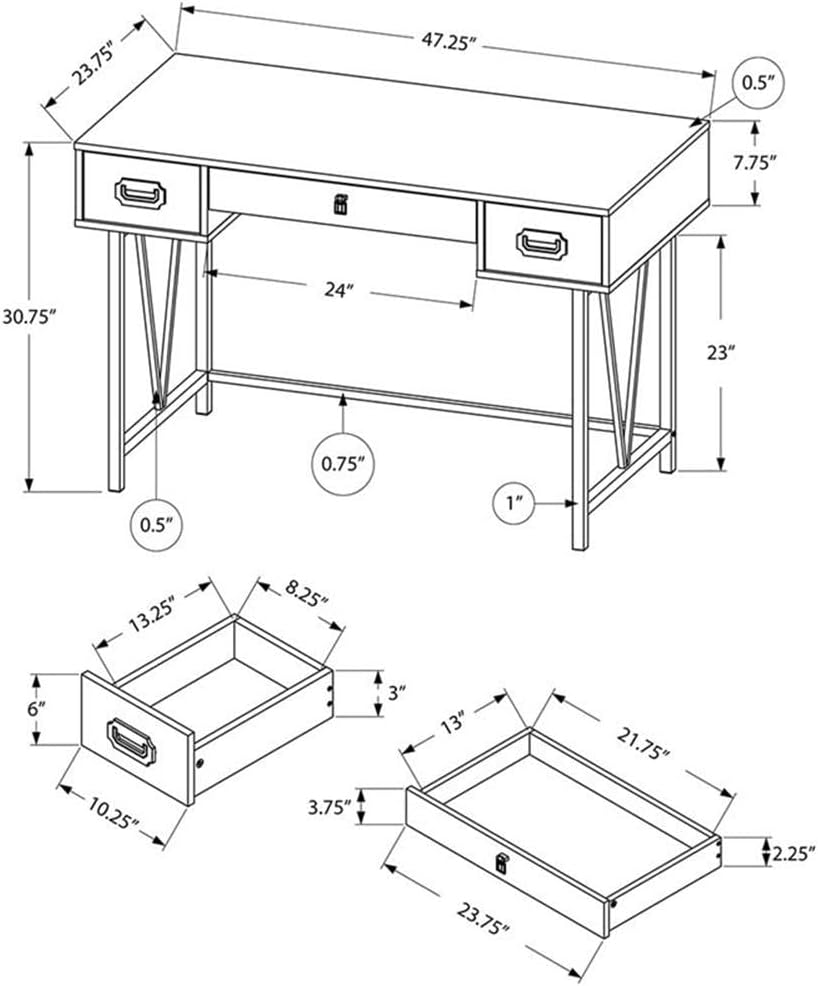
Image 2: Dimensional drawing of the Monarch Specialties Computer Desk, showing overall dimensions and an exploded view of the drawer components. This diagram is essential for identifying parts and understanding assembly.
- Desempaquetar components: Traieu amb cura totes les peces de l'embalatge. Col·loqueu-les sobre una superfície suau i neta per evitar ratllades.
- Muntar calaixos: Construct the two side drawers and the one wide middle drawer according to the detailed instructions in your physical assembly guide. Note the different pull types for the side drawers (black metal) and the middle drawer (black leather).
- Attach Drawer Glides: Secure the metal drawer glides to the desk frame and the drawers themselves, ensuring smooth operation.
- Assemble Metal Legs: Attach the black metal legs to the underside of the desk top. Ensure all screws are tightened securely. The legs feature a distinctive V-shape design.
- Instal·leu la barra transversal: Connect the horizontal metal crossbar between the two leg frames for added stability.
- Inserir calaixos: Carefully slide the assembled drawers into their respective compartments. Test their movement to ensure they open and close smoothly.
- Comprovació final: Verify that all connections are tight and the desk is stable.
Instruccions de funcionament
The Monarch Specialties Computer Desk is designed for general office and home use. Its features include:
- Funcionalitat del calaix: The desk includes two side drawers with smooth metal glides and black metal pulls, and one wide middle drawer with metal glides and a black leather pull. These drawers are suitable for storing office supplies, documents, and personal items.
- Capacitat de pes: Distribute weight evenly across the desk surface. Avoid placing excessively heavy items on the desk or in the drawers to prevent damage.
- Ús de superfície: The thick paneled top with a brown reclaimed wood-look finish provides a durable work surface. Consider using coasters for beverages and protective mats for hot items to preserve the finish.

Image 3: The Monarch Specialties Computer Desk positioned in a room, showcasing its use as a workstation with a laptop and office accessories. This image illustrates the desk's functional design in a typical setting.
Manteniment
- Neteja: Wipe the desk surface and metal legs with a soft, damp drap. Eviteu netejadors abrasius o productes químics agressius, ja que poden danyar l'acabat.
- Vessaments: Clean spills immediately to prevent staining, especially on the wood-look laminate surface.
- Comprovació de maquinari: Reviseu periòdicament tots els cargols i elements de fixació per assegurar-vos que romanen ajustats. Torneu a apretar-los si cal per mantenir l'estabilitat.
- Cura del calaix: If drawers become stiff, a small amount of silicone lubricant can be applied to the metal glides.
Resolució de problemes
- Escriptori tambaleant: Ensure all leg connections and the crossbar are securely tightened. Check that the desk is on a level surface.
- Els calaixos no llisquen suaument: Verify that the drawer glides are correctly aligned and free of obstructions. Ensure the drawers are assembled correctly. Lubricate glides if needed.
- Ratllades o cops: Minor scratches on the laminate surface may be touched up with a furniture repair marker matching the finish. Deep dents may require professional repair or replacement of the affected component.
Especificacions
| Número de model | I 7412 |
| Marca | Especialitats Monarca |
| Dimensions del producte (L x A x A) | 120.02 cm x 60.33 cm x 78.11 cm (47.25" de llargada x 23.75" d'amplada x 30.75" d'alçada) |
| Pes | 27.67 kg (61 lliures) |
| Material | Wood (top material type), Metal (base material) |
| Tipus d'acabat | Laminated (brown reclaimed wood-look) |
| Color | Brown (reclaimed wood-look) / Black (metal legs) |
| Característica especial | Compact design, 3 drawers (2 side, 1 middle) |
Garantia i Suport
Warranty information for the Monarch Specialties Computer Desk, Model I 7412, is typically included with the product packaging or available directly from the manufacturer. Please refer to these resources for details regarding coverage and terms.
For technical support, missing parts, or warranty claims, please contact the retailer where the product was purchased or visit the official Monarch Specialties weblloc web per obtenir informació de contacte del servei d'atenció al client.
Ask a question about this manual
Ask about setup, troubleshooting, compatibility, parts, safety, or missing instructions. Manuals+ will review the question and use this page’s manual context to help answer it.