
Introducció
Gràcies per la compraasing the VTech VT1091 Cordless Phone. This manual provides essential information for setting up, operating, and maintaining your new phone. Please read these instructions carefully to ensure proper use and to fully benefit from its features.
Contingut del paquet
Abans de començar, assegureu-vos que tots els elements estiguin presents al paquet:
- Telèfon sense fil
- Unitat base
- Adaptador d'alimentació per a la unitat base
- Cordó de línia telefònica
- Rechargeable Batteries (pre-installed or separate)
- Manual d'usuari (aquest document)
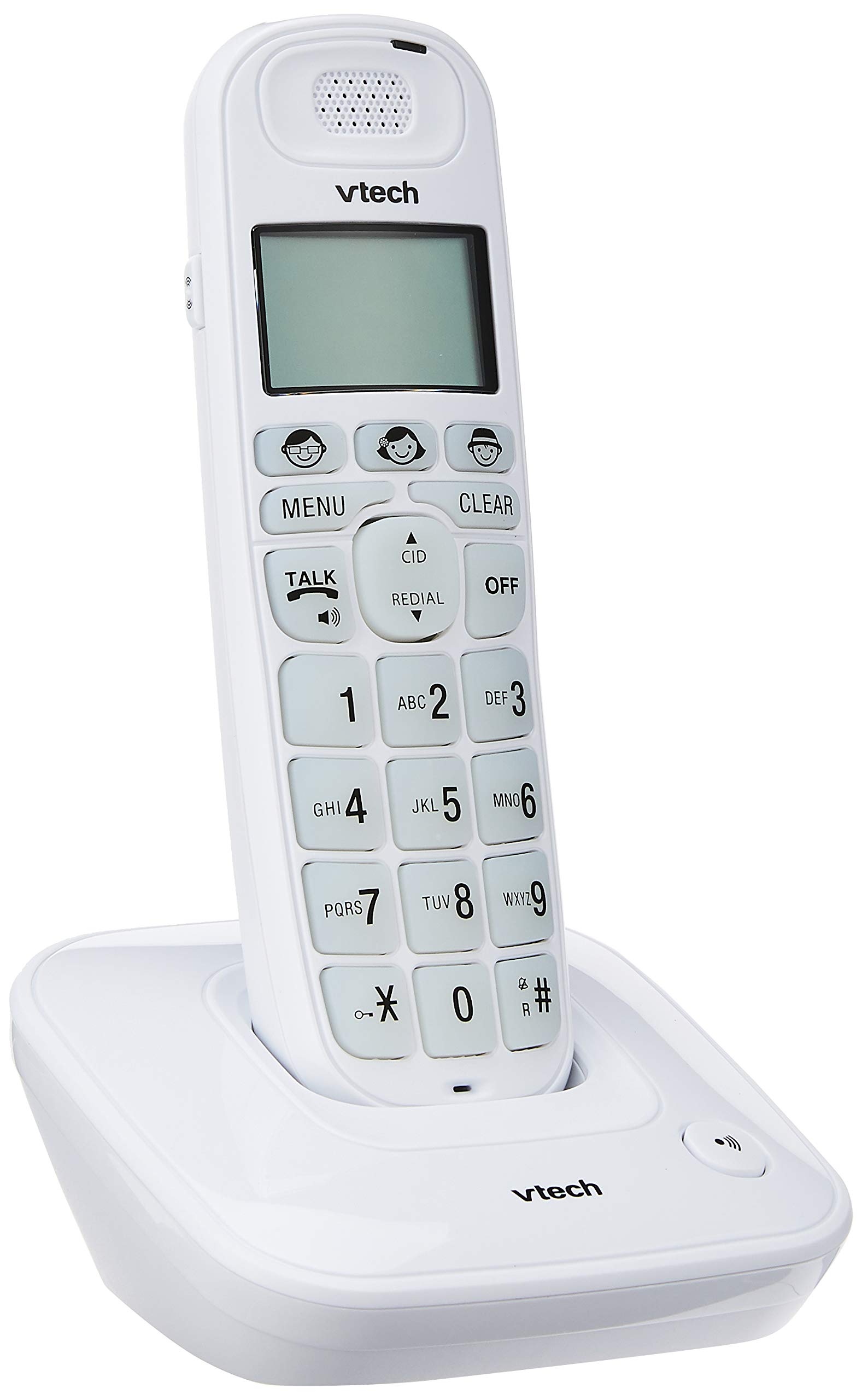
Image: The VTech VT1091 cordless phone handset resting in its base unit, showing the front view of the keypad and screen.
Configuració
1. Instal·lació de la bateria
- Localitzeu la tapa del compartiment de la bateria a la part posterior del telèfon.
- Feu lliscar la tapa cap avall per obrir-la.
- Inseriu les piles recarregables subministrades, respectant la polaritat correcta (+ i -).
- Substituïu la tapa del compartiment de la bateria.
2. Connexió de la unitat base
- Connecteu un extrem del cable de la línia telefònica a la presa TEL LINE de la part posterior de la unitat base.
- Connecteu l'altre extrem del cable de la línia telefònica a la presa de paret del telèfon.
- Connect the small end of the power adapter to the DC IN jack on the back of the base unit.
- Connecteu l'extrem gran de l'adaptador de corrent a una presa de corrent estàndard.

Imatge: Part posterior view of the VTech VT1091 base unit, showing the ports for the telephone line cord and the power adapter.
3. Càrrega del telèfon
Place the handset on the base unit with the display facing forward. The handset will begin charging. For optimal battery performance, allow the handset to charge for at least 16 hours before initial use.

Imatge: Lateral view of the VTech VT1091 cordless phone handset securely placed in its charging base.
Característiques clau
- Amplificació: Amplification of incoming sounds by up to 30 decibels.
- Ultra-low Radiation Mode: Operates with reduced radiation levels.
- BOOSTER Button: One-touch button for easy sound amplificació.
- Teclat gran: Big buttons with backlit keypad for improved visibility.
- Pantalla LCD retroiluminada: Large display with orange backlight.
- Altaveu del telèfon: Per a la comunicació amb mans lliures.
- Page/Handset Locator: Helps locate a misplaced handset.
- Auto Answer/Keypad Lock: Convenient call handling and security features.
- Alarm/Secrecy: Includes alarm function and call secrecy feature.
- GAP Compliant: Compatible with other GAP-enabled DECT devices.
- Directori de l'agenda telefònica: 20 name and number entries.
- Identificador de trucada: Displays the last 10 caller numbers.
- Torna a marcar: Stores the last 5 numbers dialed.
- Ringer Melodies: 10 selectable ringer melodies (5 polyphonic and 5 standard).
- Durada de la bateria: Approximately 10 hours talk time / 100 hours standby time.
- Botons de memòria: 3 one-touch memory buttons.
- De marcatge ràpid: 8 number (2-9) speed dial memories.
- Compatible amb audiòfons: Designed for use with hearing aids.
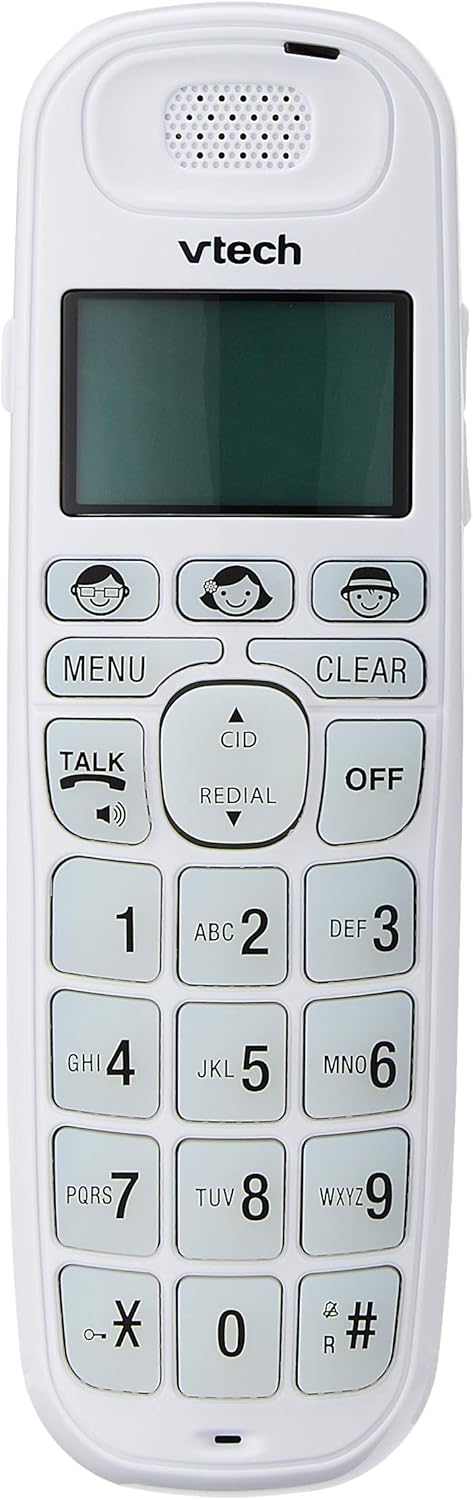
Image: Close-up of the VTech VT1091 handset, highlighting the large backlit keypad, LCD display, and dedicated function buttons.
Instruccions de funcionament
Fent una trucada
- Premeu el botó PARLAR botó per obtenir el to de marcatge.
- Marqueu el número de telèfon desitjat.
- Per finalitzar la trucada, premeu el botó OFF o torneu a col·locar l'auricular a la unitat base.
Responent una trucada
Quan soni el telèfon, premeu la tecla PARLAR botó per respondre la trucada.
Ús de l’altaveu
Durant una trucada, premeu el botó PARLAR button again (with the speaker icon) to activate the speakerphone function. Press it again to switch back to the earpiece.
Ajust de volum
Durant una trucada, utilitzeu UP i ABAIX arrow buttons on the side of the handset to adjust the earpiece or speakerphone volume.
Phonebook Directory
- Premeu el botó MENÚ botó.
- Navigate to "Phonebook" using the arrow buttons and press MENÚ per seleccionar.
- Segueix les instruccions que apareixen a la pantalla per afegir, editar o suprimir entrades.
Funció de remarcació
Premeu el botó RECOMANTA botó per view a list of the last 5 dialed numbers. Use the arrow buttons to select a number and press PARLAR per marcar.
Identificador de trucada
When the phone rings, the caller's number (if available) will be displayed on the screen. Press the CID botó per tornarview the caller ID list. Use the arrow buttons to scroll through entries.
BOOSTER Function
Durant una trucada, premeu el botó dedicat BOOSTER button (if available, often integrated with volume or a specific key) to instantly amplify the incoming audio by up to 30 decibels. Press again to deactivate.
Localitzador d'auriculars
To locate a misplaced handset, press the PÀGINA button on the base unit. The handset will ring.
Manteniment
Neteja
Netegeu el telèfon i la unitat base amb un drap suau.amp cloth. Do not use cleaning sprays or abrasive cleaners, as these can damage the finish or electrical components.
Cura de la bateria
- Only use the supplied rechargeable batteries.
- Si no heu d'utilitzar el telèfon durant un període prolongat, traieu-ne les piles per evitar fuites.
- No llenceu les piles al foc.
Resolució de problemes
| Problema | Solució |
|---|---|
| Sense to de marcatge |
|
| El telèfon no es carrega |
|
| Mala qualitat del so |
|
| No es mostra l'identificador de trucades |
|
Especificacions
| Marca | VTech |
| Model | VT1091 |
| Tipus de telèfon | Sense fils |
| Color | Blanc |
| Material | Plàstic |
| Font d'alimentació | Cable elèctric (per a la unitat base) |
| Tipus de marcador | Teclat únic |
| Tipus de contestador | Digital (Note: This model's primary features do not highlight an integrated answering machine, but refers to general digital phone capabilities.) |
| Operació multilínia | Solter |
| Temps de conversa telefònica | 10 hores |
| Temps d'espera del telèfon | 100 hores |
| Identificador de trucada | Sí |
| UPC | 735078026569 |

Image: The VTech VT1091 cordless phone in its base, with a measurement overlay indicating a height of 8.3 inches (21 cm).
Garantia i Suport
This VTech VT1091 Cordless Phone comes with a Garantia del fabricant local (Singapur) d'2 any. For warranty claims or technical support, please refer to the contact information provided with your purchase documentation or visit the official VTech Singapore weblloc.
Per a més ajuda, poseu-vos en contacte amb el servei d'atenció al client de VTech.