
1. Introducció i directrius de seguretat
This manual provides essential information for the safe operation and maintenance of your Hubsan H501A X4 Brushless Drone. Please read it thoroughly before operating the drone.
1.1 Precaucions generals de seguretat
- Always operate the drone in open areas, away from people, animals, buildings, and obstacles.
- Maintain a safe distance from the drone during flight.
- No voli a prop d'aeroports o espais aeris restringits.
- Ensure the drone's batteries and the transmitter's batteries are fully charged before each flight.
- Eviteu volar amb vents forts, pluja o altres condicions meteorològiques adverses.
- Keep propellers clear of obstructions and body parts during operation. Rotating propellers can cause injury.
- Always turn off the drone and transmitter after use.
2. Contingut del paquet
Verifiqueu que tots els articles siguin presents al vostre paquet. Si falta algun article o està malmès, poseu-vos en contacte amb el vostre distribuïdor.
- Hubsan H501A X4 Brushless Drone
- HT011A Transmitter
- 1080P HD Camera (integrated)
- Flight Battery (for drone)
- Cable de càrrega USB
- Hèlixs (joc de recanvi inclòs)
- Propeller Wrench
- Manual d'usuari (aquest document)
3. Drone Components Overview
Familiarize yourself with the main parts of your Hubsan H501A X4 drone.

Imatge: Superior view of the Hubsan H501A X4 drone, highlighting its symmetrical design and propeller placement.

Imatge: Lateral view of the Hubsan H501A X4 drone, illustrating its compact body and landing gear.

Image: Detail of the integrated 1080P HD camera on the front of the drone.
4. Configuració i preparació
4.1 Càrrega de bateries
- Drone Bateria: Connect the drone's flight battery to the USB charging cable, then plug the cable into a USB power adapter (not included). The indicator light will show charging status and turn off when fully charged.
- Bateria del transmissor: Insert the required batteries (check transmitter manual for type) into the HT011A transmitter.
4.2 Instal·lació de l'hèlix
- Assegureu-vos que el drone estigui apagat.
- Match the propellers to the correct motor arms (usually marked A and B).
- Securely attach each propeller using the provided propeller wrench. Do not overtighten.
4.3 Instal·lació i connexió de l'aplicació
The Hubsan H501A supports APP control via the X-Hubsan app.
- Descarrega't el X-Hubsan aplicació des de l'App Store (iOS) o Google Play (Android).
- Power on the drone and your HT011A transmitter.
- Connect your smartphone to the drone's Wi-Fi network (usually named "H501A_XXXXXX").
- Open the X-Hubsan app. The app should automatically connect to the drone, displaying the live camera feed.

Image: X-Hubsan app download options for iOS and Android devices.

Image: Various control configurations for the H501A, including app and different transmitter models.
5. Instruccions de funcionament
5.1 Comprovacions prèvies al vol
- Ensure all batteries are fully charged.
- Comproveu si les hèlixs estan danyades i assegureu-vos que estiguin ben fixades.
- Verify GPS signal acquisition (drone LEDs will indicate GPS lock).
- Ensure a clear flight path and safe operating environment.
5.2 Controls bàsics de vol
The HT011A transmitter provides intuitive control over the drone's movement.
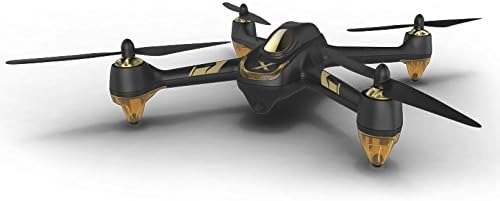
Image: Drone movement directions (forward, backward, left, right) as controlled by the transmitter sticks.
- Enlairament: After GPS lock, use the one-key take-off function or push both joysticks to the bottom-outer corners to arm motors, then push the left joystick up to ascend.
- Pujar/Descens: Use the left joystick (throttle) to control altitude.
- Endavant/Enrere: Feu servir el joystick dret per moure el dron endavant o enrere.
- Left/Right (Strafe): Use the right joystick to move the drone left or right horizontally.
- Yaw (Rotate): Feu servir el joystick esquerre per girar el dron cap a l'esquerra o la dreta.
- Aterratge: Use the one-key landing function or slowly pull the left joystick down to descend and land.
5.3 Modes de vol avançats
The Hubsan H501A features several intelligent flight modes for enhanced control and photography.

Image: The drone utilizing 'Follow Me' mode, automatically tracking a subject.
- Segueix-me: In this mode, the drone will automatically follow the transmitter or a designated GPS point, keeping the subject centered in the frame. Activate via the X-Hubsan app or transmitter.

Image: Visual representation of Automatic Take-Off and Return Home functions.
- Automatic Take-Off / Return Home (RTH): The drone can automatically take off and hover at a set altitude. The Return Home function, activated manually or automatically upon signal loss, guides the drone back to its take-off point and lands it.

Image: Visuals for APP Waypoint Function (flying a pre-set path) and APP Orbiting Function (circling a point).
- APP Waypoint Function: Plan a flight path by selecting points on the map within the X-Hubsan app. The drone will then fly along this predefined route.
- APP Orbiting Function: Select a point of interest in the app, and the drone will orbit around it at a specified radius and altitude, capturing continuous footage.
5.4 Funcionament de la càmera
The integrated 1080P HD camera allows for high-quality aerial photography and videography.
- Foto/vídeo: Use the dedicated buttons on the transmitter or controls within the X-Hubsan app to start/stop video recording or take still photos.
- Emmagatzematge: Footage is typically saved to a Micro SD card inserted into the drone (Micro SD card not included).
6. Manteniment
6.1 Cura de l'hèlix
- Inspect propellers before and after each flight for cracks, bends, or chips. Replace damaged propellers immediately.
- Assegureu-vos que les hèlixs estiguin netes i lliures de residus.
6.2 Manteniment de la bateria
- No sobrecarregueu ni descarregueu excessivament les bateries.
- Guardeu les piles en un lloc fresc i sec, allunyat de la llum solar directa i de temperatures extremes.
- Si emmagatzema les bateries durant períodes prolongats, carregueu-les fins a aproximadament un 50% de la seva capacitat.
6.3 Neteja i emmagatzematge
- Clean the drone's body with a soft, dry cloth. Avoid using solvents or harsh chemicals.
- Store the drone and its components in a protective case or bag to prevent damage.
7. Solució De Problemes
Consulteu aquesta secció per obtenir solucions a problemes comuns.
| Problema | Causa possible | Solució |
|---|---|---|
| El dron no s'encén | Bateria baixa o sense càrrega; instal·lació incorrecta de la bateria | Charge drone battery; Reinstall battery correctly |
| No GPS signal lock | Flying indoors; Obstructions; Magnetic interference | Move to an open outdoor area; Avoid areas with strong magnetic fields |
| Pèrdua de control/vol inestable | Weak signal; Damaged propellers; Incorrect calibration | Ensure drone is within range; Replace damaged propellers; Perform IMU/compass calibration |
| No camera feed in app | Wi-Fi not connected; App error | Reconnect to drone's Wi-Fi; Restart app and drone |
| Return Home (RTH) not working | No GPS lock at take-off point; Insufficient altitude | Ensure GPS lock before take-off; Fly above minimum RTH altitude |
8. Especificacions
Key technical specifications for the Hubsan H501A X4 Brushless Drone.
- Marca: HUBSAN
- Número de model: H501A+HT011A
- Característica especial: GPS integrat
- Resolució de gravació de vídeo: 1080p
- Components inclosos: Camera, Transmitter
- Tipus de control: Aplicació, control remot
- Interval màxim: 300 metres
- Tecnologia de comunicació sense fils: Wi-Fi
- Bateries incloses: Yes (for drone)
- Comandament a distància inclòs: Yes (HT011A)
- Rechargeable Batteries Supplied: Sí
- Media Type (for storage): Micro SD (card not included)
- Descripció de la franja d'edat: Adult
- GTIN: 840250110995
9. Garantia i Suport
For warranty information and technical support, please refer to the official HUBSAN weblloc web o poseu-vos en contacte amb el vostre distribuïdor autoritzat. Conserveu el rebut de compra com a comprovant de compra per a reclamacions de garantia.
Official HUBSAN Weblloc: www.hubsan.com