
1. Introducció
Gràcies per la compraasing the GooDee Mini Projector GD-DE-9. This manual provides essential information for setting up, operating, and maintaining your projector. Please read it thoroughly before use to ensure optimal performance and safety.
The GooDee GD-DE-9 is a portable LED projector designed for home entertainment, gaming, and presentations. It features a native resolution of 800x480p, supports up to 1080p input, and offers multiple connectivity options including HDMI, VGA, USB, AV, and SD card. Its advanced cooling system ensures quiet operation, and the integrated 2W speaker provides clear audio.

Figura 1.1: Frontal view of the GooDee Mini Projector GD-DE-9.
2. Informació de seguretat
Per evitar incendis, descàrregues elèctriques o lesions, observeu les següents precaucions de seguretat:
- No obriu el projector casing. Demaneu totes les tasques de manteniment a personal de servei qualificat.
- No exposeu el projector a la pluja o la humitat per evitar incendis o descàrregues elèctriques.
- Assegureu-vos una ventilació adequada. No bloquegeu les obertures de ventilació.
- Feu servir només l'adaptador de corrent que s'inclou amb el projector.
- Eviteu mirar directament a la lent del projector quan lamp està activat.
- Col·loqueu el projector sobre una superfície estable i plana.
- Desendolleu el projector de la presa de corrent durant tempestes o quan no l'utilitzeu durant períodes prolongats.
3. Contingut del paquet
Si us plau, comproveu que tots els articles estiguin inclosos al vostre paquet:
- GooDee Mini Projector GD-DE-9
- Adaptador d'alimentació
- Control remot
- Cable HDMI
- Cable AV
- Manual d'usuari
4. Producte acabatview
4.1 Components del projector

Figura 4.1: lateral view amb ports d'entrada/sortida.
The projector features a direct light path optical technology for enhanced brightness and an advanced cooling system for quiet operation.

Figure 4.2: Advanced Cooling System and HIFI Stereo Speaker.
4.2 Control remot
The remote control allows you to operate the projector from a distance. Insert two AAA batteries (not included) into the remote control before use.

Figura 4.3: Control remot.
5. Configuració
5.1 Placement and Projection Distance
The image size is adjusted by changing the projection distance. For optimal viewing, a projection distance between 1.5 to 4 meters is recommended, yielding screen sizes from 50 to 130 inches. The best projection size is typically 80-100 inches at a distance of 6.6-8 feet.

Figure 5.1: Projection Distance and Screen Size Chart.
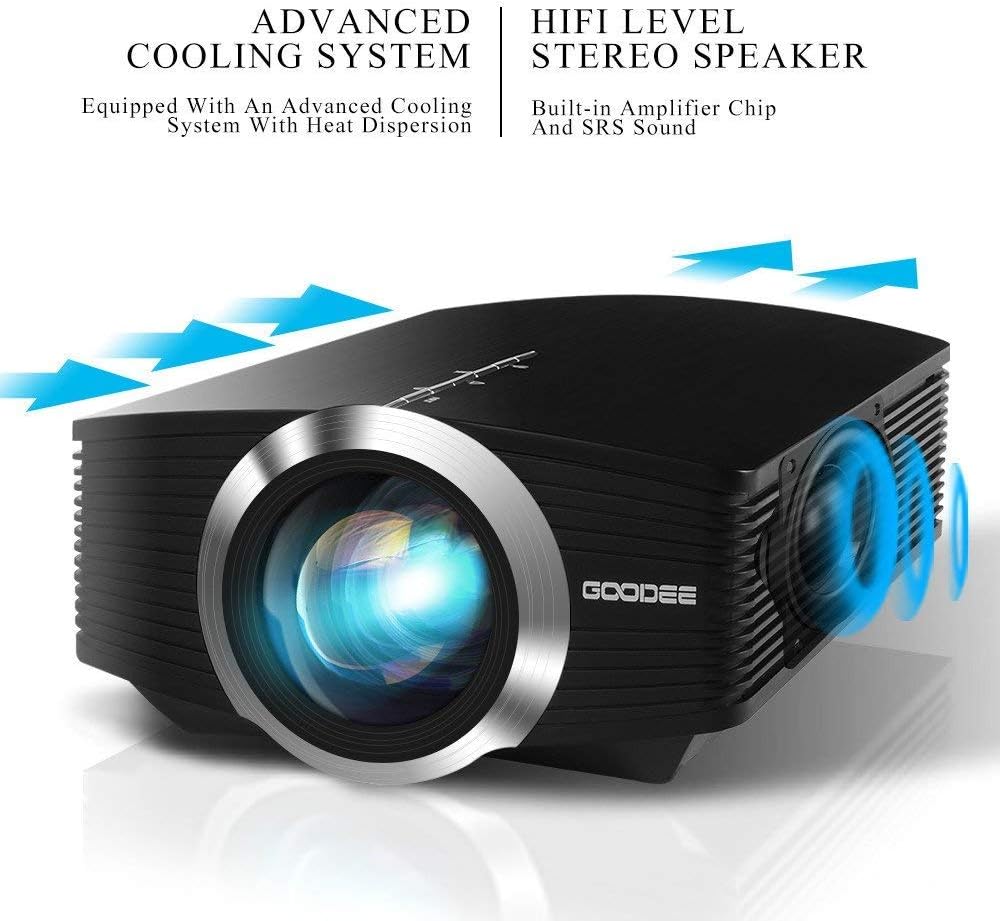
Figura 5.2: Example Projector Placement.
5.2 Connexió d'alimentació
Connecteu l'adaptador de corrent al port d'entrada d'alimentació del projector i, a continuació, endolleu l'adaptador a una presa de corrent.
5.3 Connexió de dispositius d'entrada
The projector supports various input sources including HDMI, VGA, USB, AV, and SD card. It can connect to PCs, laptops, DVD players, PS3/4, Xbox ONE, and smartphones/tablets (via MHL cable and adapter, not included).

Figure 5.3: Multimedia Connection Diagram.
To connect a smartphone or tablet, ensure your device supports MHL functionality. You will need an MHL cable and a suitable adapter (not included).

Figure 5.4: Connecting Smartphones/Tablets.
5.4 Focus Adjustment and Keystone Correction
Adjust the focus ring on the projector lens until the image is clear. Use the keystone correction feature to adjust the image if it appears trapezoidal. The projector supports a ±15° keystone correction.
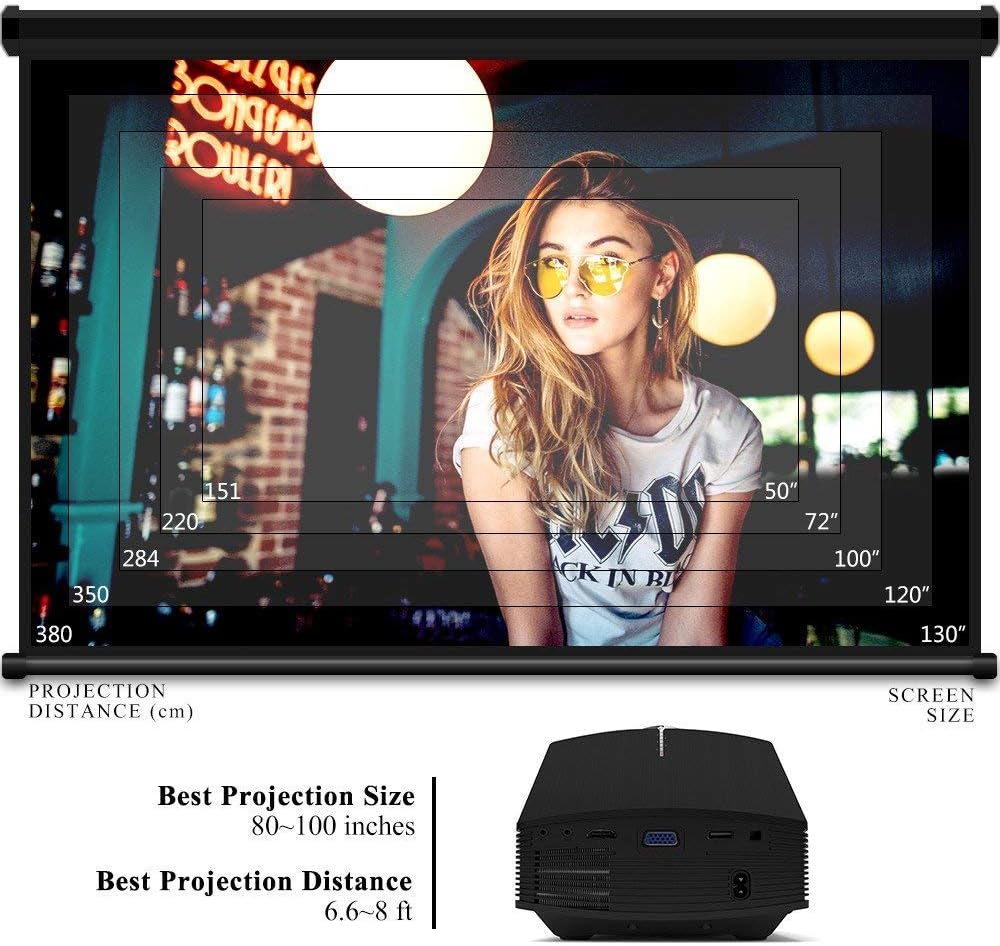
Figure 5.5: Focus and Keystone Adjustment.
6. Instruccions de funcionament
6.1 Encès/Apagat
Press the power button on the projector or the remote control to turn the projector on or off.
6.2 Selecció de la font
Press the 'Source' button on the projector or remote control to cycle through available input sources (HDMI, VGA, USB, AV, SD). Select the desired input source corresponding to your connected device.
6.3 Navegació de menús
Use the arrow buttons on the projector or remote control to navigate through the on-screen menu. Press 'OK' or 'Enter' to confirm selections. Use the 'Menu' button to access settings and 'Exit' or 'Return' to go back.
6.4 Sortida d'àudio
The projector has a built-in 2W speaker. For external audio, connect speakers or headphones to the 3.5mm audio output jack on the projector.
7. Manteniment
7.1 Neteja de la lent
Use a soft, lint-free cloth or lens cleaning paper to gently wipe the projector lens. Do not use abrasive cleaners or solvents.
7.2 Neteja de les reixetes d'aire
Regularly clean the air vents to ensure proper airflow and prevent overheating. Use a soft brush or compressed air to remove dust accumulation.
7.3 Emmagatzematge
When not in use, store the projector in a cool, dry place, away from direct sunlight and extreme temperatures. Use the original packaging or a protective case to prevent dust and damage.
8. Solució De Problemes
| Problema | Causa possible | Solució |
|---|---|---|
| No es mostra cap imatge | Incorrect input source selected; Cable not connected properly; Device not powered on. | Select the correct input source; Check all cable connections; Ensure the source device is powered on. |
| La imatge és borrosa | Enfocament no ajustat; Projector massa a prop/lluny de la pantalla. | Ajusteu l'anell d'enfocament; Ajusteu la distància de projecció. |
| La imatge és trapezoïdal | Projector no perpendicular a la pantalla. | Adjust keystone correction. |
| Sense so | Volume too low; Muted; External audio device not connected/configured. | Increase volume; Unmute; Check external audio connections and settings. |
| El comandament a distància no funciona | Batteries low/dead; Obstruction between remote and projector; Remote sensor blocked. | Replace batteries; Remove obstructions; Ensure remote sensor is clear. |
9. Especificacions
| Característica | Detall |
|---|---|
| Marca | GoodDee |
| Número de model | GD-DE-9 |
| Tipus de visualització | LCD |
| Resolució nativa | 800 x 480 píxels |
| Resolució suportada | Fins a 1080p |
| Brillantor | 3000 Lumens (LED) |
| Lamp La vida | 30,000 hores |
| Tecnologia de connectivitat | HDMI, USB, VGA, AV, SD Card |
| Interfície del maquinari | HDMI, USB, VGA |
| Altaveu integrat | 2W Stereo Speaker |
| Distància de projecció | 1.5 - 4 meters (6.6 - 8 feet recommended) |
| Mida de la pantalla | 50 - 130 inches (80 - 100 inches recommended) |
| Correcció de pedra clau | ±15° Manual |
| Factor de forma | Portàtil |
| Tipus de muntatge | Muntatge de taula |
| Color | Negre |
| Dimensions del paquet | 33 x 21.6 x 11.8 cm |
| Pes de l'article | 1.48 kg |
| Ús recomanat | Gaming, Home Theater |
| Dispositius compatibles | Smartphone, PC, Laptop, DVD Player, PS3/4, Xbox ONE, Fire TV Stick |
10. Garantia i Suport
GooDee offers a 3-year warranty for this projector. If you encounter any issues or are not completely satisfied with your purchase, please contact GooDee customer support. A refund or replacement is available within the first 2 months of purchase. Customer satisfaction is our top priority.
For support, please refer to the contact information provided on the GooDee official weblloc web o la vostra plataforma de compra.


