
1. Producte acabatview
The DJI Mini 4 Pro is a compact and advanced camera drone designed for aerial photography and videography. Weighing under 249 grams, it offers enhanced portability and often requires no registration in many regions (always check local regulations). This drone is equipped with a high-resolution camera, intelligent flight features, and robust obstacle sensing capabilities.
The Fly More Combo includes additional accessories to extend flight time and enhance the user experience.
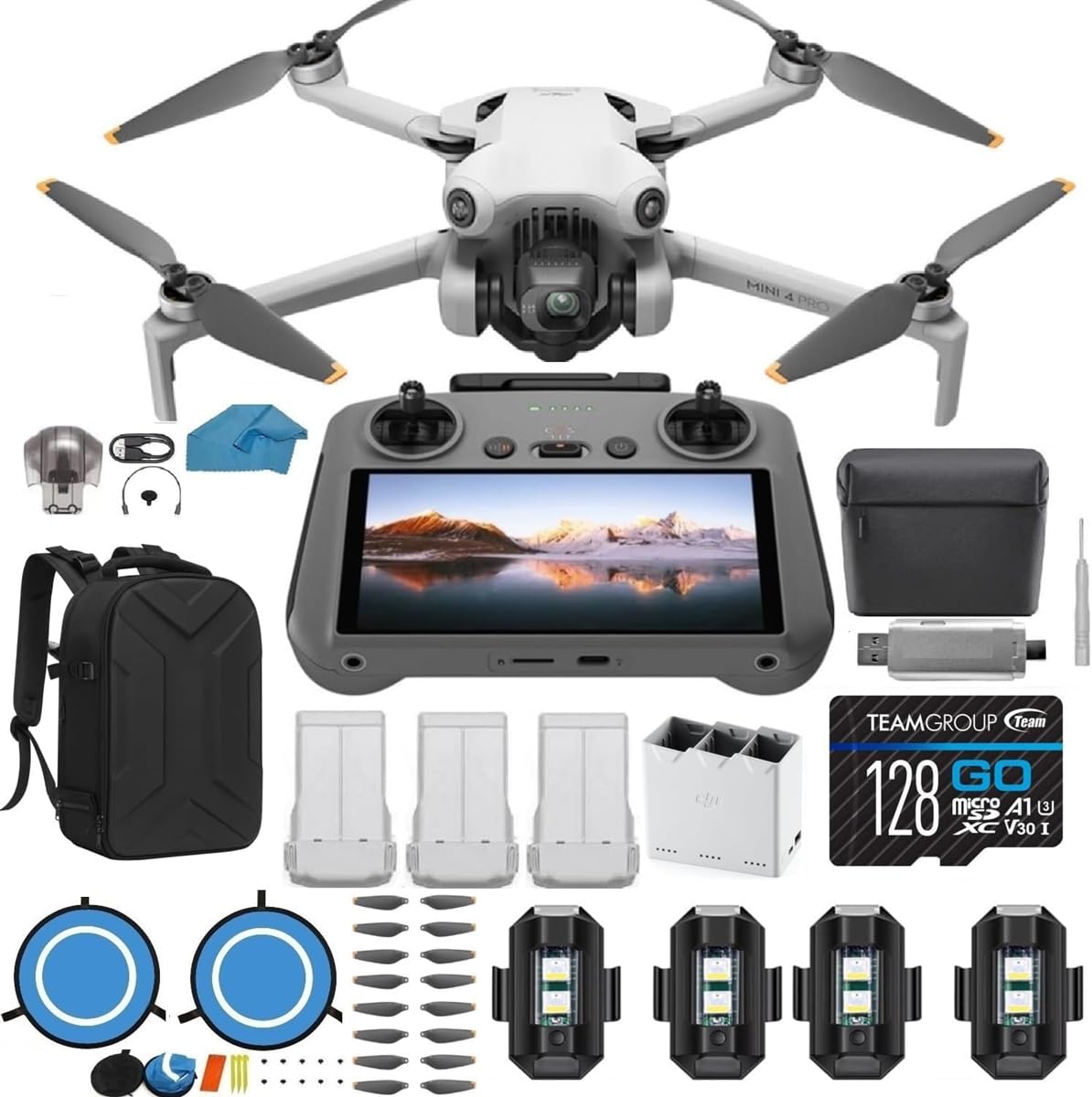
Figure 1: DJI Mini 4 Pro Drone and DJI RC 2 Remote Controller.

Figure 2: The DJI Mini 4 Pro Drone in its compact, folded state.
2. Guia de configuració
2.1 Desembalatge i inspecció inicial
Carefully remove all components from the packaging. Verify that all items listed in your Fly More Combo are present:
- DJI Mini 4 Pro Drone (with DJI RC 2 Remote Controller)
- 3x DJI Intelligent Flight Batteries
- 1x Two-way Charging Hub
- 1x Shoulder Bag
- 2 Pairs (10 pieces) of Propellers
- 1x Gimbal Holder
- Cables i adaptadors
- Quick Start Manuals
- 1 targeta SD de 128 GB
- 1x USB 3.0 SD Card Reader
- 1x Micro Fiber Cleaning Cloth
- 1x estoig
- 1x Landing Pad
- 1x tornavís
- 6x cargols
- 4x Strobe Lights
2.2 Càrrega de bateries
Before first use, fully charge all Intelligent Flight Batteries using the provided Two-way Charging Hub and appropriate power adapter. The charging hub allows for sequential charging of multiple batteries.
2.3 Preparació del Drone
- Unfold the drone arms. The front arms unfold first, followed by the rear arms.
- Traieu el protector del gimbal.
- Insert a charged Intelligent Flight Battery into the drone until it clicks securely into place.
- Insert the 128GB SD card into the drone's SD card slot.
2.4 Remote Controller Preparation
Ensure the DJI RC 2 remote controller is fully charged. Attach the control sticks by screwing them into the designated ports on the controller.
3. Instruccions de funcionament
3.1 Engegada/apagada
- To power on: Press the power button once, then press and hold it for two seconds.
- To power off: Repeat the power-on sequence.
3.2 Operacions de vol bàsiques
After powering on the drone and remote controller, ensure they are linked. The DJI RC 2's built-in screen will display the camera view and flight information. Always ensure sufficient GPS signal before taking off.
- Enlairament: Place the drone on a flat, open surface. Use the auto take-off function via the remote controller or manually push both control sticks down and outwards to start the motors, then push the left stick up to ascend.
- Aterratge: Use the auto-landing function or slowly pull the left stick down to descend. Hold the stick down for a few seconds after landing to stop the motors.
- Control de vol: Use the left stick to control altitude and rotation (yaw). Use the right stick to control forward/backward (pitch) and left/right (roll) movement.
3.3 Funcions intel·ligents

Figure 3: Omnidirectional Obstacle Sensing in action, providing enhanced flight safety.
- Detecció d'obstacles omnidireccional: The drone features sensors in all directions to detect and avoid obstacles, enhancing flight safety.
- ActiveTrack 360°: This feature allows the drone to automatically track a subject from various angles, providing dynamic footage.
- Advanced RTH (Return-to-Home): The drone can automatically return to its take-off point when the battery is low or connection is lost, navigating obstacles along the way.

Figure 4: Key features of the DJI Mini 4 Pro, including extended flight time and advanced tracking.
3.4 Funcionament de la càmera

Figure 5: High-quality imaging features of the DJI Mini 4 Pro.
- Gravació de vídeo: The drone supports 4K/60fps HDR video recording, and 4K/100fps for slow-motion effects.
- Captura de fotos: Capture still images at 48 MP resolution, including RAW format for professional editing.
- Tret vertical real: The gimbal can rotate to allow for native vertical video capture, ideal for social media platforms.
- Control de cardán: Use the remote controller's dedicated dial to adjust the camera's tilt angle during flight.
4. Manteniment
4.1 Substitució de l'hèlix
Regularly inspect propellers for any signs of damage (cracks, bends, chips). Replace damaged propellers immediately using the spare propellers and screwdriver provided in the kit. Ensure correct propeller types are installed on the corresponding motor arms (indicated by markings).
4.2 Cura de la bateria
- Always use official DJI charging equipment.
- No sobrecarregueu ni descarregueu excessivament les bateries.
- Emmagatzemeu les bateries en un lloc fresc i sec, lluny de la llum solar directa.
- If storing for extended periods, discharge batteries to approximately 50-60% capacity.
4.3 Neteja
Use the microfiber cleaning cloth to gently wipe the drone's body, camera lens, and sensors. Avoid using harsh chemicals or abrasive materials.
5. Solució De Problemes
5.1 Problemes comuns i solucions
- El dron no s'encén: Ensure the battery is fully charged and correctly inserted. Perform the power-on sequence (press once, then press and hold).
- Loss of signal: Fly within the recommended range (up to 4.3 miles). Ensure no major obstructions are between the remote controller and the drone.
- Vol inestable: Check propellers for damage and replace if necessary. Ensure flight is conducted in calm weather conditions, as strong winds can affect stability.
- Mala qualitat d'imatge/vídeo: Clean the camera lens with the microfiber cloth. Ensure adequate lighting conditions. Adjust camera settings as needed.
- L'evitació d'obstacles no funciona: Ensure obstacle sensing is enabled in the app settings. Fly at appropriate speeds in complex environments.
5.2 Consideracions importants
- Normativa local: Always check and comply with local drone flight regulations and laws before operating the drone.
- Corba d'aprenentatge: Familiarize yourself with the drone's controls and features in a safe, open environment before attempting complex maneuvers.
6. Especificacions
| Marca | DJI |
| Nom del model | Mini 4 Pro |
| Pes de l'article | 3 lliures (aprox. 1.36 kg) |
| Resolució de captura de vídeo | 4K |
| Resolució de fixes efectius | 12 MP (up to 48 MP RAW) |
| Tecnologia de connectivitat | Wi-Fi |
| Composició de les cèl·lules de la bateria | Ió de liti |
| Interval màxim | 4.3 milles (aprox. 6.9 km) |
| Tipus de control | Control remot |
| Material | Plàstic |
| Temperatura de funcionament | 14 Degrees Fahrenheit (-10°C) |
7. Garantia i Suport
7.1 Informació de la garantia
The DJI Mini 4 Pro Drone typically comes with a 1-year manufacturer's warranty. Please refer to the official DJI warranty policy for detailed terms and conditions.
7.2 Atenció al client
For technical assistance, troubleshooting beyond this manual, or warranty claims, please contact DJI customer support directly. If purchased from a third-party seller, such as Koozam - Same Day Shipping, you may also reach out to them for initial support, though their primary contact method may be email only.