
1. Introducció
The Nulaxy TM185G is a 2.4G wireless vertical ergonomic mouse designed to promote a natural 'handshake' wrist and arm position, reducing strain during extended use. This manual provides detailed instructions for the setup, operation, maintenance, and troubleshooting of your Nulaxy TM185G mouse.

Figure 1.1: Nulaxy TM185G Wireless Vertical Ergonomic Mouse
2. Contingut del paquet
- 1 x Nulaxy TM185G Wireless Vertical Ergonomic Mouse
- 1 x Receptor USB (guardat al compartiment de la bateria del ratolí)
- 1 x Manual d'usuari
3. Instruccions de configuració
3.1 Instal·lació de la bateria
- Localitzeu el compartiment de la bateria a la part inferior del ratolí.
- Obriu la tapa del compartiment de la bateria.
- Insert two (2) AAA batteries (not included) according to the polarity indicators (+/-) inside the compartment.
- Tanqueu bé la tapa del compartiment de la bateria.
3.2 USB Receiver Connection
- The USB receiver is stored inside the battery compartment for safekeeping. Remove it before use.
- Connecteu el receptor USB a un port USB disponible de l'ordinador o portàtil.
- The computer should automatically detect and install the necessary drivers. No additional software installation is required.
3.3 Powering On the Mouse
- Locate the Power Switch on the bottom of the mouse.
- Feu lliscar l'interruptor a la posició "ON".
- El ratolí ja està llest per al seu ús.

Figura 3.1: A baix view with Power Switch, Receiver Slot, and Battery Slot
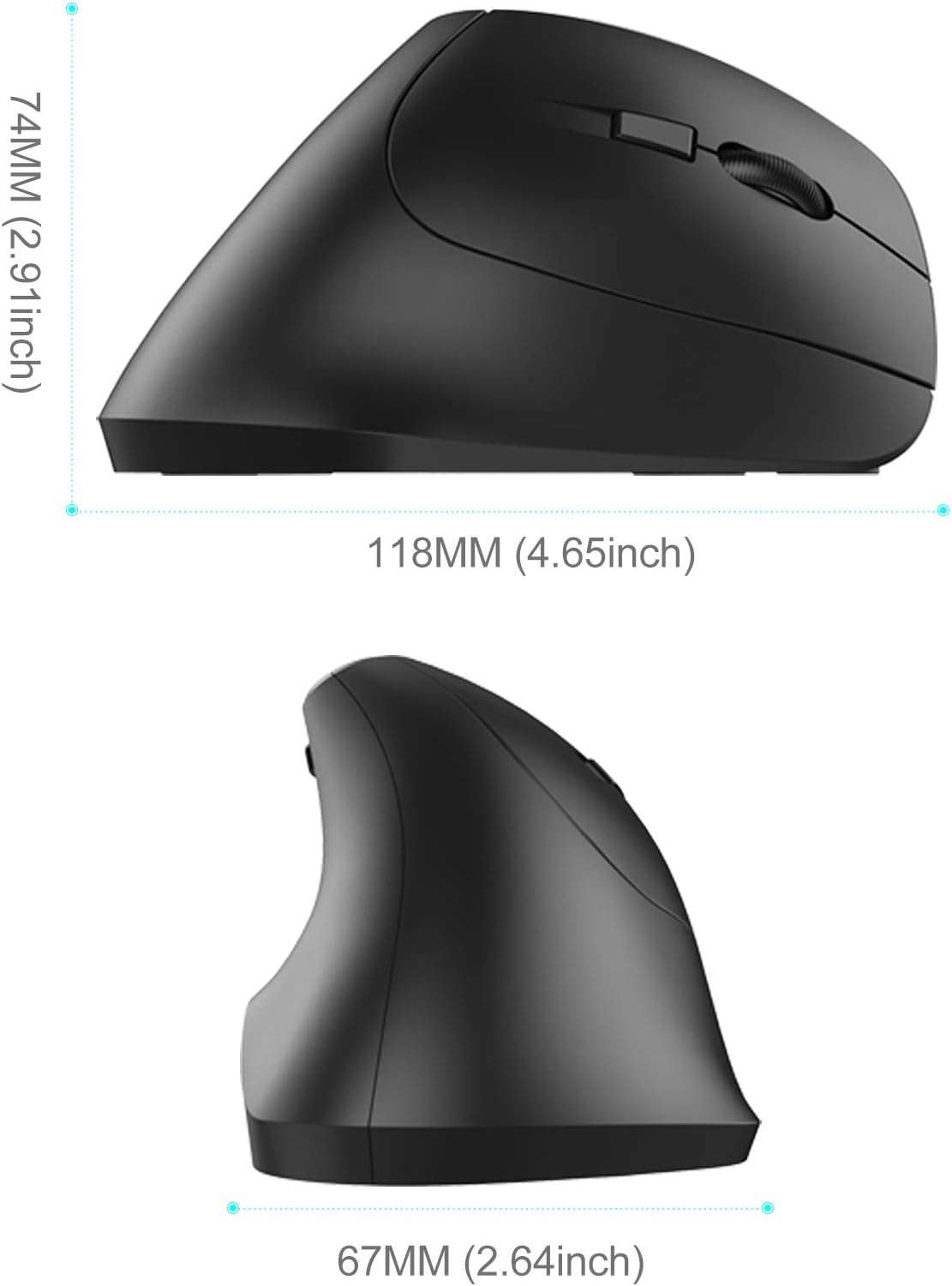
Figure 3.2: Nulaxy TM185G Mouse and USB Receiver
4. Instruccions de funcionament
4.1 Disseny ergonòmic
The vertical design of the Nulaxy TM185G mouse promotes a neutral wrist posture, similar to a handshake, which can help prevent wrist pronation and reduce muscle tension compared to traditional horizontal mice.

Figure 4.1: Vertical Mouse vs. Standard Mouse Hand Position

Figure 4.2: Proper Hand Grip on the Vertical Mouse
4.2 Funcions dels botons
The Nulaxy TM185G mouse features 6 buttons for enhanced productivity:
- Botó esquerre: Funció estàndard del clic esquerre.
- Botó dret: Funció estàndard del clic dret.
- Roda de desplaçament: Desplaceu-vos amunt/avall i feu clic per a la funció del botó central.
- Botó de commutació de DPI: Ajusta la sensibilitat del cursor (DPI).
- Botó Endavant: Navega cap endavant web navegadors o file exploradors.
- Botó enrere: Navega cap enrere web navegadors o file exploradors.

Figure 4.3: Multi-functional Buttons Overview
4.3 Ajust de DPI
The DPI (Dots Per Inch) switch button allows you to change the cursor speed and sensitivity. Press the DPI button to cycle through the available settings:
- 800 DPI: Lower sensitivity, suitable for precise tasks.
- 1200 DPI: Medium sensitivity, standard for general use.
- 1600 DPI: Higher sensitivity, for faster cursor movement.
5. Manteniment
- Neteja: Feu servir un drap suau i sec per netejar el ratolí. Per a la brutícia persistent, fregueu lleugerament.ampNetegeu el drap amb aigua o una solució de neteja suau. Eviteu productes químics agressius.
- Substitució de la bateria: Replace batteries when the mouse performance degrades or stops responding. Always use fresh AAA batteries.
- Emmagatzematge: When not in use for extended periods, turn off the mouse using the power switch to conserve battery life. Store the USB receiver inside the battery compartment to prevent loss.
6. Solució De Problemes
- El ratolí no respon:
- Ensure the mouse is powered on (switch on the bottom).
- Comproveu si les piles estan correctament instal·lades i tenen prou càrrega. Substituïu-les si cal.
- Verify that the USB receiver is securely plugged into a working USB port on your computer.
- Proveu de connectar el receptor USB a un port USB diferent.
- Reinicieu l'ordinador.
- El moviment del cursor és erràtic o imprecís:
- Netegeu el sensor òptic de la part inferior del ratolí.
- Assegureu-vos que feu servir el ratolí sobre una superfície adequada. Eviteu superfícies molt reflectants o transparents.
- Adjust the DPI setting using the DPI switch button to find a comfortable sensitivity.
- Forward/Backward buttons not working:
- Note that the Forward/Backward buttons are generally not supported in Mac OS X.
- Ensure your application supports these navigation buttons.
7. Especificacions
| Característica | Detall |
|---|---|
| Marca | Nulaxi |
| Model | TM185G |
| Connectivitat | Sense fil 2.4G (receptor USB) |
| Configuració de DPI | 800 / 1200 / 1600 |
| Nombre de botons | 6 (Esquerra, Dreta, Roda de desplaçament, Interruptor DPI, Endavant, Enrere) |
| Orientació de la mà | D'acord |
| Font d'alimentació | 2 piles AAA (no incloses) |
| Dimensions (L x A x A) | 11.81 x 6.71 x 7.39 cm (4.65 x 2.64 x 2.91 polzades) |
| Pes | 118 g |
| Tecnologia de detecció de moviment | Òptic |
| Sistemes operatius compatibles | Windows 2000 / XP / Vista / 7 / 8 / 10, Linux, Mac (Forward/Backward buttons unavailable) |

Figure 7.1: Mouse Dimensions (Side View)

Figure 7.2: Mouse Dimensions (Front View)

Figure 7.3: Mouse Dimensions (Top View)
8. Garantia i Suport
For warranty information, technical support, or any inquiries regarding your Nulaxy TM185G mouse, please refer to the product packaging or contact Nulaxy customer service directly through their official weblloc web o el venedor on es va comprar el producte.