
Introducció
This manual provides detailed instructions for the installation, operation, and maintenance of your VTech DS6151-11 2-Line Cordless Phone System, which includes the DS6151-11 base unit and up to four DS6101-11 accessory handsets. This system features DECT 6.0 technology for clear communication, a 2-line operation capability, and an integrated digital answering system.
Contingut del paquet
Comproveu que el vostre paquet contingui els elements següents:
- 1 x DS6151-11 Cordless Base Unit with Cordless Handset
- 4 x DS6101-11 Cordless Handsets
- 5 carregadors de telèfon
- 2 x AC Power Adapters (for base and chargers)
- 2 x Telephone Line Cords
- 9 x AAA Rechargeable Batteries (for handsets)
- Manual d'usuari (aquest document)
Configuració
1. Instal·lació de la bateria
Each cordless handset requires three AAA rechargeable batteries. Follow these steps to install them:
- Obriu la tapa del compartiment de la bateria a la part posterior del telèfon.
- Insert three AAA rechargeable batteries, observing the correct polarity (+ and - markings).
- Tanqueu bé la tapa del compartiment de la bateria.
2. Connexió de la unitat base
Connect the base unit to your telephone line and power outlet:
- Plug one end of the telephone line cord into the TEL LINE jack on the back of the base unit.
- Connecteu l'altre extrem del cable de la línia telefònica a una presa de paret.
- Plug the small end of the AC power adapter into the POWER jack on the back of the base unit.
- Connecteu l'extrem gran de l'adaptador de corrent altern a una presa de corrent estàndard.
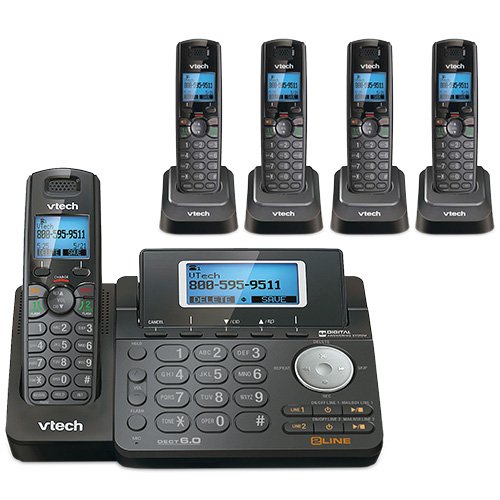
Figura 1: VTech DS6151-11 Base Unit. This image shows the main base unit with its keypad, LCD screen, and digital answering system controls. The base unit is dark gray with silver buttons and a blue backlit screen displaying "VTech 800-595-9511".
3. Charging Handsets
Place each handset into its respective charger. The CHARGE indicator on the handset will illuminate, indicating it is charging. Allow at least 16 hours for the batteries to fully charge before initial use.

Figura 2: VTech DS6101-11 Handset in Charging Cradle. This image displays a cordless handset securely placed in its compact charging cradle. The handset is dark gray with a black keypad and a VTech logo on the cradle.
Instruccions de funcionament
Fer i rebre trucades
- Per fer una trucada: Premeu LÍNIA 1 or LÍNIA 2, then dial the number. Alternatively, dial the number first and then press LÍNIA 1 or LÍNIA 2.
- Per respondre una trucada: When the phone rings, press any key from LÍNIA 1, LÍNIA 2, o PARLAR.
- Per finalitzar una trucada: Premeu OFF o torneu a col·locar el telèfon al carregador.
- Altaveu: Durant una trucada, premeu el botó PONENT button to switch to speakerphone mode. Press it again to return to handset mode.
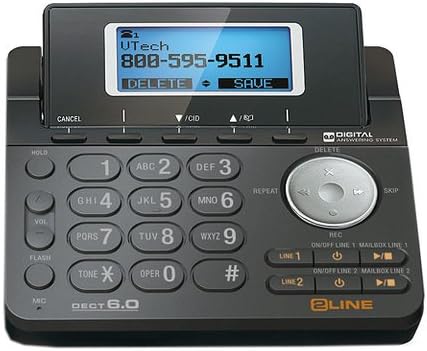
Figura 3: VTech DS6101-11 Cordless Handset. This image shows the full cordless handset, highlighting its ergonomic design, keypad, and display screen. The handset is dark gray with a black keypad and a blue backlit screen.
Identificació de trucades i trucada en espera
This system supports Caller ID and Call Waiting services. To use these features, you must subscribe to them through your telephone service provider.
- Pantalla d'identificació de trucades: Incoming call information (name and number) will appear on the handset's LCD screen.
- Trucada en espera: If you are on a call and another call comes in, you will hear a tone. Press FLASH per canviar entre trucades.
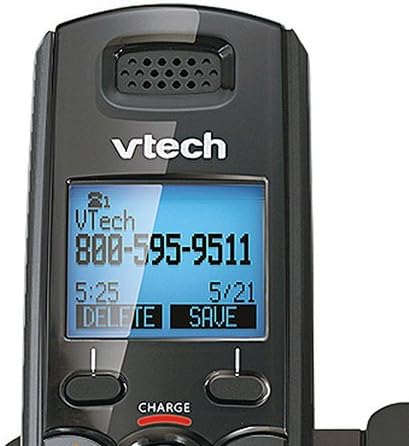
Figura 4: VTech DS6101-11 Handset LCD Screen. A close-up view of the handset's blue backlit LCD screen, displaying caller information such as "VTech 800-595-9511" along with time and date. The screen shows options like "DELETE" and "SAVE".
Phonebook Directory
The system can store up to 50 names and numbers in its phonebook directory. Refer to the detailed instructions in the full user manual for adding, editing, and deleting entries.
Ajust de volum
Durant una trucada, premeu el botó VOL button on the side of the handset or the VOL buttons on the base unit to adjust the listening volume.
Handset Locator / Paging
To locate a misplaced handset, press the PÀGINA button on the base unit. All registered handsets will ring.
Sistema de resposta digital
The VTech DS6151-11 base unit includes a digital answering system with approximately 13 minutes of recording time. It features a dedicated mailbox for each line.
- Activació/desactivació: Utilitza el ON/OFF LINE 1 i ON/OFF LINE 2 buttons on the base unit to activate or deactivate the answering system for each line.
- Reproducció de missatges: Premeu el botó PLAY/STOP button on the base unit to listen to messages. Use the SALTAR i REPETIR buttons to navigate messages.
- Retrieving Messages Remotely: You can access your messages from an outside line using a remote access code. Refer to the full manual for detailed instructions on setting up and using remote access.
Manteniment
Neteja
Clean the phone's surfaces with a soft, damp cloth. Do not use cleaning sprays or harsh chemicals. Avoid getting moisture into any openings.
Cura de la bateria
To ensure optimal battery life, always return the handset to its charger when not in use. If the phone will be unused for an extended period, remove the batteries to prevent leakage.
Resolució de problemes
If you experience issues with your phone system, try the following common solutions:
- Sense to de marcatge:
- Ensure the base unit's power adapter is securely plugged into an electrical outlet.
- Verify that the telephone line cord is properly connected to both the base unit and the wall jack.
- Prova la presa de paret amb un altre telèfon que funcioni.
- Qualitat de so baixa:
- Apropeu el telèfon a la unitat base.
- Assegureu-vos que no hi hagi objectes metàl·lics grans ni altres dispositius electrònics que interfereixin amb el senyal.
- Check for fully charged batteries in the handset.
- El telèfon no es carrega:
- Ensure the handset is correctly seated in the charger.
- Verify the charger's power adapter is plugged into a working electrical outlet.
- Clean the charging contacts on both the handset and charger with a dry cloth.
- El contestador automàtic no grava:
- Check if the answering system for the respective line is turned ON.
- Ensure there is sufficient recording time available (13 minutes total).
For more detailed troubleshooting, please refer to the comprehensive user manual or visit the VTech support weblloc.
Especificacions
| Característica | Especificació |
|---|---|
| Marca | VTech |
| Números de model | DS6151-11 (Base), DS6101-11 (Handset) |
| Tipus de telèfon | Sense fils |
| Tecnologia | DECT 6.0 (1.9GHz) |
| Nombre de línies | Funcionament de 2 línies |
| Expandabilitat | Fins a 12 telèfons |
| Tipus de contestador | Digital |
| Capacitat d’enregistrament | 13 minuts |
| Identificador de trucades / Trucada en espera | Yes (Subscription required) |
| Phonebook Directory | 50 Name/Number Stations |
| Mostra | Pantalla LCD retroil·luminada gran |
| Teclat | Teclat retroil·luminat |
| Bateries | Calen 9 piles recarregables AAA (3 per auricular) |
| Material | Plàstic |
| Color | Negre |
| UPC | 650415512850 |
| ASIN | B07H291DZ5 |
Garantia i Suport
For warranty information, technical support, or to purchase accessories, please visit the official VTech website or contact VTech customer service. Keep your purchase receipt as proof of purchase for warranty claims.
VTech Official Store: VTech on Amazon