
1. Introducció
This manual provides essential information for setting up, operating, maintaining, and troubleshooting your HP 24-F0047C All-in-One PC. Please read these instructions carefully to ensure proper use and longevity of your device.
2. Producte acabatview
The HP 24-F0047C is an All-in-One desktop computer featuring a 23.8-inch Full HD IPS WLED-backlit touchscreen display. It integrates all computer components into a single unit, offering a compact and streamlined computing experience.
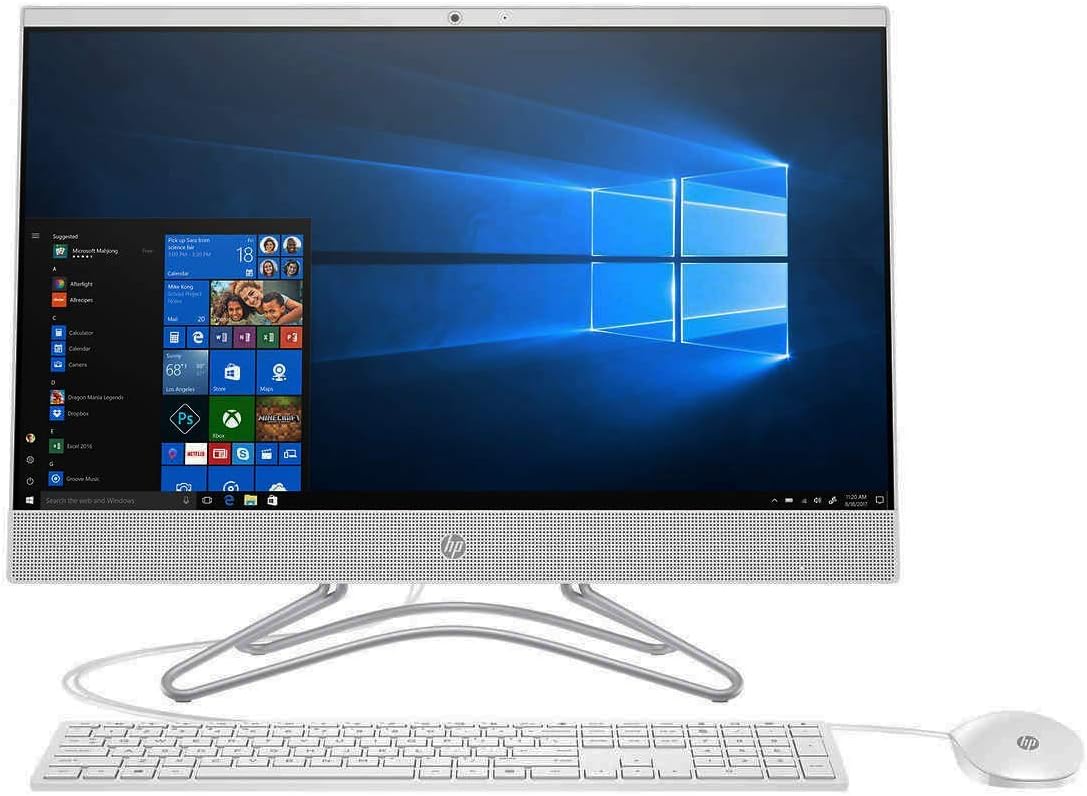
Figura 2.1: Frontal view of the HP 24-F0047C All-in-One PC with keyboard and mouse.
Components frontals
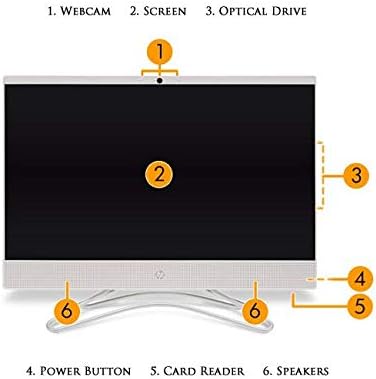
Figure 2.2: Front component identification.
- Weblleva: Integrated HP HD Privacy Camera for video calls and conferencing.
- Pantalla: 23.8-inch Full HD IPS WLED-backlit Touchscreen Micro Edge Display.
- Unitat òptica: DVD Writer (located on the side, indicated by diagram).
- Botó d'encesa: Serveix per encendre o apagar l'ordinador.
- Lector de targetes: 3-in-1 Media Card Reader.
- Ponents: Altaveus estèreo integrats.
Components posteriors i ports
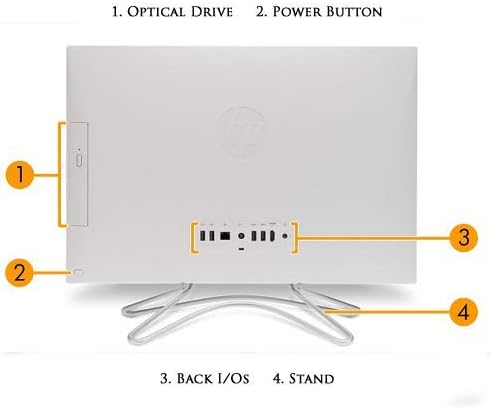
Figure 2.3: Rear component and port identification.
- Unitat òptica: DVD Writer.
- Botó d'encesa: Secondary power button location or indicator.
- Back I/O (Input/Output) Ports: Includes USB ports, HDMI, LAN, and audio jacks.
- Stand: Provides stable support for the All-in-One PC.
3. Configuració
Follow these steps to set up your HP 24-F0047C All-in-One PC.
3.1 Desembalatge
- Traieu amb cura l'ordinador i tots els accessoris de l'embalatge.
- Ensure all components listed in the 'What's in the Box' section are present: HP 24-F0047C All-in-One PC, USB Keyboard, and USB Optical Mouse.
3.2 Connexió de perifèrics
- Teclat i ratolí: Connect the USB keyboard and USB optical mouse to the available USB ports on the rear of the PC.
- Potència: Connect the power adapter to the power input port on the rear of the PC, then plug the power cord into a wall outlet.
3.3 Engegada inicial i configuració de Windows
- Press the power button located on the front or rear of the PC to turn it on.
- The PC will boot up and guide you through the initial Windows 10 setup process. Follow the on-screen instructions to configure your region, language, network connection, and user account.
- Once Windows 10 is set up, your PC is ready for use.
4. Funcionament
This section covers the basic operation of your HP 24-F0047C All-in-One PC.
4.1 Ús de la pantalla tàctil
- The 23.8-inch display supports touch input. You can interact with Windows 10 and applications directly on the screen using gestures similar to a tablet or smartphone.
- Use a light touch and ensure your screen is clean for optimal responsiveness.
4.2 Teclat i ratolí
- The included USB keyboard and mouse provide traditional input methods for typing, navigation, and executing commands.
- Ensure they are securely connected to the USB ports.
4.3 Optical Drive (DVD Writer)
- The integrated DVD Writer allows you to read and write data to CDs and DVDs.
- To open the tray, press the eject button usually located near the drive slot. Insert the disc with the label side facing up.
4.4 Media Card Reader
- Insert compatible memory cards (e.g., SD cards) into the 3-in-1 Media Card Reader slot to access photos, videos, and other files.
4.5 Connectivitat
- Wi-Fi: Connect to wireless networks using the integrated 802.11ac Wireless module. Access network settings through Windows 10.
- LAN: For a wired network connection, plug an Ethernet cable into the 10/100/1000 Gigabit LAN port on the rear of the PC.
- Bluetooth: Pair Bluetooth-enabled devices such as headphones, speakers, or other peripherals using Bluetooth 4.2. Manage Bluetooth devices through Windows settings.
- Ports USB: Utilize the 2 USB 3.1 ports and 2 USB 2.0 ports for connecting external devices like printers, external hard drives, or USB flash drives.
- HDMI: Connect an external display or projector using the HDMI output port.
4.6 HP HD Privacy Camera
- The integrated front-facing HP HD Privacy Camera can be used for video conferencing, online meetings, or capturing photos/videos.
- Ensure the camera is enabled in your privacy settings and within the application you are using.
5. Manteniment
Proper maintenance helps ensure the longevity and optimal performance of your PC.
5.1 Neteja de l'ordinador
- Pantalla: Utilitzeu un drap suau i sense pelusa lleugerament dampNetegeu-ho amb aigua o una solució netejadora de pantalles. Eviteu productes químics agressius.
- Exterior: Netegeu les superfícies exteriors amb un drap suau i sec. No utilitzeu productes de neteja abrasius.
- Reixetes: Periodically check and gently clean the ventilation openings to prevent dust buildup, which can affect cooling.
5.2 Actualitzacions de programari
- Regularly install Windows updates to ensure your operating system has the latest security patches and performance improvements.
- Check for driver updates from the HP support website to ensure all hardware components function correctly.
5.3 Cura del sistema
- Avoid placing the PC in direct sunlight or near heat sources.
- Ensure adequate ventilation around the PC.
- Perform regular backups of your important data.
6. Solució De Problemes
This section addresses common issues you might encounter with your HP 24-F0047C PC.
6.1 Problemes d'energia
- L'ordinador no s'encén: Ensure the power cord is securely connected to both the PC and a working electrical outlet. Try a different outlet.
- El PC s'apaga inesperadament: Check for proper ventilation. Overheating can cause automatic shutdowns.
6.2 Problemes de rendiment
- PC is slow: Close unnecessary applications. Check for background processes consuming high resources (Task Manager). Ensure Windows and drivers are up to date. Consider running a disk cleanup.
- Applications are unresponsive: Try restarting the application. If the entire system is unresponsive, perform a forced shutdown by holding the power button for several seconds.
6.3 Problemes de visualització
- Sense imatge a la pantalla: Ensure the PC is powered on. Check display settings if an external monitor was recently connected.
- La pantalla tàctil no respon: Restart the PC. Ensure the screen is clean and free of obstructions.
6.4 Problemes de connectivitat
- Sense connexió Wi-Fi: Verify your router is working. Check Wi-Fi settings in Windows. Restart your PC and router.
- El dispositiu Bluetooth no s'emparella: Assegureu-vos que el dispositiu estigui en mode d'emparellament i dins del seu abast. Comproveu la configuració de Bluetooth a Windows.
7. Especificacions
Below are the technical specifications for the HP 24-F0047C All-in-One PC.
| Característica | Especificació |
|---|---|
| Marca | HP |
| Nom del model | HP 24-F0047C |
| Sistema operatiu | Windows 10 Home |
| Model de CPU | AMD A9-9425 Dual Core Processor |
| Velocitat de la CPU | 3.1 GHz (up to 3.7 GHz turbo boost) |
| Mida instal·lada de la memòria RAM | 8 GB DDR4-2133 SDRAM |
| Capacitat d'emmagatzematge de memòria | 1 TB 7200RPM Hard Drive |
| Mida de la pantalla | 23.8 polzades |
| Resolució de pantalla màxima | 1920x1080 (Full HD) |
| Tipus de visualització | IPS, WLED-backlit Touchscreen Micro Edge Display |
| Coprocessador gràfic | Gràfics AMD Radeon R5 (integrats) |
| Tecnologia de connectivitat | 802.11ac Wireless, Bluetooth 4.2, 10/100/1000 Gigabit LAN |
| Ports USB | 2 USB 3.1, 2 USB 2.0 |
| Interfície de sortida de vídeo | 1 HDMI |
| Característiques addicionals | HP HD Privacy Camera, 3-in-1 Media Card Reader, DVD Writer, Integrated Audio with Stereo speakers |
| Dimensions de l'article | 9.6 x 20.1 x 26.2 polzades |
| Pes de l'article | 16 unces |
8. Garantia i Suport
8.1 Informació de la garantia
This HP 24-F0047C All-in-One PC, if purchased as a certified refurbished unit, typically comes with a 90-day HP factory warrantyConsulteu la documentació de compra per conèixer els termes i condicions específics de la garantia.
8.2 Suport tècnic
Per obtenir assistència tècnica, descàrregues de controladors o més informació sobre la resolució de problemes, visiteu el lloc web d'assistència oficial d'HP. website. You will need your product model number (HP 24-F0047C) to access relevant support resources.
Suport d'HP Weblloc: https://support.hp.com