
Introducció
The Roland AX-Edge is a performance synthesizer designed for keytarists, featuring a modern design with customizable Edge Blades, 49 full-sized keys, and a specialized sound set. It offers a wide range of tones and effects to enhance musical expression.

Figure 1: Roland AX-Edge Keytar in use during a performance.
Configuració
1. Powering the AX-Edge
The AX-Edge can be powered in two ways:
- Adaptador de CA: Connect the included AC adaptor to the DC IN port on the rear panel and plug it into a standard power outlet.
- Bateries: For portable use, the AX-Edge supports up to 4 hours of operation using rechargeable Ni-MH batteries (not included). Insert eight AA-size rechargeable Ni-MH batteries into the battery compartment.
2. Connexió a dispositius externs
The AX-Edge is designed to be connected to a computer or other MIDI devices to produce sound, as it does not have a built-in speaker or microphone for direct sound output.
- MIDI USB: Use a USB cable to connect the AX-Edge to your computer. This allows for MIDI data transmission and power.
- Connexió sense fil: The keytar can also connect wirelessly to your computer using compatible software. Refer to your software's documentation for setup instructions.
- Sortida d'àudio: Connect the AUDIO OUT jacks to an amplifier, mixer, or headphones for sound monitoring.
- Entrada de micròfon: A MIC INPUT is available for using the built-in vocoder function.
3. Col·locació de la corretja
For comfortable playing, attach a guitar strap to the strap pins located on the body of the keytar. An extra Edge Blade is included for customization.
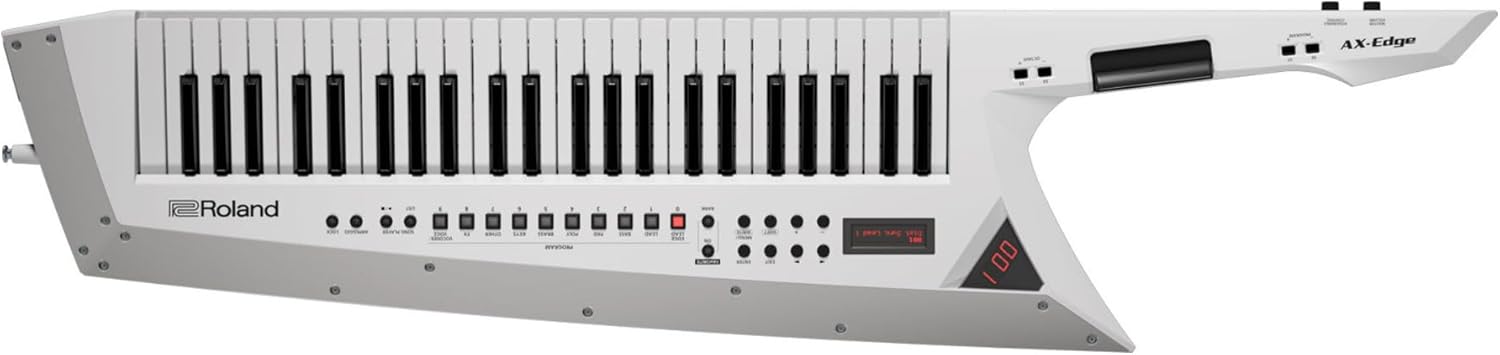
Figure 2: Roland AX-Edge Keytar with strap attached, ready for use.
4. Customizing Edge Blades
The AX-Edge features interchangeable Edge Blades, allowing for personalized aesthetics. An extra Edge Blade is included with your purchase. To change the Edge Blade, carefully unscrew the fasteners holding the current blade in place, remove it, and attach the new blade using the same fasteners.
Video 1: Official Roland AX-Edge 49-Key Keytar overview, demonstrating features including customizable Edge Blades.
Operating the AX-Edge
1. Característiques del teclat
The AX-Edge is equipped with 49 full-sized keys that support velocity and channel aftertouch, providing expressive control over your sound.

Figura 3: Detallada view of the 49 full-sized keys.
2. Sound Selection and Customization
Access a vast library of sounds and effects:
- Programs and Tones: Choose from 320 programs and over 500 preset tones specifically designed for keytarists.
- Multiefectes: Utilize 79 types of part multi-effects and part EQ, along with 79 types of program multi-effects, chorus, reverb, master compressor, and master EQ to shape your sound.
- Capes: Build complex sounds by layering up to four different parts simultaneously.
3. Controls de rendiment
Enhance your performance with intuitive controls:
- Pitch Bend and Modulation Bar: Located on the neck, these controls allow for dynamic pitch and tone manipulation.
- Octave Shift Buttons: Easily shift the keyboard's octave range up or down.
- Ribbon Controller: Provides a unique way to control various parameters.
- Controls assignables: Customize buttons and sliders to control specific functions or effects.

Figure 4: Control panel with program selection and performance modifiers.
4. Vocoder Function
The built-in vocoder allows you to process your voice through the synthesizer's sounds. Connect a microphone to the MIC INPUT jack and activate the vocoder function to create unique vocal effects.
5. Funcions addicionals
The AX-Edge includes features such as a Song Player for playback, Arpeggio for automatic note patterns, and a Lock function to prevent accidental changes during performance.
Manteniment
1. Neteja
Wipe the surface of the AX-Edge with a soft, dry cloth. Avoid using abrasive cleaners, solvents, or waxes, as these can damage the finish. For stubborn dirt, a slightly damp es pot fer servir un drap, seguit d'un drap sec.
2. Emmagatzematge
Store the keytar in a cool, dry place away from direct sunlight, extreme temperatures, and high humidity. When not in use, it is recommended to store it in a protective case to prevent dust accumulation and physical damage.
Resolució de problemes
1. Sense sortida de so
- Ensure the AX-Edge is properly connected to an amplifier, mixer, or headphones via the AUDIO OUT jacks.
- Verify that the volume levels on both the AX-Edge and the connected audio device are turned up.
- Confirm that the correct sound program is selected on the AX-Edge and that your connected software (if applicable) is receiving MIDI signals.
2. Connectivity Issues (USB/Wireless)
- For USB connections, try a different USB port or cable. Ensure necessary drivers are installed on your computer.
- For wireless connections, check the Bluetooth or wireless settings on both the AX-Edge and your computer. Ensure they are paired correctly and within range.
3. Durada de la bateria
- If using batteries, ensure they are rechargeable Ni-MH batteries and are fully charged.
- Battery life can vary based on usage and battery condition. Consider using the AC adaptor for extended sessions.
Especificacions
| Característica | Detall |
|---|---|
| Marca | Roland |
| Número de model | AX-EDGE-W |
| Color | BLANC |
| Nombre de claus | 49 |
| Característiques clau | Velocity and Channel Aftertouch |
| Tones/Programs | 320 Programs, Over 500 Preset Tones |
| Efectes | 79 Part Multi-Effects, 79 Program Multi-Effects, Chorus, Reverb, Master Compressor, Master EQ |
| Font d'alimentació | Battery Powered (Rechargeable Ni-MH), AC Adaptor |
| Durada de la bateria | Up to 4 hours (with rechargeable Ni-MH batteries) |
| Connectivitat | MIDI USB, USB |
| Pes de l'article | 8.04 quilos |
| Dimensions de l'article | 55.31 x 17.2 x 8.07 polzades |
| Components inclosos | Extra Edge Blade |
Garantia i Suport
For detailed warranty information and customer support, please refer to the official Roland weblloc. El fabricant website provides comprehensive resources, including warranty terms, service centers, and additional product documentation.
Visita: www.roland.com