
FLEXISPOT EF1W-UK
FLEXISPOT Electric Standing Desk EF1 User Manual
Model: EF1W-UK
Producte acabatview
The FLEXISPOT Electric Standing Desk EF1 is a versatile, height-adjustable desk frame designed to enhance your workspace ergonomics. This robust frame allows users to easily switch between sitting and standing positions, promoting a healthier work routine. It is constructed from heavy-duty steel, ensuring stability and durability, and features an intuitive control panel for seamless operation.
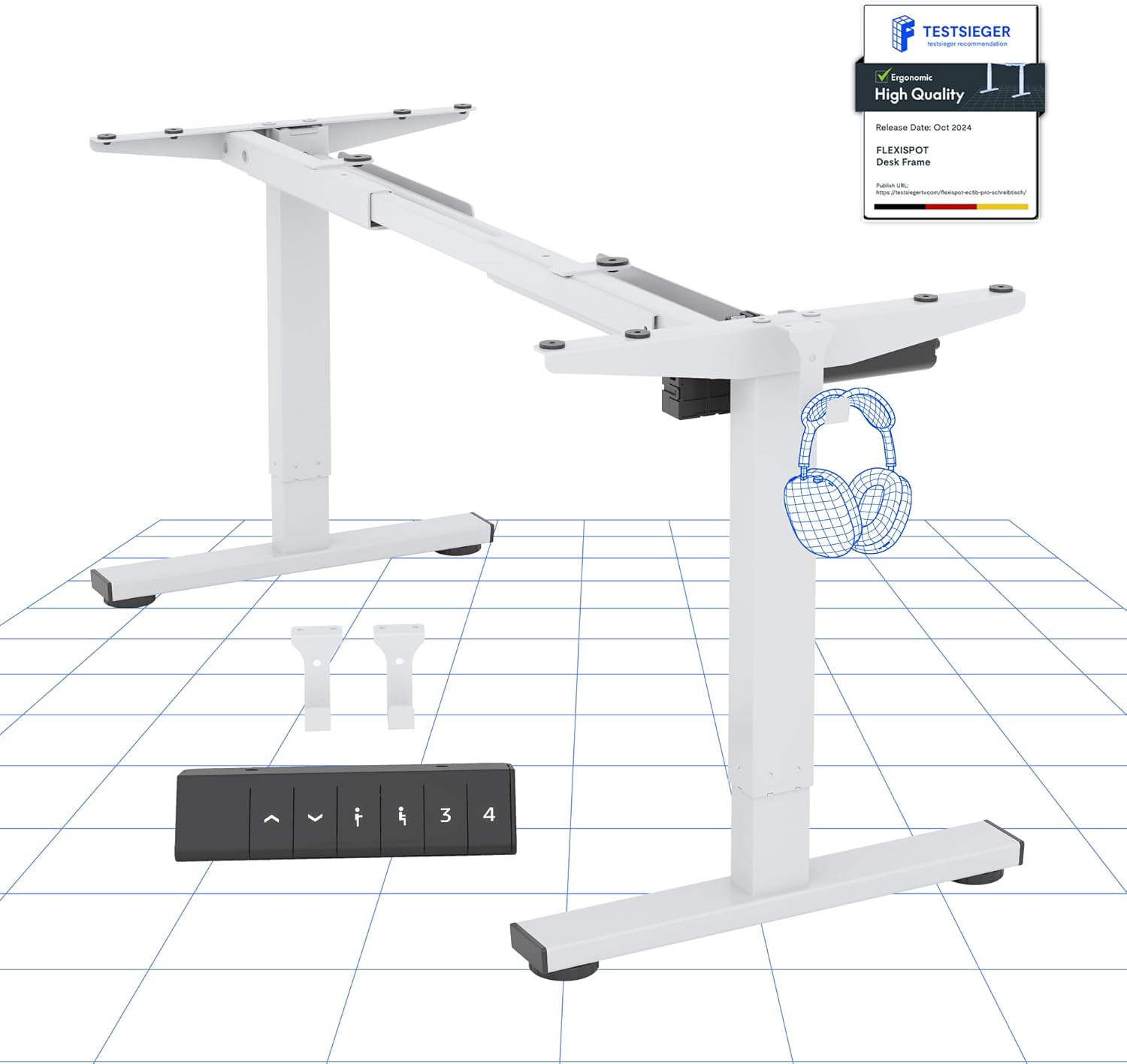
Figure 1: FLEXISPOT Electric Standing Desk EF1 Frame (White)
This image displays the main components of the FLEXISPOT EF1 electric standing desk frame in white, including the adjustable legs, crossbar, and the control panel. It provides a clear view of the frame's structure before a desktop is attached.
Muntatge i muntatge
Careful assembly is crucial for the proper function and stability of your FLEXISPOT Electric Standing Desk EF1. While the frame comes with necessary tools and screws, a drill is recommended for securely attaching your chosen desktop.
Eines necessàries (no incloses):
- Electric Drill (for desktop attachment)
- Measuring Tape (for precise desktop positioning)
Passos de muntatge:
- Desempaquetar components: Traieu amb cura totes les peces de l'embalatge i verifiqueu-les amb la llista de peces incloses.
- Muntar la base del marc: Connect the leg columns to the feet and the crossbar, ensuring all connections are secure. Pay attention to the orientation of parts as indicated in the detailed assembly diagrams provided with your product.
- Adjunta l'escriptori: Position your desktop (not included) onto the assembled frame. Use a measuring tape to ensure the desktop is centered and aligned. Secure the desktop to the frame using the provided screws and an electric drill. Ensure screws do not penetrate through the desktop surface.
- Connecta l'electrònica: Connect the motor cables and control panel cable to the main control box. Route cables neatly to prevent interference with the desk's movement.
- Engegada inicial: Connecteu l'escriptori a una presa de corrent. L'escriptori pot realitzar un cicle de calibratge inicial.
- Nivell: Adjust the leveling feet at the bottom of each leg to ensure the desk is stable and does not wobble on uneven surfaces.
Warning: Do not exceed the weight limit of 70kg. Be cautious when assembling and using the electric height adjustment feature. Ensure the desk is properly anchored for stability. Take precautions when children are present.
Instruccions de funcionament
The FLEXISPOT EF1 desk features a user-friendly control panel for effortless height adjustments and memory presets.
Funcions del tauler de control:
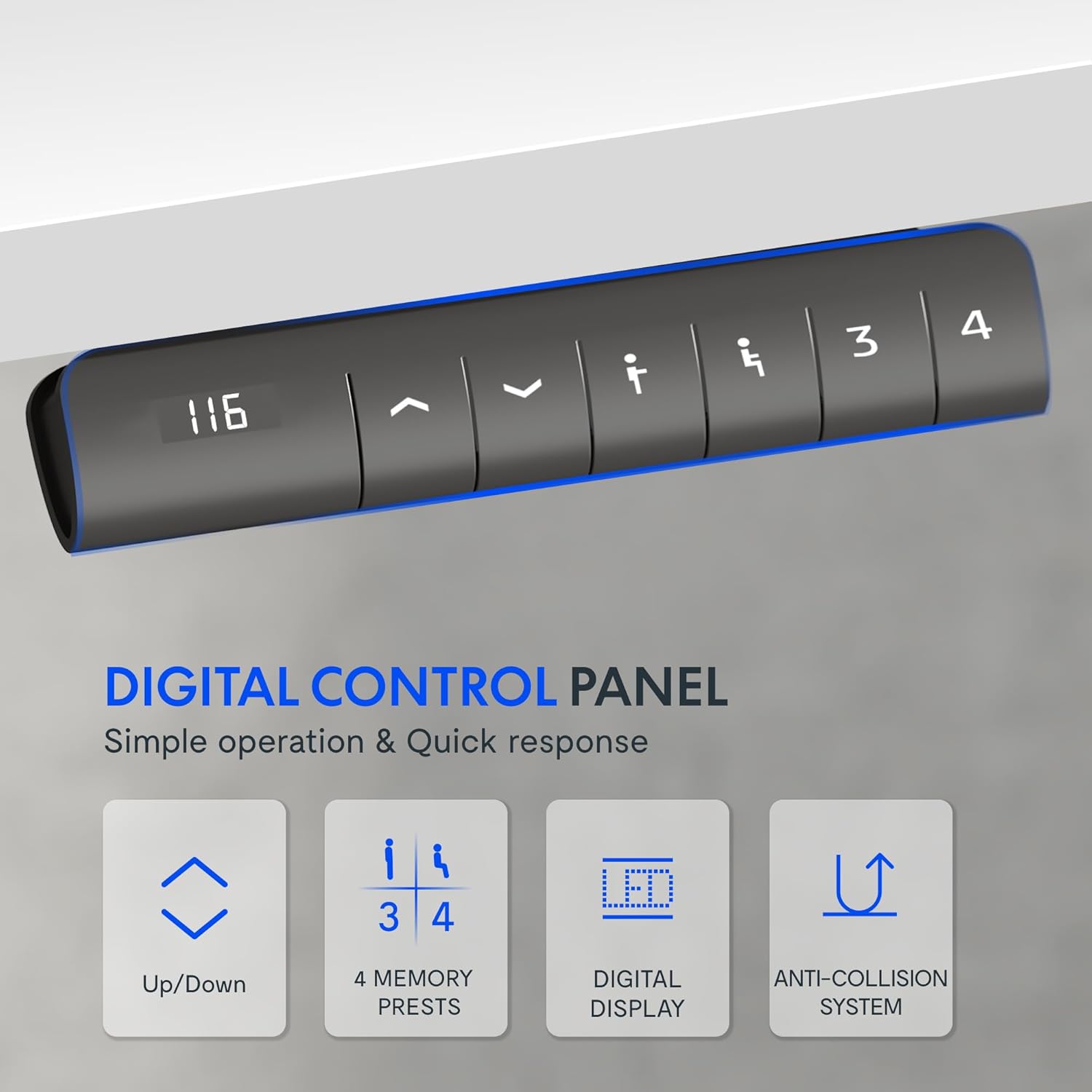
Figura 2: Panell de control digital
This image shows a close-up of the digital control panel with an LED display and buttons for up/down adjustment, memory presets (1, 2, 3, 4), and a memory set button.
- Botons amunt/avall (^ / v): Press and hold to manually adjust the desk height. Release to stop at the desired height.
- Pantalla LED: Mostra l'alçada actual de l'escriptori en centímetres.
- Preajustos de memòria (1, 2, 3, 4): Store and recall up to four preferred height settings.
- A guardar a height: Adjust the desk to your desired height, then press the 'M' or 'Set' button (often indicated by an 'i' or 'S' icon) followed by the desired number button (1, 2, 3, or 4). The display may flash to confirm.
- A recordar a height: Simply press the corresponding number button (1, 2, 3, or 4). The desk will automatically move to the saved position.
Interval d'ajust d'alçada:
The desk offers a wide adjustment range from 71.5 cm (minimum) to 116 cm (maximum), accommodating various user heights and preferences.

Figure 3: Wide Adjustment Range
This diagram illustrates the minimum (71.5 cm) and maximum (116 cm) height capabilities of the FLEXISPOT EF1 desk frame, showing its suitability for various user heights.
Tecnologia anti-colisió:
For enhanced safety, the desk is equipped with an anti-collision system. If the lifting column encounters an obstacle during movement (up or down), it will automatically reverse slightly and stop to prevent damage or injury.

Figure 4: Anti-Collision System in action
This image demonstrates the anti-collision feature, showing the desk reversing its movement upon detecting an obstacle, such as a filing cabinet, ensuring safety and preventing damage.
Rendiment del motor:
The desk's motor operates quietly (under 50 dB) and provides smooth, stable adjustments at a speed of 25 mm/s. It supports a significant load capacity, ensuring reliable performance even with heavy equipment.

Figura 5: Motor potent i silenciós
This diagram highlights the internal motor mechanism of the FLEXISPOT desk, emphasizing its powerful yet quiet operation, energy efficiency, and speed.
Manteniment
To ensure the longevity and optimal performance of your FLEXISPOT Electric Standing Desk EF1, follow these simple maintenance guidelines:
- Neteja regular: Wipe down the desk frame with a soft, damp drap. Eviteu productes de neteja abrasius o dissolvents que puguin danyar l'acabat.
- Comproveu les connexions: Periodically inspect all screws and bolts to ensure they remain tight. Re-tighten if necessary. Check power cables and motor connections for any signs of wear or damage.
- Elimina les obstruccions: Ensure the area around the desk legs is clear of any obstructions that could impede movement or activate the anti-collision system unnecessarily.
- Distribució de pes: Distribute weight evenly across the desktop to prevent undue stress on the motor and frame.
Resolució de problemes
If you encounter issues with your FLEXISPOT Electric Standing Desk EF1, refer to the following common troubleshooting steps:
| Problema | Causa possible | Solució |
|---|---|---|
| L'escriptori no es mou ni respon als controls. |
|
|
| Desk stops moving unexpectedly. |
|
|
| Desk height display shows an error code. | Condició d'error específica. | Refer to the specific error code in the full product manual (if available) or contact customer support. A power cycle (unplugging for 10 minutes) may resolve temporary errors. |
| L'escriptori trontolla amb la configuració més alta. | Sòl irregular o connexions fluixes. |
|
Especificacions
| Característica | Detall |
|---|---|
| Marca | FLEXISPOT |
| Número de model | EF1W-UK |
| Color | Desk Frame|white |
| Product Dimensions (Frame) | 60D x 120W x 85H cm (adjustable width 91-146 cm, height 71.5-116 cm) |
| Material | Acer d'aliatge |
| Pes de l'article | 21 kg |
| Capacitat de càrrega | 80 kg (movable) / 100 kg (fixed) |
| Nivell de soroll del motor | Menys de 50 dB |
| Velocitat d'ajust | 25 mm/s |
| Característiques especials | Electric height adjustment, 4 memory presets, LED display, Anti-Collision Technology |
Garantia i Suport
FLEXISPOT products are designed for durability and performance. While specific warranty details are typically provided with your purchase documentation, FLEXISPOT generally offers support for their products.
For any questions, technical assistance, or warranty claims, please contact FLEXISPOT customer support directly. You can usually find contact information on the official FLEXISPOT weblloc web o a través del punt de compra original.
Visit the official FLEXISPOT Store for more information: FLEXISPOT Store
Ask a question about this manual
Ask about setup, troubleshooting, compatibility, parts, safety, or missing instructions. Manuals+ will review the question and use this page’s manual context to help answer it.