
Introducció
This manual provides detailed instructions for the safe and efficient use of the Domus Line ST30/12 30W 12V Power Supply. Please read this manual thoroughly before installation and operation to ensure proper functionality and to prevent damage or injury. This power supply is designed for use with compatible lighting panels, including the TITAN series (maximum 5 panels), PASSEPARTOUT, SMALL, and DATE series.
Instruccions de seguretat
- Ensure the power supply is disconnected from the mains before any installation, maintenance, or troubleshooting.
- This product is designed for indoor use only (IP20 rating). Do not expose it to moisture, water, or extreme temperatures.
- No obriu la font d'alimentació casing. No hi ha peces que l'usuari pugui reparar a l'interior.
- Assegureu-vos una ventilació adequada al voltant de la unitat per evitar el sobreescalfament.
- Connect only compatible 12V DC devices within the specified load range (1-30W).
- Installation should be performed by a qualified professional if you are unsure about electrical connections.
Configuració i instal·lació
Follow these steps for proper installation of your Domus Line ST30/12 power supply:
- Desembaleu la font d'alimentació: Carefully remove the ST30/12 power supply from its packaging. Inspect for any visible damage.
- Muntatge (opcional): Position the power supply in a dry, well-ventilated area. Ensure it is not covered or enclosed in a way that restricts airflow.
- Connecteu els dispositius de sortida: The power supply features a 500 mm output cable with a 12-way distributor and MiniPlug connectors. Connect your compatible 12V DC lighting panels (e.g., TITAN, PASSEPARTOUT, SMALL, DATE series) to the MiniPlug ports on the distributor. Ensure the total load of connected devices does not exceed 30W.
- Connexió a la xarxa elèctrica: The power supply has a 2000 mm input cable. Plug the input cable into a standard 220-240Vac electrical outlet.
- Verificar el funcionament: Once connected, the lighting panels should illuminate. If not, refer to the Troubleshooting section.
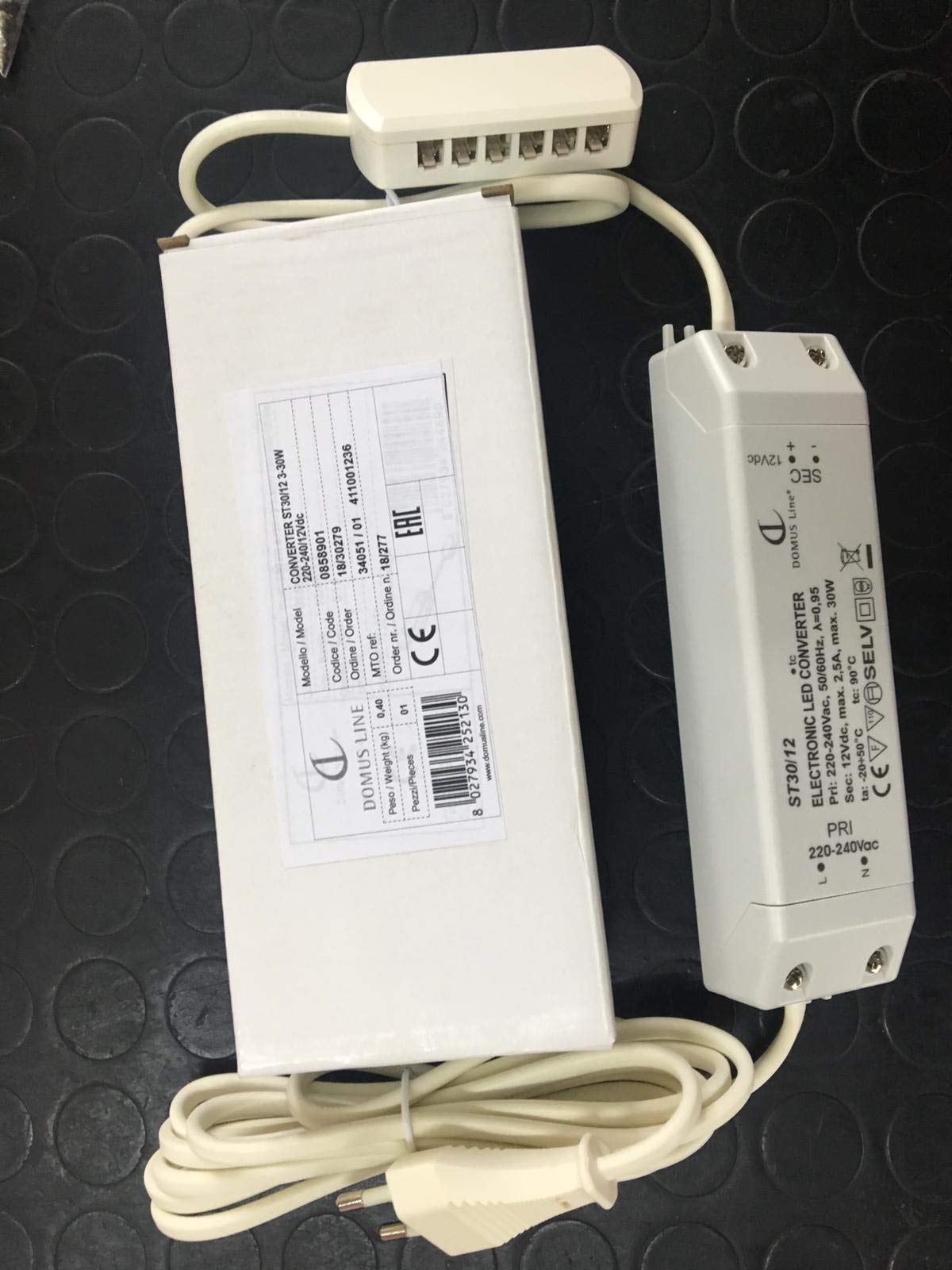
Figure 1: Domus Line ST30/12 Power Supply. This image shows the compact design of the power supply unit, including its input and output cables with MiniPlug connectors, ready for connection to compatible 12V DC lighting systems.
Instruccions de funcionament
The Domus Line ST30/12 power supply operates automatically once connected to a power source and compatible 12V DC devices. It converts the incoming AC voltage to a stable 12V DC output for your lighting applications.
- Assegureu-vos que totes les connexions estiguin segures abans d'aplicar energia.
- The power supply is designed for continuous operation within its specified load limits.
- To turn off the connected devices, disconnect the power supply from the mains outlet.
Manteniment
The Domus Line ST30/12 power supply requires minimal maintenance.
- Neteja: Disconnect the power supply from the mains before cleaning. Use a soft, dry cloth to wipe the exterior. Do not use liquid cleaners or abrasive materials.
- Inspecció: Periodically check the cables and connectors for any signs of wear or damage. If any damage is found, discontinue use and replace the unit.
- Ventilació: Ensure that the ventilation openings are not blocked by dust or debris.
Resolució de problemes
If you encounter issues with your Domus Line ST30/12 power supply, refer to the following common problems and solutions:
| Problema | Causa possible | Solució |
|---|---|---|
| No hi ha alimentació als dispositius connectats. |
|
|
| Devices flicker or dim. |
|
|
| La font d'alimentació es nota calenta. |
|
|
Si el problema persisteix després de provar aquestes solucions, poseu-vos en contacte amb l'atenció al client.
Especificacions
| Marca: | Línia Domus |
| Model: | ST30/12 |
| Entrada Voltage: | 220-240Vac |
| Vol. De sortidatage: | 12V DC |
| Potència de sortida: | 30 watts |
| Interval de càrrega: | 1 - 30 Watts (Note: Product description mentioned 1-15W, but title and other specs indicate 30W output. Use 1-30W as the operational range.) |
| Longitud del cable d'entrada: | 2000 mm |
| Longitud del cable de sortida: | 500 mm with 12-way distributor |
| Tipus de connector: | MiniPlug |
| Insulation Degree: | II |
| Índex de protecció: | IP20 (només per a ús interior) |
| Recommended Panels: | TITAN series (max 5 panels), PASSEPARTOUT, SMALL, DATE |
Garantia i Suport
Per obtenir informació sobre la garantia o assistència tècnica, poseu-vos en contacte amb el vostre distribuïdor o directament amb el fabricant. Conserveu el rebut de compra com a comprovant de compra.
Manufacturer: Domus Line
Note: Availability of spare parts and software updates is not specified by the manufacturer.


