
FERMAX 1431
FERMAX 1431 Video Door Intercom User Manual
Model: 1431 | Brand: FERMAX
Introducció
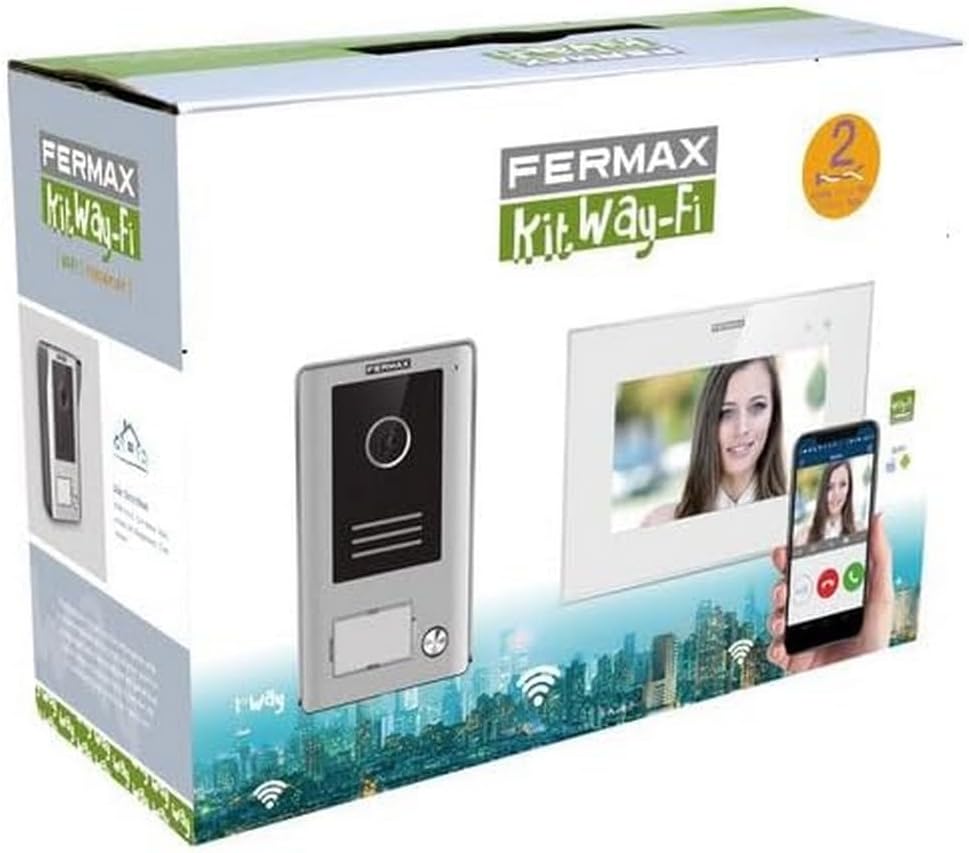
The FERMAX 1431 Video Door Intercom is a comprehensive security solution designed to enhance the safety and convenience of your home or property. This system features a 7-inch video monitor and an outdoor door entry panel, allowing for clear visual and audio communication with visitors. With Wi-Fi connectivity, you can manage your intercom system remotely via a smartphone, ensuring you never miss a visitor, even when you're away.
Les característiques clau inclouen:
- WAY-FI Video Kit with 7-inch monitor.
- Robust outdoor door entry panel.
- Wi-Fi connectivity for smartphone integration.
- Compact dimensions for easy installation.
Configuració i instal·lació
Proper installation is crucial for the optimal performance of your FERMAX 1431 Video Door Intercom. It is recommended that installation be performed by a qualified professional. Always ensure power is disconnected before beginning any wiring.
1. Desembalatge i identificació de components
Carefully unpack all components and verify that all parts are present according to the packing list. The kit typically includes the indoor monitor, outdoor panel, power supply, and mounting accessories.
2. Mounting the Outdoor Panel
Select a suitable location for the outdoor panel, typically near your main entrance, at a height that allows for clear viewing of visitors. Ensure the location is protected from direct heavy rain if possible, although the unit has an IP44 rating for protection against splashing water.

3. Mounting the Indoor Monitor
Mount the indoor monitor in a convenient location within your home, such as a hallway or living area, where it is easily accessible. Ensure there is access to a power outlet and sufficient space for wiring.

4. Connexions de cablejat
Connect the outdoor panel to the indoor monitor using the provided wiring. The system uses a 2-wire non-polarized connection, simplifying installation. Connect the power supply to the indoor monitor. Refer to the detailed wiring diagram in the official Manual d'instal·lació (PDF) for precise instructions.
5. Initial Power-Up and Wi-Fi Configuration
Once all connections are secure, connect the system to power. Follow the on-screen prompts on the indoor monitor to configure Wi-Fi settings and connect the system to your home network. This step is essential for enabling smartphone app functionality.
Instruccions de funcionament
The FERMAX 1431 Video Door Intercom is designed for intuitive operation, both from the indoor monitor and via the smartphone application.
1. Contestar una trucada
When a visitor presses the call button on the outdoor panel, the indoor monitor will ring and display the visitor's video feed. To answer the call, press the designated answer button on the monitor. You can then communicate with the visitor.
2. Obrint la porta
Durant una trucada, o quan viewing the outdoor panel, you can activate an electronic door lock (if connected) by pressing the door release button on the indoor monitor.
3. Monitorització de l'entrada
You can manually activate the camera on the outdoor panel at any time from the indoor monitor to view your entrance area without a visitor initiating a call.
4. Smartphone App Integration
Download the official FERMAX WAY-FI app from your smartphone's app store. Once installed and configured with your system, you can receive calls, view visitors, and open the door remotely from anywhere with an internet connection.

Manteniment
Regular maintenance ensures the longevity and optimal performance of your FERMAX 1431 Video Door Intercom.
Neteja
- Utilitzeu un suau, damp cloth to clean the surfaces of both the indoor monitor and outdoor panel.
- Eviteu netejadors abrasius, dissolvents o productes químics agressius, ja que poden danyar l'acabat i els components electrònics.
- For the camera lens on the outdoor panel, gently wipe with a microfiber cloth to ensure clear image quality.
Consideracions ambientals
- While the outdoor panel is designed for outdoor use (IP44), extreme weather conditions can affect performance. Ensure it is securely mounted and free from obstructions.
- Keep the indoor monitor away from direct sunlight, excessive heat, or moisture.
Resolució de problemes
If you encounter issues with your FERMAX 1431 Video Door Intercom, refer to the following common problems and solutions:
| Problema | Causa possible | Solució |
|---|---|---|
| No video on indoor monitor. | Loose wiring, camera malfunction, power issue. | Check all wiring connections. Ensure the outdoor panel has power. Contact support if the issue persists. |
| No hi ha àudio durant les trucades. | Microphone/speaker issue, wiring problem. | Verify audio settings on the monitor. Check wiring for secure connections. |
| Smartphone app not connecting. | Incorrect Wi-Fi settings, internet connectivity issues, app not configured. | Ensure the monitor is connected to Wi-Fi. Check your home internet connection. Reconfigure the app if necessary. |
| L'obertura de la porta no funciona. | Incorrect wiring to door lock, faulty lock, power issue. | Verify wiring to the electronic lock. Ensure the lock receives power. Test the lock independently. |
If these steps do not resolve the issue, please refer to the full installation manual or contact FERMAX customer support.
Especificacions
Below are the key technical specifications for the FERMAX 1431 Video Door Intercom:
| Característica | Detall |
|---|---|
| Nom del model | 1431 |
| Ús interior/exterior | Outdoor (Panel) |
| Dispositius compatibles | Smartphone |
| Font d'alimentació | AC |
| Protocol de connectivitat | Wi-Fi |
| Resolució de captura de vídeo | 480p |
| Nombre de canals | 4 |
| Material | Plàstic, metall |
| Voltage | 230 Volts |
| Wattage | 1 watts |
| Dimensions de l'article (L x A x A) | 8.27 x 11.42 x 4.72 polzades |
| Pes de l'article | 3.34 lliures (1.52 quilograms) |
| Tipus d'alerta | Només moviment |
| Classificació de protecció internacional | IP44 |
Garantia i Suport
FERMAX products are manufactured to high-quality standards and come with a manufacturer's warranty. For specific warranty terms and conditions, please refer to the documentation included with your product or visit the official FERMAX weblloc.
For technical support, troubleshooting assistance, or inquiries regarding your FERMAX 1431 Video Door Intercom, please contact FERMAX customer service. You can also visit the FERMAX Store on Amazon per obtenir més informació sobre el producte i recursos.
Documents relacionats1431


Ask a question about this manual
Ask about setup, troubleshooting, compatibility, parts, safety, or missing instructions. Manuals+ will review the question and use this page’s manual context to help answer it.