
Introducció
Welcome to the user manual for your Maxcom MM135 2G Mobile Phone. This guide provides comprehensive instructions to help you get started, operate, and maintain your device. The Maxcom MM135 is a simple and elegant mobile phone, designed for straightforward communication with essential features.
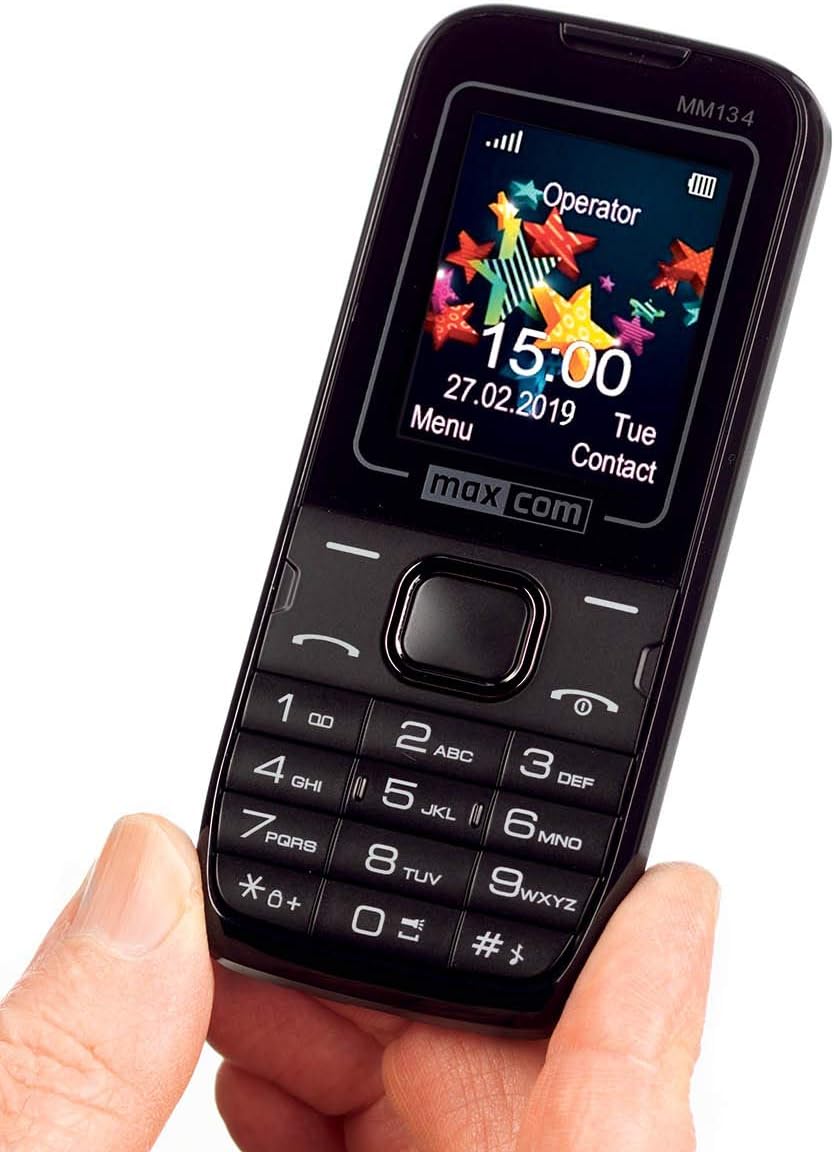
Imatge: Davant view of the Maxcom MM135 mobile phone, showing the display, keypad, and navigation buttons. The screen displays "Operator", time, date, and menu options.
Què hi ha a la caixa
Please check the contents of your Maxcom MM135 package. It should include:
- Maxcom MM135 Mobile Phone
- Bateria (ió de liti)
- Carregador
- Cable USB
- Auriculars
- Manual d'usuari
Configuració
1. Instal·lació de la targeta SIM i la bateria
- Traieu suaument la tapa posterior del telèfon.
- Insert your SIM card(s) into the designated slot(s). The Maxcom MM135 supports Dual SIM.
- If using a microSD card (up to 32 GB), insert it into the memory card slot.
- Insert the Lithium-ion battery into its compartment, ensuring the contacts align.
- Torneu a col·locar la coberta posterior fins que sentiu un clic i que quedi ben fixada al seu lloc.

Imatge: Primer pla view of the top or bottom edge of the Maxcom MM135, showing the 3.5mm audio jack and the USB charging port.
2. Carregant la bateria
- Connecteu el cable USB a l'adaptador del carregador.
- Plug the small end of the USB cable into the charging port on your phone (3.5mm Jack).
- Connecteu el carregador a una presa de corrent.
- Deixeu que el telèfon es carregui completament abans del primer ús. L'indicador de bateria a la pantalla mostrarà l'estat de càrrega.
Instruccions de funcionament
Encès/Apagat
- Per engegar: premeu i manteniu premut el botó Engegar/Finalitzar trucada botó fins que la pantalla s'il·lumini.
- Per apagar: premeu i manteniu premut el botó Engegar/Finalitzar trucada i, a continuació, seleccioneu "Apagar" de les opcions.
Realització de trucades
- From the home screen, dial the phone number using the keypad.
- Premeu el botó Truca button (usually green) to initiate the call.
- Per finalitzar una trucada, premeu el botó Finalitzar la trucada button (usually red).
- Per respondre una trucada entrant, premeu el botó Truca botó.
Sending SMS Messages
- Vés a Menú > Missatges > Escriu missatge.
- Introduïu el vostre missatge amb el teclat numèric.
- Introduïu el número de telèfon del destinatari o seleccioneu-lo dels contactes.
- Premeu Enviar. The phone can store up to 200 messages.
Contacts (Phonebook)
- Access contacts via Menú > Contactes.
- You can store up to 500 entries.
- To add a new contact, select Afegeix nou and enter the details.
Característiques especials
- Bluetooth: Per activar el Bluetooth, aneu a Menú > Configuració > Connectivitat > Bluetooth. You can pair with other Bluetooth-enabled devices for hands-free communication.
- Ràdio FM: Plug in the headset (which acts as an antenna) and go to Menú > Ràdio FM to listen to radio stations.
- Llanterna: The phone includes a built-in flashlight. Typically, this can be activated by a dedicated button or a long press on a specific key (e.g., '0' or a side button). Refer to your phone's quick start guide for exact activation.
- Càmera: The phone features a 0.08 MP camera. Access it via Menú > Càmera per fer fotos.
Manteniment
- Mantingueu el telèfon sec. La humitat pot danyar els circuits electrònics.
- No exposeu el telèfon a temperatures extremes.
- Netegeu el telèfon amb un drap suau i sec. Eviteu utilitzar productes químics agressius.
- Handle the phone with care to prevent physical damage.
- Ensure the charging port and headphone jack are free from dust and debris.
Resolució de problemes
| Problema | Possible solució |
|---|---|
| El telèfon no s'encén | Assegureu-vos que la bateria estigui correctament inserida i completament carregada. Intenteu carregar el telèfon durant almenys 30 minuts. |
| No puc fer ni rebre trucades | Comproveu si la targeta SIM està correctament inserida i activada. Verifiqueu la intensitat del senyal de xarxa. Assegureu-vos que el mode avió estigui desactivat. |
| Mala qualitat de so durant les trucades | Check network signal. Ensure the speaker/earpiece is not blocked. Adjust call volume. |
| La bateria s'esgota ràpidament | Redueix la brillantor de la pantalla. Tanca les aplicacions no utilitzades. Limita l'ús de dades en segon pla. Assegura't que la bateria no sigui antiga ni estigui danyada. |
| Bluetooth no connectat | Ensure Bluetooth is enabled on both devices. Make sure devices are within range. Try restarting both devices. |
Especificacions
| Característica | Detall |
|---|---|
| Número de model | MM135 |
| Tecnologia de xarxes | 2G (GSM 900/1800 MHz) |
| Mida de la pantalla | 1.77 polzades |
| Resolució de visualització | 160 x 128 píxels |
| Ranures per a targetes SIM | Doble SIM |
| Connectivitat | Bluetooth, USB |
| Conector d'auriculars | 3.5 mm |
| Càmera | 0.08 MP (Rear) |
| Flash Memory Support | microSD fins a 32 GB |
| Capacitat de l'agenda | Fins a 500 entrades |
| SMS Memory | Fins a 200 missatges |
| Tipus de bateria | Ió de liti |
| Capacitat de la bateria | 800 mAh (estimated) |
| Temps de conversa | Fins a 6 hores |
| Pes | 68 grams |
| Dimensions | 111 x 47 x 13 mm (L x A x A) |
| Sistema operatiu | Symbian |
| Característiques especials | FM Radio, Flashlight, Hands-free function |
Garantia i Suport
For warranty information and customer support, please refer to the warranty card included in your product package or visit the official Maxcom weblloc web. Conserveu el comprovant de compra per a qualsevol reclamació de garantia.
Nota: La informació sobre la disponibilitat de recanvis i actualitzacions de programari no està disponible en aquest moment.