
Introducció
This manual provides essential instructions for the safe and efficient use of your Maxcom MM134 2G Senior Mobile Phone. Please read this manual thoroughly before operating the device and keep it for future reference.
1. Configuració
1.1 Contingut del paquet
Assegureu-vos que tots els elements siguin presents a la caixa:
- Maxcom MM134 Mobile Phone
- Bateria (ió de liti)
- Carregador
- Cable USB
- Auriculars
- Manual d'usuari
1.2 Inserció de la targeta SIM i la bateria
- Traieu la coberta posterior del telèfon.
- Insert your SIM card into the designated slot. The MM134 supports a single SIM card.
- If using, insert a Micro SD card (up to 32GB) into its slot.
- Insert the Lithium-ion battery, ensuring the contacts align correctly.
- Torneu a col·locar la coberta posterior fins que encaixi al seu lloc.
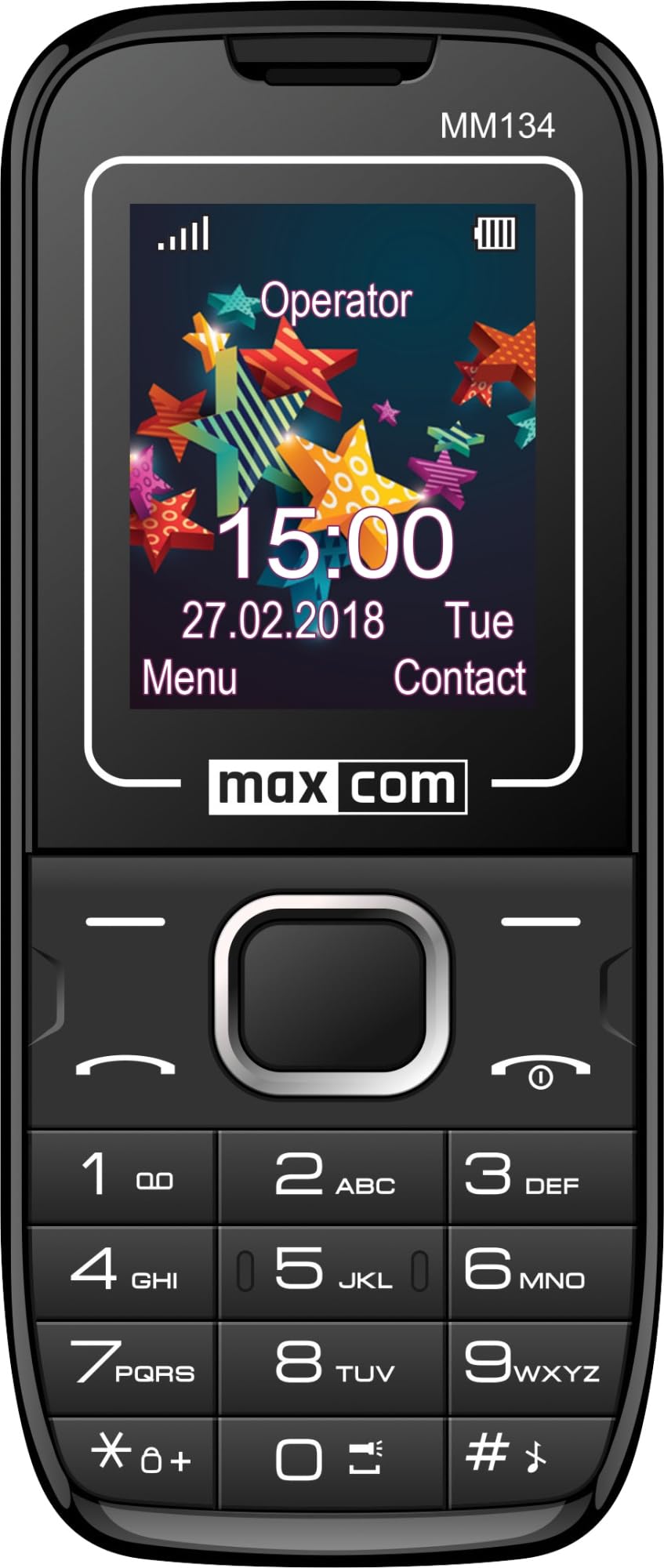
Image 1: Maxcom MM134 2G Senior Mobile Phone. This image shows the front of the phone, highlighting its compact design, screen, and large, easy-to-use buttons.
1.3 Càrrega del telèfon
Connect the charger to the phone's charging port and plug it into a power outlet. The battery indicator on the screen will show charging status. Fully charge the phone before first use. The battery capacity is 800 mAh.
1.4 Engegada/apagada
- Per engegar: premeu i manteniu premut el botó Engegar/Finalitzar trucada botó fins que la pantalla s'il·lumini.
- Per apagar: premeu i manteniu premut el botó Engegar/Finalitzar trucada button, then confirm shutdown.
2. Instruccions de funcionament
2.1 Fer i rebre trucades
- To make a call: Enter the phone number using the keypad and press the Truca botó.
- Per respondre a una trucada: premeu la tecla Truca botó quan sona el telèfon.
- Per finalitzar una trucada: premeu la tecla Engegar/Finalitzar trucada botó.
2.2 Contacts (Phonebook)
The phonebook can store up to 500 entries. Navigate to the "Contacts" menu to add, edit, or delete entries.
2.3 Enviament i recepció de missatges SMS
The phone can store up to 200 SMS messages. Access the "Messages" menu to compose new messages or view received ones.
2.4 Connectivitat Bluetooth
To enable Bluetooth, go to the "Settings" menu, then "Connectivity" or "Bluetooth". You can pair with other Bluetooth-enabled devices for hands-free communication or file transferència.
2.5 Ràdio FM
Plug in the headset (which acts as an antenna) to use the FM Radio function. Navigate to the "FM Radio" application in the menu to scan for stations.
2.6 Llanterna
The phone features a built-in flashlight. Typically, this can be activated by a dedicated button or through a quick access menu option.
2.7 Càmera
The phone is equipped with a rear camera (0.08 MP). Access the "Camera" application from the main menu to take photos. Photos will be saved to the phone's memory or the inserted Micro SD card.
3. Manteniment
3.1 Cura de la bateria
- Eviteu exposar la bateria a temperatures extremes.
- No perforeu ni danyeu la bateria.
- Use only the original charger provided with the phone.
- If the phone will not be used for an extended period, charge it partially before storage and recharge every few months.
3.2 Neteja
Wipe the phone with a soft, dry cloth. Do not use liquid cleaners or aerosols. The phone is not water-resistant.
4. Solució De Problemes
| Problema | Solució |
|---|---|
| El telèfon no s'encén | Assegureu-vos que la bateria estigui correctament inserida i carregada. Connecteu el carregador i torneu-ho a provar. |
| Sense senyal de xarxa | Check if the SIM card is properly inserted. Move to an area with better network coverage. Contact your service provider if the issue persists. |
| No puc fer ni rebre trucades | Verify that your SIM card is active and has sufficient credit/plan. Check network signal strength. |
| La bateria s'esgota ràpidament | Reduce screen brightness. Close unused applications. Limit background data usage. Ensure the battery is not old or damaged. The phone has a talk time of approximately 6 hours. |
5. Especificacions
| Nom del model | Classic MM134 |
| Marca | Maxcom |
| Sistema operatiu | Symbian |
| Tecnologia cel·lular | 2G (GSM 900/1800 MHz) |
| Tecnologia de connectivitat | Bluetooth, USB |
| Mida de la pantalla | 1.77 polzades (LCD) |
| Model de CPU | Cortex (1.8 GHz) |
| Descripció de la càmera | Rear (0.08 MP) |
| Tipus de bateria | Ió de liti |
| Capacitat de la bateria | 800 mAh |
| Temps de conversa | Fins a 6 hores |
| SMS Memory | Fins a 200 missatges |
| Capacitat de l'agenda | Fins a 500 entrades |
| Suport de targeta Micro SD | Fins a 32 GB |
| Ranures per a targetes SIM | SIM única |
| Dimensions | 13 x 52 x 111 mm |
| Conector d'auriculars | 3.5 mm Jack |
| Resistència a l'aigua | No |
6. Garantia i Suport
For warranty information and technical support, please refer to the warranty card included in your product package or visit the official Maxcom weblloc web. Conserveu el comprovant de compra per a reclamacions de garantia.