
1. Introducció
This manual provides essential information for the safe and effective use of your Masterplug SRGTOW102B-MPA Surge Tower Extension Lead. Please read these instructions carefully before use and retain them for future reference.
The Masterplug SRGTOW102B-MPA is a 13A surge-protected extension lead featuring 10 safety-shuttered sockets, designed to provide power and protection for multiple electronic devices.
2. Informació de seguretat
ADVERTÈNCIA: PERILL DE XOC ELÈCTRIC
- No supereu la càrrega màxima de 13 Amps.
- Ensure the product is used in a dry environment. Do not expose to moisture or liquids.
- Do not open or modify the unit. There are no user-serviceable parts inside.
- Always insert plugs fully into the sockets.
- Do not daisy-chain multiple extension leads.
- Mantenir fora de l'abast dels nens.
- If the surge protection indicator light is off, the surge protection feature may no longer be active. Replace the unit to ensure continued protection.
3. Característiques del producte
- 10 Safety Shuttered Sockets: Provides power for multiple devices with enhanced safety.
- Protecció contra sobretensions: Protects connected equipment from power surges and spikes.
- Indicador LED d'alimentació: S'il·lumina quan la unitat està engegada.
- Horizontal Mounting Options: Allows for flexible placement.
- Tower Design: Space-saving vertical orientation.
4. Configuració i instal·lació
- Desempaquetar la unitat: Carefully remove the Masterplug Surge Tower Extension Lead from its packaging.
- Posicionament: Place the extension lead on a stable, flat surface. The tower design allows for efficient use of space. Horizontal mounting options are also available if preferred.
- Connecteu-vos a l'alimentació: Plug the extension lead's main power cord into a wall socket.
- Verifica l'alimentació: The LED Power Indicator on the unit should illuminate, indicating that the extension lead is receiving power.
- Connexió de dispositius: Plug your electronic devices into the 10 safety-shuttered sockets. Ensure all plugs are fully inserted.
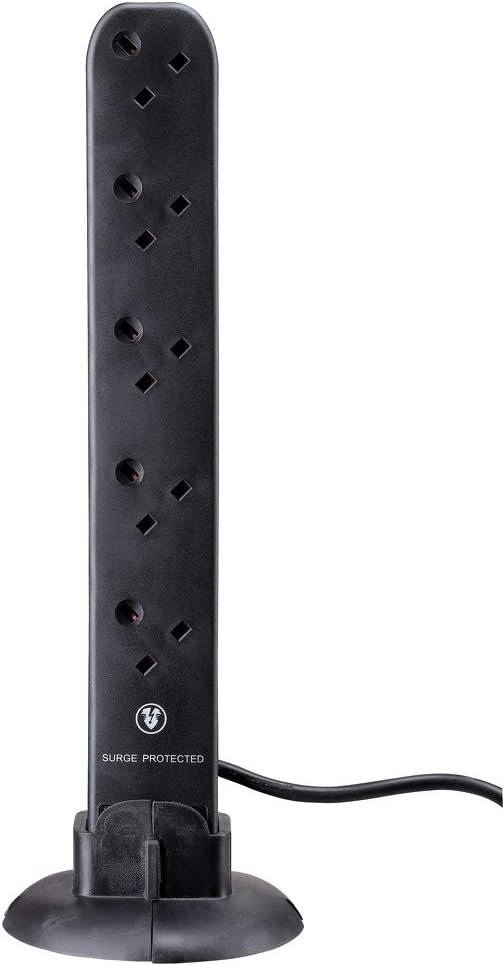
Image 1: Masterplug Surge Tower Extension Lead in its vertical orientation, showing multiple sockets and the 'SURGE PROTECTED' label.

Image 2: Masterplug Surge Tower Extension Lead positioned horizontally, demonstrating its alternative mounting configuration with integrated stands.
5. Instruccions de funcionament
Once connected to a power source, the Masterplug Surge Tower Extension Lead is ready for use. The LED Power Indicator will confirm it is active.
- Dispositius de connexió: Insert the power plugs of your electronic devices into any of the 10 available sockets. The safety shutters will open as the plug is inserted.
- Protecció contra sobretensions: The unit continuously monitors for power surges. In the event of a surge, the internal protection circuitry will activate to safeguard your connected devices.
- Indicador d'alimentació: A green LED light indicates that the unit is powered and the surge protection is active. If this light is off, the surge protection may have been compromised by a significant power event and the unit should be replaced.
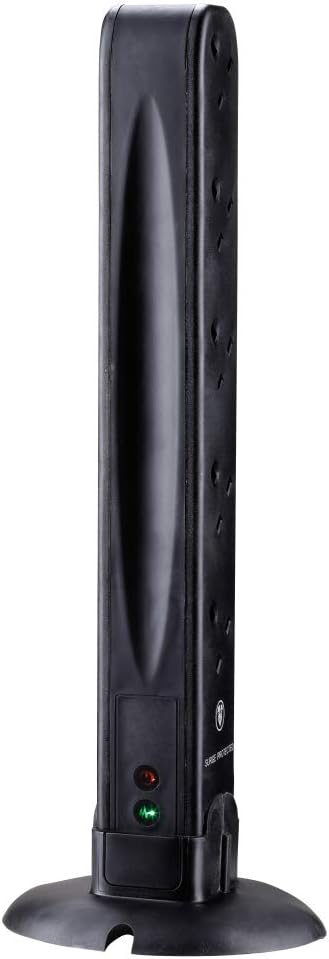
Imatge 3: posterior view of the Masterplug Surge Tower, highlighting the power and surge protection indicator lights.
6. Manteniment
- Neteja: Disconnect the extension lead from the wall socket before cleaning. Wipe the unit with a dry, soft cloth. Do not use liquid cleaners or abrasive materials.
- Inspecció: Periodically inspect the power cord and the unit for any signs of damage, such as cuts, fraying, or discoloration. If damage is found, discontinue use immediately and replace the unit.
- Emmagatzematge: When not in use, store the extension lead in a cool, dry place, away from direct sunlight and extreme temperatures.
7. Solució De Problemes
| Problema | Causa possible | Solució |
|---|---|---|
| No hi ha alimentació als dispositius connectats. |
|
|
| El llum indicador de protecció contra sobretensions està apagat. | The surge protection component has absorbed a significant power surge and is no longer active. | Replace the extension lead to ensure continued surge protection for your devices. |
8. Especificacions
- Marca: Masterplug
- Model: SRGTOW102B-MPA
- Nombre de preses: 10
- Valoració actual: 13 Amps (AC adapter current)
- Dimensions del producte: 13 x 5 x 42.3 cm (aproximadament)
- Pes: 0.6 quilos
- Color: Negre
- Forma: Torre
- Fabricant: LUCECO
- País d'origen: Xina
9. Garantia i Suport
This Masterplug product comes with a 3 anys de garantia del fabricantSi us plau, conserveu el comprovant de compra per a reclamacions de garantia.
For technical support or warranty inquiries, please contact Masterplug customer service through their official weblloc web o el venedor on es va comprar el producte.