
Introducció
This manual provides detailed instructions for the operation and maintenance of your BOBLOV BT-S3 Helmet Headset. The BT-S3 is designed for motorcycle communication, offering hands-free calling, music playback, FM radio, and intercom functionality for riders. Please read this manual thoroughly before using the device to ensure proper function and safety.
Contingut del paquet
Verifiqueu que tots els elements que s'enumeren a continuació s'inclouen al vostre paquet:
- 1 x BOBLOV BT-S3 Helmet Intercom Unit
- 1 x Stereo Headphones (with microphone)
- 1 x Mounting Clip & Screws
- 1 x tornavís
- 1 x cable de càrrega USB
- 1 x Manual d'usuari
- 1 x Velcro Pad (for mounting)
- 1 x Audio Line

Figura 1: All components included in the BOBLOV BT-S3 package.
Producte acabatview
Botons i ports de control

Figura 2: BOBLOV BT-S3 control buttons and connection ports.
- Botó del telèfon: Used for answering/ending calls, redialing, and activating voice assistant.
- Volum + botó: Increases volume, navigates forward in music/FM.
- Volum - Botó: Decreases volume, navigates backward in music/FM.
- Power/Intercom Button: Powers the device on/off, initiates/ends intercom, plays/pauses music, activates FM radio.
- Charger and Headset Socket: Multi-purpose port for charging and connecting the headset.
- Cable Input Interface: For connecting the headset cable.
Configuració
1. Càrrega del dispositiu
Before initial use, fully charge the BT-S3 unit. Connect the provided USB cable to the charging port on the device and to a standard USB power adapter (not included). The LED indicator will show charging status. A full charge typically takes approximately 2-3 hours.
2. Installing the Headset in Your Helmet
The BT-S3 can be installed in various helmet types, including full-face, half-face, and open-face helmets.
- Attach the mounting clip to the side of your helmet using the provided screws and screwdriver, or use the adhesive Velcro pad for a tool-free installation. Ensure the clip is securely fastened.
- Slide the BT-S3 intercom unit onto the mounting clip until it clicks into place.
- Open the helmet's inner lining. Position the stereo headphones inside the helmet, ensuring they are aligned with your ears for optimal sound.
- Route the microphone to a position near your mouth, ensuring it is not obstructed.
- Connect the headset cable to the designated port on the BT-S3 unit.

Figura 3: Helmet mounting clip and unit attachment.
Instruccions de funcionament
Encès/Apagat
- Encès: Manteniu premut el botó Botó d'alimentació/intercomunicador for approximately 3 seconds until you hear an audible prompt and the LED indicator lights up.
- Apagar: Manteniu premut el botó Botó d'alimentació/intercomunicador for approximately 3 seconds until you hear an audible prompt and the LED indicator turns off.
Bluetooth Pairing with Mobile Phone
- Ensure the BT-S3 is powered off.
- Manteniu premut el botó Botó d'alimentació/intercomunicador for approximately 5-7 seconds until the LED indicator flashes red and blue alternately, indicating pairing mode.
- Al telèfon mòbil, activa el Bluetooth i cerca els dispositius disponibles.
- Select "BT-S3" from the list of devices. If prompted for a password, enter "0000".
- Once paired, the LED indicator will flash blue slowly, and you will hear a confirmation tone.
Funcionalitat d'intercomunicació
The BT-S3 supports full-duplex wireless communication. It allows for 2 riders to intercom simultaneously, with a maximum talking range of 1000 meters. Up to 3 riders can be connected, but only two can actively communicate at any given time. If a third rider wishes to join, one of the active intercom participants must end their conversation.

Figura 4: Intercom connection scenarios.
- Pairing Intercom Units:
- Ensure both BT-S3 units are powered off.
- On both units, press and hold the Botó d'alimentació/intercomunicador for approximately 5-7 seconds until the LED indicators flash red and blue alternately.
- Premeu breument Botó d'alimentació/intercomunicador on one of the units. The units will search and pair with each other.
- Once paired, the LED indicators will flash blue slowly, and you will hear a confirmation tone.
- Iniciació de l'intercomunicador: After pairing, a short press of the Botó d'alimentació/intercomunicador on either unit will initiate an intercom conversation.
- Finalització de l'intercomunicació: Una breu premsa de la Botó d'alimentació/intercomunicador will end the intercom conversation.
Trucades telefòniques
- Respon a la trucada: When a call comes in, the device will automatically answer after a few rings (auto-receiving phone calls feature). Alternatively, short press the Botó del telèfon per respondre.
- Finalitzar la trucada: Premeu breument Botó del telèfon to end an active call.
- Rebutja la trucada: Manteniu premut el botó Botó del telèfon durant 2 segons per rebutjar una trucada entrant.
- Torna a marcar l'últim número: Premeu dues vegades el botó Botó del telèfon per tornar a marcar l'últim número marcat.
Reproducció de música
After pairing with your mobile phone, you can stream music to the BT-S3.
- Reproduir/pausa: Premeu breument Botó d'alimentació/intercomunicador per reproduir o posar en pausa música.
- Pista següent: Premeu breument Botó de volum +.
- Pista anterior: Premeu breument Volum - Botó.
Ràdio FM
The BT-S3 includes an FM radio function.
- Activar/desactivar l'FM: Premeu dues vegades el botó Botó d'alimentació/intercomunicador to activate or deactivate FM radio.
- Estacions d'escaneig: While FM is active, short press the Volum + or Volum - botons per canviar d'emissora.
GPS Voice Instructions
When paired with a smartphone running a GPS application, the BT-S3 can receive voice instructions directly to your headset.
Manteniment
- Keep the device dry. Do not expose it to extreme temperatures.
- Netegeu la unitat amb un aparell suau, damp tela. Eviteu utilitzar productes químics aggressivs o netejadors abrasius.
- Assegureu-vos que la tapa del port de càrrega estigui ben tancada quan no es carrega per mantenir la resistència a l'aigua.
- Guardeu el dispositiu en un lloc fresc i sec quan no el feu servir durant períodes prolongats.
Resolució de problemes
| Problema | Causa possible | Solució |
|---|---|---|
| El dispositiu no s'encén. | Bateria baixa. | Carregueu el dispositiu completament. |
| No es pot emparellar amb el telèfon. | El dispositiu no està en mode d'emparellament; Bluetooth desactivat al telèfon. | Ensure BT-S3 is flashing red/blue. Enable Bluetooth on phone and search again. |
| L'intercomunicador no connecta. | Units not paired or out of range. | Re-pair intercom units. Ensure units are within 1000m range. |
| Poor audio quality / Wind noise. | Microphone placement; environmental factors. | Adjust microphone closer to mouth. The device features DSP cancellation for wind noise. |
| Durada de la bateria més curta del que s'esperava. | Frequent use of high volume or intercom. | Battery life varies with usage. Ensure full charge before use. |
Especificacions
- Model: BT-S3
- Connectivitat: Sense fil (Bluetooth)
- Gamma d'intercomunicació: Up to 1000 meters (between 2 riders)
- Velocitat de treball: Fins a 100 km/h
- Temps de conversa: Fins a 8 hores
- Temps d'espera: Fins a 300 hores
- Hora de trucada telefònica: Fins a 10 hores
- Temps de reproducció de música: Fins a 6 hores
- Resistència a l'aigua: Water-resistant (fully weather protection)
- Cancel·lació de soroll: Wind noise DSP cancellation
- Característiques: Auto-receiving phone calls, FM Radio, Stereo music (A2DP), GPS voice instructions
- Compatibilitat amb el casc: Fits all kinds of helmets (full/half/open face)
- Mètode de control: Botons tàctils
- Auriculars Jack: Jack de 3.5 mm (per a la connexió d'auriculars)
- UPC: 889251631535

Figura 5: Estimated battery performance for various functions.
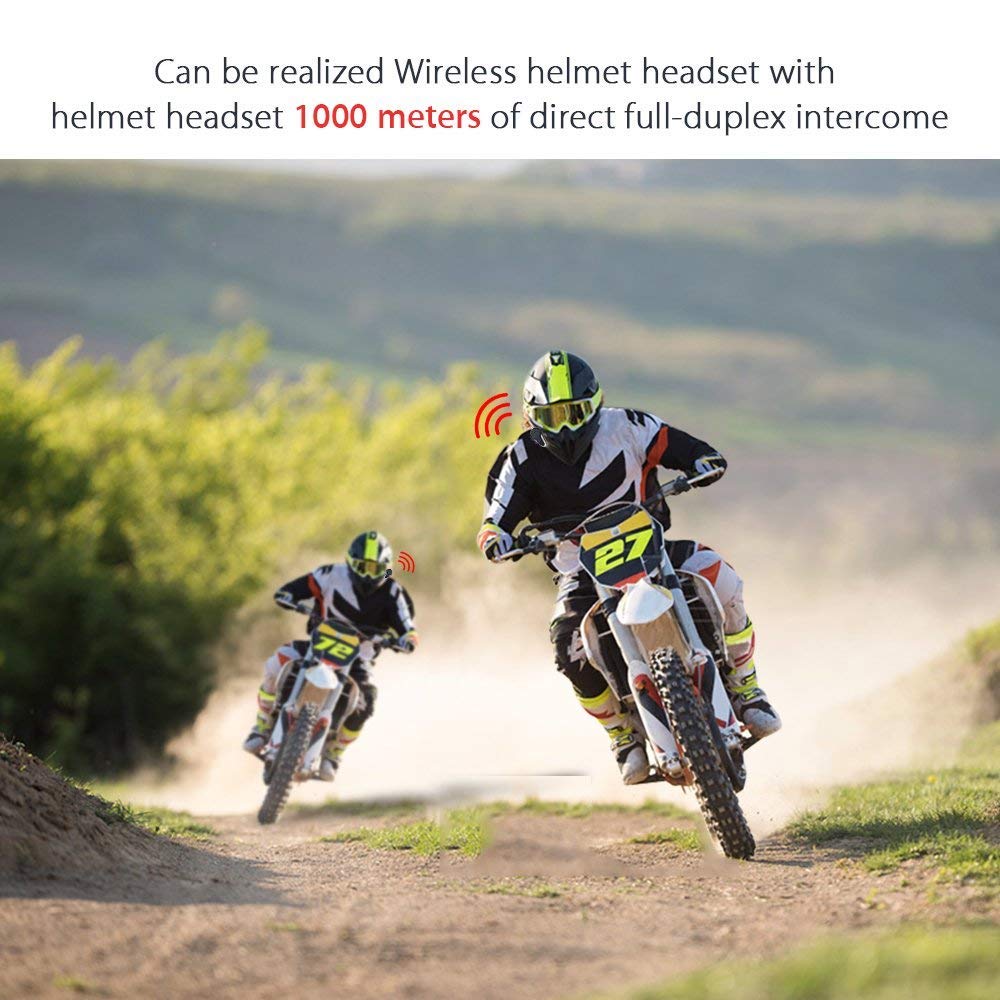
Figura 6: Wireless helmet headset with 1000 meters direct full-duplex intercom.

Figura 7: Versatile applications for the BT-S3 headset, including motorcycling and skiing.
Garantia i Suport
Specific warranty information is not provided in the product details. For warranty claims, technical support, or further assistance, please contact your retailer or the manufacturer directly. Retain your proof of purchase for any warranty-related inquiries.
Manufacturer: BOBLOV