
AWEI T5
AWEI T5 True Wireless Earbuds User Manual
Introducció
This manual provides detailed instructions for the AWEI T5 True Wireless Earbuds. Please read this guide carefully before using the product to ensure proper operation and to maximize your listening experience.
Contingut del paquet
Verifiqueu que tots els elements que s'enumeren a continuació siguin presents al vostre paquet:
- AWEI T5 True Wireless Earbuds (Left and Right)
- Estoig de càrrega
- Cable de càrrega USB
- Manual d'usuari
- Múltiples mides de puntes per a les orelles

Image: AWEI T5 True Wireless Earbuds retail packaging, showing the brand logo and product model.
Producte acabatview
Familiarize yourself with the components of your AWEI T5 True Wireless Earbuds and charging case.

Image: The AWEI T5 True Wireless Earbuds inside their charging case, with an additional image showing an earbud being worn by a user.

Imatge: Un primer pla view of the AWEI T5 True Wireless Earbuds and their charging case resting on a laptop keyboard.
The earbuds are designed for a secure and comfortable fit, and the charging case provides both protection and power on the go.
Configuració
1. Càrrega inicial
Abans del primer ús, carregueu completament els auriculars i l'estoig de càrrega.
- Col·loqueu els dos auriculars a la caixa de càrrega.
- Connecteu el cable de càrrega USB a la funda de càrrega i a una font d'alimentació.
- Els indicadors lluminosos de la funda i dels auriculars mostraran l'estat de càrrega.
- Un cop estigui completament carregat, desconnecteu el cable.
2. Vinculació amb un dispositiu
To connect your AWEI T5 earbuds to a Bluetooth-enabled device:
- Assegureu-vos que els auriculars estiguin carregats.
- Obre l'estoig de càrrega i treu els dos auriculars. Entraran automàticament en mode d'emparellament.
- Al dispositiu (telèfon intel·ligent, tauleta, etc.), aneu a la configuració de Bluetooth i activeu-lo.
- Cerca available devices and select "AWEI T5" from the list.
- Once connected, you will hear a confirmation tone, and the indicator lights on the earbuds will change.
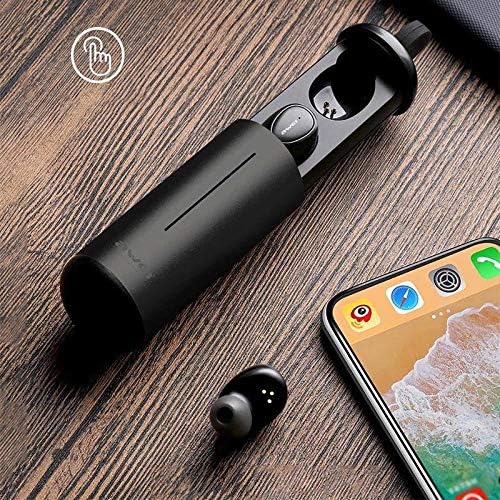
Image: AWEI T5 Earbuds in their charging case, positioned next to a smartphone, illustrating the pairing process.
Instruccions de funcionament
Controls bàsics
The AWEI T5 earbuds feature touch controls for various functions:
- Reproduir/pausa: Toqueu una vegada a qualsevol dels auriculars.
- Pista següent: Fes doble toc a l'auricular dret.
- Pista anterior: Fes doble toc a l'auricular esquerre.
- Respondre/Finalitzar la trucada: Toqueu una vegada qualsevol dels auriculars durant una trucada entrant.
- Rebutja la trucada: Premeu i manteniu premut qualsevol dels auriculars durant 2 segons durant una trucada entrant.
- Activa l'Assistent de veu: Toqueu tres vegades qualsevol dels auriculars.
Mode auricular únic
You can use either the left or right earbud independently:
- Remove one earbud from the charging case. It will automatically connect to the last paired device.
- The other earbud can remain in the case or be turned off.
Mode d'auricular dual
For a stereo audio experience, use both earbuds:
- Remove both earbuds from the charging case. They will automatically connect to each other and then to the last paired device.
Manteniment i cura
To ensure the longevity and optimal performance of your AWEI T5 earbuds:
- Neteja: Netegeu regularment els auriculars i l'estoig de càrrega amb un drap suau, sec i sense borrissol. No utilitzeu productes químics agressius ni materials abrasius.
- Emmagatzematge: Quan no els utilitzeu, guardeu els auriculars a la seva funda de càrrega per protegir-los de la pols i els danys.
- Cura de la bateria: Avoid fully discharging the battery frequently. Charge the earbuds and case regularly, even if not used for extended periods.
- Resistència a l'aigua: The earbuds are rated IPX4, meaning they are resistant to splashing water from any direction. Do not submerge them in water or expose them to heavy rain.

Image: AWEI T5 Earbuds with water droplets, indicating their IPX4 splash-resistant rating.
Resolució de problemes
If you encounter issues with your AWEI T5 earbuds, refer to the following common problems and solutions:
| Problema | Solució |
|---|---|
| Els auriculars no s'emparellan amb el dispositiu. | Assegura't que els auriculars estiguin carregats. Desactiva i activa el Bluetooth al dispositiu. Oblida't de "AWEI T5" de la llista de Bluetooth del dispositiu i torna a emparellar-los. |
| Només funciona un auricular. | Torneu a col·locar els dos auriculars a l'estoig de càrrega, tanqueu la tapa i, a continuació, obriu-los i retireu-los junts. Assegureu-vos que tots dos estiguin carregats. |
| Sense so o amb un volum baix. | Check volume levels on both your device and the earbuds. Ensure earbuds are properly connected. |
| L'estoig de càrrega no es carrega. | Verify the USB cable is securely connected to both the case and the power source. Try a different cable or power adapter. |
Especificacions
Technical details for the AWEI T5 True Wireless Earbuds:
| Característica | Detall |
|---|---|
| Número de model | T5 |
| Connectivitat | Bluetooth |
| Factor de forma | In-orella |
| Material | Plàstic |
| Color | Negre |
| Dimensions (producte) | 4 x 10 x 16.5 cm |
| Pes (producte) | 4.54 g |
| Tipus de bateria | 1 Lithium Ion (per earbud, typically) |
| Classificació de resistència a l'aigua | IPX4 (a prova d'esquitxades) |
Garantia i Suport
Per obtenir informació sobre la garantia i assistència al client, consulteu la documentació que s'inclou amb la compra o poseu-vos en contacte amb el distribuïdor. Conserveu el comprovant de compra per a qualsevol reclamació de garantia.
Ask a question about this manual
Ask about setup, troubleshooting, compatibility, parts, safety, or missing instructions. Manuals+ will review the question and use this page’s manual context to help answer it.