
AZDOME PG02
Manual d'usuari de la càmera de salpicader AZDOME Mirror
Model: PG02
10" Touch Screen, 1080P HD, Front and Rear Car Camera
1. Introducció i finalview
The AZDOME PG02 Mirror Dash Cam is designed to enhance your driving safety and provide reliable video evidence. This advanced system integrates a high-definition front camera and a rear camera into a sleek 10-inch touch screen mirror, offering features such as superior night vision, parking assistance, and intelligent warning systems.

Figure 1: AZDOME PG02 Mirror Dash Cam with included rear camera.
2. Què hi ha a la caixa
Please verify that all items are present and in good condition upon unboxing:
- AZDOME PG02 Mirror Dash Cam Unit
- Càmera posterior
- Carregador de cotxe
- Manual d'usuari
- Muntatge de succió
3. Característiques del producte
3.1 Streaming Media Super Night Vision
Equipped with industry-leading 8339IC and SC2363s sensors, the dash cam provides clear 1080P front and 720P rear camera footage. WDR (Wide Dynamic Range) technology ensures excellent performance in low-light conditions, delivering optimal image quality.

Figura 2: Capacitats de visió nocturna millorades.
3.2 Clear Imaging in Adverse Weather
The waterproof IP68 rear camera and anti-fog/dust features ensure sharp images even in rain or fog, providing reliable visibility in challenging weather conditions.
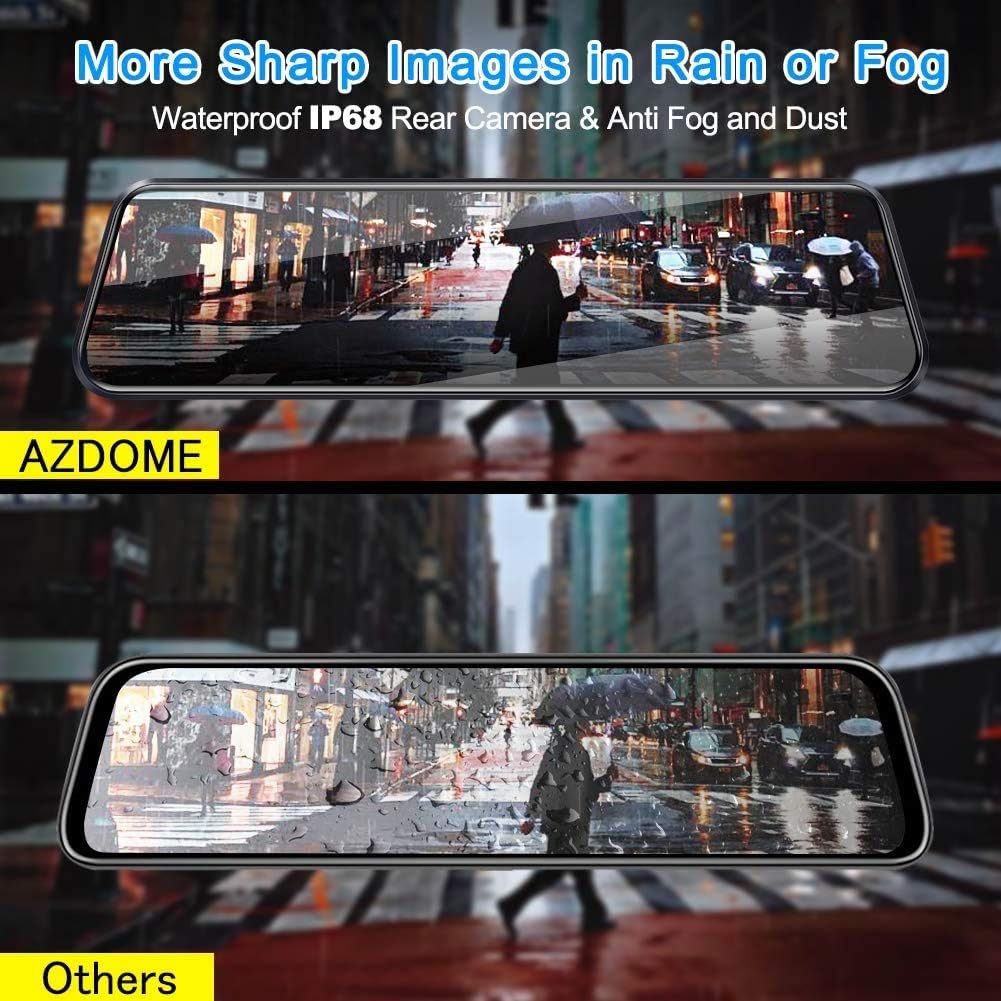
Figure 3: Superior image clarity in rain or fog.
3.3 Backup Camera with Reversing Assistance
The backup camera displays a high-resolution real-time video feed in the mirror. When reversing, the screen automatically shows guidelines, simplifying parking maneuvers.

Figure 4: Parking Assistance Mode in action.
3.4 Sistemes avançats d'assistència al conductor (ADAS)
The system includes a Lane Departure Warning System (LDWS) that alerts you if the car veers into another lane without signaling. It also features a Dangerous Distance Alarm, providing security alerts when sensing the proximity of other obstructions ahead.
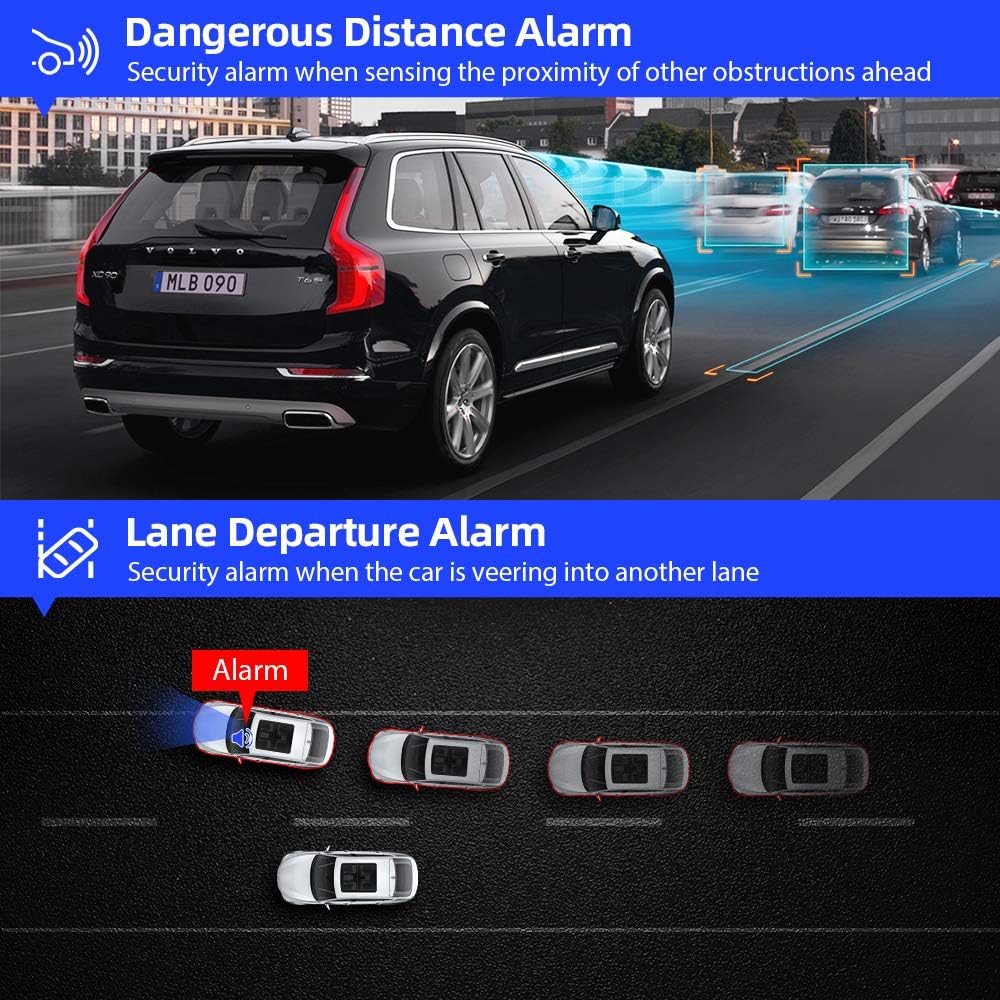
Figure 5: Visual representation of ADAS features.
3.5 Powerful Recording Functions
The dash cam offers several powerful recording features:
- Enregistrament d'emergència del sensor G: Bloqueja i desa automàticament els vídeostage upon detecting sudden shakes or collisions, protecting critical evidence.
- Monitor d'aparcament: Records automatically if an impact is detected while the vehicle is parked (requires continuous power supply).
- Detecció de moviment: Begins recording when motion is detected in front of the camera, useful for surveillance.
- Enregistrament en bucle: Records video in 3/5/10-minute intervals, automatically overwriting the oldest unlocked footage quan la targeta de memòria estigui plena.

Figure 6: Built-in G-sensor for emergency recording.
4. Guia de configuració
The AZDOME PG02 is designed for user-friendly installation. Follow these steps for proper setup:
- Muntatge de la Dash Cam: Secure the mirror dash cam to your existing rearview mirror using the provided straps or suction mount. Ensure it is firmly attached and does not obstruct your view.
- Connecting the Front Camera Power: Connect the Mini USB cable from the dash cam to the car charger, then plug the car charger into your vehicle's 12V power outlet.
- Installing the Rear Camera: Mount the rear camera at the back of your vehicle, typically above the license plate or inside the rear window. Ensure it has a clear view.
- Connecting the Rear Camera: Run the rear camera cable from the rear camera to the AV-IN port on the main dash cam unit.
- Connecting Reverse Trigger Wire (Optional): For automatic parking assistance display, connect the red wire (anode) from the rear camera cable to your vehicle's reverse light positive wire. The black wire is for the rear camera signal.
- Inseriu la targeta MicroSD: Insert a high-speed (Class 10 or higher) MicroSD card into the designated slot on the dash cam. Format the card through the dash cam's settings menu before first use.
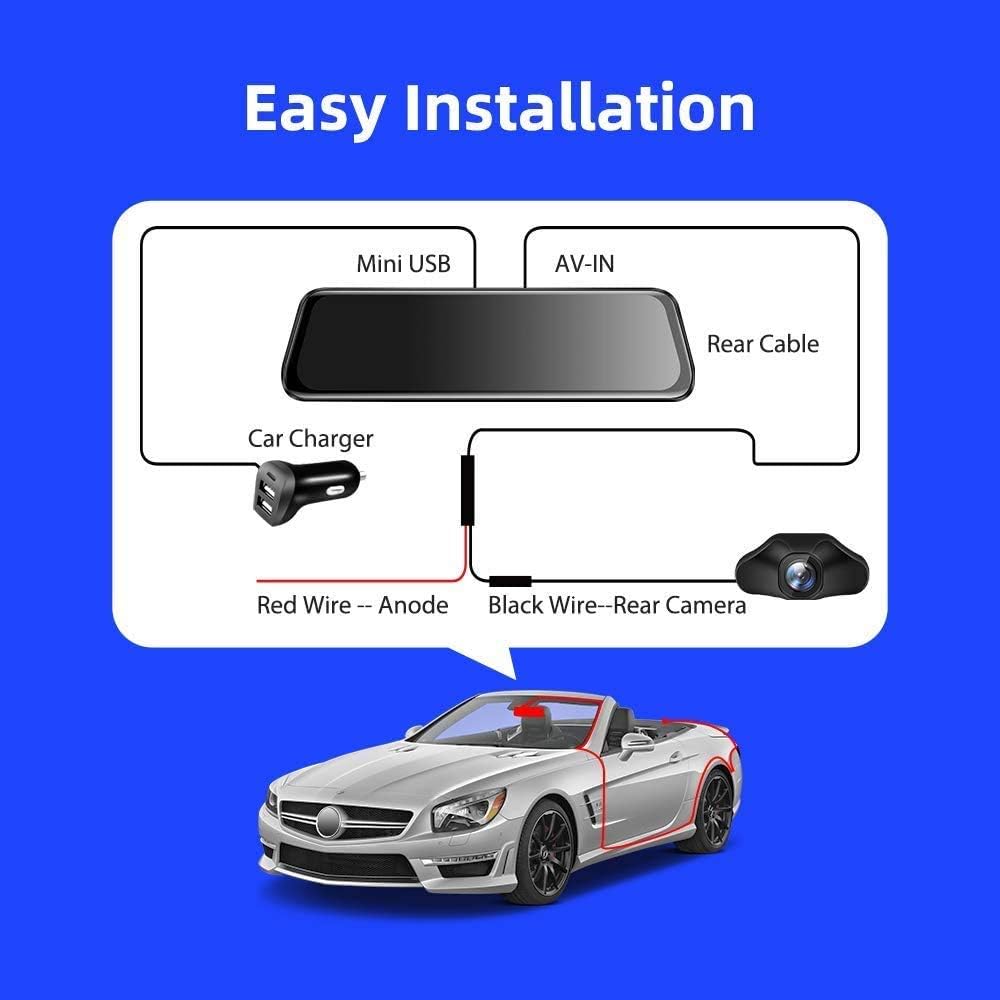
Figura 7: Diagrama d'instal·lació simplificat.
5. Instruccions de funcionament
The AZDOME PG02 features a responsive touch screen for easy navigation. Here are basic operating instructions:
5.1 Encès/Apagat
The device will typically power on automatically when your vehicle starts and power off when the engine is turned off. You can also manually power it on/off by pressing and holding the power button.
5.2 Modes de visualització de la pantalla
Tap the screen to switch between front camera view, càmera posterior view, or dual-camera display. Swipe left/right on the screen to access different menu options or playback modes.
5.3 Enregistrament
The dash cam automatically begins loop recording when powered on. A red dot or recording icon on the screen indicates active recording. To manually stop/start recording, tap the corresponding icon on the screen.
5.4 Accés a la configuració
From the main screen, swipe to find the 'Settings' icon and tap it to adjust video resolution, loop recording duration, G-sensor sensitivity, parking monitor settings, and other preferences.
5.5 Reproducció
In playback mode, you can browse recorded videos and photos. Locked files (from G-sensor events) are stored in a separate folder to prevent accidental overwriting.
6. Manteniment
- Neteja: Feu servir un drap suau i sec per netejar la pantalla i la lent de la càmera del salpicader. Eviteu utilitzar netejadors o dissolvents abrasius.
- Targeta MicroSD: Regularly format your MicroSD card (at least once a month) to ensure optimal performance and prevent data corruption. Back up important files abans de formatar.
- Actualitzacions de firmware: AZDOME provides free firmware updates. Check the official AZDOME website periodically for the latest firmware to ensure your device has the most current features and bug fixes.
- Temperatura: Avoid exposing the device to extreme temperatures for prolonged periods, as this can affect battery life and component integrity.
7. Solució De Problemes
| Problema | Causa possible | Solució |
|---|---|---|
| El dispositiu no s'encén. | Sense font d'alimentació; carregador de cotxe defectuós; connexió fluixa. | Check car charger connection and vehicle's 12V outlet. Ensure vehicle ignition is on. Try a different power source if available. |
| Screen freezes or is unresponsive. | Software glitch; full or corrupted MicroSD card. | Perform a hard reset by pressing the power button for 10 seconds. Format the MicroSD card or try a new one. |
| Poor rear camera image quality. | Dirty lens; incorrect installation; low resolution setting. | Clean the rear camera lens. Ensure proper installation and connection. Check video resolution settings in the menu. |
| Lane Departure Warning System (LDWS) not working. | Improper calibration; environmental factors (heavy rain/fog); feature disabled. | Ensure the camera is properly calibrated and aligned. Check LDWS settings in the menu to ensure it is enabled. Performance may vary in poor weather. |
| MicroSD card not formatting or recording. | Card not compatible; card corrupted; card full and not overwriting. | Use a high-speed (Class 10 or U1/U3) MicroSD card from a reputable brand. Try formatting the card on a computer. Replace the card if issues persist. |
8. Especificacions
| Característica | Detall |
|---|---|
| Dimensions del producte | 10.24 x 2.76 x 0.47 polzades |
| Pes de l'article | 1.5 lliures (0.68 quilograms) |
| Bateries | 1 bateria de polímer de liti (inclosa) |
| Data de primera disponibilitat | 24 d'octubre de 2018 |
| Marca | AZDOME |
| Model | PG02 |
| Orientació | La part dels conductors |
| Tipus de servei del vehicle | Cotxe |
| Tecnologia de connectivitat | USB |
| Resolució de captura de vídeo | 1080p (frontal) |
| Tipus de muntatge | Muntatge de succió |
| Mètode de control | Toca |
9. Garantia i Suport
AZDOME stands behind the quality of its products. The AZDOME PG02 Mirror Dash Cam comes with a 2 any de garantia.
També oferim FREE Firmware Upgrades for this car camera, ensuring your device remains up-to-date with the latest features and improvements.
For technical support, warranty claims, or further assistance, please refer to the contact information provided on the official AZDOME weblloc o l'embalatge del producte.
Note: No official seller videos were available for embedding based on the provided data.
Ask a question about this manual
Ask about setup, troubleshooting, compatibility, parts, safety, or missing instructions. Manuals+ will review the question and use this page’s manual context to help answer it.