
1. Introducció
This manual provides essential information for the setup, operation, and maintenance of your Teufel Ultima 40 Active speaker system. Please read these instructions carefully before using the product to ensure optimal performance and safety.
The Teufel Ultima 40 Active is a pair of high-quality 3-way active floor-standing speakers, featuring an integrated amplifier, Bluetooth aptX for wireless streaming, and HDMI ARC connectivity for seamless integration with your television. This system delivers detailed audio without the need for an external ampmés viu o receptor AV.

Figure 1.1: Teufel Ultima 40 Active Speaker System (White/Black)
2. Contingut del paquet
Verifiqueu que tots els elements siguin presents al paquet:
- 1 × UL 40 Active Mk2 Column Speaker (Active Speaker)
- 1 × UL 40 Mk3 Column Speaker (Passive Speaker)
- 2 × Fabric Grilles with Teufel Logo (for UL 40 Mk3/UL 40 Active Mk2)
- 8 × Red Rubber Feet (4 pcs per speaker, for UL 20/40 Mk3 18)
- 1 × Speaker Cable (5.0 m) for connecting active to passive speaker
- 1 × Ultima 40 Active Remote Control
- 1 × cable d'alimentació
3. Configuració
3.1 Col·locació dels altaveus
For optimal sound, place the speakers symmetrically in your listening room. Ensure adequate space around each speaker for proper bass reflex operation. The active speaker (UL 40 Active Mk2) contains the amplifier and connections, while the passive speaker (UL 40 Mk3) connects to the active unit.

Figure 3.1: Recommended speaker placement in a listening environment.
3.2 Attaching Rubber Feet
Attach the included red rubber feet to the bottom of each speaker. These feet provide stability and decouple the speakers from the floor, improving sound quality.
3.3 Connexió dels altaveus
Connect the active speaker to the passive speaker using the provided 5.0m speaker cable. Ensure correct polarity (+ to + and - to -) at both ends.
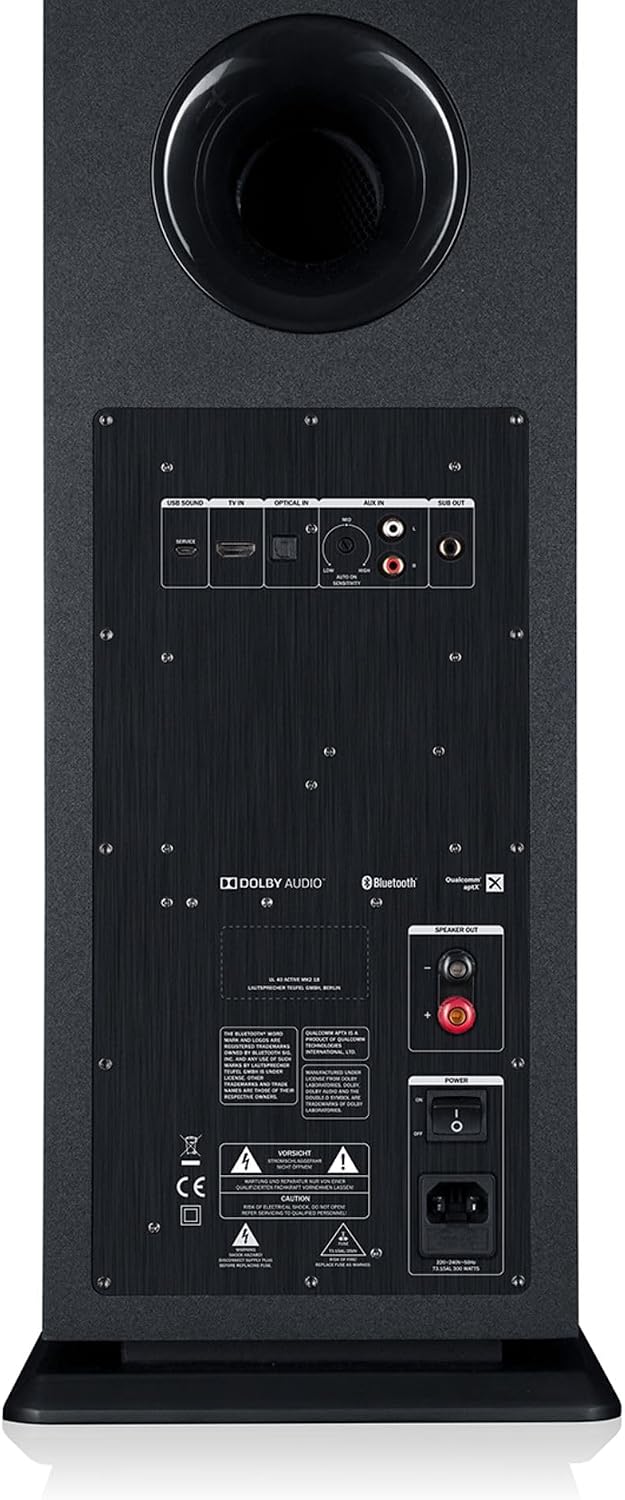
Figure 3.2: Active speaker rear panel with connection options.

Figure 3.3: Passive speaker rear panel with speaker terminals.
3.4 Connexió d'alimentació
Connect the active speaker to a power outlet using the provided power cable. The system is now ready for operation.
4. Instruccions de funcionament
4.1 Encès/Apagat
Press the power button on the top panel of the active speaker or on the remote control to turn the system on or off.

Figure 4.1: Active speaker top control panel.
4.2 Selecció d'entrada
Use the input selection buttons (AUX, OPT, TV) on the top panel or remote control to switch between audio sources. The display on the active speaker will indicate the currently selected input.

Figure 4.2: Speaker display indicating active input.
4.3 Vinculació Bluetooth
- Press the Bluetooth button on the top panel or remote control. The display will show "Bluetooth" and start flashing, indicating pairing mode.
- On your device (smartphone, tablet, PC), enable Bluetooth and search for "Teufel Ultima 40 Active".
- Select the speaker from the list of available devices to pair. Once connected, the display will show "Bluetooth" steadily.
- The system supports Bluetooth aptX for high-quality wireless audio streaming.
Connexió HDMI ARC 4.4
Connect your television's HDMI ARC port to the HDMI ARC input on the active speaker. This allows audio from your TV to be played through the speakers and enables control of the speaker volume using your TV remote (if HDMI CEC is enabled on your TV).
4.5 Control de volum
Adjust the volume using the '+' and '-' buttons on the top panel or the remote control. The current volume level will be shown on the display.
4.6 Dynamore Virtual Center
The Dynamore Virtual Center technology, activated via remote control, simulates a center channel for improved speech intelligibility in movies, TV news, or podcasts.
5. Manteniment
5.1 Neteja
Wipe the speaker surfaces with a soft, dry cloth. Do not use abrasive cleaners or solvents, as these can damage the finish. The fabric grilles can be gently brushed to remove dust.
5.2 Atenció general
- Avoid exposing the speakers to direct sunlight, extreme temperatures, or high humidity.
- Do not place objects on top of the speakers that could block ventilation or cause damage.
- Ensure proper airflow around the active speaker to prevent overheating.
6. Solució De Problemes
| Problema | Causa possible | Solució |
|---|---|---|
| Sense so |
|
|
| L'aparellament de Bluetooth falla |
|
|
| So distorsionat |
|
|
7. Especificacions tècniques
| Característica | Detall |
|---|---|
| Nom del model | Ultima 40 Active |
| Marca | Teufel |
| Tipus d'altaveu | 3-way Active Floor-standing |
| Potència de sortida màxima | 260 watts |
| Mode de sortida d'àudio | Estèreo (2.0 canals) |
| Tecnologia de connectivitat | USB, Bluetooth (aptX), HDMI (ARC), Optical Digital Input, AUX |
| Interval Bluetooth | Fins a 10 metres |
| Mètode de control | Touch controls on speaker, Remote control |
| Dispositius compatibles | Laptops, Game Consoles, Smartphones, Tablets, Televisions |
| Característiques especials | Dolby Audio, Dolby Digital, Dynamore Virtual Center, HDMI ARC CEC, Display, USB Soundcard, Bass reflex |
| Diàmetre del woofer | 165 mm |
| Diàmetre del Tweeter | 25 mm (1 polzades) |
| Font d'alimentació | Wired (AC) |
| Color | White (as per product description, though black is also common) |
8. Garantia i Suport
Your Teufel Ultima 40 Active speaker system comes with a limited warranty. For detailed warranty information, please refer to the official Teufel weblloc web o la targeta de garantia inclosa amb el producte.
For technical support, troubleshooting assistance, or service inquiries, please contact Teufel customer service. Contact details can be found on the official Teufel weblloc (www.teufelaudio.com).


