
Introducció
This manual provides instructions for the ALLIMITY AH59-02298A / AH59-02299A replacement remote control. This remote is designed to be compatible with various Samsung Blu-ray player models, offering direct functionality without the need for programming.
Configuració
The ALLIMITY AH59-02298A / AH59-02299A remote control requires no programming. Simply insert two AAA alkaline batteries to begin operation.
- Localitzeu el compartiment de la bateria a la part posterior del comandament a distància.
- Feu lliscar la tapa del compartiment de la bateria cap avall i retireu-la.
- Insert two new AAA alkaline batteries, ensuring the positive (+) and negative (-) terminals match the diagrams inside the compartment.
- Torneu a col·locar la tapa del compartiment de la bateria fent-la lliscar fins que faci clic de manera segura.
Instruccions de funcionament
Once batteries are installed, the remote control is ready for use. Point the remote control directly at your Samsung Blu-ray player and press the desired function buttons.
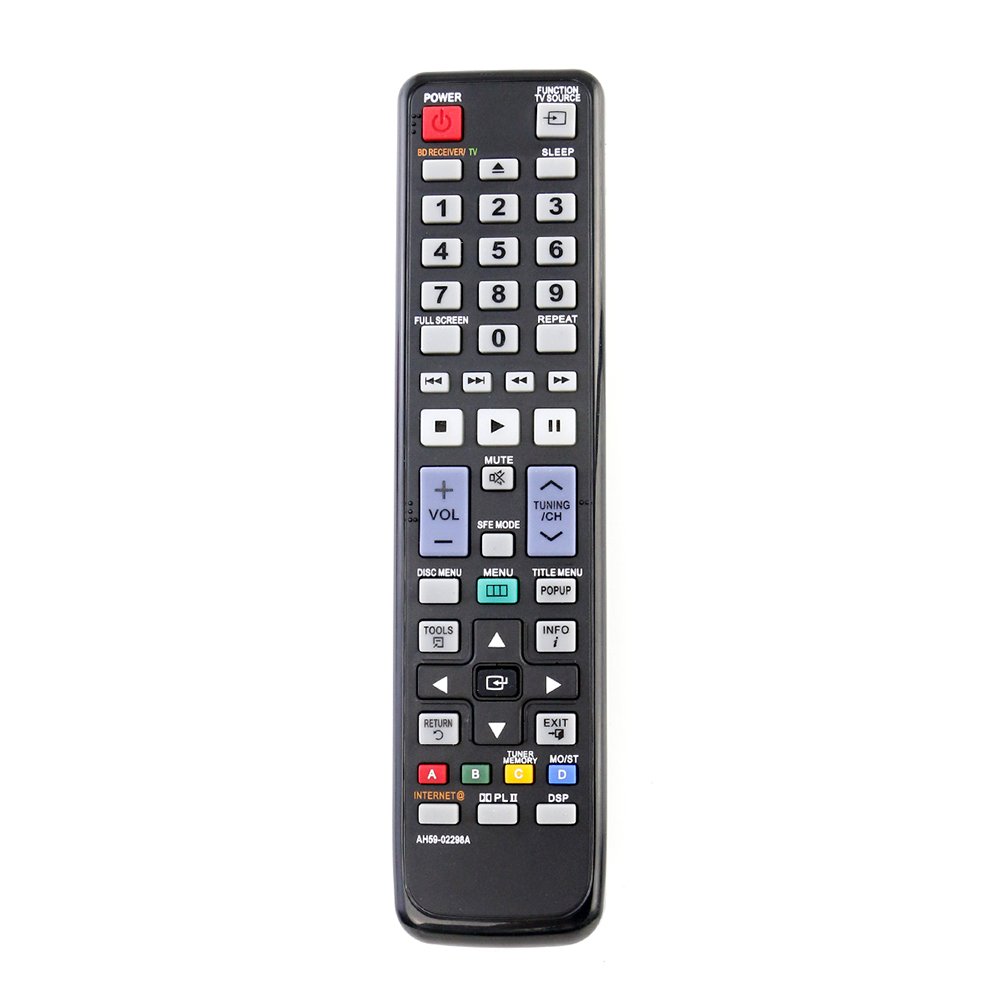
- Botó d'encesa: Turns the Blu-ray player on or off.
- Botons de navegació: Use the directional arrows (Up, Down, Left, Right) and the Enter/OK button to navigate menus.
- Controls de reproducció: Buttons such as Play, Pause, Stop, Fast Forward, and Rewind control media playback.
- Controls de volum: Adjust the volume of your connected audio system (if supported by the Blu-ray player's remote pass-through function).
- Botons de funció: Specific buttons for menu access, disc eject, and other player features.
Manteniment
- Substitució de la bateria: Replace batteries when the remote's response becomes sluggish or stops working. Always replace both batteries simultaneously with new AAA alkaline batteries.
- Neteja: Netegeu el comandament a distància amb un drap suau i sec. No utilitzeu netejadors líquids ni materials abrasius.
- Emmagatzematge: Si no heu d'utilitzar el comandament a distància durant un període prolongat, traieu-ne les piles per evitar fuites i possibles danys.
Resolució de problemes
- El comandament a distància no respon:
- Assegureu-vos que les piles estiguin inserides correctament amb la polaritat correcta.
- Substitueix les piles velles per piles alcalines AAA noves.
- Check for any obstructions between the remote control and the Blu-ray player's infrared sensor.
- Ensure you are within the maximum operating range (up to 10 meters).
- Funcionament intermitent:
- Weak batteries may cause inconsistent performance. Replace them.
- Ensure the remote's infrared emitter is clean and unobstructed.
Especificacions
| Nom del model | AH59-02298A / AH59-02299A |
| Marca | ALLIMITAT |
| Dispositius compatibles | Samsung Blu-ray Players |
| Tecnologia de connectivitat | infrarojos |
| Característica especial | No es requereix programació |
| Quantitat de botons | 20 |
| Interval màxim | 10 metres (aprox. 33 peus) |
| Tipus de bateria | 2 piles alcalines AAA (no incloses) |
| Pes de l'article | 86 Grams (approx. 3.03 oz) |
| Dimensions de l'article (L x A x A) | 15.24 cm x 5.08 cm x 1.27 cm (aprox. 6 cm x 2 cm x 0.5 cm) |
Compatible Samsung Blu-ray Player Models
This remote control is compatible with the following Samsung Blu-ray player models:
- HTC5500
- HTC5500/NWT
- HTC5500/SAH
- HTC5500/XAA
- HTC5500/XAC
- HTC5500/XAO
- HTC5500/XAX
- HTC5500/XAZ
- HTC5500/XCH
- HTC5500/XER
- HTC5500/XFA
- HTC5500/XSA
- HTC5500/XSH
- HTC5500XAA
- HTC5530
- HTC5530/XAC
- HTC5530W
- HTC5530W/XME
- HTC5530W/XSA
- HTC5550
- HTC5550/HAC
- HTC5550/NWT
- HTC5550/XAC
- HTC5550/XER
- HTC5550/XFA
- HTC5550/XSE
- HTC5550W
- HTC5550W/MEA
- HTC5550W/STR
- HTC5550W/XAO
- HTC5550W/XFA
- HTC5550W/XME
- HTC5550W/XSA
- HTC5550W/XSH
- HTC5550W/XSS
- HTC5550W/XTC
- HTC5550W/XTR
- HTC6500
- HTC6500/XAA
- HTC6500XAA
- HTC6530
- HTC6530/XAC
- HTC6600
- HTC6600/XAA
- HTC6730W
- HTC6730W/XAA
- HTC6730W/XAC
- HTC6730WXAA
- HTC6900W
- HTC6900W/XAA
- HTC6930W
- HTC6930W/EDC
- HTC6930W/STR
- HTC6930W/XAA
- HTC6930W/XEE
- HTC6930W/XEF
- HTC6930W/XEN
- HTC6930W/XEU
- HTC6930W/XTR
- HTC6950W
- HTC6950W/MEA
- HTC6950W/XER
- HTC6950W/XFA
- HTC6950W/XSA
- HTC6950W/XSS
- HTC6950W/XTL
- HTC7530W
- HTC7530W/XAA
- HTC7550W
- HTC7550W/CHN
- HTC7550W/EDC
- HTC7550W/XEE
- HTC7550W/XEN
- HTC7550W/XSH
- HTC7550W/XTR
Garantia i Suport
Specific warranty information for this product is not provided in the available documentation. For support or warranty inquiries, please refer to the retailer or manufacturer's contact information provided at the time of purchase.