
1. Introducció
This manual provides essential information for the safe and efficient operation, maintenance, and troubleshooting of your Lexmark MS710dn Laser Printer. Please read this manual thoroughly before using the printer to ensure proper setup and functionality.
The Lexmark MS710dn is a monochrome laser printer designed for high-volume printing, featuring duplex capabilities and various connectivity options.
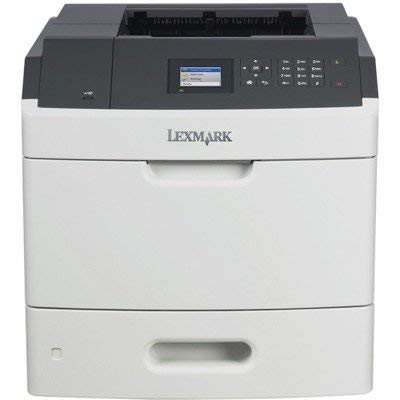
Figura 1: Frontal view of the Lexmark MS710dn Laser Printer.
2. Configuració
2.1 Desembalatge de la impressora
- Traieu amb cura la impressora de l'embalatge.
- Remove all packing materials, tapes, and protective films from the printer. Ensure no internal packing materials remain.
- Col·loqueu la impressora sobre una superfície estable i anivellada amb una ventilació adequada.
2.2 Connexió de potència
- Connecteu el cable d'alimentació al port d'entrada d'alimentació de la impressora.
- Connecteu l'altre extrem del cable d'alimentació a una presa de corrent amb connexió a terra.
- Do not power on the printer until all other connections are made.
2.3 Connecting to a Computer or Network
The MS710dn supports USB and Ethernet connectivity.
- Connexió USB: Connect a USB 2.0 cable from the printer's USB Type B port to an available USB port on your computer.
- Connexió de xarxa: Connect an Ethernet cable from the printer's Gigabit Ethernet port to your network router or switch.
Drivers and user guides are available from the Lexmark manufacturer website and are not included with the printer.
2.4 Installing Toner and Drum Unit
The printer ships with new generic print consumables (Drum Unit: 52D0Z00 / Toner Cartridge: 52D1000).
- Obriu la porta d'accés frontal de la impressora.
- Carefully insert the drum unit into its designated slot until it clicks into place.
- Unpack the toner cartridge and gently shake it horizontally to distribute the toner.
- Introduïu el cartutx de tòner a la unitat de tambor fins que quedi ben encaixat.
- Tanqueu la porta d'accés frontal.
3. Funcionament de la impressora
3.1 Engegada i configuració inicial
- Premeu el botó d'engegada de la impressora.
- The 2.4-inch (60 mm) Color LCD display will illuminate. Follow any on-screen prompts for initial language and network settings.
3.2 Càrrega de paper
The printer has a standard paper input capacity of 350 sheets (250 sheets in the main tray and 100 sheets in the multipurpose feeder).
- Pull out the paper tray until it stops.
- Ajusteu les guies del paper perquè coincideixin amb la mida del paper que carregueu.
- Carregueu la pila de paper a la safata, assegurant-vos que estigui plana i per sota de la línia d'ompliment màxim.
- Empenyeu suaument la safata de paper cap a dins de la impressora fins que quedi bloquejada.
- Confirm the paper size and type on the printer's display if prompted.
3.3 Impressió bàsica
- Assegureu-vos que la impressora estigui engegada i connectada a l'ordinador o a la xarxa.
- Des de l'ordinador, obriu el document que voleu imprimir.
- Seleccioneu "Imprimir" al menú de l'aplicació.
- Choose the Lexmark MS710dn from the list of available printers.
- Adjust print settings (e.g., number of copies, paper source, duplex printing) as needed.
- Feu clic a "Imprimeix".
The printer supports a print speed of up to 50 pages per minute (PPM) and a resolution of 1200 x 1200 DPI.
4. Manteniment
4.1 Neteja de la impressora
Una neteja regular ajuda a mantenir la qualitat d'impressió i allarga la vida útil de la impressora.
- Apagueu i desendolleu la impressora abans de netejar-la.
- Utilitzeu un drap suau i sense pelusa dampRenteu amb aigua per netejar l'exterior de la impressora.
- For internal cleaning, refer to the detailed instructions in the full user guide available on the Lexmark weblloc. Eviteu utilitzar netejadors o dissolvents abrasius.
4.2 Replacing Toner and Drum Unit
The printer will display messages on the LCD panel when the toner cartridge or drum unit needs replacement.
- Obriu la porta d'accés frontal.
- Remove the old toner cartridge and/or drum unit by following the instructions on the printer's display or the full user guide.
- Unpack and install the new genuine Lexmark or compatible toner cartridge/drum unit as described in Section 2.4.
- Tanqueu la porta d'accés frontal.
4.3 Eliminació d'embussos de paper
If a paper jam occurs, the printer's display will indicate the location of the jam. Follow these general steps:
- Apagueu la impressora.
- Obriu les portes o safates d'accés indicades.
- Carefully pull the jammed paper in the direction of the paper path. Avoid tearing the paper.
- Assegureu-vos que s'hagin eliminat tots els fragments de paper.
- Close all access doors and power on the printer.
5. Solució De Problemes
This section addresses common issues you might encounter with your Lexmark MS710dn printer.
- La impressora no respon:
- Comproveu les connexions d'alimentació i assegureu-vos que la impressora estigui engegada.
- Verifiqueu les connexions del cable USB o Ethernet.
- Reinicieu tant la impressora com l'ordinador.
- Ensure printer drivers are correctly installed on your computer.
- Mala qualitat d'impressió:
- Comproveu els nivells del cartutx de tòner i substituïu-lo si és baix.
- Inspeccioneu la unitat de tambor per detectar danys o desgast.
- Assegureu-vos que feu servir el paper adequat per a la impressió làser.
- Realitzeu un diagnòstic de la qualitat d'impressió des del tauler de control de la impressora.
- Embussos de paper:
- Refer to Section 4.3 for clearing paper jams.
- Assegureu-vos que el paper estigui carregat correctament i que no estigui massa ple.
- Feu servir paper que compleixi les especificacions de la impressora.
For more detailed troubleshooting, consult the comprehensive user guide available on the Lexmark support weblloc.
6. Especificacions
| Característica | Especificació |
|---|---|
| Nom del model | MS710dn |
| Tecnologia d'impressió | Làser monocrom |
| Velocitat màxima d'impressió (monocrom) | 50 ppm |
| Resolució d'impressió | 1200 x 1200 DPI |
| Impressió dúplex | Sí (Automàtic) |
| Capacitat d'entrada de paper | 350 Sheets (Standard) |
| Tecnologia de connectivitat | Gigabit Ethernet (10/100/1000), USB 2.0 (Type B), Front USB 2.0 (Type A) |
| Mostra | LCD color de 2.4 polzades (60 mm). |
| Pes de l'article | 90 lliures |
| UPC | 034722805629 |
7. Garantia i Suport
7.1 Informació de la garantia
This Lexmark MS710dn printer comes with a 90-day Depot Warranty on the hardware. Print consumables are guaranteed for 30 days. This warranty covers defects in materials and workmanship under normal use.
For warranty claims or service, please contact your reseller or the manufacturer's authorized service center.
7.2 Suport tècnic
For additional support, drivers, and the complete user guide, please visit the official Lexmark weblloc. El fabricant website provides comprehensive resources for product information, software downloads, and customer service contacts.
Nota: Drivers and user guides are available from the manufacturer's website and are not included in the product packaging.